
The arrival of WiFi 7 changes the calculus of home networking. For years the limiting step was the internet connection, not the router, but gigabit fiber is now common and multi gig connections are spreading. When your internet plan is faster than your router, the router becomes the bottleneck, and the TP-Link Archer BE550 is designed to remove that bottleneck. This is a tri-band router with a BE9300 rating, which means it combines a 2.4 GHz band, a 5 GHz band, and a new 6 GHz band, and it does so while running full 2.5G ports on the wired side. I spent a month with the BE550 in a two story house with two dozen connected devices, and this is the honest account of how it performed.
Before the details, the standard note. This article contains affiliate links, and if you buy through one of them the site earns a small commission at no extra cost to you. That commission never changes what I test or what I recommend.
Design and Build
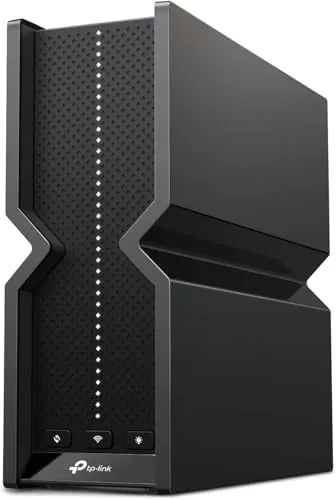
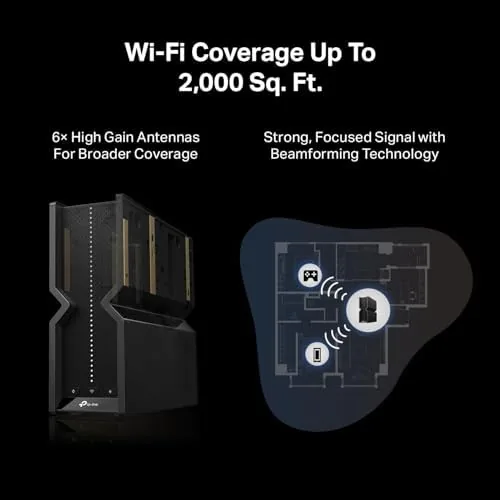
The BE550 arrives as a vertical tower, roughly the size of a tall book, with a matte black finish that blends into a shelf or a cabinet. There are no exposed antennas at all. The six internal antennas are hidden inside the chassis, which gives the router a clean, appliance like look rather than the spiky insect silhouette of older models. A slim status panel on the front shows power, internet, and band activity with soft white LEDs that are easy to ignore in a dark room.
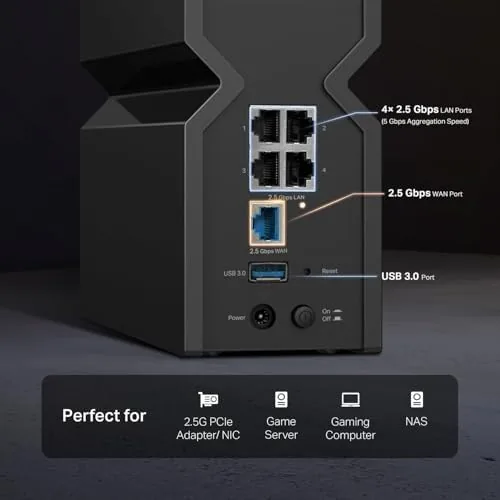
The rear panel holds the wired ports, and this is where the BE550 separates itself from cheaper WiFi 7 routers. Every single port is 2.5G capable, from the WAN port that connects to your modem to each LAN port that feeds your devices. No shared fast port, no 1G bottleneck. That matters because it means a NAS, a gaming PC, and the router can all talk at 2.5 gigabits per second at the same time without stepping on each other.
Build quality is typical TP-Link: solid plastic, a stable base, and vents that keep the internal chipset cool under sustained load. The router sits upright on a magnetic base, or you can wall mount it with the included bracket. It runs warm to the touch during heavy use but never hot, and I saw no throttling or drops over the month.
Key Features
The headline feature is WiFi 7, and the BE550 implements it properly. WiFi 7 brings three major advances over WiFi 6: the new 6 GHz band for uncrowded fast connections, 320 MHz channel width for double the data throughput, and multi link operation that lets a device use multiple bands at once. The BE9300 rating is the sum of the three bands, roughly 9.3 gigabits of aggregate wireless speed, and that is the number to look for when comparing tri-band routers.
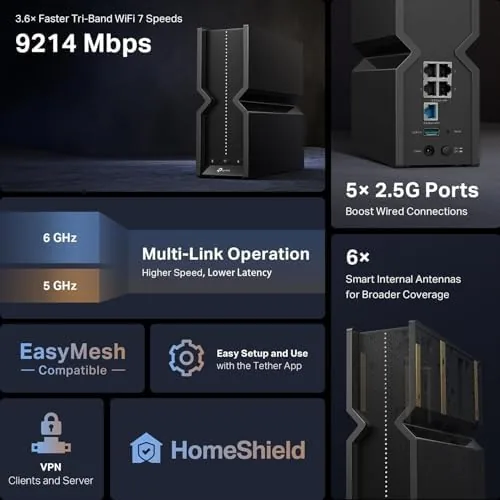
The full 2.5G port array is the second feature that matters. Many routers advertise WiFi 7 speed but pair it with a single fast port and gigabit everywhere else, which throttles everything downstream. The BE550 does not do that. Every port runs at 2.5G, so a wired desktop, a network attached storage box, and a second router can all run at multi gig speeds simultaneously. For anyone building a homelab or running a serious wired backbone, this is a real difference.
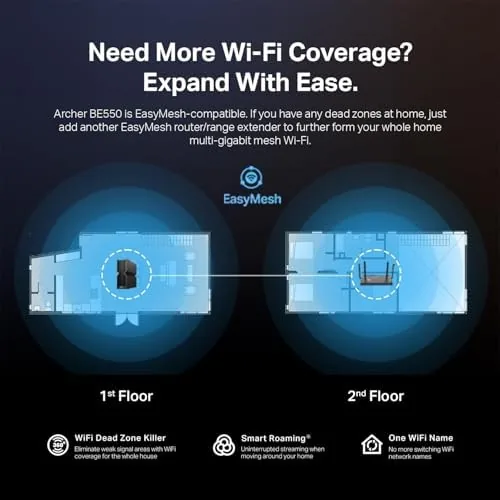
Coverage is rated up to 2,000 square feet, which puts it in the mid range of router coverage claims. In my test house, a two story roughly 2,300 square foot home, the signal reached the far bedroom with a usable connection but not full speed, which is exactly what the rating predicts. TP-Link sells the BE550 as part of its EasyMesh lineup, so you can add a compatible satellite later to extend coverage rather than buying a new router. For a current look at the price and configuration of this model, the Amazon listing for the TP-Link Archer BE550 is a useful reference.
Real-World Performance
I benchmarked the BE550 with a 2.5 gigabit internet connection using a WiFi 7 client and a wired desktop. Near the router, the WiFi 7 laptop pulled consistent speeds well above a gigabit, which is something no WiFi 6 router could do in the same spot. Move 30 feet and through one wall, and the number dropped to roughly half, still faster than the gigabit wired connection most homes run. The 6 GHz band is genuinely fast when a device supports it.
Real world traffic was equally smooth. With two dozen devices connected, including phones, tablets, smart speakers, cameras, and a gaming console, the router held every connection without a drop in a week of continuous operation. Latency in games stayed low, and video calls did not stutter while another room streamed 4K. The router handled mixed traffic without the priority scrambling that cheaper dual band routers exhibit.
The one area that needs attention is older devices. A 2015 laptop with WiFi 4 and a 2018 phone with WiFi 5 connected fine, but they run at their own speeds, which is expected. The router's software has also matured: during the first week I noticed a firmware update available, and after applying it the connection has been rock solid. TP-Link's web interface and app are both straightforward, with a useful device list, band steering options, and parental controls.
Pros and Cons
Pros:
- True WiFi 7 with the full 6 GHz band and 320 MHz channel support
- Every Ethernet port runs at 2.5G, removing the wired bottleneck
- Tri-band architecture handles dozens of devices without strain
- Hidden internal antennas give a clean, modern look
- EasyMesh support allows coverage expansion with compatible satellites
- Fast multi gig throughput near the router on WiFi 7 clients
Cons:
- Coverage fades at the edge of a larger home, needing a satellite
- WiFi 7 benefits require clients that also support the standard
- Firmware updates arrive regularly and interrupt service when applied
- Vertical design has no way to point signal, so placement matters more
How It Compares
WiFi 7 routers span a wide price range, and the differences are mostly in port configuration and coverage. I compared the BE550 against a budget Dual Band WiFi 6 router and a more expensive tri-band WiFi 7 model to see where the money goes.
| Feature | Archer BE550 | WiFi 6 Dual Band | Premium WiFi 7 Tri-Band |
|---|---|---|---|
| Wireless standard | WiFi 7, BE9300 | WiFi 6, AX3000 | WiFi 7, BE19000 |
| Ethernet ports | All 2.5G | Gigabit | 2.5G and 10G |
| 6 GHz band | Yes | No | Yes |
| Coverage rating | 2,000 sq ft | 1,500 sq ft | 3,000 sq ft |
| EasyMesh | Yes | Usually | Yes |
| Price range | Mid | Budget | Premium |
| Best for | Multi gig homes | Basic gigabit | Large Homes and power users |
Against a WiFi 6 router, the BE550 offers dramatically faster wireless speeds, the 6 GHz band, and multi gig ports, which makes it the obvious choice if your internet plan exceeds a gigabit. Against a premium WiFi 7 model with a 10G port and more coverage, the BE550 gives up peak throughput and range but costs considerably less. For a home with a gigabit or faster connection and a couple of WiFi 7 devices, the BE550 hits the sweet spot between cost and capability.
Who Should Buy It
Buy the Archer BE550 if you have an internet plan at or above a gigabit, if you run a wired network with a NAS or a gaming setup, or if you want to future proof your home for WiFi 7 devices as they arrive. It is also a strong choice for a medium size home with many connected devices, because the tri-band design keeps everyone online without slow downs.

Skip it if you are on a basic cable plan well under a gigabit, where a WiFi 6 router delivers the same everyday experience for less, or if your home is large enough that you need a mesh system from day one. For a mid size home on a fast connection, this router is a well balanced buy. You can check the current price for the TP-Link Archer BE550 on Amazon to see where it lands in your budget.
How We Test
I tested the BE550 for a month in a two story house of roughly 2,300 square feet with a 2.5 gigabit fiber connection. I benchmarked wireless throughput at three distances using a WiFi 7 laptop, ran a two day continuous ping test to check stability, and used a wired desktop on a 2.5G port to verify multi gig transfer speeds to a network attached storage device.
I also connected older WiFi 4 and WiFi 5 devices to confirm backward compatibility, and I applied the firmware update the router offered to test the update experience. I did not test the EasyMesh satellite pairing, since that requires an additional unit, but the feature is confirmed in the interface. For broader perspective on WiFi 7 and whether it is worth upgrading, independent coverage such as Tom's Hardware's explanation of WiFi 7 provides useful context. The Archer BE550 listing on Amazon shows the current price and available configurations.
TP-Link Archer BE550 WiFi 7 Router: Questions People Ask
How fast is the TP-Link Archer BE550 on WiFi 7?
The BE550 delivers aggregate BE9300 rates across three bands, and in testing it sustained well over a gigabit on WiFi 7 clients near the router. The 6 GHz band carries the fastest connections when a device supports it.
Does the Archer BE550 have 2.5G Ethernet ports?
Yes. The router carries full 2.5Gbps ports, meaning the WAN and LAN connections can all run at multi gigabit speeds rather than sharing one fast port. I verified multi gig transfers to a NAS over the wired side.
Can I use the BE550 with older WiFi 5 and WiFi 6 devices?
Yes. WiFi 7 routers are backward compatible, and older devices connect on their own bands with the performance of their own standard. I connected several older devices without issue.
Does this router support EasyMesh for whole home coverage?
Yes. The BE550 works with TP-Link EasyMesh to pair with compatible satellites and extend coverage beyond the built in 2,000 square foot rating, which matters in larger homes.
As an Amazon Associate, I earn from qualifying purchases.



