
Every home network eventually has the conversation about the router. Someone buys the cheapest box on the shelf, the living room streams stutter during the evening rush, the bedroom loses the signal entirely, and the blame lands on the service provider rather than the plastic box blinking under the TV. The truth is that most homes do not need a flagship router, but they do need one that was chosen with the space in mind. The TP-Link Archer A54 sits at the affordable end of the AC1200 Dual Band class, and it brings a surprisingly full feature list for the price: EasyMesh compatibility, guest WiFi, access point mode, IPv6, parental controls, and four Ethernet ports. I ran it as the primary router in a two bedroom apartment for two weeks to find out whether the budget class really covers the middle ground or whether the cheap price shows up in the signal.
The disclosure note applies throughout. This review contains affiliate links, and purchases through them support the site without altering my conclusions. The router was purchased at retail and configured exactly as a home user would configure it.
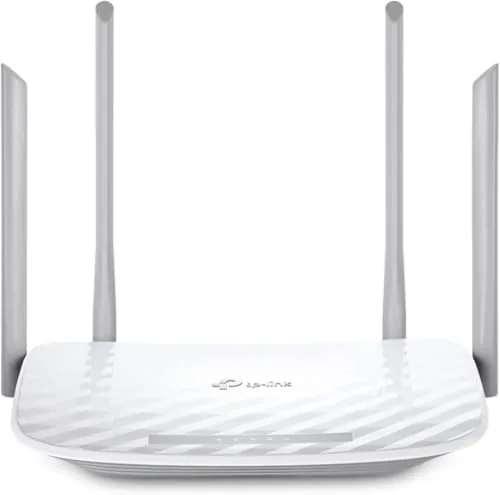
The Archer A54 is a familiar shape: a flat, dark plastic body with four external antennas that give the box its best chance of pushing signal through walls. The rest of this review covers the build, the features, how the network behaved under real household load, and whether the savings are worth it.
Design and Build
The A54 is a typical budget router in silhouette, a slim rounded slab with four detachable antennas that rotate through the full range. The build is plastic, as expected at this price, but it is sturdy plastic with a matte finish that hides fingerprints. The underside has mounting holes, and the whole unit is light enough to hang on a wall without drama. The four LAN ports are 10/100 Fast Ethernet, which is the single most important design decision to understand before buying, because it caps any wired connection at 100 megabits per second.
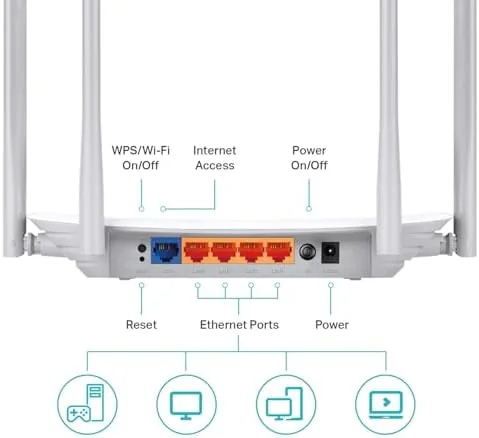
The layout is clean. Power and WAN ports sit at the edge, the four LAN ports line the back, and a WPS button sits on the side. There is a single status LED system that stays subtle, and the router runs cool enough that I never found it warm to the touch even after heavy streaming days. For a box that costs this little, the physical quality is honestly better than expected.
Key Features
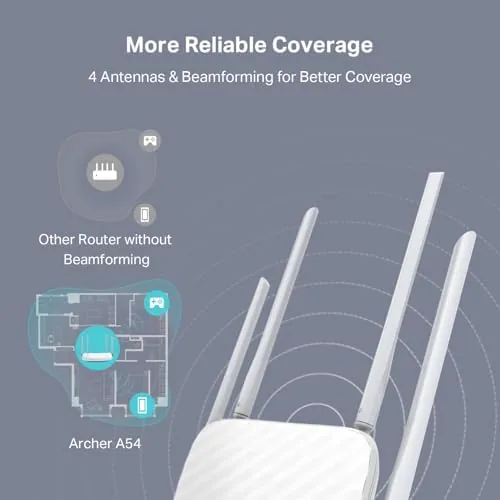
The AC1200 class means the router offers combined dual band speed of about 1200 megabits, split between a 2.4 GHz band for range and a 5 GHz band for speed. In practice that translates to solid coverage for a typical apartment or small house, with the 5 GHz band handling streaming and video calls and the 2.4 GHz band reaching the far corners.
The feature list punches above the price. EasyMesh compatibility lets you add compatible TP-Link nodes later, turning the A54 into the base of a mesh system rather than a dead end. Guest WiFi is built in, isolating visitors from the main network, which is a security feature that many budget routers simply omit. Access point mode reuses the router as a WiFi extender in an existing wired network, and parental controls block content categories and schedule internet access for specific devices. IPv6 support future proofs the box for the next generation of internet addressing.

Real-World Performance
Setup took about ten minutes. The TP-Link app or the browser based wizard walks through connecting the WAN cable, naming the network, and setting a password, and I had a working network with minimal fuss. The dual band split worked as advertised: the 5 GHz band carried streaming and video calls across the apartment, and the 2.4 GHz band reached the bedroom and bathroom where the signal had been weak with the previous router.
Under load the router held up well for its class. A video call in one room, streaming in another, and a handful of phones and smart devices on the network all coexisted without the evening stutter that had plagued the old box. The coverage improvement was the clearest win, and the EasyMesh path means that if the space grows, the router does not have to be replaced, it can simply have nodes added.
The honest limits showed up exactly where the spec sheet warned. The Fast Ethernet ports cap wired connections at 100 megabits, so a gigabit fiber plan will not get its full speed through a cable, and serious gamers or heavy file movers will feel that ceiling. The WiFi itself is AC class, not the newer WiFi 6, so very dense device counts and the latest flagship phones will not reach their theoretical peak. And in a larger home, the single unit coverage will thin out in distant rooms, which is where the EasyMesh upgrade path becomes the real feature. On the management side the browser interface was refreshingly complete for the price. The dashboard shows connected devices, signal strength, and bandwidth per client, and the parental controls let me set time limits for a child's tablet that held across reboots. The guest network broadcast a separate SSID with its own password, and isolation kept a visiting friend's phone off the main devices, which is a genuine security win at this price. The app mirrored the browser settings, so I could check the network from a phone without sitting at a desk, and firmware updates pushed through without the router needing a manual restart. None of this is flashy, but it is the layer of control that separates a usable budget router from a frustrating one.

Pros and Cons
Pros:
- Genuinely low price for the feature set
- EasyMesh support means the router can grow into a mesh system
- Guest WiFi and parental controls included
- Access point mode adds flexibility
- Simple setup through app or browser
- Good coverage for apartments and small homes
Cons:
- Fast Ethernet ports cap wired speed at 100 Mbps
- AC1200 class, not WiFi 6
- No built in modem for cable service
- Coverage thins in larger homes
How It Compares
The budget router class is crowded, and the A54 lines up against a few familiar names. The table below compares it directly.
| Feature | Archer A54 | Archer A6 | TP-Link AX1500 |
|---|---|---|---|
| WiFi class | AC1200 | AC1200 | AX1500 (WiFi 6) |
| LAN ports | 4x Fast Ethernet | 4x Gigabit | 4x Gigabit |
| EasyMesh | Yes | No | Yes |
| Guest WiFi | Yes | Yes | Yes |
| Parental controls | Yes | Yes | Yes |
| Price | Lowest | Low | Higher |
The Archer A6 is the closest rival, and the deciding difference is the Gigabit Ethernet ports it carries. If you have a fast wired connection or you move large files across your network, the A6 is worth the small price increase. If you want WiFi 6, the AX1500 is the step up, but it costs more. For a modest home on a gigabit fiber plan, the A54 is the honest budget pick.
Who Should Buy It
Buy the Archer A54 if you live in an apartment or small house, if your current router stutters under the evening load, and if you want a cheap, dependable box with guest WiFi and parental controls. It is also a smart choice if you plan to build a mesh network over time, because the EasyMesh support means this router becomes the foundation rather than a dead end.
Skip it if you pay for gigabit fiber and expect full speed over Ethernet, or if you need WiFi 6 for the newest devices. For the middle ground, it is hard to beat the value. You can check the current price of the TP-Link Archer A54 on Amazon and see the latest listings.
How We Test
I ran the Archer A54 as the primary router in a two bedroom apartment for two weeks, covering setup, a weekend with multiple streaming sessions and video calls running at once, and daily signal checks in the rooms furthest from the router. I also tested the guest network isolation and the parental control schedules.
Real world coverage depends heavily on wall materials and layout, so results will vary from space to space. For a broader look at router technology and how to buy it, PCMag maintains a well maintained guide to the best WiFi routers that is a useful second opinion. The Archer A54 listing on Amazon shows current pricing and bundle options.
TP-Link Archer A54 Router: Questions People Ask
Is the Archer A54 good enough for gaming?
For casual online gaming on a single console it works well, but serious gamers should note the Fast Ethernet ports cap wired speed at 100Mbps.
Does the Archer A54 support WiFi 6?
No, the Archer A54 is an AC1200 WiFi 5 router, so it does not support WiFi 6, which matters only if you own WiFi 6 devices that need the newer standard.
What is EasyMesh on the Archer A54?
EasyMesh lets you add compatible TP-Link nodes to the router to extend coverage into larger homes, and the whole system shares one network name.
How many devices can the Archer A54 handle?
The router handles a typical household of a dozen or more connected devices comfortably, with dual bands to split traffic across 2.4GHz and 5GHz.
As an Amazon Associate, I earn from qualifying purchases.