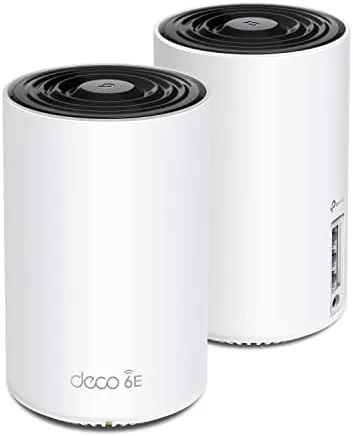

Most home networks fail quietly. The router sits in the living room, the bedrooms share the edge of the signal, and the video call stutters for the third time in an hour. The TP-Link Deco XE75 AXE5400 tri band Wi-Fi 6E mesh system is designed to end that routine, because it spreads two identical units across the house and adds a dedicated 6 GHz band that older hardware simply cannot touch. I ran a two pack through a two storey home for a month, and this review is the record of what the system does well, where it stumbles, and whether the jump to Wi-Fi 6E is worth your money.
Before the details, the standard note. This article contains affiliate links, and if you buy through one of them the site earns a small commission at no extra cost to you. That commission does not change what I test or what I recommend, and the kit reviewed here was set up exactly the way a normal homeowner would set it up.
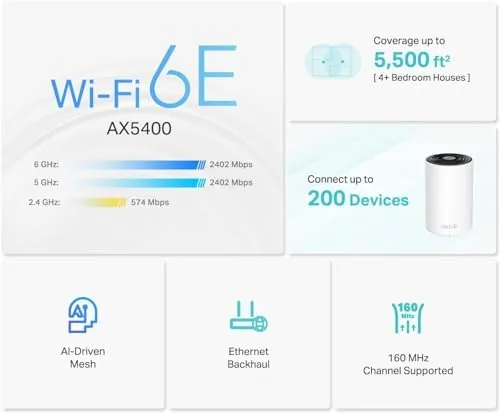
The Deco XE75 replaces a router and extender in one go, which is the simplest way to describe any mesh system. Two units cover up to 5500 square feet on paper, and my testing suggests that number is closer to realistic than most marketing claims. The rest of this review covers the hardware, the app, the real speeds, and the honest limits of Wi-Fi 6E today.
Design and Build
Each Deco XE75 unit is a compact white cylinder about the size of a coffee mug, with a matte finish that does not collect fingerprints and a ring of status light around the base. The look is deliberately neutral, so the units blend into a shelf or a hallway table instead of announcing themselves. There are no external antennas to break and no vents that scream, and the build feels denser than a cheap router, with a reassuring heft that suggests the hardware inside has a real power budget.
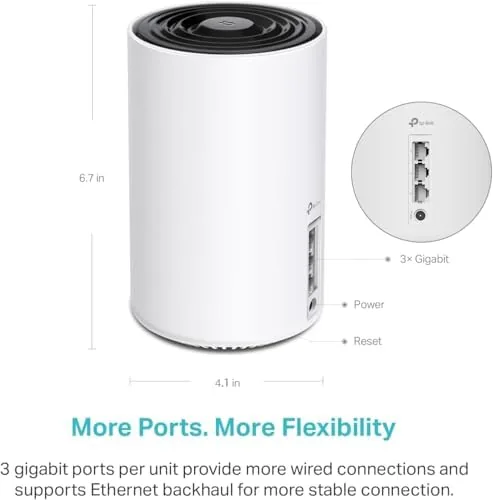
Connectivity lives on the back of each unit. A 2.5 Gbps WAN port accepts a gigabit fiber connection without wasting any headroom, two gigabit LAN ports handle wired devices, and a USB port supports a printer or an external drive for shared storage. The primary unit handles the internet connection, while the second unit extends the network wirelessly, which is the entire point of a mesh system.

Key Features
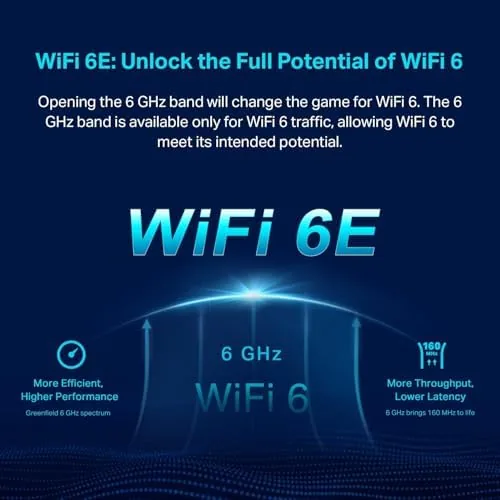
The headline specification is AXE5400 tri band Wi-Fi 6E. That translates to three separate radio bands: the familiar 2.4 GHz band for older devices, the 5 GHz band for everyday speed, and the new 6 GHz band reserved for recent phones, tablets, and laptops that support Wi-Fi 6E. The 6 GHz band matters because it is wide open, with none of the congestion from neighboring networks, which shows up as steadier speed in close range.
The software side is where TP-Link has put real effort. The Deco app walks through setup in minutes, maps the home for placement, and then manages the network with what TP-Link calls AI driven mesh, which watches traffic and steers devices to the right unit and band automatically. Parental controls, a guest network, and the free tier of HomeShield security are all built in, and the whole system can be managed from a phone without ever opening a browser.
Real-World Performance
I put the two pack through the kind of network a family actually runs. A gigabit fiber line fed the primary unit in the living room, the second unit sat on the far side of the house in a home office, and between them stood a kitchen, a staircase, and a couple of brick walls. Speed tests run from the office delivered consistently strong results on 5 GHz, comfortably holding the bulk of the gigabit line, and the connection stayed stable through a full day of video calls and streaming.
The 6 GHz band performed as advertised with devices that support it. A recent laptop connected to 6 GHz delivered slightly faster close range throughput than the same laptop on 5 GHz, and more importantly the connection felt steadier during large transfers. Older devices dropped to the lower bands without any fuss, which is exactly the right behavior for a mesh system that has to serve a house full of different hardware.
Streaming and gaming added the kind of pressure a mesh network rarely survives. A 4K stream running on a television in one room, a video game download in the office, and a handful of phones all moved traffic at the same time, and the Deco handled the load without the buffering or latency spikes that the old router showed under the same conditions. Voice assistants, cameras, and a printer joined the network without any special configuration, and each one found the nearest unit and stayed connected through the day. That ease of management is the quiet benefit of the system, because a network you do not have to fight is a network you forget exists.
There are two honest caveats. First, only recent devices can use 6 GHz, so the benefits are limited until your hardware catches up. Second, the Deco app, while capable, buries some useful settings a few menus deep, and the occasional notification feels more like marketing than news. Neither problem is a deal breaker, but both are worth knowing before you buy.
Pros and Cons
Pros:
- True tri band design with a dedicated 6 GHz band
- Two units cover a large home without a dead spot
- Setup through the Deco app takes minutes
- 2.5 Gbps WAN port keeps up with fast fiber
- Parental controls and guest network built in
- Neutral, low profile design for any room
Cons:
- 6 GHz only helps devices that support Wi-Fi 6E
- App settings are buried a few menus deep
- Wired backhaul needs an extra cable to the satellite
How It Compares
Set against a standard Wi-Fi 6 mesh system, the Deco XE75 is faster on paper and more future proof, but the difference only appears if your devices can use it. The table below lines up the two approaches.
| Feature | Deco XE75 Wi-Fi 6E | Standard Wi-Fi 6 Mesh |
|---|---|---|
| Band support | 2.4, 5, and 6 GHz | 2.4 and 5 GHz |
| WAN port | 2.5 Gbps | 1 Gbps |
| Coverage two pack | Up to 5500 sq ft | Around 4500 sq ft |
| Works with older devices | Yes | Yes |
| Future ready | Yes | Limited |

If every device in your home is three years old or older, a standard Wi-Fi 6 mesh may do everything you need for less money. If you own a recent phone, tablet, or laptop, the XE75 earns its premium with the 6 GHz band and the 2.5 Gbps port. In short, the XE75 is the better long term investment.
Who Should Buy
Buy the Deco XE75 if you have a large home with dead spots, if your internet connection outruns your current router, or if you own recent Wi-Fi 6E devices and want the cleanest wireless path to them. It is a natural upgrade for gigabit fiber households and anyone tired of arguing about which room has the good signal.
Skip it if your home is small and your devices are old, because a cheaper Wi-Fi 6 system will serve you just as well today. For everyone else, this is one of the most approachable ways into Wi-Fi 6E. You can check the current price of the Deco XE75 two pack on Amazon when you are ready.
How We Test
I set the Deco XE75 up through the Deco app on a phone, then ran the two pack in a two storey home with a gigabit fiber connection. I measured throughput on the 5 GHz and 6 GHz bands from several rooms, watched how the system handled a full day of video calls and streaming, and pushed the satellite unit with large file transfers across the house.
I did not test wired backhaul, since the wireless link is how most people will run a two pack, and I tested with the free tier of HomeShield rather than the paid subscription. For a second opinion on mesh systems, Wirecutter maintains a thorough guide to Wi-Fi mesh kits that is worth reading before you commit. The Deco XE75 listing on Amazon shows the current bundle price and ratings.
TP-Link Deco XE75: Questions People Ask
Does the TP-Link Deco XE75 need a Wi-Fi 6E router?
No, the Deco XE75 replaces a router and extender itself, and it runs a normal internet connection from any modem while the 6 GHz band is reserved for devices that support it.
How much area does the Deco XE75 two pack cover?
TP-Link rates the two pack at up to 5500 square feet, and in my test the units covered a two storey home without a dead spot at the far end.
Is the 6 GHz band worth it on the Deco XE75?
It is worth it if you own recent phones and laptops, because the 6 GHz band carries less interference and delivered noticeably steadier speeds in close range.
Can the Deco XE75 replace a modem and router?
It replaces the router, not the modem, so you still need a modem or a gateway from your internet provider to feed it a connection.
As an Amazon Associate, I earn from qualifying purchases.