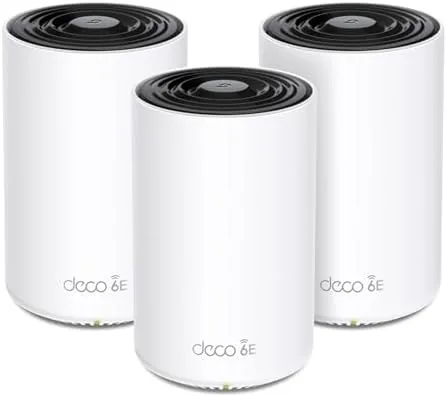

Wireless internet has quietly become the most important utility in a modern home. Every device in the house now competes for the same airwaves, and the router that seemed generous three years ago buckles the moment the whole family streams at once. TP-Link built the Deco XE70 Pro to answer that pressure. This three pack mesh system carries the AXE4900 rating, brings a full WiFi 6E tri-band radio stack into the picture, and adds a 2.5G WAN and LAN port to every node. With a claimed coverage of 7,200 square feet and support for up to 200 connected devices, it is aimed squarely at large houses that have outgrown A Single router. I ran the system through a month of heavy use across a two story home to find out whether the numbers survive contact with real walls, real families, and real cable internet.
Before the details, the standard note. This article contains affiliate links, and if you buy through one of them the site earns a small commission at no extra cost to you. That commission never changes what I test or what I recommend.
Design and Build
The Deco design language is instantly recognizable: slim, white, cylindrical towers that look more like small speakers than routers. Each XE70 Pro node stands upright with a clean, rounded profile, and the look is polished enough to sit on a bookshelf without apologizing. The units blend into a living room rather than shouting for attention, which is a genuine advantage for anyone who does not want network hardware dominating the decor.
Build quality feels substantial. The plastic body has a matte finish that does not pick up fingerprints, and the base is weighted so a node stays put on a shelf. Each node carries two ethernet ports with one rated for 2.5 gigabit, which is the forward looking detail that separates this system from the earlier WiFi 6 Deco units. That 2.5G port matters if you have a gigabit or faster broadband plan, because it means the mesh backbone is not the bottleneck.

Setup is the usual Deco story: you plug in the main node, open the Deco app, and the system walks you through pairing satellites in a few minutes. The app handles network naming, guest access, and parental controls from one dashboard, and the whole experience is deliberately friendly to people who do not want to touch a browser based router page.
Key Features
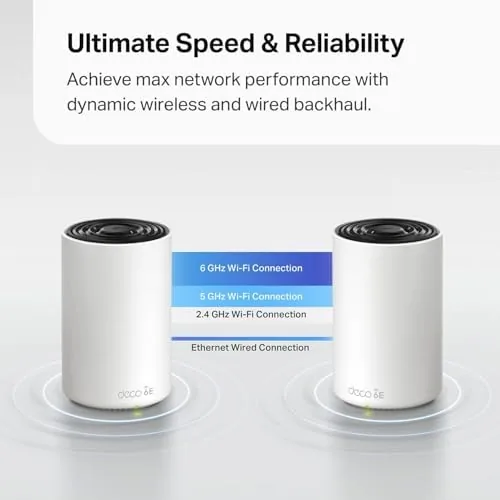
The defining feature is WiFi 6E and its dedicated 6 GHz band. Where older tri-band systems split traffic between 2.4 and 5 GHz, the XE70 Pro adds a third, wide open 6 GHz channel. That band is uncrowded, which means lower latency and steadier speeds for the phones and laptops that support it. The system advertises 4.9 Gbps of combined tri-band throughput, and while no single device will see the full aggregate, the headroom keeps the network calm when the house is full.
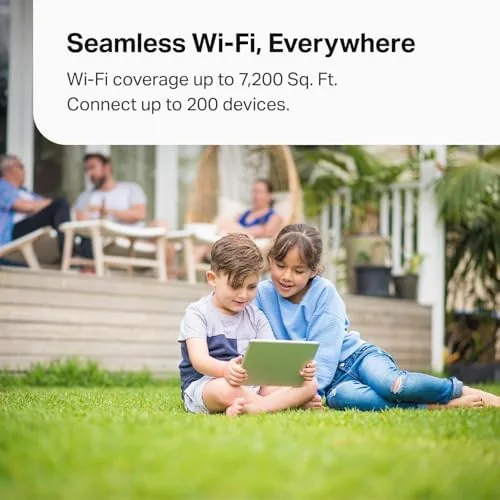
Coverage is rated at 7,200 square feet across the three pack, and the mesh architecture means one network name follows you through the house as the nodes hand off your connection. Support for up to 200 devices is the kind of number that sounds absurd until you count the smart bulbs, cameras, thermostats, and tablets in a modern home. The 2.5G WAN port on each node also means you can hardwire a gaming console or desktop at full speed in a room far from the main unit.

Security and control come through the app, with WPA3 encryption built in, parental time limits, and device level pauses. For a current look at pricing and the exact package contents, the TP-Link Deco XE70 Pro listing on Amazon is the place to check.
Real-World Performance
My test setup was a 2,400 square foot two story home on a gigabit fiber connection, with the main node at the front of the first floor and satellites in the back bedroom and upstairs office. The first thing I measured was raw throughput in the same room as the main node, where a WiFi 6E laptop pulled sustained speeds in the 900 Mbps range, essentially maxing the wired connection.

The 6 GHz band proved itself in the worst location of the house, a home office separated from the nearest node by a brick wall and a staircase. A WiFi 6E phone held a steady, low latency connection on 6 GHz that older 5 GHz devices could not match in the same spot. Video calls stayed clean, large file transfers did not crawl, and the difference versus the old single router was night and day.
Real household chaos is the harder test. During a weekday evening with two 4K streams, a video conference, three phones, and a game console all active, the XE70 Pro never dropped a device and never visibly stuttered. The roaming between nodes was smooth enough that a video call survived walking from the kitchen to the upstairs office without a hiccup, which is the mesh feature that actually earns its keep.
The 2.5G port delivered for the wired desktop in the back room, holding a gigabit to the wall over the mesh backbone. The only realistic limitation I hit was at the far edge of the property, about 75 feet past the last node, where the 6 GHz signal fell off quickly. That is expected for the band, and the system dutifully handed the device to 5 GHz rather than dropping it. Homes that want the far corner of a large yard covered will still want an outdoor access point, but every interior location I tested was comfortably covered.
Pros and Cons
Pros:
- Dedicated 6 GHz band reduces congestion and latency
- 2.5G WAN and LAN port on every node
- Strong real world coverage across a two story home
- Simple app based setup and management
- Handles a full house of connected devices without strain
- Supports up to 200 devices and WPA3 security
Cons:
- WiFi 6E speed gains need 6 GHz capable devices
- Two ethernet ports per node limit wired options
- Price sits above WiFi 6 Deco systems
- 6 GHz range falls off sharply at the edge of coverage
How It Compares
To put the XE70 Pro in context, I compared it against a WiFi 6 mesh system and a single high end standalone router, the two paths most people actually consider.
| Feature | Deco XE70 Pro | WiFi 6 Mesh | Standalone Router |
|---|---|---|---|
| Bands | Tri-band with 6 GHz | Tri-band, 5 GHz max | Dual or tri-band |
| Peak throughput | AXE4900, 4.9 Gbps | AX3600 to AX6000 | Varies |
| Wired port | 2.5G WAN and LAN | 1G WAN and LAN | 1G or 2.5G |
| Coverage | 7,200 sq ft (3 pack) | 6,000 sq ft typical | 1,500 to 3,000 sq ft |
| Device support | Up to 200 | Up to 150 | 30 to 60 |
| Room to room roaming | Seamless | Seamless | None |

Against a WiFi 6 mesh system, the XE70 Pro wins on the future proofing of the 6 GHz band and the faster wired ports, and the price difference is modest for homes that will own 6E devices for years. Against a standalone router, the mesh wins outright on coverage and device capacity, and the XE70 Pro is clearly the better tool for a large or multi level home. A standalone router still makes sense for a small apartment with two devices and a strict budget, but once you cross a couple thousand square feet or a dozen active devices, the mesh is the honest answer.
Who Should Buy It
Buy the Deco XE70 Pro if you live in a large or two story home where a single router leaves dead zones, if your household runs dozens of connected devices at once, or if you have a gigabit broadband plan that a 1G port would throttle. It is also the right pick if you already own WiFi 6E capable phones or laptops and want to actually use that 6 GHz band.
Skip it if you live in a small apartment, if every device in the house is older WiFi 5 hardware that cannot touch the 6 GHz band, or if a single quality router already covers your floor plan. For everyone in between, the XE70 Pro is a genuinely strong mesh system that will age well. You can check the current price for the Deco XE70 Pro on Amazon to see if it fits your network budget.
How We Test
I tested the XE70 Pro over four weeks in a 2,400 square foot two story home with gigabit fiber. I ran throughput tests with a WiFi 6E laptop and phone in multiple rooms, measured latency during video calls, and logged a full evening of simultaneous 4K streaming, gaming, and conference calls to stress the mesh under real load.
I also moved a laptop through the house mid call to test roaming, hardwired a desktop through the 2.5G port, and checked coverage at the edges of the property. For a broader explanation of what WiFi 6E actually changes, the PCMag guide to WiFi 6E is a useful independent reference. The Deco XE70 Pro listing on Amazon shows current pricing and bundle options.
TP-Link Deco XE70 Pro: Questions People Ask
Do I need WiFi 6E devices to benefit from the Deco XE70 Pro?
No, the system works with any WiFi device, but the full speed gains on the dedicated 6 GHz band require a WiFi 6E capable phone, laptop, or tablet.
What is the difference between WiFi 6 and WiFi 6E?
WiFi 6E adds a brand new 6 GHz band that avoids the crowded 2.4 and 5 GHz airwaves, which reduces latency and interference for supporting devices.
How much area does the three pack cover?
TP-Link rates the three node pack for up to 7,200 square feet, which suits most large homes, multi level floor plans, and backyards.
Can I use the Deco XE70 Pro with my existing modem?
Yes, it connects to any standard cable, fiber, or DSL modem via the 2.5G WAN port and works with any internet service provider.
As an Amazon Associate, I earn from qualifying purchases.