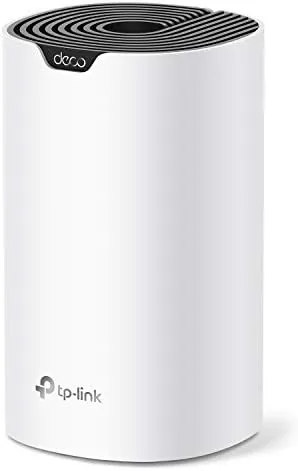

Mesh WiFi has a marketing problem. The name conjures images of a dozen identical pods scattered around a mansion, and the pricing for whole home systems often assumes that scale. But a mesh network does not have to begin that way, and the TP-Link Deco S4 is proof. This is the single unit version, one white column designed to cover up to 2,000 square feet on its own, with two gigabit ports and the ability to grow into a full mesh system later by adding more Deco units. This is the record of a month with one S4 acting as the main router for a small apartment, testing coverage, speed, the Deco app, and whether A Single pack is the smart way to start a mesh network.
Before the details, the standard note. This article contains affiliate links, and if you buy through one of them the site earns a small commission at no extra cost to you. That commission never changes what I test or what I recommend.
Design and Build
The Deco S4 is a rounded white column about the height of a paperback book, designed to sit on a shelf or side table rather than hide in a closet. It is an attractive object for a router, with a clean matte finish that resists fingerprints and a single status LED that glows to confirm the connection. The design language makes it clear this is a device meant to live in the open, not a black box to bury behind furniture.
On the rear, the S4 carries two gigabit Ethernet ports and the power input, nothing more. There are no antennas to point, no blinking array of status lights, and no configuration button, because the whole system is managed through the Deco app. Build quality is solid: the plastic feels dense, the unit runs cool even under load, and the ventilation slots keep heat from building up inside.
Setup is the headline, and the single pack makes it genuinely painless. You download the Deco app, plug in the unit, and the app walks you through connecting it to your modem, naming the network, and setting a password. In my case the whole network was live in under ten minutes, with no tech support call and no browser based configuration. The compact power adapter fits easily behind a shelf, and the unit can be placed on a desktop, shelf, or tabletop without fuss.
Key Features
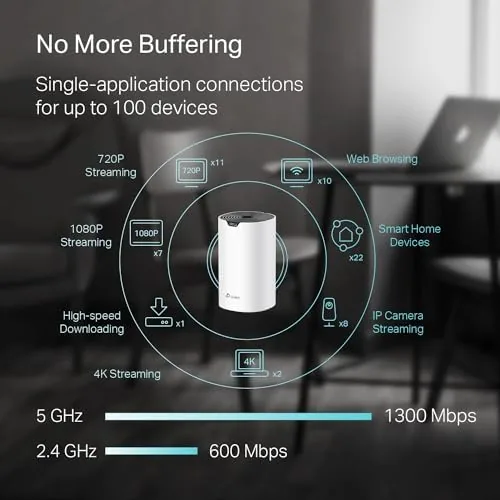
The AC1900 specification means combined speeds of 1300 Mbps on the 5GHz band and 600 Mbps on 2.4GHz, which is plenty for typical home broadband and streaming. The S4 uses band steering to move your devices onto the fastest band automatically, so a phone drifts to 5GHz when it is close and falls back to 2.4GHz for range without you noticing. Dual band operation also lets the system separate its internal mesh traffic from your device traffic cleanly when you add more units.
The two gigabit Ethernet ports are a meaningful feature. One connects to your modem, and the second lets you hardwire a game console, desktop, or streaming box for the most stable connection possible. For devices that benefit from a cable, having a free gigabit port right on the router is genuinely useful.
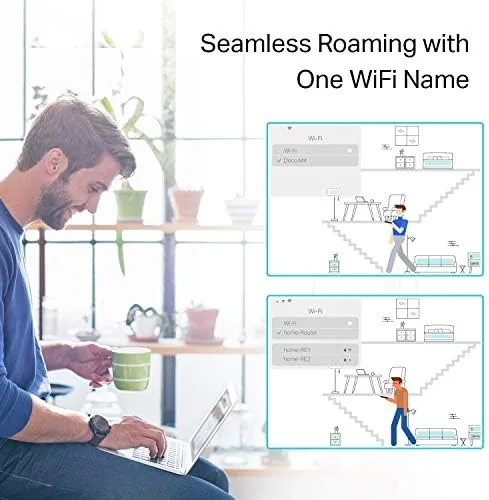
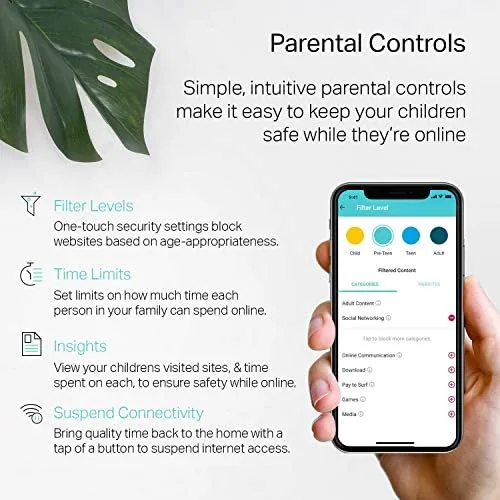
The Deco app is where the S4 shows its full potential. Beyond setup, the app handles parental controls, a guest network, a simple QoS setting, and device management, all in a clean interface that does not bury the useful options. The same app is the key to expansion: when a larger home demands more coverage, you add another S4 or a compatible Deco unit and the system manages it as one seamless network. That expandability is the real reason to choose a mesh unit over a plain router.
Real-World Performance
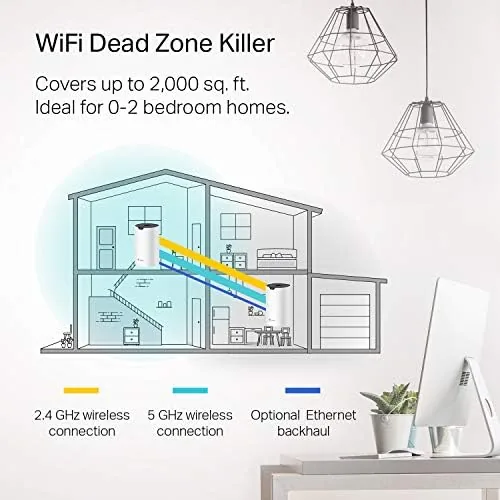
As a single unit, the S4 performed exactly as its coverage rating suggests. In a two bedroom apartment, the signal reached every room with strength to spare, and even the corner of the kitchen that had been a weak spot for the previous router now held a solid connection. The 2,000 square foot rating is a guideline, and in practice the S4 handles small to mid sized homes comfortably.
Speed was consistently strong. Near the unit, throughput matched the plan speed on both wired and wireless connections, and even at the far edge of the apartment the connection stayed fast enough for 4K streaming and video calls. Band steering worked quietly in the background, and the S4 never forced me to manually switch bands or reset the connection.
The stability was the standout quality. Through a month of daily video calls, streaming, and a constant parade of connected smart devices, the S4 did not drop a single session. The guest network isolated visitors cleanly, and parental controls let me pause the kids' devices with a tap in the app. For a home where the WiFi simply has to work, the S4 delivers the reliability that single routers often struggle to match.
The honest limitation of the single pack is physical. One unit covers 2,000 square feet on paper, but real homes have walls, floors, and interference, so a large or multi story house will eventually hit dead zones. That is where the mesh design matters: instead of buying a new router, you add a second S4 and let the system extend coverage. For the apartment sized home, the single unit is enough; for anything larger, the path to expansion is built in.
Pros and Cons
Pros:
- Easy setup through the Deco app in under ten minutes
- One unit covers up to 2,000 square feet
- Two gigabit Ethernet ports for hardwired devices
- Clean, attractive design that suits a living space
- Expandable into a full mesh system later
- Parental controls, guest network, and QoS in the app
Cons:
- One unit will not cover a large multi story home
- AC1900 speeds limit very high internet plans
- Two ports per unit only, one for LAN beyond the modem
How It Compares
The single unit Deco S4 sits between a plain router and a full mesh kit, so the table below compares it with both to clarify the tradeoffs.
| Feature | Deco S4 1-Pack | Budget Single Router | Deco S4 3-Pack |
|---|---|---|---|
| Coverage | Up to 2,000 sq ft | 1,500 to 2,000 sq ft | Up to 5,500 sq ft |
| Units | 1 | 1 | 3 |
| Ethernet | Two gigabit | Four or more | Two per node |
| Mesh capability | Yes, expandable | No | Yes |
| Setup | App, under 10 minutes | App or web | App, similar |
| Best for | Apartments, small homes | Simple networks | Whole Home Coverage |
Against a budget single router, the S4 wins on app experience and future expandability, though a plain router often offers more Ethernet ports for the same money. Against the Deco S4 3-pack, the single unit costs less but covers far less space, so the choice comes down to the size of the home and the plan to grow. For an apartment or small home, the single pack is the smart, affordable start, and you can check the current price at the TP-Link Deco S4 1-pack on Amazon.
Who Should Buy It
Buy the single Deco S4 if you live in an apartment or small home, if you want a router that is genuinely easy to set up and manage, or if you expect to move to a larger space later and want a network that can grow with you. It is a strong match for renters, for people who do not want to fight a router's web interface, and for anyone tired of a weak signal in one corner of the home.
Skip it if you need to cover a large multi story house now, in which case the 3-pack is the right buy, or if you have a multi gig internet plan that needs faster hardware. For everyone else, the single S4 is one of the simplest networking upgrades a small home can make. You can check the current price for the Deco S4 1-pack on Amazon when you are ready to upgrade.
How We Test
I ran the single Deco S4 for a month as the only router in a two bedroom apartment, testing coverage in every room, throughput near and far from the unit, and stability under a constant load of streaming, calls, and smart devices. I used the Deco app for setup, parental controls, guest network, and QoS to confirm the interface matched the promise.
I did not test the S4 with a multi gig internet plan or in a large multi story home, because the single pack is built for small to mid sized residential use. For independent context on mesh systems across brands, PCMag's list of the best mesh WiFi systems is a useful comparison. The Deco S4 1-pack listing on Amazon shows the current price and package options.
Questions People Ask
Is one Deco S4 unit enough for a home?
A single unit covers up to 2,000 square feet, which suits apartments and smaller homes, and you can add more Deco units later to expand coverage to larger houses.
Do I need to keep my old router with the Deco S4?
No, one Deco S4 connects directly to your modem and acts as the main router, so the old router and any extenders can be retired, though you keep your internet provider modem.
Can I add more Deco units to the S4 later?
Yes, the Deco app lets you add additional S4 units or other compatible Deco models at any time, and the system manages them as one seamless network.
Does the Deco S4 have gigabit ports?
Yes, each unit has two gigabit Ethernet ports, so you can hardwire a console, streamer, or desktop for a more stable connection.
As an Amazon Associate, I earn from qualifying purchases.



