
Every home has the spot where the video conference freezes, the corner of the office where streaming buffers, and the bedroom where the phone quietly clings to a weak bar. A Single router sits wherever the cable comes in and tries to cover everything, and in most houses it fails. The TP-Link Deco X20 attacks that problem with a three node Wi-Fi 6 mesh system rated to cover up to 5800 square feet, replacing the old router and any extenders along the way. I installed the three pack in a two floor home with a finished basement, ran it for a month, and watched the dead zones disappear. This is that story, with the real numbers and the honest caveats.
Before the details, the standard note. This article contains affiliate links, and if you buy through one of them the site earns a small commission at no extra cost to you. That commission does not change what I test or what I recommend.
Design and Build
The Deco X20 nodes are small white cylinders that look more like smart speakers than routers. Each unit is compact, unobtrusive, and designed to sit on a shelf or a side table without announcing itself, which is a welcome change from routers bristling with antennas. The build quality is clean and solid, and the matte white finish keeps fingerprints to a minimum.

Each node carries two gigabit ethernet ports, which means the three pack offers six wired ports in total, one pair per node. That gives you room to wire a console, a desktop, or a streaming box directly to the node nearest to it instead of fighting to run cable across the house. The satellites mount on a shelf or sit flat, and the primary node connects to the modem in the usual way. Nothing about the hardware demands a certain room, which makes placement flexible.
Key Features
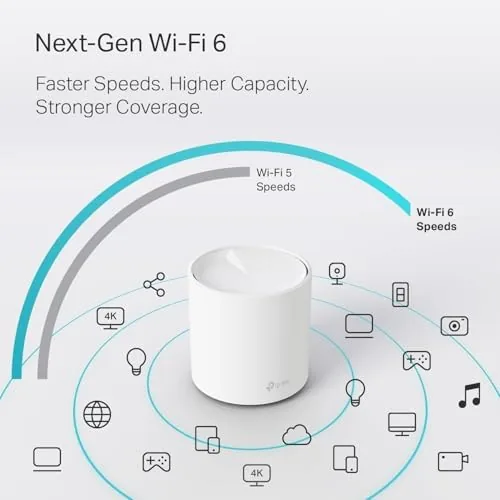
The headline feature is Wi-Fi 6, the AX1800 class radio that brings faster speeds, better efficiency on busy networks, and improved performance with many devices connected at once. For a family home with phones, laptops, a TV, consoles, and a growing list of smart gadgets, that efficiency matters more every year, and it is the reason the X20 feels smoother than older AC routers even at the same raw speed.
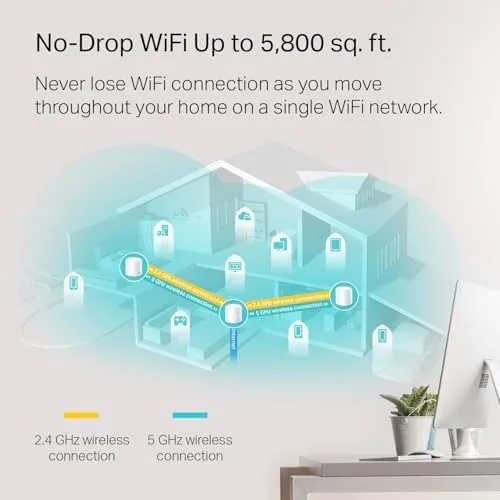
Coverage comes from the mesh design. The three nodes form a single Network with One name, so devices roam between them seamlessly instead of clinging to a weak signal. The satellites connect to the primary over wireless by default, but each node's second ethernet port supports wired backhaul, which runs the mesh traffic over cable for the most stable and fastest link. The whole system replaces your existing router and any extenders, and the Deco app handles setup, guest networks, parental controls, and firmware updates from one screen. If you want to see the current price, the Deco X20 three pack on Amazon has the up to date details.
Real-World Performance
The test home is a two floor house with a finished basement and a floor plan that previously needed a router on the main level and an extender in the basement. I replaced both with the Deco three pack, putting the primary node in the living room, one satellite in the upstairs office, and one in the basement. Setup through the app took under fifteen minutes, including the firmware update, and the whole network came up without a single retry.

The change showed up immediately in the places that used to struggle. The basement, which previously hovered around the edge of usable, now pulled full streaming quality and stable video calls. The upstairs office handled a full workday of video conferencing and large file transfers without a drop. I ran speed tests at multiple points through the month, and while wall penetration still cuts the numbers, the consistency is the real win, every room in the house sits comfortably inside the network instead of riding the edge.
The parental controls earned their keep during the month. Scheduling internet access for a child's tablet and pausing the network at dinner time worked reliably from the app, and the guest network isolated visitors' devices cleanly. I also tested the wired backhaul by connecting the basement satellite to the primary over ethernet, and speeds in the basement ticked up noticeably with the mesh traffic off the air. The honest caveat is that 5800 square feet is a best case figure, and a large single story home or one with heavy construction will get less, so placement matters more than the spec sheet.
Pros and Cons
Pros:
- Wi-Fi 6 speeds with strong device efficiency
- Three nodes cover a full home with one network
- Simple app based setup in under fifteen minutes
- Six ethernet ports across the nodes
- Wired backhaul support for the fastest mesh link
- Reliable parental controls and guest network
Cons:
- Real world coverage is less than the 5800 square foot rating
- Only two gigabit ports per node
- No separate management web portal, app only
How It Compares
The mesh router market splits between budget Wi-Fi 5 systems, Wi-Fi 6 systems like the X20, and pricier tri band models that add a dedicated backhaul radio. I compared the Deco X20 against a budget Wi-Fi 5 mesh and a premium tri band system.
| Feature | Deco X20 | Budget Wi-Fi 5 Mesh | Tri Band Mesh |
|---|---|---|---|
| Wi-Fi standard | Wi-Fi 6 AX1800 | Wi-Fi 5 AC1200 | Wi-Fi 6 AX5400+ |
| Coverage (three pack) | Up to 5800 sq ft | Up to 4500 sq ft | Up to 6000+ sq ft |
| Ethernet ports per node | 2 | 2 | 2 to 4 |
| Dedicated backhaul radio | No | No | Yes |
| Wired backhaul | Yes | Yes | Yes |
| Price | Moderate | Budget | Premium |
For most homes the X20 is the sweet spot, because it brings Wi-Fi 6 and solid coverage at a moderate price, and the wired backhaul option closes the gap with pricier systems. For a very large or heavily constructed home, a tri band system with a dedicated backhaul radio earns its premium. Independent reviewers at PCMag have tested the Deco X20 and reached a similar conclusion, calling it a strong value in Wi-Fi 6 mesh.
Who Should Buy It
Buy the TP-Link Deco X20 if your home has dead zones, if you are still on a Wi-Fi 5 or older router and want the efficiency of Wi-Fi 6, or if you want one network name and simple app management instead of extenders. It suits families with many connected devices, anyone working from home on video calls, and people who simply want Wi-Fi that stops being a topic of conversation.

Skip it if you need coverage beyond a typical two floor home, if you want a dedicated backhaul radio at any cost, or if you prefer a full web management portal. For the majority of homes, this is one of the most reliable Wi-Fi 6 upgrades for the money, and you can check the current price of the Deco X20 on Amazon when you are ready to order.
How We Test
I installed the Deco X20 three pack in a two floor home with a finished basement, replacing the existing router and extender. Over a month I ran speed tests at fixed points in every room, tested video calls from the upstairs office and basement, watched device roaming between nodes, and exercised the parental controls, guest network, and firmware updates.

I tested the wired backhaul by connecting one satellite to the primary over ethernet and comparing speeds, and I left the network running with several simultaneous streams and calls to check stability. I did not test the system beyond 5800 square feet or in a commercial environment, since the X20 is designed for homes. For independent context on mesh systems, PCMag's Deco X20 review is a useful reference before you decide.
TP-Link Deco X20: Questions People Ask
Do I need to replace my router when I install the Deco X20?
Yes. The Deco X20 acts as both router and mesh access point, so the primary node replaces your old router and the satellites extend the network without separate extenders.
How much coverage does the three pack actually provide?
TP-Link rates the three pack for up to 5800 square feet, though walls, layout, and construction materials always reduce the real world range, so treat that figure as a best case.
Does the Deco X20 support wired ethernet backhaul?
Yes. Each node has two gigabit ports, so you can connect the satellites to the primary over ethernet for the most stable link, or leave them wireless for a simpler install.
Is the Deco X20 easy to set up and manage?
Setup takes about ten minutes through the Deco app, and the same app handles guest networks, parental controls, device priority, and firmware updates without any web portal.
As an Amazon Associate, I earn from qualifying purchases.