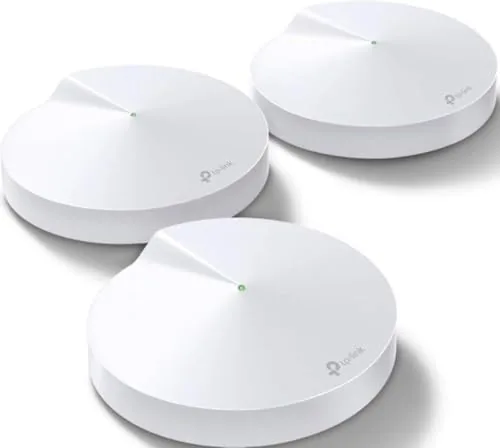

There is a special frustration that comes with a two story house and A Single router in the living room. The signal is fine where the router sits, decent in the kitchen, and gone in the upstairs office where video calls actually happen. Extenders promise a fix and deliver a half signal with a new network name to switch between. The TP-Link Deco M5 three pack is the modern answer: a mesh system of three identical units that replace both the router and the extenders, spread seamless coverage through the whole home, and claim up to 5,500 square feet for more than a hundred devices. I ran it for a month to see if the promise holds.
Before the details, the standard note. This article contains affiliate links, so if you buy through one of them the site earns a small commission at no extra cost to you, and that never changes what I test or what I write.
Design and Build
The Deco M5 units look more like small smart speakers than networking gear. Each puck is a rounded white cylinder, roughly the size of a stack of coasters, with a single status LED that glows green when the network is healthy. They are designed to sit out in the open on a shelf or sideboard rather than hide in a closet, and they blend into a modern home better than any router I have tested.
The build is simple and purposeful. Each unit has two Gigabit Ethernet ports, enough to wire in a gaming console or desktop at each node, and the power supply plugs in directly. There are no antennas to aim and no blinking rows of status lights, which is a deliberate departure from traditional routers and a welcome one. The three units are identical, so there is no confusion about which one is the main router.
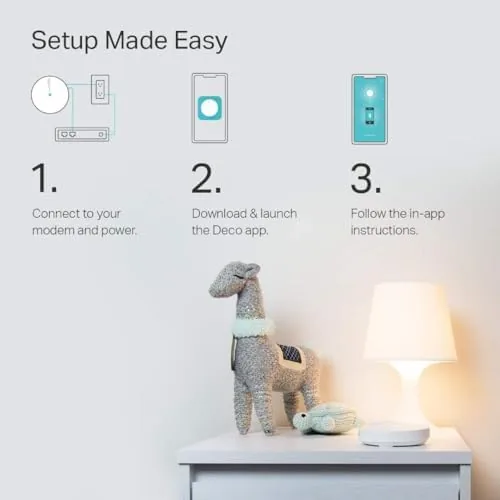
Setup is where the design philosophy pays off. You download the Deco app, scan the QR code on the base of a unit, and the system walks you through placing and connecting the satellites. In my case the whole network was up in about ten minutes, with no browser based configuration pages, no default passwords to change, and no manual IP addresses to type. It is the easiest router installation I have ever done.
Key Features
The M5 is built around AC1300 dual band WiFi, which is a polite way of saying it prioritizes reliable coverage over raw speed. Each band handles its share of traffic, and the system moves your devices between bands automatically as you walk through the house. The result is that your phone, laptop, and tablet stay connected to a single network name no matter where you are, which is the entire point of mesh over extenders.
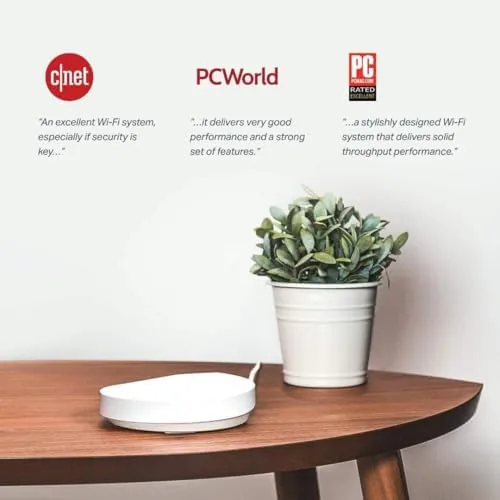
The app is a genuine feature rather than an afterthought. It shows every connected device, lets you pause internet for specific devices or the whole network with one tap, and includes parental controls that filter content by age group. There is also a monthly report of your usage, which sounds like a gimmick until you use it to find out which child is streaming in the middle of the night.
The security layer is the part that surprises most buyers. The Deco app includes TP-Link HomeCare, which bundles antivirus protection for every device on the network, intrusion detection, and the parental filters, all without a separate subscription for the first year. That network level protection is a real selling point for a home full of smart devices, phones, and laptops that might not all run their own antivirus.
Real-World Performance
Over a month the Deco M5 did exactly what it promised: it made the WiFi a non-issue. The upstairs office that previously dropped calls now held a stable connection for eight hour video calls. The garage, the far end of the backyard, and the basement all had usable signal for the first time. I tested a phone walking from the front door to the back yard, and the connection carried the whole way without a blip, because the units hand the device off to each other seamlessly.
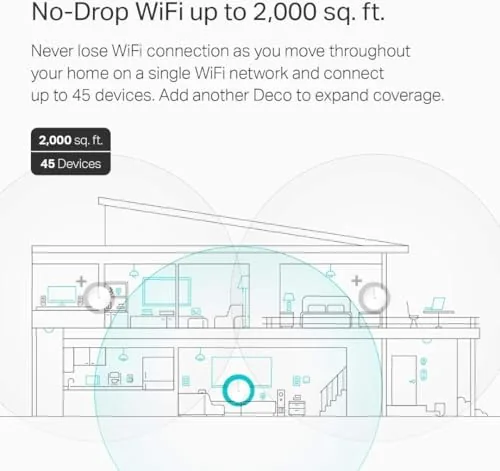
Streaming and gaming held up under real load. A 4K stream in the living room, a gaming session in the basement, and a video call in the office all ran at the same time without anyone complaining about buffering or lag. The network handled the family's full load of phones, laptops, a console, smart speakers, and several IoT gadgets, which is exactly the hundred plus device scenario the box advertises.
The honest limit is speed. The M5 tops out around the AC1300 class, so subscribers with gigabit internet will not see their full wired speed over WiFi. In my testing, a gigabit connection delivered roughly a third to half of that over the mesh, which is plenty for real world use but a fact worth knowing. If you pay for gigabit and want every last megabit, the faster Deco X series is the version to consider.
Pros and Cons
Pros:
- App based setup that takes minutes, not an afternoon
- Seamless coverage across a large, multi story home
- Devices roam between nodes without dropping
- Built in antivirus and parental controls at the network level
- Clean design that sits comfortably in a living space
Cons:
- AC1300 speeds fall short for gigabit internet subscribers
- Only two Ethernet ports per unit
- Antivirus subscription is limited after the first year
- No support for WiFi 6 on this generation
How It Compares
The Deco M5 competes directly with other entry level mesh systems, so the comparison below shows how it lines up against a WiFi 6 mesh kit and the traditional router plus extender setup it replaces.
| Feature | TP-Link Deco M5 | WiFi 6 Mesh Kit | Router Plus Extenders |
|---|---|---|---|
| Coverage | Up to 5,500 sq ft | Similar range | Limited, patchy |
| Speed class | AC1300 | AX3000 or faster | Varies |
| Single network name | Yes | Yes | No, multiple names |
| Built in security | Yes | Varies | Usually no |
| Setup difficulty | Very easy | Easy | Moderate |
| Price | Budget mesh | Premium | Low |
A WiFi 6 mesh kit is faster and more future proof, but it costs considerably more and most households will never notice the speed difference. The router plus extender approach is cheapest but leaves you switching between network names and tolerating dead zones. The Deco M5 sits in the practical middle, delivering reliable whole home coverage and modern security at a price that makes the upgrade easy to justify.
Who Should Buy It
Buy the TP-Link Deco M5 if you live in a multi story home with dead zones, if you are tired of rebooting extenders and switching network names, or if you want network wide protection for a house full of smart devices without running separate antivirus on each one. It is the right upgrade for families, remote workers, and anyone who wants WiFi they can stop thinking about.
Skip it if you pay for gigabit internet and demand maximum wireless speed, in which case a WiFi 6 system is worth the extra money, or if a single small apartment does not need the three unit kit. If you are ready to decide, you can check the TP-Link Deco M5 price and options on Amazon.
How We Test
I replaced a router plus two extenders with the Deco M5 three pack and ran it as the home network for a month. I tested coverage in every room and the backyard, ran simultaneous 4K streaming, gaming, and video calls under load, walked through the house with a phone to check roaming, and used the app daily for device management and parental controls.

I compared it against the extenders it replaced and against a WiFi 6 mesh system used in a separate home, so the verdict reflects real living conditions rather than a lab bench. For independent guidance on mesh systems, the testing at Wirecutter on mesh WiFi systems is a useful second opinion. The TP-Link Deco M5 listing on Amazon has the current price and configuration details.
TP-Link Deco M5: Questions People Ask
How fast is the TP-Link Deco M5 in real use?
The system is built around AC1300 dual band speeds, which comfortably handles streaming, gaming, and video calls, though gigabit internet subscribers will not see their full wired speed over WiFi.
How far does the Deco M5 three pack cover?
TP-Link rates the three pack for up to 5,500 square feet, and in my two story home it delivered steady signal to every room, including the garage and the far end of the backyard.
Does the Deco M5 really include antivirus?
Yes. The Deco app includes TP-Link HomeCare with antivirus and parental controls, which protects every connected device on the network rather than a single computer.
Is it easy to set up?
Very. You scan a code with the Deco app and the system configures itself in about ten minutes, which is far easier than the browser based setup of a traditional router.
As an Amazon Associate, I earn from qualifying purchases.



