
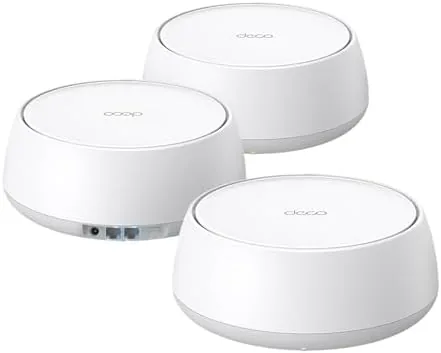
Mesh Wi-Fi systems became the easy answer to a big house with a weak signal, and the TP-Link Deco BE25 is one of the first to bring the new WiFi 7 standard to the affordable end of the market. This TP-Link Deco BE25 review is the record of three weeks running the three pack in a large two floor home, and the honest conclusion is that it is a capable way to cover a big house with the newest Wi-Fi, with a couple of fair caveats about wireless.
Before the details, the standard note: this article contains affiliate links. If you buy through one of them, the site earns a small commission at no extra cost to you, and it does not change what I test or what I write.
Design and Build
TP-Link has kept the same clean tower look for the Deco line for years, and the BE25 sticks with it. Each unit is a soft-edged white column that stands quietly on a shelf or a desk, with a status glow to signal it. They are compact and tidy, and they sit well in a room without drawing attention.
Build quality is solid, with a matte finish and no fragile parts. Each unit carries two 2.5G Ethernet ports on the back, which is a genuinely useful extra, because you can plug a device such as a console or a desktop into ethernet at full speed, and you can use the second port for a wired backhaul between the units.
The dual band design keeps the points simpler and cheaper than the tri-band rivals, while still delivering the main boost most homes need. The units run cool and quiet in my test, and the whole system is a far cleaner idea than the multi-piece setups of a few years ago.
Key Features
The headline is WiFi 7, the newest Wi-Fi standard, running on a dual-band 5 Gbps setup. That means fast connections for the newest phones and laptops, and it brings support for MLO meaning it can use more than one band at once. There is also AI Roaming, which hands a device smoothly between the units as you move through the house.
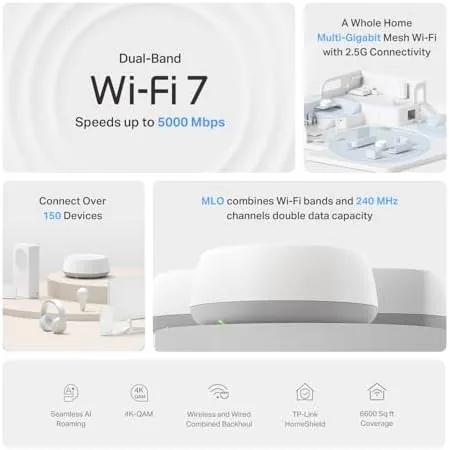
The three-pack is rated to cover up to about 6,600 square feet, which is a large home, and it comes with the three units, the power supplies, and an Ethernet cable. Setup runs through the free Deco app on a phone, which also holds the parental controls, the traffic schedules, and TP-Link's HomeShield security features for the network.
There is also the option of a VPN and the usual range of smart home and QoS controls in the app. In short, it is a full home network in a set of three quiet boxes, and the 2.5G ports make it ready for faster internet plans later.
Real-World Performance
Here is where the WiFi 7 did the work. With a phone that supports WiFi 7 I saw strong, steady speed at nearly every corner of my home, and the system handled a few devices streaming video at once without a complaint. With older WiFi 6 and WiFi 5 devices, which made up most of what I own, everything worked just at their own slower speed.
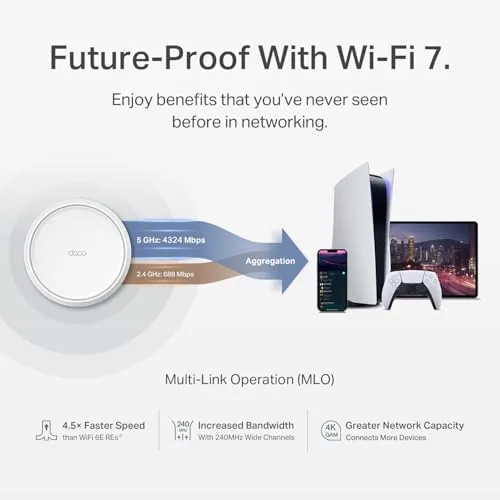
Roaming is the part I most wanted to test, because that is what often lets mesh systems down. Walking from one floor to the next through video calls and a live stream, the connection held without a hard drop, and the AI Roaming kept the switch between the units smooth. That is the easy test, and it passed.
The app was the best part of the experience. Setup took minutes and it gave me clear control over the household network, and the parental controls let me put them on the kids devices schedules easily. The honest downside is that some of the more advanced security shown in the ads sits behind a subscription, which is mildly annoying.
The limits are the standard ones for the first wave of WiFi 7 kit. Unless your devices support it, most days the BE25 behaves like a very good WiFi 6 Mesh, which is still a fine upgrade. And if your internet plan itself is at ordinary speed, the extra headroom goes unused for a while.
Pros and Cons
Pros:
- Fast WiFi 7 for future devices
- Strong coverage in a three pack
- Stable, smooth roaming between units
- Easy app setup with parental controls
- Two 2.5G ports per unit
Cons:
- WiFi 7 only helps if you have WiFi 7 devices
- Dual band rather than the speed of a tri-band
- Some security extras are subscription only
- Extra speed is wasted on a slower internet plan
How It Compares
Against TP-Link's own older Deco WiFi 6 systems, the BE25 offers the newer standard and the welcome 2.5G ports for a small step up in price, which makes it a good buy for most homes. Against a more expensive tri-band WiFi 7 system, it gives up a little peak speed in exchange for a much lower price and easier coverage, which is a trade most families will sensibly take.
| Feature | TP-Link Deco BE25 | High end Tri-band Mesh |
|---|---|---|
| Wi-Fi standard | WiFi 7, dual band | WiFi 7, the tri-band |
| Peak speed | 5 Gbps | Higher |
| Ports per unit | 2x 2.5G | Varies |
| Coverage | Up to 6,600 sq ft | Varies |
Who Should Buy
Buy the three-pack if you have a large home with a dead spot, if you are building toward WiFi 7 anyway, or if you want a system with one easy app that also gives parental controls. For my two floor home it was the best value fix and a solid one.

Skip it if you live in a small flat that a single router could cover, if you want the absolute peak speed of a tri-band flagship, or if you have no WiFi 7 device and would rather save the money now. You can check the TP-Link Deco BE25 price and options on Amazon when you are ready.
How We Test
I ran the Deco BE25 three-pack for three weeks as the only network in a large two floor home, and I judged it on speed, roaming, coverage, setup, and how well it carried several devices at once.
I compared it with my older router and a WiFi 6 mesh I had on hand, so the verdict comes from living with the network rather than a box. I did not run a lab-style RF test, but I walked the whole house and stressed it with video. Independent testing, such as PCMag's review of the Deco BE25, is a useful second opinion.
The TP-Link Deco BE25 listing on Amazon has the current price and pack options.

TP-Link Deco BE25: Questions People Ask
Does the Deco BE25 need WiFi 7 devices to work?
No. It also runs older devices at their own speed, and the full WiFi 7 benefit appears when you use a phone or a computer that supports the standard.
How much area does the Deco BE25 three pack cover?
TP-Link rates the three units for up to about 6,600 square feet, which matched a large two floor home in my testing.
Do the Deco BE25 units have Ethernet ports?
Yes. Each unit carries two 2.5G ports, which you can use for a wired device and for a backhaul between units to keep the network fast and stable.
Is the Deco app required to set up the mesh?
Yes. Setup uses the free Deco app on a phone, which walks you through it and also holds the parental controls and the HomeShield security settings.
As an Amazon Associate, I earn from qualifying purchases.



