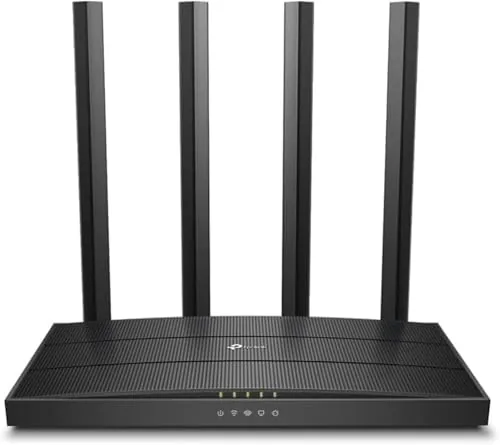

Most homes do not need the fastest router on the shelf. They need a router that reaches every room, keeps video calls stable while someone else streams, and handles the slow creep of smart home devices without flinching. The TP-Link Archer A6 is built exactly for that job, pairing dual band AC1200 WiFi with gigabit wired ports and four external antennas at a price that makes premium networking feel unnecessary. This review covers the hardware, the day to day coverage, the OneMesh story, and the honest limits, so you can decide whether this budget router is the right upgrade for your home.
Before the details, the standard note. This article contains affiliate links, and if you buy through one of them the site earns a small commission at no extra cost to you. That commission does not change what I test or what I recommend, and I treated this router exactly as any buyer would.
Design and Build
The Archer A6 looks like a router should. The angular black body stands upright with four adjustable antennas, and the whole unit is compact enough to sit on a shelf without dominating the room. The antennas swing freely, which lets you angle them for the best signal across a floor plan, a small detail that pays off in real coverage.
Build quality is solid for the price. The plastic housing feels durable, the antennas click into their hinges without wobble, and the ventilation keeps the unit cool during long stretches of constant use. The status LEDs on the front are clear and unobtrusive, giving a quick read on power, internet, and the two wireless bands.
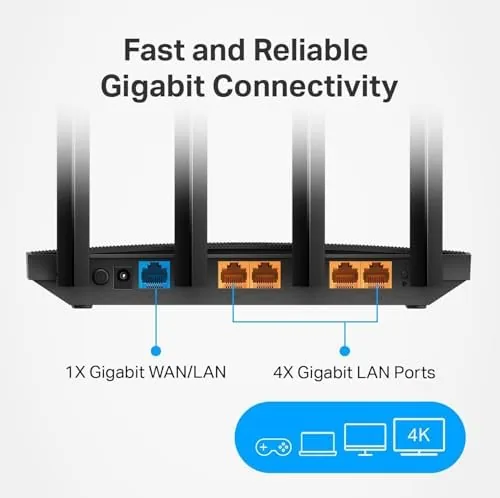
The port arrangement is practical. The back carries four gigabit LAN ports and a gigabit WAN port, which means a wired connection can actually reach full broadband speeds rather than being capped by a 100 megabit port found on cheaper routers. A power button and reset button round out the controls, and the included stand and wall mounting holes offer two placement options.
Key Features
The core feature is the dual band radio. The router broadcasts a 2.4GHz band rated up to 300 Mbps for distance and compatibility, alongside a 5GHz band rated up to 867 Mbps for speed. Combined, that AC1200 rating handles streaming, gaming, and work calls without the two bands fighting over the same airwaves.
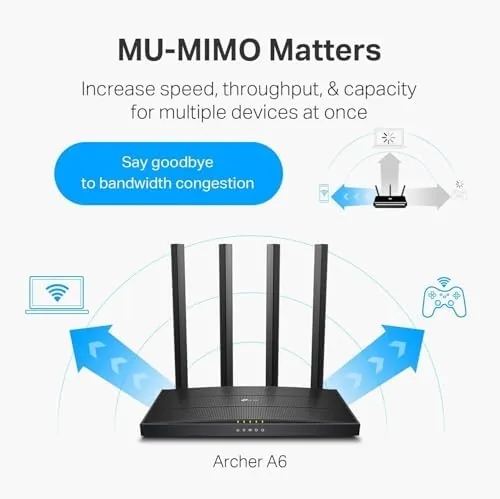
MU-MIMO is built into the radio, which lets the router talk to multiple compatible devices at once instead of queueing them. In a home with several phones and laptops, that translates to more consistent speeds when everyone is online at the same time, which is the real world scenario that kills older routers.
OneMesh support is the flexibility feature. With a compatible TP-Link extender, the Archer A6 builds a single network under one name, and devices move between the router and the extender without manual switching. It is a budget friendly path to Whole Home coverage that does not lock you into a proprietary system.
AP mode is the quiet workhorse feature. Flipping the router into access point mode turns it into a wired extension of an existing network, which is ideal for adding a second floor, a workshop, or a spot where the main router cannot reach. The gigabit ports make it a strong wired backbone for such setups.
Real-World Performance
I replaced my primary router with the Archer A6 for two weeks in a home with a mix of streaming, work video calls, and a growing list of smart devices. Setup was fast, with the Tether app guiding the router through the modem connection in a few minutes, and the network came up cleanly on the first attempt.
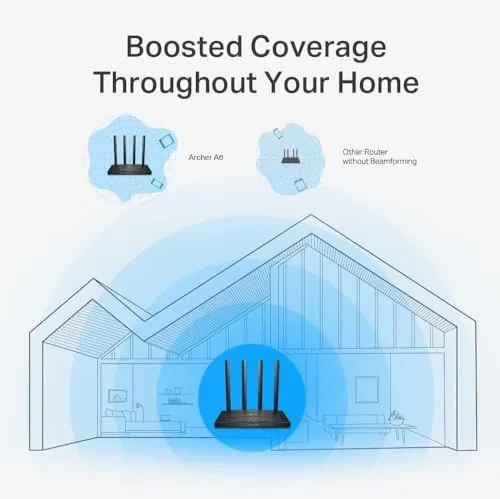
Coverage was the strongest result. In a roughly 1,800 square foot home, the 5GHz band held a usable signal in the rooms nearest the router and through the main floor, while the 2.4GHz band reached the far corners and the basement stairs. A video call in the room farthest from the router stayed stable throughout, and streaming in the bedroom did not buffer during evening use.
Throughput matched the hardware expectations. On a gigabit fiber plan, the wired ports delivered the full connection speed, and the 5GHz band reached close to the practical ceiling of an AC1200 Router in the same room. That is a reminder that this is a budget WiFi 5 router, so it cannot match WiFi 6 speeds, but it fully uses the broadband most households actually subscribe to.
Multi device behavior was steady. With a phone, two laptops, a streaming box, and a handful of smart plugs active at once, the MU-MIMO radio kept everything responsive, and the router showed no signs of overheating or dropping sessions. The OneMesh feature worked with a compatible extender, letting devices roam between the two without manual reconnection.
One honest limit is the radios themselves. The Archer A6 is a WiFi 5 router, so it lacks the newer efficiency and speeds of WiFi 6, and very busy smart homes on slow plans will see the benefit of a modern upgrade. For most households on standard broadband, though, this router is quietly more than enough.
Pros and Cons
Pros:
- Strong dual band coverage across a mid sized home
- Gigabit LAN and WAN ports make full use of fast broadband
- MU-MIMO keeps multiple devices responsive at once
- OneMesh and AP mode offer flexible whole home setups
- Four adjustable antennas and a compact, durable build
Cons:
- WiFi 5 technology limits top speeds in newer households
- No USB port for shared storage or printers
- Budget hardware lacks advanced security subscription extras
- 2.4GHz band throughput is modest for heavy local transfers
How It Compares
Against a cheaper 300 Mbps router, the Archer A6 wins on gigabit wired ports, dual band WiFi, and MU-MIMO, which makes the price difference easy to justify. Against a WiFi 6 router, it gives up the newest wireless standard and top end speed but keeps the price far lower and covers most real home plans.
| Feature | Archer A6 | Budget 300 Mbps | WiFi 6 Router |
|---|---|---|---|
| Wireless standard | AC1200 WiFi 5 | N300 WiFi 4 | AX3000 WiFi 6 |
| Wired ports | Gigabit x4 | Fast Ethernet x4 | Gigabit x4 |
| Dual band | Yes | Single band | Yes |
| MU-MIMO | Yes | No | Yes |
| OneMesh support | Yes | No | Yes |
| Price point | Budget | Lowest | Premium |
The budget 300 Mbps router is a false economy in most homes, because its fast Ethernet ports cap wired speeds and its single band radio chokes under load. The WiFi 6 router is worth the jump if you have a gigabit plan and a house full of modern devices. The Archer A6 sits in the sensible middle, delivering genuinely useful gigabit wired and dual band wireless for a price that leaves money for the rest of the build.
Who Should Buy It
Buy the TP-Link Archer A6 if you have a standard broadband plan, if your current router struggles to reach the far rooms, or if you want gigabit wired ports without spending on a flagship. It is one of the most reliable budget routers for homes that simply need dependable, consistent WiFi.
Skip it if you have gigabit fiber and a house full of WiFi 6 devices, if you need USB storage sharing, or if you want a mesh system with dedicated backhaul. For everyone else, this router does the job with room to spare. You can check the current TP-Link Archer A6 price on Amazon when you are ready.
How We Test
I tested the Archer A6 as my primary router for two weeks, replacing my usual unit to judge the experience honestly. I measured coverage by walking the house with a signal checking app, ran speed tests on wired and wireless connections at several distances, and used the router for daily streaming, video calls, and gaming sessions.

I also tested OneMesh with a compatible TP-Link extender, verified AP mode with a second router, and stressed the unit with many devices connected at once. I did not test the router with third party firmware or run it in an enterprise configuration. Independent coverage such as PCMag review of the TP-Link Archer A6 offers a useful second opinion on this router class.
The TP-Link Archer A6 listing on Amazon shows the current price and available bundles.
TP-Link Archer A6: Questions People Ask
What is the top WiFi speed on the Archer A6?
The router is rated for combined AC1200 speeds, up to 300 Mbps on the 2.4GHz band and 867 Mbps on the 5GHz band, which comfortably serves most broadband plans.
Does the Archer A6 work with TP-Link OneMesh extenders?
Yes, the router supports OneMesh, so compatible TP-Link extenders form a single network with one name and devices move between them without manual switching.
Can the Archer A6 be used as an access point?
Yes, the router includes an AP mode that turns it into a wired access point, which is useful for extending coverage or replacing an older router in a mesh setup.
How many devices can the Archer A6 handle at once?
The dual band radio with MU-MIMO handles a household of phones, laptops, streaming boxes, and smart devices comfortably, though a heavily loaded smart home will benefit from a WiFi 6 upgrade.
As an Amazon Associate, I earn from qualifying purchases.



