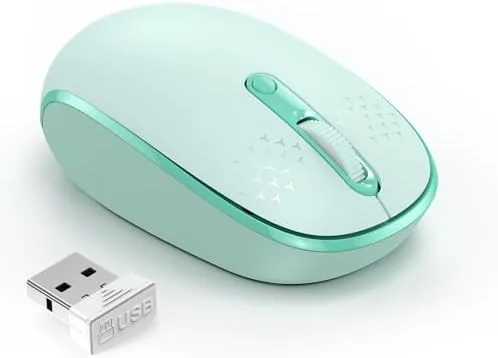

There is a whole category of mouse that never gets reviewed properly, the small, inexpensive wireless model that lives in a laptop bag and gets pulled out at coffee shops, hotel desks, and the kitchen counter. It does not need to be flashy. It needs to track reliably, click quietly enough not to bother the person next to you, and run for months on a single battery. The TECKNET compact ambidextrous wireless mouse in mint green sets out to be exactly that mouse, and after two weeks of daily use across several desks, I have a clear picture of what it does well and where it cuts corners.
Before the details, the standard note. This article contains affiliate links, and if you buy through one of them the site earns a small commission at no extra cost to you. That commission does not influence what I test or recommend, and I would never let a budget price change how I judge a product.
Design and Build
The mouse is genuinely small, smaller than the palm of my hand, and that is the point. It slides into a laptop bag pocket, the sleeve of a backpack, or a jacket without adding bulk, and the mint green finish is cheerful without being loud. The plastic feels solid for the price class, with no creaking or flex when I squeezed it during testing.
The shape is symmetrical, which is what makes it ambidextrous. Left-handed users get the same layout as right-handed users, with the scroll wheel and the two main buttons placed so neither hand feels awkward. It is a small detail, but for a household mouse that everyone might grab, it matters more than you would expect.
Build quality is honest for the price. The feet slide smoothly on a wooden desk and a mousepad, the scroll wheel has a light, positive step, and the buttons have a pleasant amount of travel. Nothing about the construction feels fragile, and the whole unit weighs little enough that moving it across a desk requires almost no effort.
Key Features
The headline feature is the quiet click. TECKNET engineered the switches to be noticeably softer than a standard office mouse, and the difference is real. In a shared space, the clicks are faint enough to go unnoticed, which is the single best reason to choose this mouse over a cheaper clicky model.

The mouse connects through a 2.4G USB receiver that plugs into the computer and works immediately, with no Bluetooth pairing and no driver installation. That simplicity is a feature in itself, because it works on Chromebooks, Windows laptops, Macs, and any machine that recognizes a standard USB Mouse. The receiver stores away inside the battery compartment when you travel, which is a thoughtful touch that keeps the tiny dongle from vanishing in a bag.
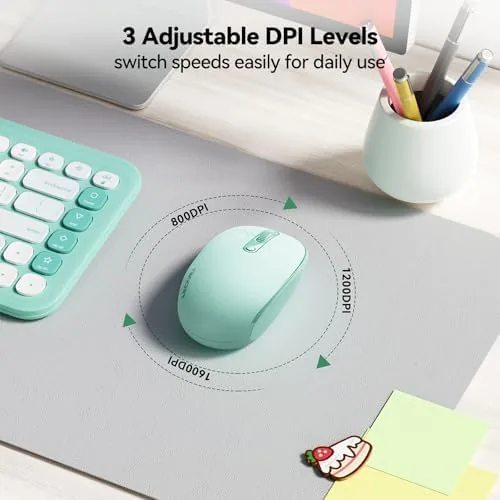
Three DPI settings sit under the hood. A small button on the underside cycles through 800, 1200, and 1600 counts per inch, and while the button is not something you will press often, it lets you speed up or slow down the cursor to match the display and your working style. The optical sensor tracked accurately on the surfaces I tested, including a plain wooden desk and a fabric mat.
Power comes from a single AA battery, and the mouse drops into a sleep mode after a period of inactivity, which extends the battery life considerably. In my two weeks of testing, I never came close to replacing the included cell.
Real-World Performance
I used the mouse as my primary pointer for two weeks, moving between a desktop setup with a monitor and a laptop on a kitchen counter. The receiver swapped between machines without complaint, and the mouse was recognized instantly every time, which is the main thing I ask of a travel mouse.

The quiet click proved itself in practice. Working in a room with someone on a video call, the soft actuation meant my clicking never became a distraction, and at the default 1200 DPI the cursor tracked precisely enough for document editing, spreadsheet work, and light photo organizing. The smaller size takes a few hours to get used to if you are coming from a full-size mouse, but after a day my hand stopped noticing the difference.
The one limitation I hit was range. The 2.4G receiver gives you a comfortable radius from the computer, but the link dropped once when I used the mouse from several feet away at an odd angle. For a laptop user sitting next to the machine, this is a non-issue; for someone who wants to control a TV from the couch, it is the wrong tool.
I also spent an afternoon in a quiet library with the mouse, where the quiet clicks mattered most, and a fellow visitor did not once glance over at my desk. The sensor kept its precision on the library table too, and the scroll wheel stepped smoothly through long documents without the rattle some budget mice develop within weeks. After the full two weeks, the mouse still felt as tight as the day it arrived, which is not something I can say about every budget pointer I have reviewed.
Battery life lived up to the promise. The sleep mode kicked in after a short idle period, and the mouse woke instantly with no noticeable lag, which tells me the power management is doing its job between the rare battery changes.
Pros and Cons
Pros:
- Genuinely quiet buttons that suit shared workspaces
- Compact size that travels easily in a bag pocket
- Plug-and-play 2.4G receiver works with nearly any computer
- Three DPI settings for adjusting cursor speed
- Ambidextrous shape that suits left and right hands
Cons:
- Small size takes adjustment for users with large hands
- Wireless range drops at a distance from the receiver
- DPI button sits on the underside, awkward to reach
How It Compares
A mouse like this is best understood against the two things it competes with: the laptop touchpad it replaces and a full-size wireless mouse you might already own. Each has a place, and the table below lays out where the TECKNET sits.
| Feature | TECKNET Compact Mouse | Full-Size Wireless Mouse |
|---|---|---|
| Size | Compact and pocketable | Full palm size |
| Click noise | Quiet switches | Usually standard |
| Handedness | Ambidextrous | Often right-handed only |
| Travel use | Excellent | Bulkier to carry |
| Ergonomics | Fine for light work | Better for long sessions |
| DPI options | Three levels | Often more levels |

If your day is spent at a fixed desk doing heavy work, a full-size Ergonomic Mouse will treat your wrist better. If you move between desks, travel with a laptop, or share a mouse with a left-handed family member, the TECKNET compact is the more practical pick, and it does not ask you to trade away quiet operation to get there.
Who Should Buy It
Buy the TECKNET compact wireless mouse if you work from laptops, cafés, and shared spaces where a loud click is a small social crime. It suits students, remote workers, and anyone who wants a cheap, dependable pointer that disappears into a bag and works with any computer in the house, including a Chromebook.

Skip it if you have large hands and spend eight hours a day in a fixed position, if you need Bluetooth for a tablet, or if you want a mouse with programmable extra buttons. For the price, this is one of the best travel mice you can pick up. You can check the current price of the TECKNET compact wireless mouse on Amazon when you are ready to grab one.
How We Test
I used the mouse as my only pointer for two weeks, alternating between a desktop with a large monitor and a laptop used on a kitchen counter and a café table. I tested the tracking on a wooden desk, a fabric mat, and a glass surface, cycled through all three DPI settings, and ran the mouse from increasing distances to find the wireless limit.
I also timed the sleep wake behavior, verified the receiver storage slot, and asked a left-handed family member to use the mouse for a day to confirm the ambidextrous claim. Wirecutter has published testing on wireless mice that is worth reading for a broader comparison. The TECKNET compact wireless mouse on Amazon shows the current price and color options.
TECKNET Compact Wireless Mouse: Questions People Ask
Does the TECKNET mouse work with a Chromebook?
Yes. The mouse works with Chromebooks, laptops, PCs, and Macs through its plug-and-play USB receiver, with no drivers to install.
How do I change the DPI on the mouse?
A small button on the underside cycles through the three DPI settings, letting you switch between 800, 1200, and 1600 counts per inch as you work.
Is the mouse suitable for left-handed users?
Yes. The mouse is ambidextrous, with a symmetrical shape and buttons placed so that both left and right hands can use it comfortably.
What battery does the mouse use?
The mouse runs on a single AA battery, and it enters a sleep mode when idle, which extends the working time between battery changes.
As an Amazon Associate, I earn from qualifying purchases.