There are tools you notice every day and tools you stop noticing because they simply work. The Logitech MX Master 3S is the second kind, which is the highest compliment a productivity mouse can receive. It is Logitech's flagship wireless mouse, updated with an 8K DPI sensor, quiet clicks, and the Logi Bolt wireless connection, and it has a reputation that precedes it: ask almost anyone who works at a computer all day and they will name the MX Master as the mouse to buy. I tested the Graphite Standard Edition for a full week of daily work to find out whether that reputation is deserved.
The short answer is that the MX Master 3S lives up to the hype, with one or two honest caveats. It is expensive for a mouse, and its sculpted shape is not for everyone, but for a desk job that involves scrolling, spreadsheets, design work, or long days of clicking, it is the best tool for the job. This review covers the design, the key features, how it performs in real work, and exactly who should buy it.
Before the details, the standard note. This article contains affiliate links, and if you buy through one of them the site earns a small commission at no extra cost to you. That never affects what I recommend or how I test a product.
Design and Build
The MX Master 3S is immediately recognizable by its shape. It is not a symmetrical mouse, and it makes no apology for that. The right-handed sculpt tilts your hand into a natural resting angle, with a thumb rest on the left side, a deep groove for your index finger, and a raised arch that fills the palm. It is an ergonomic design that encourages a relaxed grip, and after long sessions it is noticeably kinder to the hand than a flat office mouse.
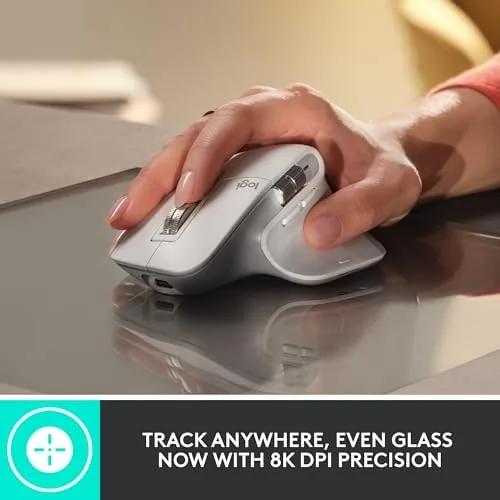
Build quality is excellent. The shell is a soft-touch dark graphite plastic that feels premium and does not pick up fingerprints easily, and the construction is solid with no creaking or flex under pressure. The Graphite finish looks professional on any desk, and the whole mouse has a heft that feels deliberate without being heavy. The MagSpeed scroll wheel is machined metal, which gives it a satisfying weight and a quality feel that cheaper mice cannot match.
Key Features
The headline feature of the MX Master 3S is the 8K DPI sensor. Logitech calls this Darkfield high precision tracking, and its practical claim is that the mouse tracks on glass, which is where virtually every other mouse fails. The 8K DPI also means the cursor moves smoothly and precisely at any speed, across a 4K monitor or a multi-display setup, without a hint of lag.

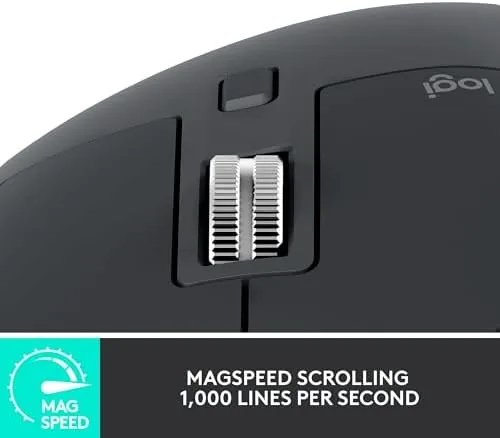
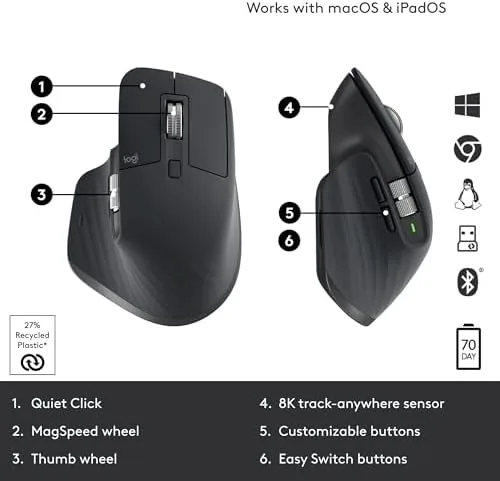
The MagSpeed scroll wheel is the feature people rave about, and it deserves the attention. It has two modes: a ratcheted mode with tactile detents for precise line by line scrolling, and a free-spin mode where the wheel spins freely and silently to fly through long documents. The switch between the two is automatic and seamless, and the free-spin mode is genuinely addictive for scrolling through feeds and long pages. A thumb wheel handles horizontal scrolling, which is invaluable in spreadsheets and timelines.
Connectivity is flexible. The mouse works over the Logi Bolt USB receiver, which is a secure connection with excellent stability, or over Bluetooth, and it can remember up to three paired devices. That means you can move the mouse between a desktop, a laptop, and a tablet with the press of a button. The battery is charged over USB-C and is rated for up to 70 days, with a quick charge feature that gives hours of use from one minute of charging.
Real-World Performance
I used the MX Master 3S as my only mouse for a full week of work, which included email, document editing, spreadsheet work, web research, and some image editing. The first thing I noticed was the quiet clicks. Logitech redesigned the switches so each click is softer and less jarring, which sounds like a small thing until you spend a day clicking and realize you are not being driven slowly mad by the noise. The buttons still have a crisp, definite feel, just with less sound.
The sensor made itself known immediately. I work at a desk with a dark, polished surface, and my previous mouse skipped and stuttered across it constantly. The MX Master 3S tracked across that same surface flawlessly, and I did not need a mousepad at all. On glass, which is the claimed superpower, it also tracked without issue. For anyone with a glass or glossy desk, that alone justifies the price.
Scrolling is where the mouse earns its keep in daily work. In a long document, the free-spin mode let me fly from the top to the bottom in one flick, and when I needed precision, the wheel clicked back into its detented mode automatically. In spreadsheets, the thumb wheel made horizontal navigation effortless. I found myself scrolling more and reaching for the keyboard less, which is exactly what a productivity mouse should encourage.

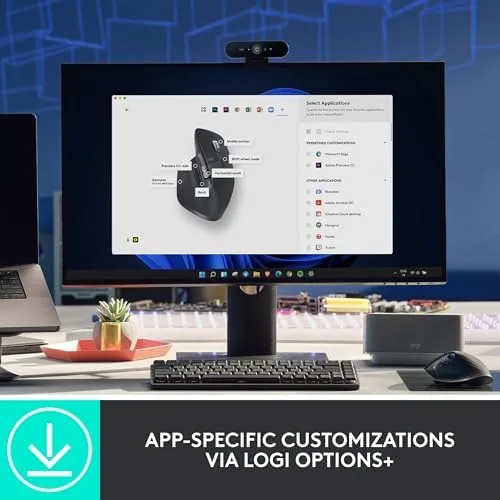
Customization through the Logi Options+ software is a genuine strength. Every button, including the thumb wheel and the side buttons, can be reassigned, and the gestures work well for app-specific actions like switching workspaces or controlling media. I set the side buttons to copy and paste, which saved me hundreds of keystrokes over the week. The software is easy to use, and it remembers settings per application, which is more flexible than most mice offer.
There are honest limits. The mouse is right-handed only, so left-handed users are locked out of the primary buttons and the shape. It is also heavier than a lightweight gaming mouse, though that weight is deliberate for stability, and it is not built for fast flicking. The 8K DPI is a specification most people will never need, since most work is done at a fraction of that sensitivity. And the price is firmly premium for what is, at its core, a mouse.
Pros and Cons
- Pros: excellent 8K DPI sensor that tracks on glass, quiet clicks that are a joy to use, addictive MagSpeed free-spin scrolling, thumb wheel for horizontal navigation, Logi Bolt and Bluetooth with three device switching, long 70 day battery with quick charge, comfortable ergonomic shape for long days
- Cons: right-handed design only, premium price, heavier than a lightweight gaming mouse, 8K DPI is overkill for most tasks
How It Compares
The MX Master 3S competes with the Logitech MX Anywhere 3S, its smaller portable sibling, and the MX Master 3, the previous generation it replaces. The table below compares the three, which is the comparison that matters for most buyers choosing a Logitech MX mouse.
| Feature | MX Master 3S | MX Anywhere 3S | MX Master 3 |
|---|---|---|---|
| Sensor | 8K DPI | 8K DPI | 4K DPI |
| Quiet clicks | Yes | Yes | No |
| Free-spin wheel | Yes | Yes | Yes |
| Glass tracking | Yes | Yes | Yes |
| Size | Full hand | Compact | Full hand |
| Price | Premium | Premium | Lower |
Against the MX Master 3, the 3S adds the 8K sensor, quieter clicks, and the newer Logi Bolt connection for a modest price increase. Against the MX Anywhere 3S, the Master 3S is the better choice if you want the full-hand ergonomics and the thumb wheel for desk work, while the Anywhere is the pick for travel. If you want the best desk mouse Logitech makes, the MX Master 3S is it, and you can check the current Logitech MX Master 3S price on Amazon to compare it against the older model.
Who Should Buy It
Buy the Logitech MX Master 3S if you work at a desk all day and your mouse is the tool you use more than any other. It is the right mouse for office workers, writers, spreadsheet users, designers, and anyone who scrolls, edits, or clicks for hours and wants that work to feel effortless. It is also a strong choice for anyone with a glass desk, since its glass tracking removes the need for a mousepad entirely.
Skip it if you are left-handed, if you want a compact mouse to travel with, or if you need a light, fast mouse for competitive gaming, where a gaming mouse is a better fit. It is also fair to say that if you are happy with a basic mouse and do not want to spend premium money, you will not miss the MX Master 3S. For everyone who spends the workday at a computer, though, it is one of the best upgrades you can make. Reviews at The Verge reached a similar verdict when the mouse launched.
How We Test
I tested the Logitech MX Master 3S for a full work week as my only mouse, covering email, document editing, spreadsheets, web research, and image editing. I judged sensor accuracy on a dark polished desk and on glass, the feel and noise of the clicks, the usefulness of the free-spin and thumb-wheel scrolling, battery life over the week, and the flexibility of the Logi Options+ customization.
I also tested switching between two devices using the Logi Bolt receiver on a desktop and Bluetooth on a laptop, and I set up custom button assignments to confirm they persisted across apps. My verdict is that the MX Master 3S is the best productivity mouse most people can buy, with the caveat that it is a right-handed, desk-oriented tool rather than an all-purpose one. If you are ready to upgrade, you can see the Logitech MX Master 3S on Amazon and decide for yourself.
Questions People Ask
Is the MX Master 3S good for large hands?
Yes. The sculpted shape fills the hand naturally and suits medium to large hands especially well, with the thumb rest and side buttons placed comfortably within reach.
How does the MX Master 3S track on glass?
The 8K DPI sensor uses Logitech Darkfield tracking, which lets the mouse track on glass and polished surfaces where older sensors would stutter or fail entirely.
What is the difference between Logi Bolt and Bluetooth?
Logi Bolt is a secure USB receiver that provides a stable connection with less interference, while Bluetooth connects without a receiver. The MX Master 3S supports both and can switch between up to three devices.
How long does the battery last on the MX Master 3S?
It lasts up to 70 days on a full charge, and a one minute USB-C charge provides about three hours of use when you need it in a hurry.
As an Amazon Associate, I earn from qualifying purchases.