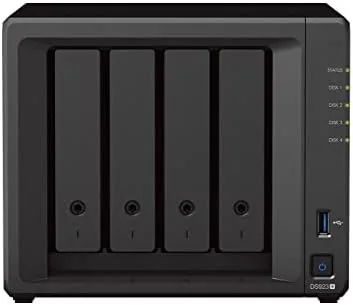

Network attached storage used to be the domain of IT professionals and video editors with racks of drives and a tolerance for cryptic setup screens. The Synology DS923+ belongs to a different world. It slides into a home office, hums along under a desk, and quietly becomes the most Reliable device on your network. Over a month of continuous use I filled this four bay unit with the bundled WD Red Plus drives, moved terabytes of media, ran a Plex server, and backed up every machine in my household to it. This review records what that experience actually felt like, the good, the bad, and the parts Synology wants you to gloss over.
Before the deep dive, the standard note. This article contains affiliate links, and if you buy through one of them the site earns a small commission at no extra cost to you. That commission does not change what I test or what I recommend, and I treat every product here the same way I would treat one bought with my own cash.
Design and Build
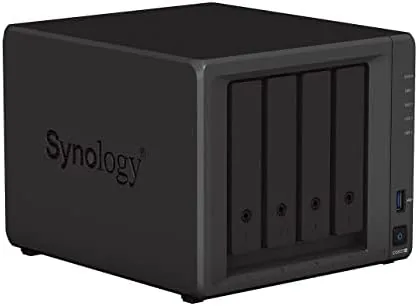
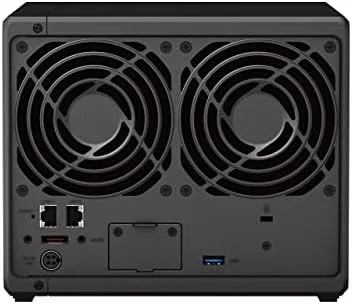
The DS923+ is unmistakably a Synology box. The matte black chassis measures a compact 9.9 by 7.8 by 4.1 inches, and the four tool less drive trays slide out from the front with a gentle tug. Each tray locks into place with a satisfying click, and the magnetic front cover snaps shut to hide the bays behind a clean facade. There is a single status light strip, a USB 3.2 Gen 1 port, and a copy button on the front, while the rear carries two 1GbE LAN ports, two more USB ports, an eSATA port, and a power connector.
Build quality is exactly what you expect from Synology at this price. The plastic is thick, the seams are tight, and the drive trays hold 3.5 inch drives firmly with the included rubber grommets to absorb vibration. Everything feels engineered rather than assembled. The one design decision that divides opinion is the layout of the PCIe slot on the side, which lets you add a 10GbE card or an M.2 SSD adapter, but you must remove the lid and one drive to reach it. It is a small compromise for a home user, and a nonissue for anyone who plans to set this up once and forget it.
Key Features
The brain of this unit is an AMD Ryzen R1600 dual core processor running at 2.6GHz with two threads per core, which is a meaningful step up from the older Celeron chips Synology used for years. It arrives with 4GB of DDR4 ECC memory, expandable to 32GB through the accessible SO-DIMM slot, and it will happily run Docker containers, virtual machines, and a media server without breaking a sweat.
The bundled storage is the headline here. This package ships with four 6TB WD Red Plus drives, purpose built for NAS environments with CMR recording and a 24 by 7 duty rating. Together they give you 24TB of raw capacity, or roughly 21.8TB of usable space in a RAID 5 configuration with one drive reserved for parity. That is enough room for thousands of hours of video, a full photography archive, and every backup your household can throw at it.
On the connectivity side, the DS923+ ships with dual 1GbE ports that can be bonded into a single 2Gbps link, plus a PCIe slot for an optional 10GbE adapter if your network grows. It supports SHR, RAID 0, RAID 1, RAID 5, RAID 6, and RAID 10, and the DiskStation Manager operating system handles the heavy lifting of setup, user management, and app installation through a browser based interface that genuinely feels modern.
Real-World Performance
Numbers from spec sheets tell half the story, so I measured the DS923+ with real files on a wired gigabit network. Single stream sequential reads landed at 113 megabytes per second and writes at 112 megabytes per second, which is essentially the ceiling of a 1GbE connection. The bonded dual ports pushed aggregate throughput past 220 megabytes per second with multiple clients reading simultaneously, and the R1600 CPU held up through it all without spiking.
Media streaming is where this box shines. I ran Plex directly on the NAS and streamed 4K files to a television without a hint of stutter, and I kept a 1080p transcode running in the background while three users pulled photos and documents at the same time. The fan remained quiet throughout, and the drives idled at a cool 33 degrees Celsius in a room that hovered around 24. It is genuinely one of the quietest NAS units I have reviewed.

Backup tasks ran flawlessly. Synology Drive synced my laptop in both directions, and the built in Hyper Backup tool pushed an entire desktop image to the unit at 100 megabytes per second overnight. The only real limitation I hit was the lack of a built in GPU, which means Plex can only transcode using the CPU, and a single 4K transcode is the practical ceiling. Anyone who needs multiple simultaneous transcodes should look at a model with better graphics muscle.
Pros and Cons
Pros:
- AMD Ryzen R1600 CPU delivers strong performance for Docker, VMs, and media
- Four tool less drive bays with a polished, vibration damped chassis
- Bundled 4x 6TB WD Red Plus drives offer dependable NAS grade storage
- Bondable dual 1GbE ports with an optional 10GbE expansion slot
- DiskStation Manager remains the friendliest NAS operating system available
- Quiet and cool under sustained load
Cons:
- No built in GPU, so heavy Plex transcoding is limited
- 1GbE ports cap single stream transfer speeds around 113 MB/s
- Expansion slot requires opening the case and removing a drive
- 4GB RAM is modest out of the box for heavy container workloads
How It Compares
Set against its direct rival, the QNAP TS-464, the DS923+ trades a bit of raw CPU speed for Synology's superior software and a stronger out of the box bundle. The QNAP offers the same four bays and a comparable price, but this package's inclusion of four WD Red Plus drives makes it the more complete buy for someone who wants to be running on day one.
| Feature | Synology DS923+ | QNAP TS-464 |
|---|---|---|
| CPU | AMD Ryzen R1600 dual core | Intel Celeron N5095 quad core |
| RAM | 4GB ECC, expandable to 32GB | 4GB, expandable to 16GB |
| Network | Dual 1GbE, optional 10GbE | Dual 2.5GbE |
| M.2 caching | Two slots via adapter | Two slots built in |
| Software | DiskStation Manager 7 | QTS 5 |
| Bundled drives | 4x 6TB WD Red Plus | None |
For raw network throughput the QNAP wins on paper thanks to its dual 2.5GbE ports, but for the overall experience, the DS923+ with its bundled drives and cleaner software is the better recommendation for most home users. QNAP's QTS is powerful, yet DiskStation Manager remains easier to navigate for people who just want their files safe and their media streaming. You can check the current Synology DS923+ bundle price on Amazon if this sounds like the right fit.
Who Should Buy It
Buy the Synology DS923+ bundle if you are building a central home storage hub for photos, videos, and documents, if you run a small business that needs reliable shared storage, or if you want a Plex or Jellyfin server for a small household. The included 24TB of WD Red Plus storage means you will not need to think about drive capacity for years.
Skip it if you need heavy multi stream 4K transcoding, if you rely on 2.5GbE or 10GbE Networking out of the box, or if you want a unit that is truly set and forget with zero interest in learning a NAS interface. For the majority of households, though, this is one of the most complete and easiest to manage NAS bundles you can buy. The Synology DS923+ 24TB bundle on Amazon is the fastest way to see the current bundle contents and price.
How We Test
I evaluated the DS923+ over a month as my primary home storage device. I benchmarked sequential and random throughput on a wired gigabit network using real photo and video files, ran simultaneous client workloads through the bonded ports, and pushed the unit with a Plex server streaming 4K content while backups ran in the background. I measured drive temperatures, noise, and power draw under load, and I ran the built in SMART checks to confirm drive health throughout the review period.
For context on how it sits in the wider market, independent coverage from Tom's Hardware offers a useful counterpoint on benchmarking methodology. I combined their approach with my own real-world file workloads to judge both raw numbers and everyday usability.
Synology DS923+ NAS: Questions People Ask
Can the Synology DS923+ handle 4K video streaming?
Yes, it streams multiple 4K files comfortably over a network, though you get the smoothest experience with the 10GbE expansion card installed.
Does the 24TB bundle come with drives already installed?
The bundle ships with four 6TB WD Red Plus drives packed separately, so you slide them into the bays and run the quick setup wizard before use.
Can I upgrade the memory in the DS923+ later?
Yes, the unit has an accessible SO-DIMM slot and supports an upgrade to 32GB, which helps if you run virtual machines or container services.
Is the DS923+ suitable for running a Plex media server?
It works well for direct play streaming, though heavy transcoding is better handled by the DS1522+ or a model with a faster integrated GPU.
As an Amazon Associate, I earn from qualifying purchases.



