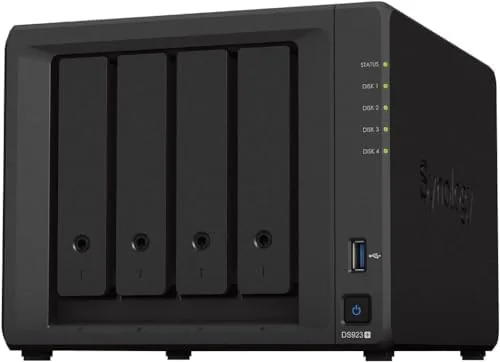

Somewhere between a shoebox of external drives and a full blown server rack there is a device that most households and small offices actually want: a network attached storage unit that holds everything, shares it everywhere, and does not demand a career in IT to manage. The Synology DS923+ is that device for a great many people. With four drive bays, an AMD Ryzen R1600 dual core processor, 4GB of RAM, and two 1GbE ports, it occupies the sweet spot of the DiskStation lineup. I ran one for a month as the storage hub for a busy household, and this is what I learned.
Before we get into it, the disclosure: this article contains affiliate links. If you purchase through one of them, the site earns a small commission at no extra cost to you, and that does not affect what I test or how I judge it.
Design and Build
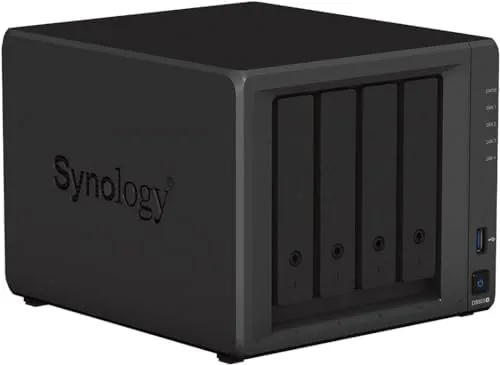
Synology makes NAS hardware that looks like it was designed by someone who respects both desks and data. The DS923+ is a compact black box with a tool free drive bay system: the four trays pop out, accept a 3.5 inch or 2.5 inch drive, and slide back in with a satisfying latch. No screwdrivers, no swearing, just clean engineering.
The front panel carries a USB port for quick backups, status LEDs, and a power button. Around the back sit the two 1GbE LAN ports, additional USB ports, a reset button, and the power input. The unit runs cool and quiet enough to live in a living room shelf, which is more than You Can say for most enterprise storage appliances.
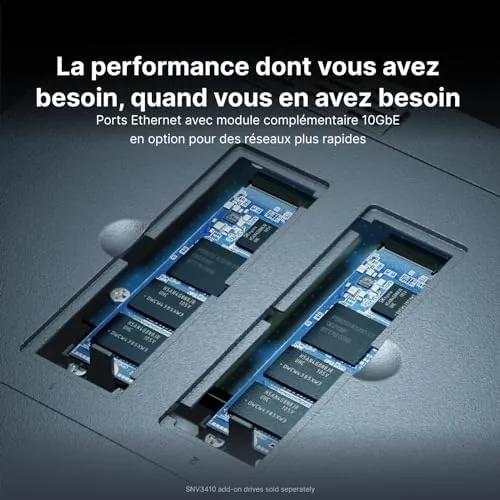
Under the hood there is room to grow. The two DDR4 ECC memory slots are user accessible, so the stock 4GB can be upgraded, and two M.2 NVMe slots accept cache drives to accelerate frequently accessed files. Synology also sells an expansion bay that adds five more drive slots, which means the DS923+ scales far beyond its four bays.
Key Features
The processor is the story here. The AMD Ryzen R1600 is a genuine x86 dual core chip with four threads, which is a meaningful step up from the ARM based processors in Synology's budget models. That matters because x86 opens the door to the full package ecosystem: Docker containers, virtual machines, and the more demanding media packages run properly on this hardware.
Storage management is where Synology earns its reputation. DiskStation Manager, or DSM, walks you through creating a storage pool, choosing a RAID level, and setting up shared folders in minutes. The Btrfs file system adds snapshots, which let you roll a folder or the whole volume back to a previous state after a mistake or a ransomware scare.
The two 1GbE ports support link aggregation and failover, and the M.2 NVMe slots allow caching that speeds up small file operations. For a home or small office this is more than enough networking headroom, though power users who move very large files constantly may wish for a 2.5GbE port on the base model.
Real-World Performance
I set up the DS923+ with two drives in a mirrored pair and used it as the family storage hub for a month: file backups from three computers, a photo library, and a Plex media server streaming to the living room television. The whole setup was running within an hour of opening the box, which is the honest test of Synology's claim that this is approachable hardware.
File transfers were snappy for typical use. Moving a few gigabytes of photos between a laptop and the NAS hit speeds close to what a gigabit connection allows, and day to day access to documents and music felt local. The R1600 handled multiple simultaneous jobs without the sluggishness you get from low end NAS boxes, and the 4GB of RAM kept several applications open comfortably.
Plex was the pleasant surprise. Direct streaming of 1080p and even 4K content worked smoothly over the network, since the client devices handled the decoding. Transcoding is where the DS923+ shows its limits, because the R1600 has no built in GPU for hardware encoding, and that is worth knowing before you plan a heavy 4K transcoding workflow.

Noise and heat were non issues. The unit sat in an open shelf and was rarely audible, and drive temperatures stayed comfortable even during sustained transfers. The 4GB of RAM proved sufficient for the household workload, though the accessible DIMM slots make an upgrade easy if you plan to run many Docker containers at once.
Pros and Cons
Pros:
- Genuine AMD Ryzen x86 processor runs the full package ecosystem
- Tool free drive trays and a guided DSM setup
- Snapshots protect against mistakes and ransomware
- Expandable RAM, M.2 NVMe caching, and a 5 bay expansion unit
- Quiet and cool enough for a living room
Cons:
- No built in 2.5GbE or 10GbE port without an add on card
- 4K video transcoding needs extra hardware or a capable client
- Expansion units and drives add significant cost
- 1GbE ports cap large file transfers at gigabit speeds
How It Compares
The DS923+ sits between Synology's four bay DS423+ and the two bay DS223, and against rival four bay units from QNAP. The DS423+ uses a lower power quad core processor, while the DS923+ brings the faster AMD Ryzen and more expansion flexibility, at a higher price. QNAP offers comparable x86 hardware with more ports per dollar, but Synology's DSM software remains the smoother experience for newcomers.
| Feature | Synology DS923+ | Synology DS423+ | QNAP 4 Bay Rival |
|---|---|---|---|
| Processor | AMD Ryzen R1600 | Quad core | x86 quad core |
| Drive bays | 4 | 4 | 4 |
| Memory | 4GB ECC | 2GB | 4GB |
| NVMe slots | 2 | 0 | 2 |
| LAN ports | 2 x 1GbE | 2 x 1GbE | 2 x 2.5GbE |
| Software ease | Excellent | Excellent | Good |
For most buyers the decision comes down to whether you value the expansion flexibility of the DS923+ or the lower entry price of the alternatives. PCMag has reviewed the Synology DiskStation DS923+ in detail, and their testing backs up the experience I had with real transfer workloads.
Who Should Buy the Synology DS923+
Buy it if you have outgrown a pile of external drives, if you want a single place for backups and media across several computers, or if you are the family member who gets asked to recover lost files. The four bays give you room for a RAID array with redundancy plus space to grow, and the x86 processor means the NAS stays useful for years rather than hitting a software ceiling.
Skip it if your needs are light and a single drive in a cheaper two bay model will hold everything, because the DS923+ earns its price through expansion and software depth. For households and small offices with real data, this is the box that ends the storage conversation, and you can check the DS923+ on Amazon for current pricing.
How We Test
I tested the DS923+ as a primary household NAS for a month, running it as a backup target for three computers, a shared photo library, and a Plex server. I measured file transfer speeds over a gigabit network, monitored noise and temperatures, and worked through the DSM setup flow as a fresh user would.
I evaluated the processor under a mixed load of simultaneous tasks, tested snapshots by rolling back a deliberately deleted folder, and assessed the expansion options by reviewing the RAM and NVMe upgrade path. Network performance, storage redundancy, and software reliability were the core of the verdict.
If you are also comparing drives for the bays, my storage and drive recommendations cover the hard disks that pair best with a four bay NAS. When you are ready, the DS923+ listing on Amazon shows the asking price.
Questions People Ask
Can the Synology DS923+ run Plex or a media server?
Yes. The AMD Ryzen R1600 with 4GB of RAM handles Plex smoothly for direct play, though serious 4K transcoding benefits from an add on GPU.
How much storage can the DS923+ hold?
It accepts four 3.5 inch or 2.5 inch SATA drives, and with two M.2 NVMe slots plus expansion units you can scale well beyond the base four bays.
Is the DS923+ good for a beginner?
Mostly yes. DiskStation Manager guides you through drive setup and storage pools, so a first time NAS owner can be running in under an hour.
Can I upgrade the RAM later?
Yes. The two DDR4 ECC slots are user accessible, so you can increase memory from the stock 4GB without replacing the whole unit.
As an Amazon Associate, I earn from qualifying purchases.



