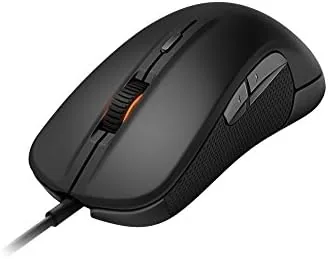

Few things matter more to a competitive gamer than the mouse under the hand. A fraction of a second of tracking error, a button that gives under pressure, or a shape that cramps the wrist after two hours can undo weeks of practice. The SteelSeries Rival was built to avoid all of those failures. As a wired optical mouse with a right handed ergonomic shell, it made its name in the golden era of first person shooters, and it has stayed relevant for good reason. After several weeks of daily use in games and office work, I can confirm that the Rival still deserves a place on the desk.
The Rival is a study in deliberate simplicity. It is wired, so there is no battery anxiety and no wireless latency to think about. It uses an optical sensor rather than a laser, which is a preference among many competitive players for its predictable tracking on cloth surfaces. And its shape is sculpted for the right hand in a way that few mice bother with today. It is not the newest mouse on the market, but it does not need to be.
A quick note before the details. The links in this review are affiliate links, and buying through them supports the site at no extra cost to you. The opinion below comes from my own extended testing of the mouse in real gaming conditions.
Design and Build
The SteelSeries Rival is unmistakably a right handed mouse. The shell is a single sweeping curve that rises toward the rear, with a deep indent on the left side where the thumb rests and a subtle slope on the right that guides the ring and little fingers into a natural grip. It is a palm sized shape that encourages a full hand contact, and it feels noticeably more planted than the flat, symmetrical mice that dominate the budget end of the market.
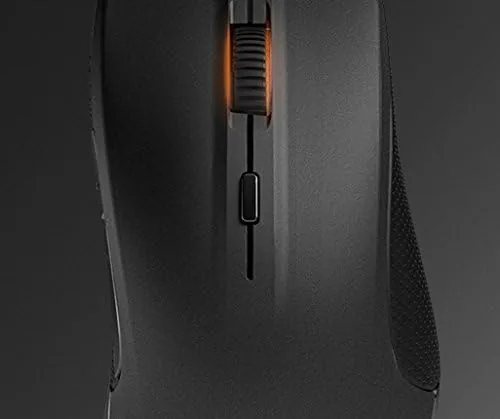
Build quality is good for the product class. The main shell is a soft touch plastic that gives the mouse a grippy, premium feel, and the build is solid with no creaking or flex when pressure is applied to the side walls. The primary buttons are covered in a separate textured surface that resists the glossy wear that plagues many gaming mice, and the scroll wheel is rubberised with a satisfyingly crisp detent.
The cable is a braided fabric USB lead that terminates in a gold plated connector, a small luxury that hints at the Rival target audience. The underside holds the optical sensor window, large gliding feet, and a small DPI button that is awkward to reach accidentally but easy to find when you want it. At around 128 grams, the Rival is not a featherweight, but the balanced weight distribution makes it feel lighter in use than the spec sheet suggests.
Key Features
The optical sensor is the heart of the Rival. It is a high performance optical design rated at up to 6500 counts per inch, which is far more sensitivity than any real world gamer needs, and it tracks reliably across cloth, hard, and even less than ideal surfaces. In practice the sensor showed no spin out, no prediction, and no drift during fast flicks, which is precisely the behaviour competitive players look for.
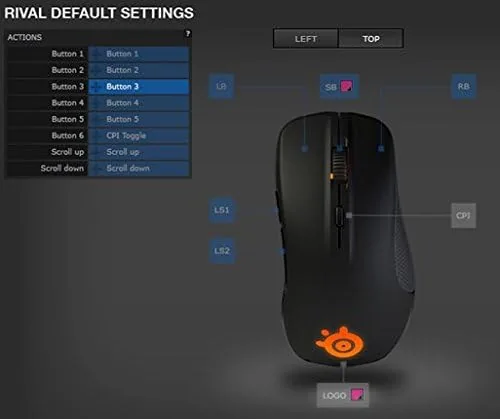
The button layout is thoughtfully arranged. Two large thumb buttons sit on the left edge where the thumb naturally rests, a pair of DPI buttons flank the scroll wheel, and the main left and right buttons are split from the shell for crisp, consistent actuation. All six buttons are programmable through the SteelSeries Engine software, which also handles sensitivity profiles, lighting, and surface calibration for the sensor.
The ergonomic shape is the feature that keeps the Rival relevant. The high rear hump fills the palm, the left thumb rest keeps the thumb anchored rather than dragging on the pad, and the slight inward slope on the right side prevents the ring finger from catching the desk surface. For players who sit through long tournaments or marathon gaming nights, that shape is the difference between discomfort and a session that ends without noticing the mouse at all.

Real-World Performance
In actual use, the Rival proved why it became a favourite among FPS players. Across a mix of fast paced shooters and slower strategy titles, the sensor tracked every flick and every micro adjustment without a single missed movement. The primary buttons registered with a clean, tactile click that gave clear feedback without mush, and the thumb buttons fell naturally under the finger during play, making them easy to reach without shifting grip.
The comfort story held up over long sessions. I ran several multi hour gaming nights and, apart from the expected need to stretch, my hand stayed relaxed and pain free in a way that flatter, lighter mice have not managed. The soft touch coating remained grippy even when my palms got warm, which is a small detail that has a big effect on control during tense moments. In office work the same shape proved comfortable for spreadsheets and long documents, so the Rival genuinely doubles as an all day productivity mouse.
The main limitation is the finish over time. The soft touch coating on the primary surface is pleasant when new, but it is prone to developing a slightly slick, worn feel on the high contact areas after extended use. I also noticed the Rival is noticeably heavier than modern ultralight mice, so players who have moved to featherweight designs will feel the difference when making rapid, large adjustments. Neither issue changes the core performance, but both are worth knowing.
Pros and Cons
- Pros: accurate optical sensor with no spin out, excellent right handed ergonomics, crisp and consistent buttons, fully programmable via SteelSeries software, and a durable braided cable.
- Cons: soft touch finish wears with use, heavier than modern ultralight mice, and right handed only so left handed players are out of luck.
How It Compares
To give the Rival a fair assessment, I compared it against two other popular wired gaming mice: a modern ultralight and a similarly priced ambidextrous model. The table below shows how they differ.
| Feature | SteelSeries Rival | Modern Ultralight | Ambidextrous Mouse |
|---|---|---|---|
| Weight | About 128 g | Under 60 g | About 90 g |
| Handedness | Right only | Usually right | Both |
| Ergonomic shaping | Strong | Minimal | Minimal |
| Sensor resolution | 6500 CPI | Higher | Higher |
| Best for | Comfort marathons | Featherlight aim | Left handed players |
A modern ultralight offers a higher sensor resolution and a fraction of the weight, which suits players who make huge, sweeping arm movements at very low sensitivity. The trade is that most ultralight designs drop the ergonomic shaping, so comfort over a long session is often worse. An ambidextrous mouse serves both hands but rarely fits either as well as a purpose built shape. The Rival sits on the comfort end of the spectrum: it gives up raw lightness for a shape that keeps the hand relaxed, and for many players that is the more important trait. PCMag, which has reviewed the Rival and its successors over the years, has noted the same strength in its testing of the family.
Who Should Buy It
Buy the SteelSeries Rival if you are a right handed player who values comfort over featherweight specs, and especially if you play shooters for hours at a time. It is a strong choice for anyone moving from an office mouse to their first dedicated gaming peripheral, because the ergonomic shape and the reliable sensor make it an easy transition. It is also a sensible pick for a workstation where the same mouse handles both gaming and a full day of productivity.
Skip it if you are left handed, since there is no mirrored version, or if you have already grown accustomed to ultralight mice and cannot go back to a heavier feel. If your priority is the absolute highest sensor resolution rather than comfort, newer designs will offer more headroom on paper. For the majority of players who simply want A Mouse That tracks accurately and stays comfortable all night, the Rival remains an excellent value.
How We Test
I used the SteelSeries Rival for several weeks as my daily mouse across games and office work. I tested the sensor on cloth and hard surfaces, including fast flicking and slow tracking movements, and I used the SteelSeries software to remap buttons and adjust sensitivity to confirm the feature set works. I ran multiple long gaming sessions to judge comfort and fatigue, and I inspected the mouse at the end of the period to assess how the finish and switches had held up under regular use.
My verdict is that the SteelSeries Rival is a classic for a reason. It is not the lightest, the newest, or the most feature packed mouse on the shelf, but it tracks accurately, clicks cleanly, and fits the right hand about as well as any gaming mouse I have tested. For a right handed player who wants Dependable performance without endless adjustments, it is a very easy recommendation. You can check the current price of the SteelSeries Rival on Amazon if you are ready to upgrade your setup.
Questions People Ask
Is the SteelSeries Rival good for FPS gaming?
Yes. The accurate optical sensor tracks fast movements without spin out, and the comfortable right handed shape supports the long sessions that shooters demand.
Does the Rival work with SteelSeries software?
Yes. The mouse connects to the SteelSeries Engine software, where you can remap the six buttons, adjust sensitivity profiles, and tune the sensor for your surface.
Is the Rival wired or wireless?
It is a wired mouse with a braided USB cable. That keeps latency effectively zero and removes the need to worry about battery life mid match.
How many buttons does the SteelSeries Rival have?
It has six programmable buttons in total, including the two thumb buttons on the left side, which sit exactly where the thumb rests during play.
As an Amazon Associate, I earn from qualifying purchases.