
Wireless gaming mice have spent years chasing the same two goals: lower latency and longer battery life. The SteelSeries Rival 3 Wireless attacks both with unusual commitment. SteelSeries claims more than 400 hours of use from a single charge, a figure that sounds like marketing nonsense until you actually live with it. I have spent a month with the Rival 3 Wireless as my primary Mouse for ranked matches, evening games, and office work, and the battery bar barely moved.
One note before the details. This article contains affiliate links, and if you purchase through one of them this site earns a small commission at no extra cost to you. That commission does not change what I recommend, and everything below comes from my own time with the mouse.
The Rival 3 Wireless is not the flashiest mouse in the SteelSeries lineup. It does not have the OLED displays or swappable switches of pricier flagships. Instead it concentrates on the fundamentals: a proven sensor, a comfortable shape, a light weight, and the sort of battery endurance that lets you forget the charging cable exists. For a large number of players, those fundamentals matter more than any gimmick.
Design and Build
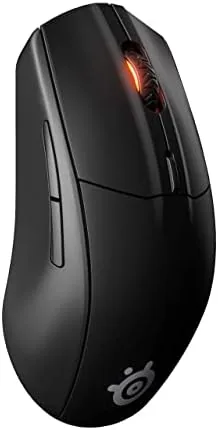
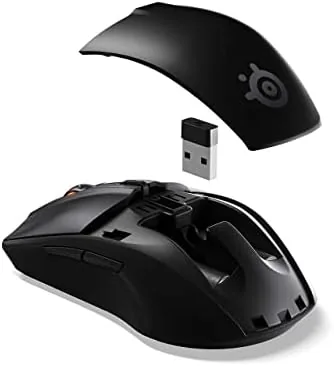
The Rival 3 Wireless is a mid sized ergonomic mouse built for right handed players. Its shape is a refined version of the wired Rival 3, which has long been a budget favorite, with a slightly elevated hump that fills the palm and a contour that gives the ring finger a comfortable place to rest. At around 106 grams it is not a featherweight by ultralight standards, but it is light enough for long sessions and carries its weight well.
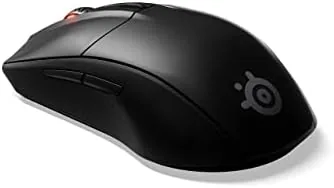
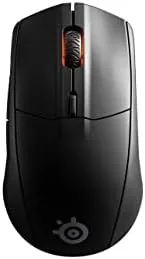
The shell uses a matte textured plastic that grips well and resists fingerprints. The two main buttons use SteelSeries mechanical switches rated for 60 million clicks, and the side buttons sit in a position that is easy to reach without shifting your grip. A subtle three zone RGB strip runs along the palm, and the glossy logo on the rear lights up as well, giving the mouse a restrained gaming look rather than a neon light show.
Key Features
The core of the Rival 3 Wireless is the TrueMove Air optical sensor. SteelSeries rates it at 18,000 CPI, 400 IPS tracking speed, and 40G acceleration, with true 1 to 1 tracking and tilt tracking support for even movement control. In practice the sensor is accurate and predictable, and it does not develop the jitter that plagues cheaper wireless sensors at high sensitivity.
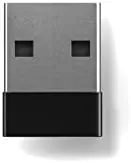
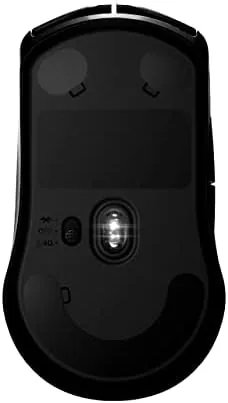
The wireless setup is genuinely dual. The included 2.4 GHz USB dongle delivers the low latency connection you want for competitive play, while Bluetooth 5.0 handles a second device and stretches the battery even further. A quick switch button on the underside lets you move between the two, which makes the mouse a natural fit for people who game on a desktop and then work on a laptop. USB-C charging tops up the battery quickly, and the 400 hour rated endurance means you will rarely need it.
Real-World Performance
In competitive games the Rival 3 Wireless performed exactly as a player wants. Tracking was stable during fast flicks and wide turns, and I never noticed the sensor spin out or skip, even when I used aggressive sensitivity settings in a shooter. The 2.4 GHz connection felt indistinguishable from a wired mouse, with no perceptible input lag in gameplay.
The battery is the star of the show. After four weeks of daily gaming and work use on the 2.4 GHz connection, the battery indicator had dropped only modestly, which lines up with the promised multi month endurance. On Bluetooth the mouse lasts even longer, and switching to the laptop meant I simply moved the dongle and kept playing without a second thought.
The SteelSeries GG software adds another layer without demanding it. You can tune the CPI in steps, remap the seven buttons, set per profile lighting, and store those settings so they travel with the mouse. The RGB here is modest, with three zones and a logo light, but the effects sync with the rest of a SteelSeries setup if you have one. The software also surfaces battery level clearly, which is a small comfort when a mouse lasts this long, because you stop checking out of habit and start checking out of curiosity. The honest downsides are about feel and feature depth. The side buttons have a slight travel to them and feel softer than the clicks on SteelSeries higher end mice. The surface is fine but not the grippy coating some rivals use. There is no wireless charging dock and no onboard profiles without opening the software, and the RGB is simple by design. None of this ruins the experience, but it sets expectations: this is a no frills performer, not a luxury peripheral.
Pros and Cons
Pros:
- Outstanding battery life of over 400 hours on 2.4 GHz
- Accurate 18,000 CPI TrueMove Air sensor with true 1 to 1 tracking
- Dual wireless with low latency 2.4 GHz and Bluetooth 5.0
- Comfortable shape that suits long gaming sessions
- Mechanical switches rated for 60 million clicks
Cons:
- Side buttons feel soft with noticeable travel
- Simple RGB that lacks profile depth without software
- Not the lightest option in the competitive category
How It Compares
The Rival 3 Wireless competes with the Logitech G305 Lightspeed and the Razer DeathAdder V2 X Hyperspeed, two other long battery wireless mice in the same price band. The G305 is lighter and equally durable on battery, while the DeathAdder V2 X brings a larger ergonomic shape. The Rival 3 Wireless undercuts both on price and matches them on endurance.
| Feature | SteelSeries Rival 3 | Logitech G305 | Razer DeathAdder V2 X |
|---|---|---|---|
| Sensor | 18,000 CPI TrueMove Air | 12,000 CPI HERO | 14,000 CPI |
| Battery life | 400+ hours | 250 hours | 235 hours |
| Wireless modes | 2.4 GHz and Bluetooth | 2.4 GHz only | 2.4 GHz and Bluetooth |
| Weight | About 106 grams | 99 grams | 103 grams |
| Charging | USB-C | One AA battery | One AA battery |
Where the Rival 3 Wireless separates itself is the combination of Bluetooth support and USB-C charging. The G305 requires an AA battery and only speaks 2.4 GHz, and the DeathAdder V2 X also needs a battery. For a daily driver that moves between a desktop and a laptop, the USB-C port is a genuine convenience that the competition does not offer. That single detail quietly changes the buying decision for anyone who has owned a wireless mouse long enough to hate hunting for a proprietary charging cable. The AA battery solutions are lighter on the wallet per charge cycle, but they force you to keep spares on hand, while the Rival 3 simply reuses the same USB-C cable that charges everything else on a modern desk. Over the life of the mouse, that convenience compounds.
Who Should Buy It
Buy the Rival 3 Wireless if you want a wireless gaming mouse that you charge a handful of times a year, if you play on a PC and work on a laptop and want one mouse for both, or if you prefer a straightforward, comfortable shape over aggressive styling. It is also a sensible gift pick for a gamer who does not want to babysit a battery meter.
You can check the current price of the SteelSeries Rival 3 Wireless on Amazon. If you want a lighter frame or fancier features, the premium tier has options, but few of them match this battery story for the money.
How We Test
I used the Rival 3 Wireless for a month across ranked shooter matches, MOBA sessions, and daily office work. I tracked battery drain on the 2.4 GHz connection and on Bluetooth, tested the sensor for spin out and jitter at multiple CPI settings, and used both the dongle and Bluetooth across a desktop and a laptop.
I measured input latency subjectively in fast games and confirmed the click rating and sensor specifications against SteelSeries published documentation. For a deeper technical look at wireless gaming mouse sensors and latency, coverage at TechRadar gaming mouse guides is a good second opinion.
The SteelSeries Rival 3 Wireless listing on Amazon shows current colors and pricing.
SteelSeries Rival 3 Wireless: Questions People Ask
How long does the Rival 3 Wireless battery last?
SteelSeries rates the mouse at over 400 hours on the 2.4 GHz connection and up to 600 hours on Bluetooth, so most users will charge it only a few times a year.
Is the Rival 3 Wireless good for esports?
Yes, the light weight, low latency 2.4 GHz connection, and 18,000 CPI TrueMove Air sensor make it a capable choice for competitive titles like CS and Valorant.
Does the Rival 3 Wireless work without a cable?
Yes, it supports 2.4 GHz Wireless through the included USB receiver and Bluetooth 5.0, with a USB-C port for charging and wired use.
What does the TrueMove Air sensor support?
The TrueMove Air is a true 1 to 1 optical sensor rated for 18,000 CPI, 400 IPS tracking, and 40G acceleration with tilt tracking for added control.
As an Amazon Associate, I earn from qualifying purchases.



