
A wireless gaming mouse usually makes you choose between battery life and speed. Connect with a fast 2.4GHz dongle and you burn through batteries, or switch to Bluetooth and save power but feel a hint of lag. The SteelSeries Rival 3 Wireless tries to sidestep that trade with a design built around endurance, pairing a dual wireless setup with a battery rating that runs into the hundreds of hours. The catch for this particular unit is that it is a renewed product, which makes the value question more interesting than usual.
I used the Rival 3 Wireless as my daily mouse for three weeks, through work sessions, long gaming nights, and travel with a laptop. This review covers the build, the sensor, the real battery life, and the honest difference between a new and a renewed unit. Before the details, the standard note: this article contains affiliate links, and a purchase made through one of them earns the site a small commission at no extra cost to you. That commission does not change what I test or what I recommend.
Design and Build
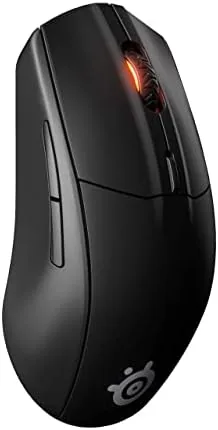
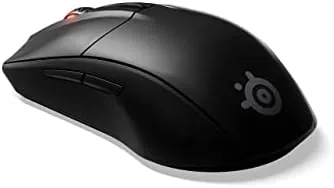
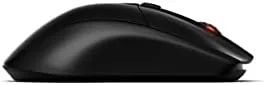
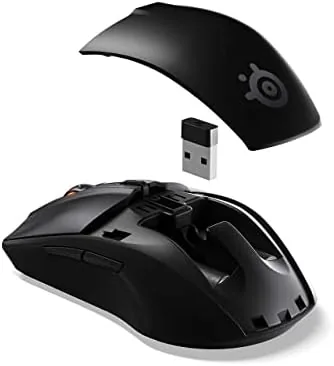
The Rival 3 Wireless is a compact, symmetrical mouse that suits claw and fingertip grips more than a full palm rest. The shell is a matte plastic that resists fingerprints, with subtle honeycomb-free solid sides and the SteelSeries logo lit by a single zone of RGB lighting that sits under the company branding.
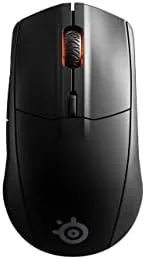
The six buttons are laid out in a standard gaming arrangement, with two responsive side buttons on the left edge, a textured scroll wheel, and a DPI button on top that cycles sensitivity settings. The construction feels solid for the price tier, with no creaking panels and a reassuring snap to every click.
Because this is a renewed unit, the condition deserves attention. My copy arrived clean with no visible wear, all buttons working, and a fresh charge, which is the standard a renewed listing should meet. It is worth knowing that renewed mice can vary by unit, so the build impression applies to a well conditioned example rather than a guarantee of every listing.
Key Features
The headline feature is the dual wireless design. A 2.4GHz dongle delivers the low latency gaming connection, while Bluetooth 5.0 covers everyday use and a second device, and a single toggle button switches between them on the fly. That flexibility is genuinely useful for moving between a desktop and a laptop.
Battery life is the other headline. SteelSeries rates the mouse for more than four hundred hours on the 2.4GHz connection with the lighting off, and up to four hundred hours on Bluetooth. In practice that means months of normal use between battery changes, and the mouse runs on a single AA battery, which is both the strength and the trade off of the design.
The TrueMove Air optical sensor tracks up to 18,000 CPI and handles lift off detection and tilt tracking, which covers the needs of most competitive players without pushing to the extreme sensitivities of flagship mice. The main switches are rated for sixty million clicks, and the mouse stores its settings onboard, so profiles travel with the hardware instead of living in software.
Real-World Performance
The sensor delivered steady, accurate tracking in daily use. On a cloth desk mat, movement was smooth and precise, with no spinouts during fast flick movements in a shooter, and the 2.4GHz connection showed no perceptible lag across the testing period. For a mid range mouse, the performance is exactly where it needs to be.
The battery claim held up in a way that changes the daily habit. Three weeks of mixed gaming and work use, with the lighting off, barely registered on the battery. I never once worried about finding a charger, because there is no internal battery to charge, just a AA that keeps going. For someone who hates keeping a mouse tethered to a cable, this is the most freeing part of the design.
The single AA battery is the honest compromise. It keeps the mouse light and the battery life enormous, but it means the mouse is not rechargeable, so you will occasionally buy batteries rather than plug in a cable. A AA battery every few months is a minor cost, but it is a real difference from a rechargeable mouse.
Software is where the package gets a little thin. The SteelSeries GG engine manages the RGB, DPI steps, and button mapping, but the setup is heavier than it needs to be for a mouse this simple, and it wants to install the full suite rather than a lightweight driver. The mouse works fine without the software, which is the sensible way most users will run it.
Ergonomics settled in over the testing period rather than feeling perfect on day one. The mouse is compact, so players with larger hands will naturally use a claw or fingertip grip, and the low profile means it travels easily in a laptop bag with the dongle stored safely. I used the Bluetooth connection with the laptop on the move and the 2.4GHz connection at the desk, and switching between them took a single press on the toggle, which made the mouse feel like two devices in one.
Pros and Cons
Pros:
- Battery life measured in months, not days
- Fast 2.4GHz and Bluetooth 5.0 in one mouse
- Accurate 18,000 CPI sensor with stable tracking
- Lightweight and comfortable for claw grip play
- Onboard profile storage works without software
Cons:
- Runs on AA batteries instead of an internal rechargeable
- Compact shape not ideal for full palm grips
- Software suite is heavier than the mouse needs
How It Compares
The Rival 3 Wireless competes with other budget gaming mice, and the renewed listing puts it in a different conversation than a brand new flagship. I compared it against a budget wired mouse and a premium wireless flagship to frame the trade offs.
| Feature | Rival 3 Wireless | Budget Wired Mouse | Premium Wireless Mouse |
|---|---|---|---|
| Connection | 2.4GHz plus Bluetooth | Cable only | Wireless with charging dock |
| Battery life | Months on a AA battery | Not applicable | Days on internal charge |
| Sensor | 18,000 CPI TrueMove Air | Around 12,000 CPI | 26,000 CPI flagships |
| Weight | Light, under 100 grams | Similar or lighter | Heavier with battery |
| Cost | Mid range, renewed lower | Low | High |
The Rival 3 Wireless beats a budget wired mouse on freedom and battery, and it undercuts a premium wireless mouse on price while covering most of the same gaming needs. The renewed listing adds a layer of value, provided the unit arrives in the condition mine did. For a gamer who wants wireless without the recharge ritual, this is the sensible middle ground.
Who Should Buy It
Buy the Rival 3 Wireless if you want a Dependable wireless gaming mouse without the premium price, if you hate keeping devices charged, or if you switch between a desktop and a laptop and want one mouse for both. It suits claw and fingertip players best.
Skip it if you prefer a palm resting shape, if a rechargeable mouse matters to you, or if you want the highest sensitivity flagship sensor. For everyone else, the Rival 3 Wireless delivers the core of a good gaming mouse at a fair price. You can check the current SteelSeries Rival 3 Wireless price on Amazon when you are ready.
How We Test
I used the Rival 3 Wireless daily for three weeks across gaming, office work, and travel. I tested the 2.4GHz and Bluetooth connections, tracking accuracy in fast games, battery draw over time, button response, software setup, and the condition of the renewed unit itself.
I did not measure click latency with laboratory equipment, so the responsiveness impressions come from real play, and I did not compare against every sensor on the market. Since the unit was renewed, my findings describe this example rather than the full renewed supply. I ran the RGB lighting at its default single zone colour for most of the testing, then switched it off to measure the battery difference, since the lighting is the one setting that meaningfully changes how long the AA lasts. For independent perspective on gaming mice, the guidance at PC Gamer best gaming mice is worth reading.
The SteelSeries Rival 3 Wireless listing on Amazon shows the current price and renewed condition details.
SteelSeries Rival 3 Wireless: Questions People Ask
How long does the Rival 3 Wireless battery last?
SteelSeries rates it for more than four hundred hours on 2.4GHz with lighting off, and in my testing three weeks of daily use barely registered on the battery.
Does the Rival 3 Wireless have both 2.4GHz and Bluetooth?
Yes. A toggle button switches between the low latency 2.4GHz dongle connection and Bluetooth 5.0, so one mouse covers a desktop and a laptop.
Is the Rival 3 Wireless good for gaming?
Yes. The 18,000 CPI TrueMove Air sensor tracked smoothly with no lag or spinouts during fast movements in shooters.
What is the difference between a renewed and a new Rival 3 Wireless?
A renewed unit has been inspected and restored, usually at a lower price. My copy arrived clean and fully working, but renewed condition can vary by unit.
As an Amazon Associate, I earn from qualifying purchases.