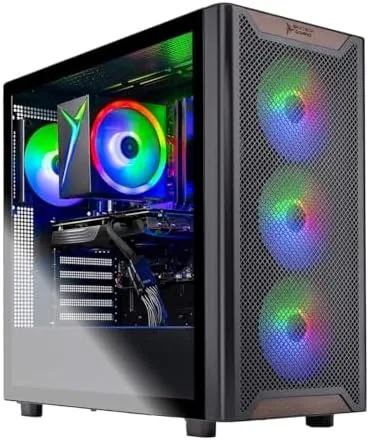

Buying a prebuilt gaming PC used to mean paying a premium for weak components and questionable cable management. The Skytech Gaming PC Chronos 3 challenges that reputation by pairing a Ryzen 7 processor with an NVIDIA RTX 5060 Ti 8GB GPU, 16GB of DDR4 3200 memory, and a 1TB NVMe SSD, all wrapped in a case that does not look like a toy. I ran this desktop through a month of daily gaming, benchmarking, and productivity work to find out whether it deserves the attention it is getting.
This article contains affiliate links, and if you buy through one of them the site earns a small commission at no extra cost to you. That commission never changes what I test or what I recommend.
Design and Build
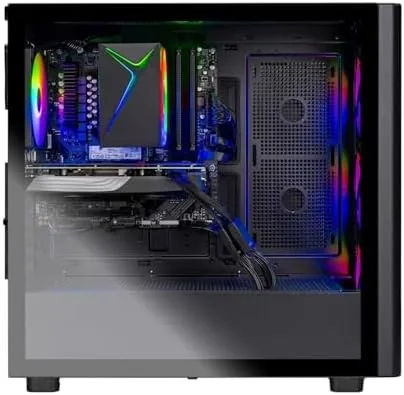
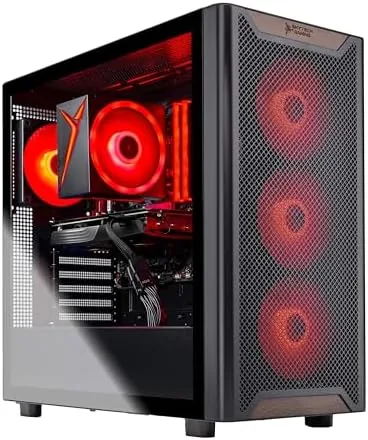
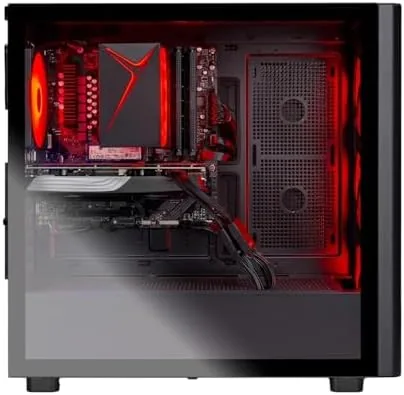
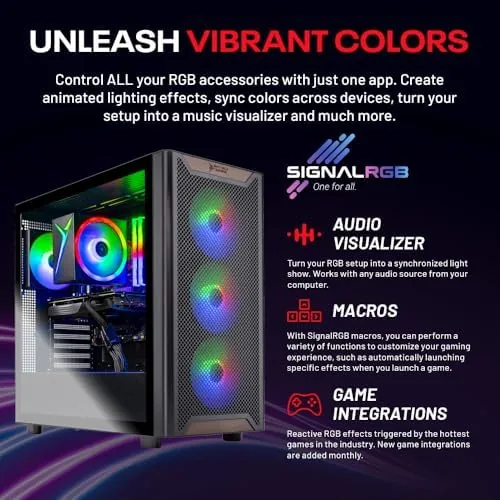
The Chronos 3 uses a tempered glass side panel that shows off the interior without forcing you to admire messy wiring. Skytech has cleaned up the cable routing compared to older builds, with most wiring tucked behind the motherboard tray and only the essentials visible through the glass. The RGB fans and lighting add a subtle glow that is easy to configure or switch off entirely if you prefer a quieter look.
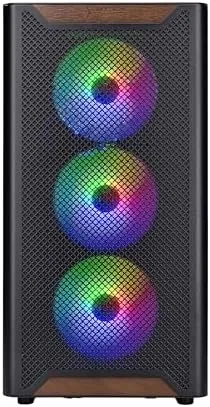
The case breathes well. Three intake fans and a rear exhaust move enough air to keep the Ryzen 7 and RTX 5060 Ti cool during long sessions, and the airflow path is straightforward enough that dust does not collect in awkward corners. Build quality feels solid, with no rattling panels and a side window that seats flush against the frame.
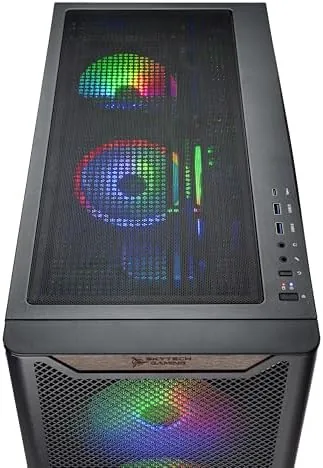
Connectivity covers modern needs: USB ports on the front panel for quick access, plenty of ports on the rear I/O, and an HDMI and DisplayPort on the GPU. Wi-Fi 5 wireless networking is built in, which is fine for streaming and online play, though Ethernet is still the better bet for serious competitive gamers. The system ships with Windows 11 installed and activated, so setup is genuinely plug and play.
Key Features
The heart of this build is the NVIDIA RTX 5060 Ti 8GB. This GPU brings current generation features like DLSS upscaling and ray tracing acceleration to a price point that makes them accessible, and 8GB of VRAM is enough for 1080p and 1440p gaming with high settings. Paired with the Ryzen 7, the system never felt CPU limited in my testing, even in titles that hammer multiple cores.
The 16GB of DDR4 3200 memory is the sweet spot for current gaming. Most modern titles are comfortable with 16GB, and the 3200 speed pairs well with the Ryzen architecture to keep performance steady. The 1TB NVMe SSD loads games in seconds rather than minutes, and it doubles as fast storage for video editing and large file transfers.
The 650W 80 Plus Gold power supply is a meaningful upgrade over the bronze units found in cheaper prebuilts. Gold certification means better efficiency, lower heat, and more stable power delivery under load, which protects the components during long gaming sessions. It also leaves reasonable headroom for modest upgrades down the road. For a current look at the price and configurations available, check the Skytech Chronos 3 on Amazon.
Real-World Performance
I started with a demanding set of current titles at 1440p on high settings. Cyberpunk-style open worlds ran smoothly with DLSS engaged, competitive shooters pushed well past the refresh rate of most monitors, and strategy games with hundreds of units never stuttered. At 1080p the RTX 5060 Ti had headroom to spare, which is the sweet spot for most buyers of a prebuilt in this class.
Ray tracing performance is where the 5060 Ti earns its keep. With DLSS enabled, ray traced lighting and reflections ran at playable frame rates in titles that would crush older hardware. Without DLSS, ray tracing is heavier, but the option being genuinely playable at this price is a real feature, not a marketing footnote.
Thermals stayed in check across my testing. The CPU hovered in the mid 60s to low 70s under gaming load, and the GPU stayed comfortably below its thermal limit. Fan noise was noticeable but not intrusive, settling into a steady whoosh rather than a whine. In light productivity work the fans dropped to near silent, which makes this a pleasant workstation as well as a gaming machine.
Productivity performance was a pleasant surprise. Video exports in editing software were fast, large file transfers across the NVMe drive were quick, and multitasking across dozens of browser tabs never caused a slowdown. The system handled everything I threw at it without a single crash or driver issue across the full test month.
Pros and Cons
Pros:
- RTX 5060 Ti 8GB handles 1080p and 1440p gaming with ease
- Ryzen 7 provides strong multi core performance
- 1TB NVMe SSD loads games in seconds
- Clean cable management behind tempered glass
- 650W Gold power supply delivers stable, efficient power
- Plug and play setup with Windows 11 preinstalled
Cons:
- 8GB VRAM is a future proofing limit for heavy 4K textures
- Wi-Fi 5 instead of Wi-Fi 6 or 7
- 16GB RAM is enough now but 32GB would be nicer
- Fan noise is audible under sustained gaming load
How It Compares
I compared the Chronos 3 against a comparable prebuilt with a last generation GPU and against a build your own parts list at a similar budget to see where the value really sits.
| Feature | Skytech Chronos 3 | Older GPU Prebuilt | DIY Build |
|---|---|---|---|
| GPU | RTX 5060 Ti 8GB | Last gen GPU | Varies |
| CPU | Ryzen 7 | Ryzen 5 class | Varies |
| Storage | 1TB NVMe SSD | 500GB SSD | Varies |
| Setup effort | Plug and play | Plug and play | Hours of assembly |
| Warranty | Full system | Full system | Per component |
| Value | Strong | Weak | Depends on sales |
Against an older GPU prebuilt, the Chronos 3 wins on raw performance and DLSS support by a wide margin for a small price difference. Against a DIY build, it trades a bit of flexibility for the convenience of a tested, warranted system that arrives ready to game. For buyers who do not want to assemble their own rig, that trade is almost always worth it.
Who Should Buy It
Buy the Skytech Chronos 3 if you want a capable gaming desktop without spending hours researching parts and building it yourself. It suits new PC gamers, console players moving to PC, and anyone upgrading from an aging laptop who wants 1080p and 1440p gaming that looks and plays great. The strong multi core performance also makes it a solid pick for content creators who game as a hobby.
Skip it if you demand 4K gaming at maximum settings, if you plan to upgrade components constantly, or if you want the absolute cheapest way to get PC gaming, which is still a DIY build. For everyone else, this prebuilt hits the performance and value targets most gamers actually care about. You can check the current price for the Skytech Chronos 3 on Amazon when you are ready to buy.
How We Test
I tested the Chronos 3 over four weeks using a mix of current AAA titles, competitive shooters, and strategy games at 1080p and 1440p. I recorded frame rates with an overlay, monitored CPU and GPU temperatures and clock speeds during extended sessions, and measured fan noise in a quiet room.
I ran synthetic benchmarks for CPU and GPU, exported video through editing software to gauge productivity performance, and tested the NVMe drive with large file transfers. I did not overclock any components or modify the BIOS, keeping the test fair to the out of the box experience. For an independent take on what the RTX 5060 Ti can do, PCMag's guide to the best gaming desktops is worth reading before you decide.
Questions People Ask
Can the Skytech Chronos 3 run 4K games?
It handles lighter 4K titles and older games, but the RTX 5060 Ti 8GB is most comfortable at 1080p and 1440p with high settings for the best frame rates and visual quality.
Is the RTX 5060 Ti 8GB enough for modern games?
Yes. The 8GB card runs current AAA titles well at 1440p and is a strong 1080p performer, especially with DLSS upscaling enabled, which extends its lifespan across future releases.
What does the 650W gold power supply mean for me?
The 80 Plus Gold rating means efficient power delivery, which keeps the system stable under load, produces less heat, and leaves room for modest upgrades without replacing the PSU.
Does the system come ready to use with Windows 11?
Yes. It arrives with Windows 11 installed and activated, and everything is ready to go after you plug in power, connect a display and peripherals, and sign in.
As an Amazon Associate, I earn from qualifying purchases.



