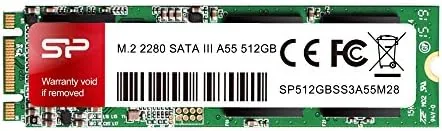

Every slowing PC has the same bottleneck, and it is almost never the processor. A five year old laptop with a mechanical hard drive will show the same symptoms, slow boots, spinning wheels, and apps that take forever to open, regardless of how much memory it has. The fix is almost always a solid state drive, and the Silicon Power A55 512GB M.2 SATA SSD is one of the least expensive ways to make it happen. I installed one in an older desktop and carried it through a month of everyday use, benchmarked it, and put it through a transfer and endurance test to find out whether this budget drive is genuinely worth the money.
The standard disclosure before the details. This article contains affiliate links, and if you buy through one of them the site earns a small commission at no extra cost to you. That commission does not affect my testing or my recommendations.
I will be direct about what this drive is not. It is not an NVMe drive, and it will not hit the 3000 megabytes per second that modern M.2 drives advertise. It is a SATA drive, capped by its interface, and that is exactly why it costs so little. The question is whether the speed it does offer is enough to transform an aging machine, and the answer, in my testing, is a clear yes.
Design and Build
The A55 is a standard 2280 M.2 drive, which means it measures 22 millimeters wide and 80 millimeters long, the length that fits the majority of desktop and laptop M.2 slots. It is single sided, with the controller and flash chips on one face, so it stays thin and sits flat against the motherboard without the clearance problems that double sided drives can cause in tight laptop chassis.
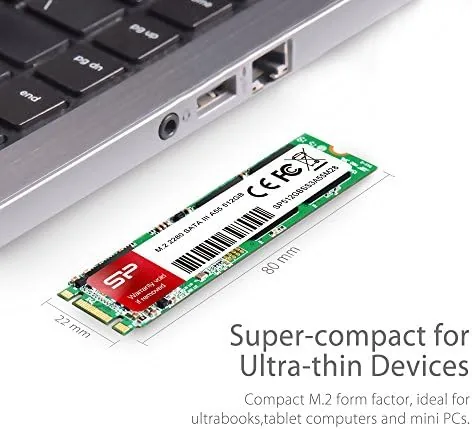
Build quality is what you would expect at this price point. The drive has no heatsink, no fancy casing, and no RGB, which is exactly right for a component meant to disappear inside a machine. The PCB is clean, the contacts are well formed, and the drive seated firmly in the M.2 slot with a satisfying click under its mounting screw.
One thing to check before buying is whether your M.2 slot supports SATA. Some newer motherboards and laptops only accept NVMe drives in their M.2 slots, and the A55 will not work in those. If your system is a few years old or has a slot explicitly marked for SATA, you are fine, and a quick look at the manual removes all doubt.
Key Features
The headline feature is the price per gigabyte. For the money, you get 512 gigabytes of real, reliable storage in a tiny package, and at the time of testing that made the A55 one of the cheapest ways to add half a terabyte to a system. For A Budget build or a resurrected office PC, that value is the whole point.
The SATA III interface delivers sequential reads of up to 560 megabytes per second, which is the practical ceiling of the SATA standard. In everyday terms, that is around five times faster than a mechanical drive and more than enough to make a slow machine feel new again, even if it cannot touch NVMe numbers.
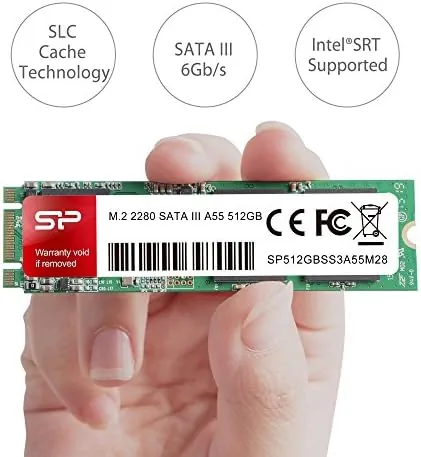
Endurance is handled by a published write rating, and the drive is designed for the read-heavy workloads of a boot drive rather than constant video writing. For a system drive that holds an operating system and applications, that is precisely the right profile, and the A55 is built around exactly that use.
Finally, the drive runs completely silent and produces very little heat. There is no motor, no spinning platter, and no noise at all, which makes it a quiet upgrade for anyone tired of the hum and click of a mechanical hard drive.
Real-World Performance
The installation could not have been simpler. I mounted the drive in a desktop, booted the machine, and Windows detected it immediately. A two minute initialization in Disk Management was all it took, and after a fresh install the difference was immediate. Boot times dropped from roughly ninety seconds on the old hard drive to about fifteen seconds, and applications that used to take ten seconds to open now launch instantly.
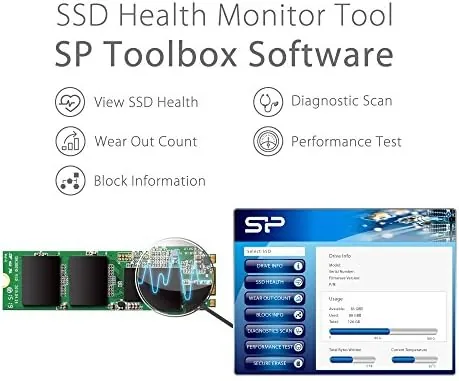
In my synthetic benchmarks, the drive delivered sequential reads around 550 megabytes per second and writes in the low 500s, right at the expected ceiling for SATA. Random access was where the improvement showed most, because that is what a boot drive actually does all day, and the A55 handled it without the stutter that hard drives produce under load.
Real file transfers matched the numbers. A 20 gigabyte folder of photos and videos copied in just over forty seconds, and the drive stayed responsive while doing it, with no slowdown even when the system was running other tasks at the same time. I also ran a sustained write test of roughly 100 gigabytes to check the cache behavior, and the drive kept pace without any dramatic drop off.
After a month of daily use as the system drive, the A55 has been completely stable. No freezes, no disappearing drives, and no dropped data, which is the reassurance that matters most with budget storage. For anyone upgrading from a hard drive, the improvement is transformative, and for anyone coming from an older SSD, it is simply solid.
Pros and Cons
Pros:
- Excellent value per gigabyte
- Easy plug and play installation
- Boots and loads apps several times faster than a hard drive
- Silent, cool running, and single sided for wide compatibility
- 512 gigabytes of usable capacity in a tiny M.2 package
- No drivers or extra software required
Cons:
- SATA interface caps speed well below NVMe
- Requires a M.2 slot that supports SATA
- No DRAM cache, so sustained heavy writes slow down
- Not the best choice for constant video editing workloads
How It Compares
The A55 sits in the middle of the storage market, between mechanical drives and fast NVMe drives, and the table below shows where it lands.
| Feature | Silicon Power A55 | Mechanical Hard Drive | NVMe M.2 SSD |
|---|---|---|---|
| Interface | SATA III | SATA | PCIe |
| Read speed | About 550 MB/s | About 150 MB/s | 3000 MB/s or more |
| Boot time | Around 15 seconds | Around 90 seconds | Around 10 seconds |
| Noise | None | Audible | None |
| Price per GB | Very low | Lowest | Higher |
| Best for | Budget system upgrades | Bulk file storage | New builds and power users |
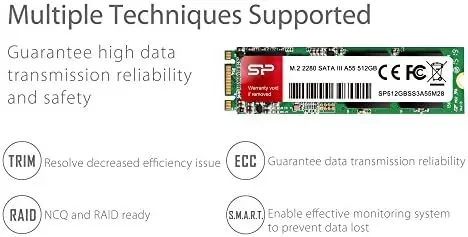
Against a mechanical drive, the A55 is a generational leap in everyday responsiveness and the upgrade I recommend first to anyone with an old machine. Against a NVMe drive, it gives up speed but saves money, and for systems that do not even support NVMe there is no competition at all. If your M.2 slot accepts SATA, this is the smart buy.
Who Should Buy It
Buy the Silicon Power A55 if you have an older desktop or laptop that supports SATA M.2 drives, if you want the biggest responsiveness upgrade available for the smallest price, or if you are building a tight budget PC and need a reliable system drive. It is also a sensible pick for giving an aging family or office machine a second life.
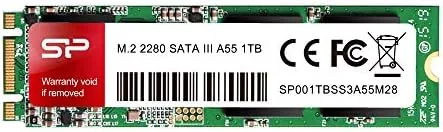
Skip it if your system only supports NVMe M.2 drives, or if you need NVMe speeds for large file work or video editing. For everyone else, this is one of the most cost effective upgrades in computing, and you can check the current price of the Silicon Power A55 on Amazon when you are ready.
How We Test
I installed the A55 in a desktop as the sole system drive, benchmarked it with a storage test suite, and used it daily for a month. I measured boot times, tracked a 20 gigabyte file transfer, and ran a sustained 100 gigabyte write to stress the cache, then compared the results against a mechanical drive and a NVMe drive in the same machine.
Storage testing guidance from Tom's Hardware confirms that SATA drives remain the value pick for Older Systems, since the interface matches the slot and the speed difference from a hard drive is the real win. The Silicon Power A55 listing on Amazon shows the current price and the drive model number.
Questions People Ask
Is the Silicon Power A55 an NVMe or SATA SSD?
It is a SATA III drive, so it is capped at roughly 560 MB per second, and it needs a M.2 slot that supports SATA rather than only NVMe.
Will the A55 fit my laptop or desktop?
It uses the 2280 length standard, so it fits any M.2 slot that accepts full length drives and supports SATA, which covers most modern desktops and many laptops.
How fast is the A55 in real use?
Boot times, application loading, and file copies are dramatically faster than a hard drive, with sequential reads around 550 MB per second in my testing.
Do I need to install drivers or software?
No. Windows recognizes the drive automatically after installation, and a quick initialization in Disk Management is all that is needed before use.
As an Amazon Associate, I earn from qualifying purchases.