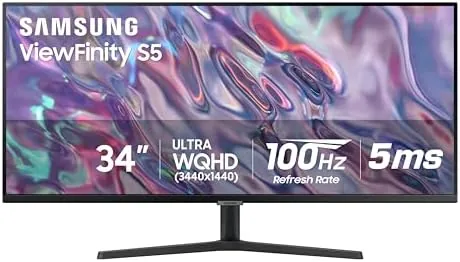

There was a time when buying a monitor meant choosing between width and sharpness. A 27 Inch QHD panel gave you clean text, and a 34 inch ultrawide gave you the immersive desk, but rarely both in one sensible package. The SAMSUNG 34 Inch ViewFinity S50GC Series resolves that by combining a 3440 by 1440 Ultra-WQHD panel with a 100Hz refresh rate, HDR10, AMD FreeSync, and a lineup of productivity features like PIP and PBP. It is aimed squarely at the person who lives at a desk: spreadsheet open on one side, browser on the other, a video call running, and the occasional game in the evening. I spent three weeks making the LS34C502GANXZA my daily display, and this is the honest record of that time.
Before the details, the standard note. This article contains affiliate links, and if you buy through one of them the site earns a small commission at no extra cost to you. That commission never changes what I test or what I recommend.
Design and Build
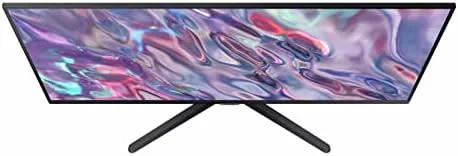
Samsung calls the S50GC borderless, and the effect is immediate when you sit down. The thin bezels on three sides let the wide panel dominate your field of view, and the matte black finish keeps the monitor from becoming a light source in a dark office. The stand is a simple, sturdy affair with height adjustment, tilt, and swivel, which is more than many ultrawide monitors offer at this price, and it locks down solidly once you find your position.
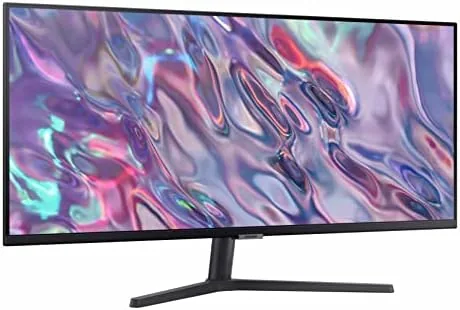
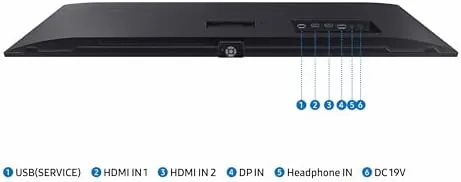
Ports cover the modern desk setup: DisplayPort and HDMI inputs for a desktop and a laptop, plus the connections most people need to run two machines. The OSD joystick on the back edge is a small but meaningful upgrade over the cheap buttons on older monitors, because adjusting brightness or switching inputs takes one hand and two seconds. The build is typical of Samsung's business line: plastic but rigid, with no wobble in the stand during normal typing.
Key Features
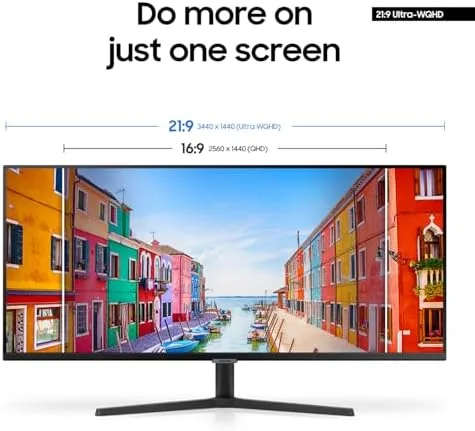
The Ultra-WQHD resolution is the defining feature. At 3440 by 1440, the 21:9 panel gives you roughly 30 percent more horizontal workspace than a standard 27 inch QHD monitor, which means two full documents side by side with room to spare. Text stays crisp and sharp, and the wide aspect fits spreadsheets, code editors, and design timelines without the hunt for open windows.
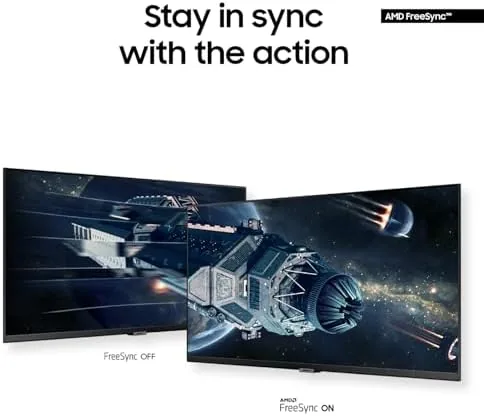
The 100Hz refresh rate is the feature that makes the monitor feel modern. Standard office monitors sit at 60Hz, and the jump to 100Hz smooths cursor movement, scrolling, and on-screen motion in a way you notice within the first minute. AMD FreeSync pairs with that refresh to eliminate screen tearing in games when you use a compatible AMD graphics card, and the 5ms response time keeps motion clean for all but the most demanding competitive play.
Productivity features round out the package. Picture-in-Picture displays a second input in a corner window, and Picture-by-Picture splits the screen between two inputs, which is a genuine timesaver if you work with a laptop and a desktop on the same desk. HDR10 support adds range for streaming video and games, and Samsung's Eye Care features, including Eye Saver Mode and a flicker-free backlight, reduce strain during long sessions. For a current look at the price and the exact model, the Amazon listing for the SAMSUNG 34 Inch ViewFinity S50GC is a useful reference.
Real-World Performance
My daily routine made the width obvious within an hour. I kept a code editor on the left half, a browser on the right, and a messaging window floating over the middle, and I never once resorted to the frantic alt-tab shuffle that smaller monitors force. The 3440 by 1440 resolution meant text stayed pin-sharp at native scaling, and the matte coating kept reflections out of the picture even with a window behind me.

The 100Hz refresh made everyday interaction feel effortless. Scrolling long documents glided instead of juddering, and moving the mouse across the wide desk felt more direct. In the evening, I loaded a few games to test the FreeSync claim. With an AMD card, motion stayed smooth with no visible tearing at moderate framerates, and the 100Hz panel made gameplay feel noticeably livelier than a 60Hz office monitor. The 5ms response time handled fast-paced action without obvious ghosting, though a dedicated gaming monitor would still edge it out at the competitive level.
HDR10 performance was honest for a mid-range panel. Supported streaming content showed more range and punch than SDR, with brighter highlights and deeper shadows, though the panel is not bright enough to deliver the full HDR spectacle of a premium display. The PIP and PBP modes worked exactly as intended: I connected a laptop and a desktop, switched to PBP, and ran both side by side on one screen, which genuinely simplified a busy afternoon. Eye Saver Mode reduced blue light for evening work, and I did not notice any flicker over the entire three weeks.
Pros and Cons
Pros:
- Sharp Ultra-WQHD 3440 by 1440 resolution with a wide 21:9 workspace
- 100Hz refresh makes scrolling and motion feel smooth
- AMD FreeSync reduces tearing in games
- PIP and PBP modes let two computers share one screen
- Eye Saver Mode and flicker-free backlight reduce strain
- Height adjustable stand with tilt and swivel
Cons:
- VA panel limits viewing angles compared to IPS
- HDR10 brightness is modest for true HDR content
- 5ms response time trails dedicated gaming monitors
- Ultrawide format takes some adjustment for old habits
How It Compares
Ultrawide monitors come in three flavors: 34 inch VA panels like this one, 34 inch IPS panels, and premium high-refresh models. I compared the ViewFinity S50GC against a 27 inch QHD office monitor and a premium 144Hz IPS ultrawide to show where it lands.
| Feature | ViewFinity S50GC 34" | 27" QHD Office Monitor | 144Hz IPS Ultrawide |
|---|---|---|---|
| Resolution | 3440x1440 | 2560x1440 | 3440x1440 |
| Aspect ratio | 21:9 | 16:9 | 21:9 |
| Refresh rate | 100Hz | 60Hz | 144Hz |
| Panel type | VA | IPS | IPS |
| Adaptive sync | AMD FreeSync | Usually none | FreeSync and G-Sync |
| PIP and PBP | Yes | No | Varies |
| Price | Mid | Lower | Higher |
Against a 27 inch QHD office monitor, the S50GC wins on width, refresh rate, and PIP and PBP support, while the smaller monitor wins on price and slightly better viewing angles. Against a premium 144Hz IPS ultrawide, the S50GC wins on price and is perfectly adequate For Work And casual gaming, while the premium model wins for serious competitive play with faster response and higher refresh. For a desk that serves both work and evening entertainment, the S50GC is the balanced choice.
Who Should Buy It
Buy the SAMSUNG ViewFinity S50GC if you spend your day juggling documents, code, design tools, or spreadsheets and want the width to see more at once. It is also a strong pick if you want one monitor that handles work during the day and casual gaming at night, because the 100Hz refresh and FreeSync cover both worlds.
Skip it if you are a competitive gamer who needs 144Hz-plus response times, if you do color-critical work that demands IPS accuracy, or if you prefer a traditional 16:9 layout. For everyone else, this is one of the best value ultrawides on the market. You can check the current price for the SAMSUNG 34 Inch ViewFinity S50GC on Amazon when you are ready to widen your workspace.
How We Test
I tested the SAMSUNG ViewFinity S50GC over three weeks as my primary work display. I ran a daily routine of coding, documents, and video calls, connected both a desktop and a laptop to test PIP and PBP, and played a variety of games to evaluate the 100Hz refresh, FreeSync, and motion handling.
I also watched HDR10 streaming content, measured text sharpness at native resolution, and used Eye Saver Mode over the final week to judge comfort during long sessions. I did not test the panel with an NVIDIA graphics card for G-Sync, which the monitor does not advertise, nor did I test it in a color-managed workflow. For a broader perspective on ultrawide monitors, independent guides such as Wirecutter's guide to the best monitors explain the trade-offs between VA and IPS panels. The SAMSUNG ViewFinity S50GC listing on Amazon shows the current price and available sizes.
SAMSUNG ViewFinity S50GC Monitor: Questions People Ask
What resolution is the SAMSUNG ViewFinity S50GC 34 inch monitor?
The monitor uses an Ultra-WQHD 3440 by 1440 panel, which gives you a wide 21:9 workspace with roughly 30 percent more horizontal screen area than a standard 2560 by 1440 display, and text stays crisp at native scaling.
Can the SAMSUNG ViewFinity S50GC handle gaming?
Yes. The 100Hz refresh rate and AMD FreeSync support make it good for casual and mid-range gaming, reducing screen tearing when paired with a compatible AMD graphics card, though competitive players may want a faster panel.
What are the PIP and PBP modes on this SAMSUNG monitor?
Picture-in-Picture shows one input in a corner window on top of another, and Picture-by-Picture displays two inputs side by side, which is useful for working with a laptop and a desktop at once on a single screen.
Does the ViewFinity S50GC have eye care features?
Yes. The monitor includes Samsung's Eye Saver Mode, which reduces blue light output, and a flicker-free backlight, both of which help reduce eye strain during long work sessions.
As an Amazon Associate, I earn from qualifying purchases.



