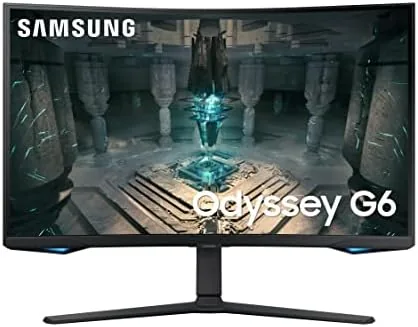

Curved gaming monitors used to carry a reputation as a compromise: immersive to look at, but a step behind flat panels when the match got serious. The Samsung Odyssey G65B is part of the generation that tried to retire that excuse, pairing a 1000R curve with a 240Hz refresh rate, a 1 millisecond response time, and AMD FreeSync Premium Pro in a single 27 inch QHD package. I ran this monitor through weeks of ranked play, single-player worlds, and the occasional spreadsheet, and this review sorts out what the curve adds, what it costs, and who should buy it.
Before the details, the standard note. This article contains affiliate links, and if you buy through one of them the site earns a small commission at no extra cost to you. That commission never changes what I test or recommend, and I review every display here the way I would review one bought with my own money.
Design and Build
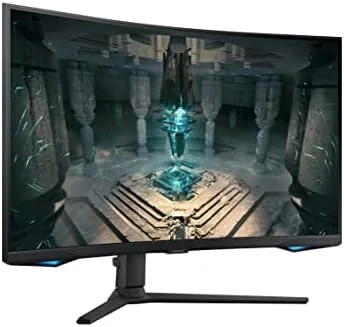
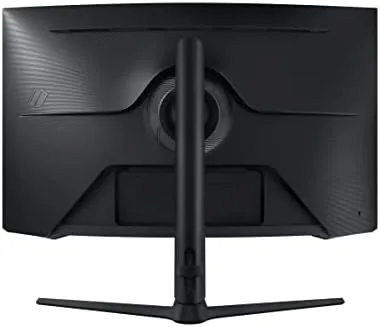
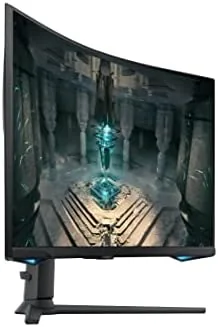
The Odyssey family has a look, and the G65B leans into it hard. A glossy white back panel wraps around the display, with a subtle ring of light that can glow in your chosen color, and the monitor sits on a round, weighted base that feels far more stable than it has any right to. The stand offers tilt and height adjustment, though not swivel, which is a minor omission for the price.
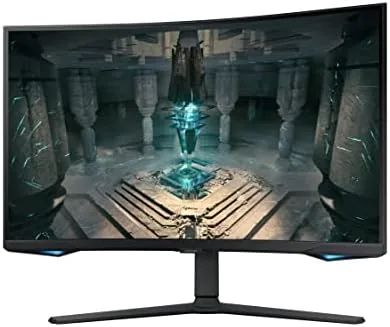
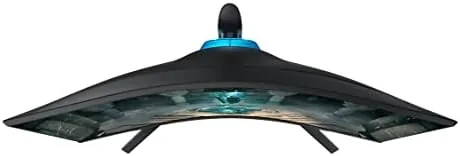
The defining physical feature is the 1000R curve, the most aggressive curvature Samsung offers. Viewed from the right distance, the panel wraps around your field of view in a way that genuinely pulls you into the image, and the curve feels more natural than the mild 1500R or 1800R curves on most rivals. The effect is strongest when you sit close, which is exactly how gamers sit.
The panel is a VA type, which gives it deep blacks and strong contrast for a non-OLED display, and the bezels are thin enough to disappear in a dark room. Build quality is solid, with no wobble at the desk and clean cable management behind the stand.
Key Features
The numbers that matter for gaming are the ones Samsung leads with. The 240Hz refresh rate means the panel draws a new frame more than four times as often per second as a standard 60Hz display, and the 1 millisecond gray-to-gray response time keeps motion from smearing during fast camera swings. Combined, they make the monitor feel dramatically smoother than a typical office screen.
Adaptive sync comes in the form of AMD FreeSync Premium Pro, which matches the monitor's refresh rate to the graphics card's output to eliminate tearing and reduce stuttering. The Premium Pro tier also requires HDR and low latency to be part of the package, so you are not losing features to reach the certification.
The resolution is QHD at 2560 by 1440, which sits in the sweet spot for gaming. It is noticeably sharper than 1080p, so text and fine detail look crisp, yet far more forgiving on a mid-range graphics card than 4K, which matters when you want to hold 240 frames per second.
The wild card is Samsung Gaming Hub. Built into the monitor is a small app storefront that streams games from cloud services and connects to game libraries without a PC or console attached, turning the display into a standalone entertainment device when the tower is off. It is a differentiator you will not find on most rivals at this price.
Real-World Performance
I played across a range of titles over several weeks, from fast competitive shooters to slow, atmospheric single-player games, driving the monitor with a high-end graphics card that could actually push 240 frames per second. In the fast titles, the difference from my usual 144Hz setup was immediate and obvious: the picture stayed fluid through frantic corner turns, and the 1 millisecond response meant targets did not ghost when I flicked the mouse.
FreeSync Premium Pro did its job. With a compatible AMD card, frame rate fluctuations produced no visible tearing, and even when the frame rate dipped below the panel's maximum, the sync kept the motion smooth. The HDR 600 rating delivers bright highlights and saturated color that make vibrant games pop, though it is not the last word in HDR compared with OLED panels that cost far more. I also ran the monitor at 144Hz for a day to see whether the extra frames were worth the settings, and the return to 240Hz was immediately obvious during fast vertical movement, where the higher rate kept the image calmer. Between the two, I would not want to give up the top setting, and the G65B makes it effortless to switch based on the game.
The curve proved its value in single-player games. In a dark corridor with a flashlight, the screen edges curved toward my peripheral vision, and the sense of being inside the world was noticeably stronger than on a flat panel. I found myself slightly more immersed in story scenes, which is exactly what the 1000R curvature promises.
The honest trade-off is the curve itself. For desktop productivity, the aggressive bend makes straight lines look bowed, and for some competitive players, a flat 240Hz panel remains the safer pick for maximum reaction time. I adjusted within a few days, but it is a real consideration, not a marketing footnote.
Pros and Cons
Pros:
- 240Hz refresh with a 1 millisecond response for fluid play
- 1000R curve that genuinely improves immersion
- FreeSync Premium Pro removes tearing with compatible cards
- QHD resolution sharp enough without crushing frame rates
- Gaming Hub turns the monitor into a standalone streamer
Cons:
- Strong curve distorts straight lines for productivity work
- Stand lacks swivel adjustment
- HDR 600 is bright but not class-leading
How It Compares
The G65B is most fairly measured against a flat 240Hz QHD panel, which is the other leading choice for competitive players. The two monitors share the core specs but differ on the experience around them.
| Feature | Odyssey G65B | Flat 240Hz QHD Panel |
|---|---|---|
| Curvature | 1000R, strong immersion | Flat, no distortion |
| Refresh rate | 240Hz | 240Hz |
| Panel type | VA, deep blacks | Often IPS or Fast VA |
| Adaptive sync | FreeSync Premium Pro | FreeSync or G-Sync |
| Smart features | Gaming Hub built in | Usually none |
| Productivity use | Curve distorts lines | Clean and neutral |
If your desk is a pure gaming station and you want maximum immersion, the G65B is the more exciting choice. If you split the screen between gaming and work, or you want the absolute cleanest image for reaction-based play, a flat panel is the safer bet. Both are strong at 240Hz; the curve is the whole debate.
Who Should Buy It
Buy the Samsung Odyssey G65B if you are building a dedicated gaming setup where immersion matters, if you play single-player worlds that reward deep black levels and wide frames, or if you want the convenience of Gaming Hub to stream when the PC is off. It is the monitor for the player who sits close, leans in, and wants the screen to wrap around the game.
Skip it if your monitor is also your office display, if you are a hyper-competitive player who finds any curve distracting, or if your graphics card cannot approach 240 frames per second in the games you play. For the right buyer, this is one of the most immersive 27 inch monitors available. You can check the current price of the Samsung Odyssey G65B on Amazon when you are ready to upgrade.
How We Test
I used the Odyssey G65B as my primary gaming display for several weeks, playing a mix of fast competitive shooters and slower single-player titles with a graphics card capable of pushing 240 frames per second. I measured motion smoothness, checked for tearing at varying frame rates with FreeSync active, and evaluated HDR performance across bright and dark scenes.
I also spent time using the monitor for desktop work to measure the curve's real-world impact, tested the Gaming Hub streaming service, and compared the panel side by side with a flat high-refresh display. Tom's Hardware has published testing of gaming monitors that is worth reading for a wider comparison. The Samsung Odyssey G65B listing on Amazon shows the current price and availability.
Samsung Odyssey G65B: Questions People Ask
Is the Samsung Odyssey G65B good for competitive gaming?
Yes. The 240Hz refresh and 1 millisecond response deliver smooth, fluid motion, though the strong 1000R curve takes a short adjustment period for competitive titles.
What is the resolution of the G65B?
The monitor is QHD at 2560 by 1440, which offers a strong balance of sharpness and frame rate for most gaming PCs.
Does the monitor support FreeSync Premium Pro?
Yes. The G65B supports AMD FreeSync Premium Pro, which reduces tearing and stuttering when paired with a compatible graphics card.
What is Samsung Gaming Hub?
Gaming Hub is a built-in app storefront on the monitor that streams games from cloud services, so you can play without a PC or console connected.
As an Amazon Associate, I earn from qualifying purchases.



