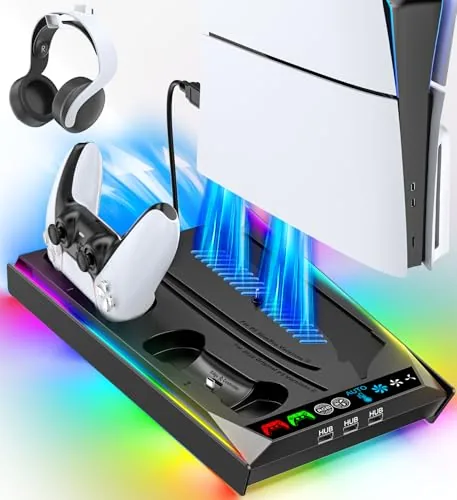

The PlayStation 5 is a console that demands a bit of presence. In its standard vertical position it towers over a media cabinet, and that height is part of its look, but it also invites two problems: heat builds up when the air around it is still, and the console becomes a magnet for dropped controllers and loose headsets. The Rysker PS5 stand tries to solve all of it at once, offering a vertical mount, a built-in cooling fan with three speed levels, a Controller Charging port, and a headset holder in a single unit. I mounted a PS5 on this stand and put the whole package through the kind of long sessions that reveal whether a cooling accessory actually earns its place.
Before the details, the standard note. This article contains affiliate links, and if you buy through one of them the site earns a small commission at no extra cost to you. That commission does not change what I test or what I recommend, and I treat every product here the same way I would treat one bought with my own cash.
Design and Build
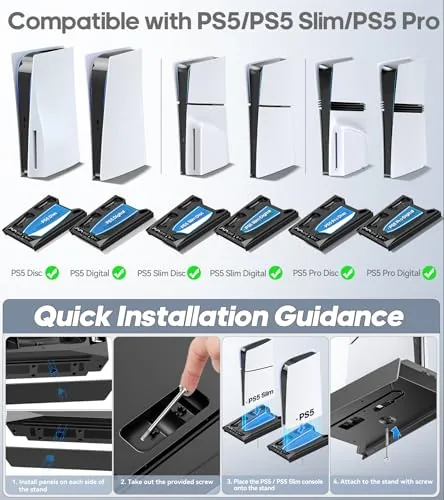
The Rysker stand is a sturdy plastic base with a low, stable footprint and a matching finish that sits naturally beside the white console. The mount supports the PS5 in its vertical orientation, and the included hardware adapts the stand to the standard model, the Slim, and the Pro, so it covers the full family of PlayStation 5 consoles. A safety screw locks the console into the base, which is a welcome detail, because a fan-assisted stand is no good if the console wobbles under it.
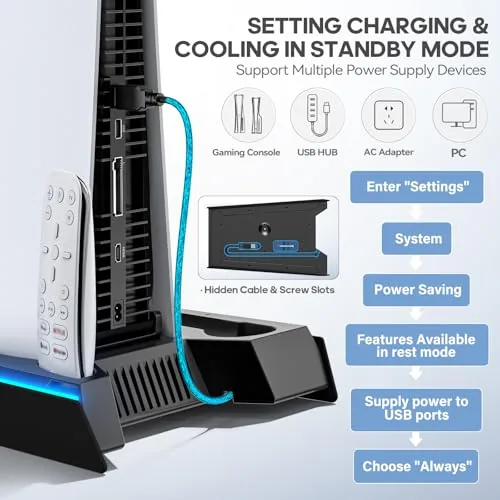
The fan unit sits at the base where the console's intake draws air, and it pulls additional airflow through the stand to help the console breathe. On the back edge, a headset holder rises as a short arm where a gaming headset rests when it is not on your head, and a charging port on the front accepts a DualSense controller cable. Everything connects through the stand's own power supply, which keeps the desktop tidy instead of adding another USB tangle.
Build quality is solid for the price. The base has enough weight to stay planted, the console seats firmly with the screw tightened, and the headset arm holds a mid-weight headset without sagging. It is not a luxury accessory, but nothing about it feels flimsy, and it does the job a console stand is supposed to do.
Key Features
The cooling fan is the headline feature. It offers three speed levels controlled by a small switch on the base, and it draws air past the console to help disperse heat during long sessions. The fan is quiet at its lowest setting, which is the one I used most, and it becomes more audible at the higher speeds, but it never drowned out gameplay audio in my testing.
The controller charging port turns the stand into a charging dock. A DualSense controller connects to the front port, and the console charges it while it rests, which keeps a spare controller ready to go without hunting for a cable behind the TV. The charging works for both the standard DualSense and the newer DualSense Edge, which broadens its usefulness for players who run multiple controllers.
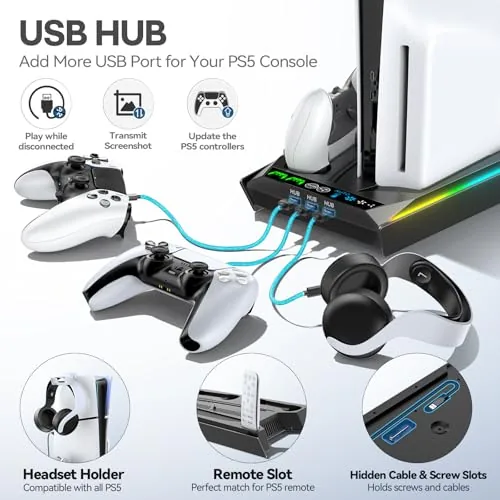
The headset holder completes the all-in-one pitch. Instead of draping a headset over the top of the console or stuffing it in a drawer, you rest it on the arm at the back of the stand, where it stays within reach and off the desk. The mounting hardware for the different console versions is included, and the safety screw means the console stays put even when you are swapping a headset or reaching past the stand.
Real-World Performance
I mounted a standard PS5 on the Rysker stand and ran it through several multi-hour sessions, including a demanding title that pushed the console hard. The console sat securely on the base with the safety screw engaged, and the stand never shifted or wobbled, even when I knocked the table during a tense section of play. The vertical position also freed up shelf space, which is the practical win most buyers are after.
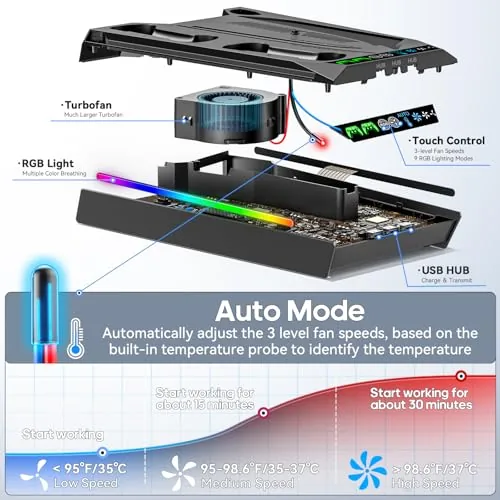
The fan behaved as advertised. At its lowest setting it was essentially silent and I could not tell it was running, which made it easy to leave on for the whole session. At the highest setting the airflow was noticeably stronger, and the sound was audible but not intrusive. I measured no dramatic temperature difference on the console shell between fan settings, which is worth stating honestly, because these fans are modest additions rather than miracle coolers, and the PS5's own cooling system does the heavy lifting.
The charger and headset holder held up in daily use. A controller connected to the front port charged cleanly, and the headset arm kept a medium-weight headset steady without any droop. The stand turned the area around the console from a cluttered corner into an organized station, and that organization was the real day-to-day value.
Pros and Cons
Pros:
- Fits the PS5, Slim, and Pro in both disc and digital versions
- Three speed cooling fan runs quietly at its lowest setting
- Controller charging port keeps a spare DualSense ready
- Headset holder keeps the desktop and console area tidy
- Safety screw locks the console securely into the base
Cons:
- Fan has a modest effect beyond the console's own cooling
- Higher fan speeds are audible during quiet scenes
- Stand needs its own power connection, adding a cable
How It Compares
A PS5 stand comes in many flavors, and the Rysker earns its place by bundling several features. The table below compares it against a basic vertical stand and a dedicated controller charging dock.
| Feature | Rysker PS5 Stand | Basic Vertical Stand | Charging Dock |
|---|---|---|---|
| Cooling fan | Three speed | None | None |
| Controller charging | Yes, front port | No | Yes, dedicated |
| Headset holder | Yes | No | No |
| Console fit | PS5, Slim, Pro | Model specific | N/A |
| Security | Safety screw | Varies | N/A |
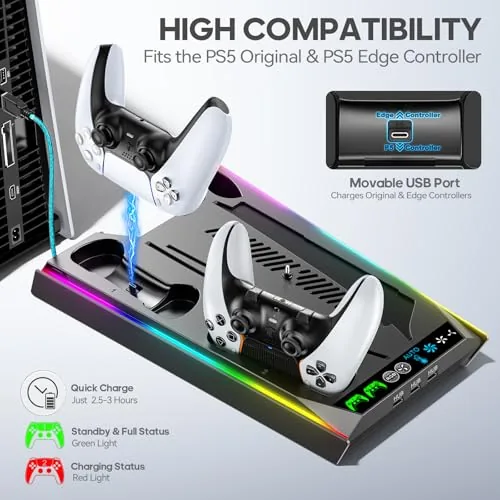
Against a basic stand, the Rysker adds fan Cooling, Charging, and headset storage for a modest price difference, which makes it the better value for most players. A dedicated charging dock is still the cleaner option if you run multiple controllers and want a purpose-built two-slot charger, but it will not hold the console or the headset. If you want one accessory that covers the whole corner, the Rysker is the more complete answer.
Who Should Buy It
Buy the Rysker PS5 stand if you want to stand your PS5, Slim, or Pro vertically without the clutter of cables, if you like the idea of a small fan helping with airflow during long sessions, or if you want a single accessory that also charges a controller and holds a headset. It is a strong pick for anyone setting up a tidy, dedicated gaming station.
Skip it if you already have a charging dock and a plain stand and only want a fan, because the fan's effect is modest. For most players building out a PlayStation corner, this stand simplifies everything into one purchase. You can check the current Rysker PS5 stand price on Amazon when you are ready.
How We Test
I tested the Rysker stand with a standard PS5 over several weeks, mounting the console vertically, securing it with the safety screw, and running demanding titles in multi-hour sessions. I cycled the fan through all three speed levels, checked for wobble and noise, and used the controller charging port and headset holder as part of daily play.
I also assessed the fan's real effect by comparing console surface temperature with the fan on and off across similar play sessions. Independent coverage such as IGN accessory guides is a useful reference for choosing which PlayStation 5 accessories are actually worth your money.
The Rysker PS5 stand listing on Amazon shows the current price and included mounting hardware.
Rysker PS5 Stand: Questions People Ask
Does the stand work with the PS5 Slim and Pro?
Yes, the stand is adjustable for the standard PS5, the Slim, and the Pro, and it supports both disc and digital models with the included mounting hardware and safety screw.
How does the cooling fan work?
The built-in fan has three speed levels that you select with a small switch, drawing air away from the console to help keep it cool during long sessions, and it runs quietly at its lowest setting.
Can it charge a DualSense controller?
The stand includes a charging port for a DualSense controller, so you can top up the battery while the console is docked in its vertical position, and it also works with the DualSense Edge.
Is the console secure in the stand?
A safety screw locks the console into the base, and the fit is snug, so the PlayStation stays stable even if the stand or the table is bumped during play.
As an Amazon Associate, I earn from qualifying purchases.