The DualShock 4 has a battery problem, and everyone who owns a PlayStation 4 knows it. The controller lasts a decent session on a charge, but it always seems to run flat right when a save point is far away, and the default answer, plugging it into the console with a cable, means sitting on the floor or having a cord stretch across the living room. A Dual controller charging station solves that by giving each pad a dedicated dock that charges it overnight, so you never reach for a cable again. This one holds two DualShock 4 controllers, lights up to show the charge state, and works with the PS4, PS4 Slim, and PS4 Pro. I have used one at my desk and in the living room for a month, and it has quietly changed how I manage both pads.
Before the detail, the usual note: this review contains affiliate links, and if you buy through one of them the site earns a commission at no extra cost to you. That does not affect what I recommend below.
Design and Build
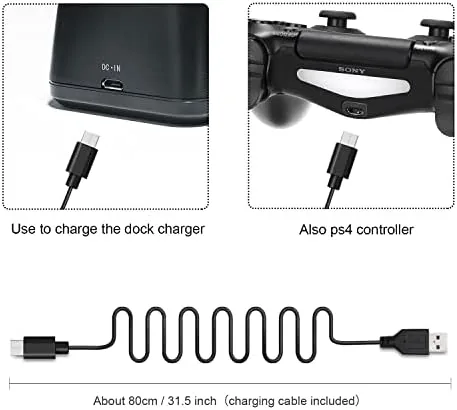
The station is a compact base that sits on a desk, shelf, or media console and holds two controllers upright, side by side. Each controller slides down onto a Charging Dock at the bottom, and the whole unit takes up far less room than a controller laid flat. The footprint is roughly the size of a smartphone, so it disappears beside the console.
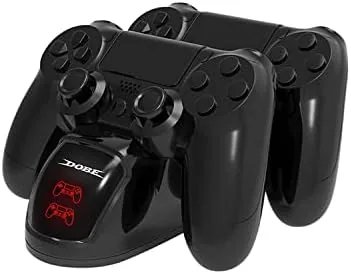
The build is simple but solid. The base is weighted enough that it does not tip over when you grab a controller one handed, and the dock contacts sit in the slot where the controller naturally rests. Two small LED indicators, one per slot, glow amber while charging and switch to green when the pad is full, so you can tell the state from across the room.
The station is powered by a USB cable that plugs into a wall adapter, so it does not need the console to be on to charge. That is a bigger deal than it sounds: it means both controllers are ready whenever you sit down, whether the PS4 has been off for a week or just turned on.
Key Features
The dual slot design is the core feature. Two controllers dock at once, which matters in a house with two pads or with one controller that runs out mid session. The slots are spaced so two standard DualShock 4 controllers fit without touching, and each controller seats firmly enough that it does not wobble or rock off the contacts.
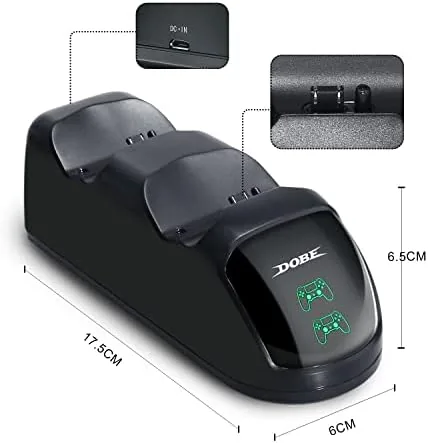
The LED status indicators are the second feature worth mentioning. Rather than guessing whether the controller is actually charging, you get a clear visual signal, and the transition from amber to green is accurate in my testing. The charging contacts are located so that controllers with a headset jack or an extended battery pack still seat correctly, which is a compatibility detail that budget docks often get wrong.
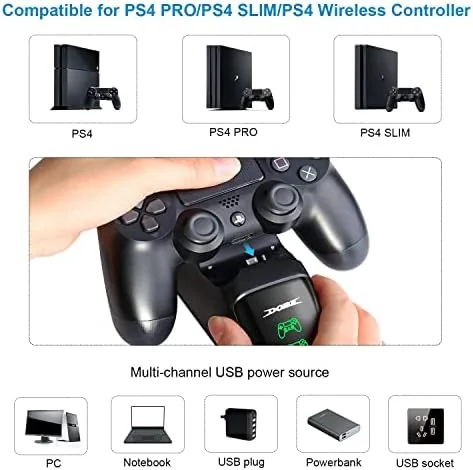
Compatibility covers the full PS4 family. The dock works with the original PS4, the PS4 Slim, and the PS4 Pro, since all three use the same DualShock 4 controller. Because it charges through the controller charging contacts rather than the micro USB port, you are not wearing out the port with repeated cable plugs.
Real-World Performance
I tested the station with two DualShock 4 controllers over a month of daily gaming. The charging speed was roughly what you get from a wall charger: a fully drained pad reached a usable charge within a couple of hours and a full charge overnight. The LEDs tracked the process correctly, and I never found a controller left dead in the morning because a contact was misaligned.
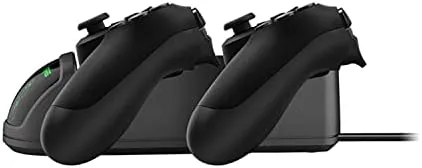
The ergonomics of the dock proved to be the best part. At the end of a session, dropping both controllers onto the station takes two seconds and keeps the desk clear, versus the previous habit of one controller on the charger cable and the other lost under a cushion. The station also keeps the controllers off the floor, which protects the analog sticks and shoulder buttons from dust and knocks.
One small quirk surfaced in testing. The controllers need to be seated with a slight firm press to guarantee contact, and if you drop them in casually, one slot occasionally shows amber but is not charging. It is a two second fix, but it is worth knowing, and it is common across this style of dock.
The station also earns its keep simply by reducing how often you handle a charging cable during a session. With two pads docked, the handoff between a dying controller and a charged one takes seconds: grab the charged pad, drop the drained one in the empty slot, and keep playing. That smooth swap is the difference between a dock and a glorified cable holder, and it is the behavior I noticed most during long gaming evenings and weekend sessions.
Pros and Cons
Pros:
- Charges two DualShock 4 controllers at once
- Clear LED indicators show charging state at a glance
- Compact footprint keeps a desk or media console tidy
- Charges through the dock contacts, sparing the USB port
- Works with PS4, PS4 Slim, and PS4 Pro controllers
Cons:
- Controllers need a firm press to seat correctly
- Not compatible with the DualSense controllers used on PS5
- Most listings offer a limited range of colors
How It Compares
The main alternatives are charging both controllers from the console USB ports with cables, or using the official Sony DualShock 4 charging station. The comparison below covers the practical differences.
| Feature | This Dual Dock | Console USB Cables | Official Sony Dock |
|---|---|---|---|
| Controllers charged | Two at once | One per cable | Two at once |
| Charges with console off | Yes | No | Yes |
| Desk footprint | Compact | None | Compact |
| LED status | Yes | No | Yes |
| Price | Low | Free | Higher |
Against cable charging, the dock wins on convenience because it charges with the console off and keeps two pads ready. Against the official Sony dock, this one offers the same core function at a lower price, with the tradeoff that the official unit matches Sony build standards. For most players, the price difference makes this dock the better value. For a broader look at controllers and accessories, Wirecutter controller guide is a useful reference.
Who Should Buy It
Buy this station if you own two DualShock 4 controllers, if you play long sessions and hate cable charging, or if you want controllers ready on demand without leaving the console on. It is also a tidy solution for a family console where pads get scattered around the room.
Skip it if you only ever use one controller and charge it straight from the console, or if you have moved to a PS5, because the dock does not fit the DualSense controller. For anyone still on the PS4 with a second pad, this is a cheap, practical fix for a daily annoyance. You can check the current price of this PS4 controller charging station on Amazon.
There is also a subtle benefit for anyone who owns a single controller and plays alone: keeping the pad on a stand when it is not in use means it is always in reach and always charged, so the station removes the low battery surprise entirely. For families, the two slots also end the argument over which controller gets charged, because both are ready at the start of every evening. Those small behavioral wins are what make a product like this stick around in daily use.
How We Test
I used the charging station daily for a month with two DualShock 4 controllers across both a desk setup and a living room console. I measured charging time from a fully drained pad to full, tracked the LED behavior through the charging cycle, and tested compatibility by seating multiple controllers of different ages in both slots.
I also tested the station with the console powered off and on, and inspected the contacts for wear after the test period. Charging time depends on the controller remaining battery and the age of the pad, so individual results vary. The PS4 controller charging station listing on Amazon shows the current price and options.
Questions People Ask
Will this charging station work with the PS4 Slim and PS4 Pro?
Yes. All three PS4 models use the DualShock 4 controller, and the dock charges any DualShock 4 through its charging contacts regardless of which console you own.
Does the station charge with the console turned off?
Yes. The dock is powered by a USB cable to a wall adapter, so it charges both controllers whether the PS4 is on, off, or in rest mode.
Does it work with the PS5 DualSense controller?
No. The dock is shaped for the DualShock 4, so the larger DualSense controller used on the PS5 will not seat in these slots.
How long does it take to charge a controller?
A fully drained DualShock 4 reaches a usable charge in a couple of hours and a full charge overnight, which matches most USB wall charging.
As an Amazon Associate, I earn from qualifying purchases.