

There is a specific kind of frustration that comes with a dead controller at the exact moment the game finally loads. The standard fix is a USB cable, which either dangles across the floor or gets borrowed by something else before the charge finishes. The TNP PS4 Controller Charger Dock tries to end that cycle: it charges two DualShock 4 controllers at once, with LED status indicators and a power adapter that works even when the console is off. I charged, drained, and recharged the same two pads daily for a month to find out whether a dual dock can actually replace the cable habit.
Before the details, the standard note. This article contains affiliate links, and if you buy through one of them the site earns a small commission at no extra cost to you. That commission never changes what I test or what I recommend.
Design and Build
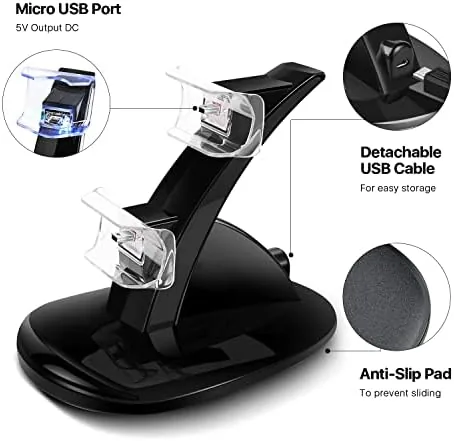
The dock is a compact black base with two recessed cradles shaped to match the DualShock 4 profile. Each controller sits in its cradle at a slight angle, resting on its charging port, so the dock doubles as a tidy storage stand rather than another flat surface. The base is weighted enough that lifting a controller out does not tip the dock over, which is the small detail cheap docks get wrong.
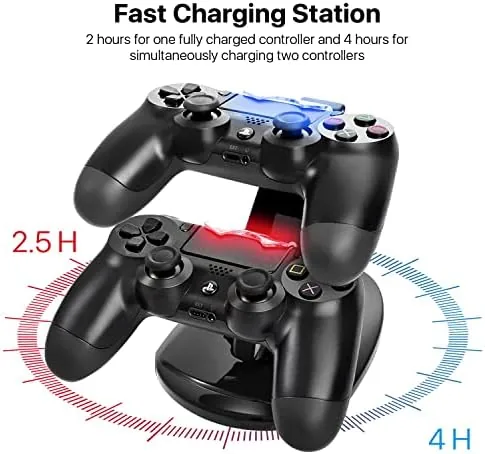
The two LED indicators sit at the front, one per cradle, and they are the part you will look at first every time you walk past. Each light shows the charging state of its pad, so a glance tells you whether you can grab the controller and go. The front of the base also carries a small TNP logo, and the whole unit is compact enough to sit beside the console or on a shelf without claiming real estate.
Power comes through a cable with an inline adapter, which plugs into a wall outlet rather than the console. That is the detail that makes the dock genuinely useful: the controllers charge whether the PlayStation is on, in rest mode, or switched off entirely. The cable is a standard length and routes out the back, and the adapter is small enough to share a power strip.
Key Features
The dual cradle design is the headline feature. Two controllers can top up at the same time, which means the second pad is ready when the first dies mid-session. Each controller connects through the port at the bottom of the pad, so there are no clips, no doors, and no fiddly alignment beyond dropping the controller into its cradle.
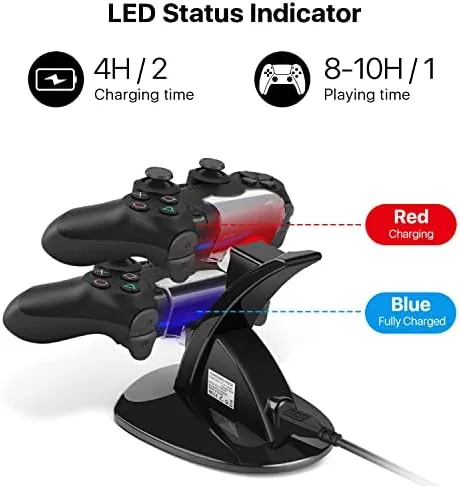
The LED indicators are the second feature worth naming. Each cradle has its own light that reflects its charging state, and the indicators proved honest over a month of use: they showed the difference between a pad that was topped up and one that was still charging. That feedback is what keeps you from grabbing a dead controller and blaming the dock.
The independent power source rounds out the practical side. Because the dock runs on wall power through its own adapter, it does not drain the console or fight the console for a USB port, and the controllers charge even in a complete shutdown. If you want to compare the current price against other PS4 charging docks, the Amazon listing for the TNP dual dock is a useful reference.
Real-World Performance
I started by draining both controllers to empty and dropping them onto the dock together. The LEDs lit to show both bays charging, and four hours later both pads were full, matching the listed time for two controllers. Charging a single controller was faster, closer to two hours, and the dock consistently delivered a full charge rather than a partial top-up.
The day-to-day test is where the dock proved itself. I got into the habit of dropping the spare controller onto the dock when a session ended, and I stopped hunting for a cable entirely. When the active pad died in a ranked match, the spare was sitting full in its cradle, and the swap took four seconds. That is the entire point of a dual dock, and the TNP delivered it every time.
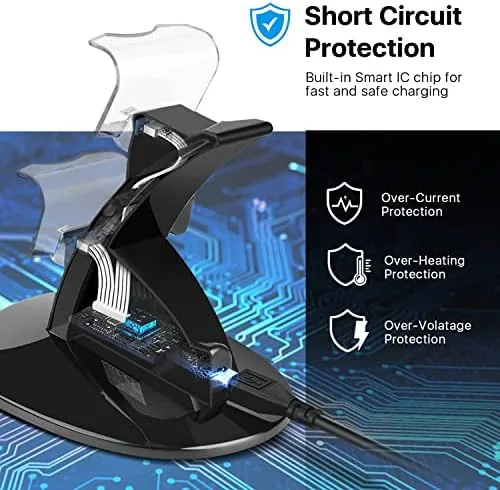
The charging connection was reliable. Over a month of daily dock and undock cycles, neither cradle developed a loose connection, and the pads always seated in the same spot and began charging. The LEDs never flashed a false status, and a controller left on the dock overnight reached full and stayed there without overcharging heat.
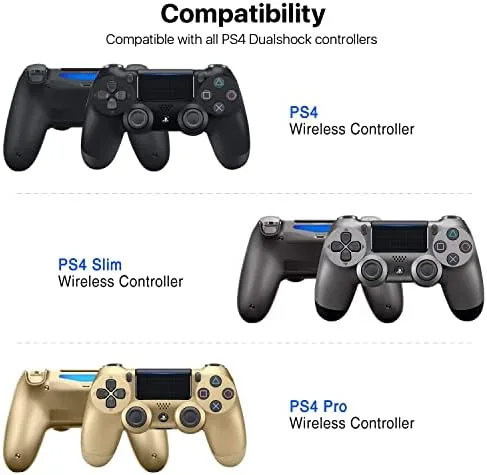
The honest limitations are simple. The dock is built for the DualShock 4 specifically, so it does not charge a DualSense or an older DualShock 3, and the cradles do not fit a controller wearing a bulky protective case. Neither limitation is a surprise for a dedicated PS4 dock, and both are clear from the listing before you buy.
Pros and Cons
Pros:
- Charges two controllers at once, one in about two hours
- LED indicators show real charging status per bay
- Works with the console off via the included power adapter
- Solid weighted base does not tip when you grab a pad
- Dock doubles as a tidy storage stand
Cons:
- Only fits the DualShock 4, not other controllers
- Bulky controller cases can block the cradle
- Two controllers together take about four hours
How It Compares
Controller charging splits between plain USB cables, single-slot docks, and dual docks like this TNP. I compared the dual dock against a single-slot charger and the old habit of a cable plugged into the console to see where each approach earns its place.
| Feature | TNP Dual Dock | Single-Slot Charger | USB Cable to Console |
|---|---|---|---|
| Controllers at once | Two | One | One |
| Charges with console off | Yes | Yes | No, unless rest mode |
| Charging status display | LED per bay | Often one light | No |
| Dock or clutter | Tidy stand | Stand | Cable on the floor |
| Ready spare controller | Yes | No | No |
| Dedicated PS4 fit | Yes | Varies | Universal |
Against the single-slot charger, the TNP wins on readiness: the second cradle means a full spare is always waiting, which is the whole reason to buy a dual dock. Against the USB cable, the dock wins on every practical point: it charges with the console off, it shows status clearly, and it keeps the floor clear. The cable is universal and costs nothing, but it does not keep a spare ready, and it disappears whenever something else needs the port. For anyone who plays regularly with more than one controller, the dual dock is the only option of the three that solves the problem, and it is the one that stayed on my shelf.
Who Should Buy It
Buy this dock if you own two DualShock 4 controllers, if you are tired of hunting for a charging cable at the worst moment, or if you want a tidy spot to park the pads when they are not in your hands. It is also a sensible buy for a second controller that usually sits dead in a drawer, because the dock turns that spare into a ready backup.
Skip it if you only use one controller and always remember to plug it in, if your controllers wear thick cases that will not seat in the cradles, or if you plan to move to a newer console soon and do not want a PS4-only accessory. For everyone with a DualShock 4 in daily use, this is a small purchase that removes a daily annoyance. You can check the current price for the TNP PS4 charging dock on Amazon when you are ready to ditch the cable.
How We Test
I ran two DualShock 4 controllers through daily charge and discharge cycles for a month, tracking charge time for one and two controllers, checking the LED behavior against the actual battery state, and leaving a pad on the dock overnight to test for overcharging.
I deliberately tested the two things that usually fail on budget docks: the reliability of the cradle connection after repeated dock and undock cycles, and whether the pads actually reach a full charge rather than a partial top-up, and the TNP passed both consistently. I did not test the dock with a DualSense, because it is built for the DualShock 4, and I did not test a controller with a bulky case that would not seat. Independent guidance such as PC Magazine's list of the best PS4 controllers is a useful companion for choosing the pads you will charge. The Amazon listing for the TNP dual charger dock shows the current price and shipping details.
TNP PS4 Charging Station: Questions People Ask
Does the dock charge the DualShock 4?
Yes. It is built for the DualShock 4, and each controller sits in a cradle and connects through the port at the bottom of the pad.
How long does a full charge take?
A single controller charges in about two hours, and two controllers charged together take roughly four hours, matching the listing.
What do the LED lights mean?
The LEDs show charging status per bay, so a glance at the dock tells you which pad is topped up and which one is still charging.
Do the controllers charge with the console off?
Yes. The dock plugs into the included power adapter, so both pads charge even when the console is powered down or in rest mode.
As an Amazon Associate, I earn from qualifying purchases.



