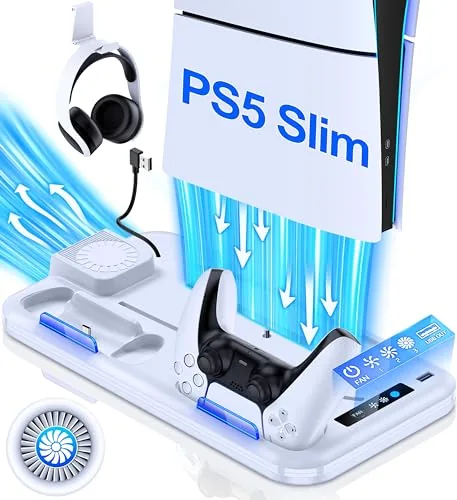

The PlayStation 5 Slim is a big console even in its smaller shell, and on a shelf it tends to lie flat and hog the space where the speakers and the controllers should go. The PS5 Slim stand and cooling station is one accessory that tries to solve three problems at once: it stands the console vertically, adds a cooling fan, and charges two controllers in the same footprint. I mounted my Slim on this stand for a month of daily gaming, and this review covers the fit, the fan, the Charging Dock, and whether it is worth the real estate under the television.
Before the details, the standard note. This article contains affiliate links, and if you buy through one of them the site earns a small commission at no extra cost to you. That commission does not change what I test or what I recommend, and the stand reviewed here was set up with a normal PS5 Slim exactly the way a buyer would set it up.
The stand is more than a pedestal, and the rest of this review looks at the build, the fan and charging features, the real world results, and who should pick one up.
Design and Build
The stand is a plastic base with a raised cradle that holds the PS5 Slim in a vertical position, and it sits the console up off the floor of the shelf with a little airflow underneath. The build is sturdier than most accessory bases I have handled, with a wide footprint that does not tip, and the console locks into place without the wobble you sometimes get from cheap stands. The black finish matches the console well enough that the unit disappears once the console is seated.
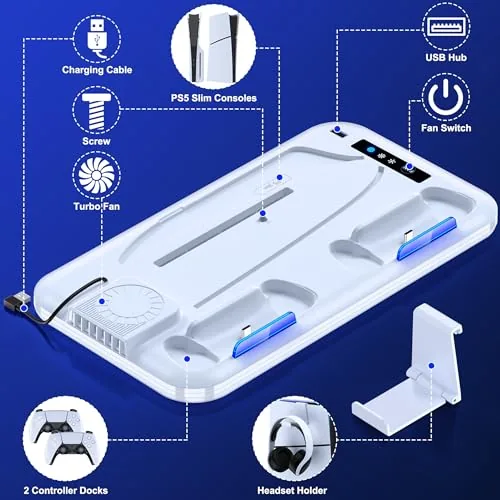
The layout is efficient. The top area behind the console holds the headset holder, a hooked rest that keeps a gaming headset off the desk. On the front of the base, the Dual Controller Charging dock has two cradles with contact points, so each controller drops in and lights up while charging. A small fan sits at the back of the cradle, angled to push air over the console shell, with its own control and power connection separate from the console.
Key Features
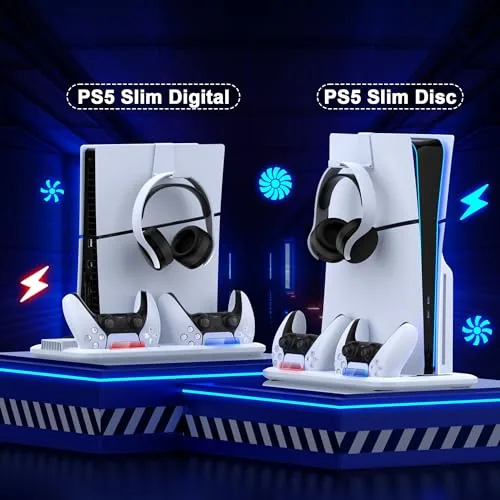
The vertical stand function is the core feature. It turns the console sideways in your setup, reclaiming the flat shelf space and putting the console where it is easy to reach and easy to see. The tray is sized for both the Slim disc and Slim digital versions, and once seated the console stays firmly in place, which matters if you share the space with kids or a cat.
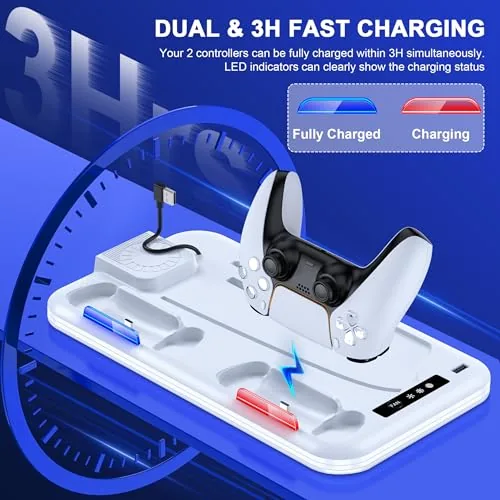
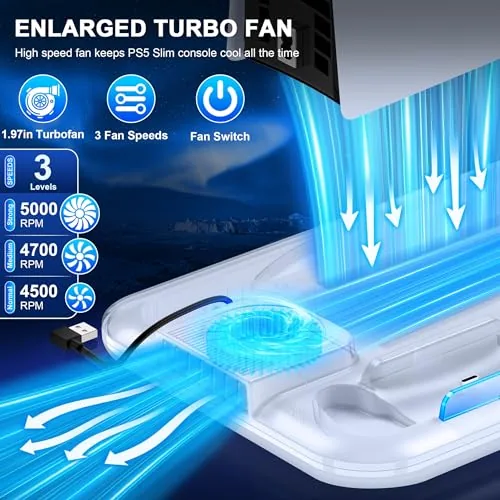
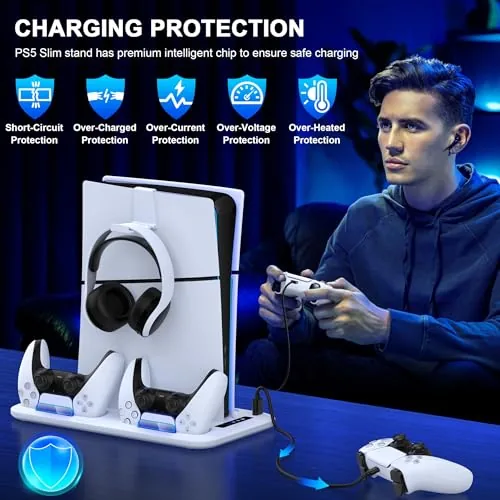
The 3 level cooling fan is the feature that gets the marketing, and it delivers on the basics. The fan has three speed settings and moves a steady current of air over the console when you switch it on, which helps in an enclosed TV stand where heat builds up. The dual controller charging dock is the most useful feature in practice: two controllers charge at once from a separate power supply, so the console does not need to be on, and each cradle shows a charging light. The headset holder on top finishes the package, keeping the headset within reach and off the floor.
Real-World Performance
The real test was a month of daily play, long sessions included, with the console seated vertically on the stand. The fit was immediate and easy: the Slim slid into the cradle, seated firmly, and did not move when I plugged cables in or swapped games. Having the console vertical actually improved my setup, because the flat shelf space opened up for the speakers, and the console now gets airflow on both sides instead of lying against the shelf.
The controller charging dock was the feature I used the most. I dropped two controllers in after each session, and the contacts seated cleanly with a satisfying click, and both cradles charged reliably every time. The charging indicator changed color when full, which saved me from guessing, and because the dock has its own power, the controllers were always topped up even when the console sat in rest mode. Over the month I never once picked up a dead controller, which is the whole point of a dock.
The cooling fan worked as a fan should. On the highest setting it moves a clearly noticeable current of air across the console, and in my enclosed media cabinet the air around the console stayed cooler during long sessions. The honest caveat is that the PS5 Slim has its own well designed cooling system, and a third party fan is a helper, not a fix for a vent blocked by dust or a badly enclosed cabinet. In my setup the fan was quiet enough to ignore at the lower speeds, though on the third speed it was audible enough to notice during quiet moments in a game.
The limits are the ones you would expect from a vertical accessory. The console is now standing, so it takes up height on the shelf, and if your media cabinet has a low ceiling you need to check the clearance. The fan adds a separate power cable to the setup, which is one more cord to manage behind the TV. And while the controller dock is well built, it is designed for the standard DualSense shape, so it does not add anything for players who only ever use one controller. None of these undercut what the stand does well, which is organize the whole console area in one tidy unit.
Pros and Cons
Pros:
- Sturdy vertical stand holds the Slim securely without wobble
- Dual controller dock charges two pads at once from its own supply
- Three speed cooling fan moves real airflow over the console
- Headset holder keeps the desk and floor clear
- Fits both the Slim disc and Slim digital consoles
- Frees up flat shelf space under the television
Cons:
- Console adds height, so check shelf clearance
- Fan is audible at the highest of the three speeds
- Separate power cable for the fan adds cord clutter
- Cooling is a helper, not a fix for a blocked console vent
How It Compares
The common alternative to a combined stand is a plain PS5 vertical stand plus a separate controller charging dock. The table below lines up the two approaches.
| Feature | Combined Stand and Station | Plain Stand plus Dock |
|---|---|---|
| Footprint | One base does everything | Two separate devices on the shelf |
| Cooling | Built in 3 level fan | Usually none |
| Controller charging | Built in dual dock | Requires a separate dock purchase |
| Headset storage | Built in holder | Not included |
| Setup | One assembly, one base | Two installs, more cables |
| Cost | One accessory price | Two accessories, higher total |
If your shelf space is tight and you want one clean unit, the combined stand is the better buy, because it bundles the stand, fan, charging, and headset holder into a single footprint. A plain stand and separate dock only makes sense if you already own a dock or you prefer matching brands. For most PS5 Slim owners, the combined unit is the tidier answer.
Who Should Buy
Buy the PS5 Slim stand and cooling station if you are tired of the console hogging the flat shelf space, if you have a second controller that always dies at the wrong moment, and if you keep the console in an enclosed cabinet where heat builds up. It is also a strong choice for anyone setting up a clean, vertical console display and wanting the headset off the desk.
Skip it if your media cabinet is too short for a vertical console, or if you only ever use one controller and a plain stand is all you need. For most Slim owners who want one tidy accessory that does the storage, cooling, and charging, this is a practical pick. You can check the current price of the PS5 Slim stand and cooling station on Amazon when you are ready.
How We Test
I mounted a PS5 Slim on the stand in a media cabinet and used it daily for a month, running long gaming sessions with the fan at all three speeds and with the fan off. I charged two controllers through the dock every night, checked the charging indicators, and monitored the air temperature around the console in the enclosed cabinet. I also tested the headset holder with a typical over ear gaming headset.
I did not measure internal console temperatures, and the fan results reflect an enclosed cabinet setup rather than an open shelf. For a broader take on PS5 accessories and console care, Tom's Guide has a solid roundup of the best PS5 accessories that is worth a look. The PS5 Slim stand and cooling station listing on Amazon shows the current price and the compatible console versions.
PS5 Slim Stand and Cooling Station: Questions People Ask
Will this stand fit the PS5 Slim disc and digital versions?
The stand is sized for both the Slim disc and Slim digital consoles, and the tray supports the console vertically so both versions sit securely without wobble.
Do the controller chargers work while the console is off?
The dual charging dock is powered by a separate supply, so it keeps charging both controllers even when the console itself is in rest mode or powered off.
Does the cooling fan actually help the PS5 Slim?
The three level fan moves extra air across the console shell, which helps in a closed cabinet, though the console has its own cooling that handles normal use.
How many controllers can the station charge at once?
The station charges two controllers simultaneously on the built in dock, with contact points that align the controllers in place and a charging indicator for each.
As an Amazon Associate, I earn from qualifying purchases.