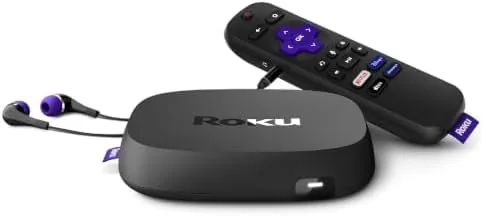

Streaming players come in two philosophies. There are the tiny sticks that hide behind a television and lean on Wi Fi, and there are the boxes that sit on the shelf, plug into the network with a cable, and keep a remote in your hand that does more than point at the screen. The Roku Ultra LT (2023) belongs firmly to the second camp. It packs 4K, HDR, and Dolby Vision, adds a wired Ethernet port, and pairs it all with a voice remote that has a headphone jack for private listening. I have used it as my main living room player for a month, and the story it tells is quieter and more reliable than the spec sheet suggests.
Before the first stream, the usual disclosure. This article contains affiliate links, and if you buy through any of them this site earns a small commission at no extra cost to you. That does not change what I test or recommend in this Roku Ultra LT review.
Design and Build
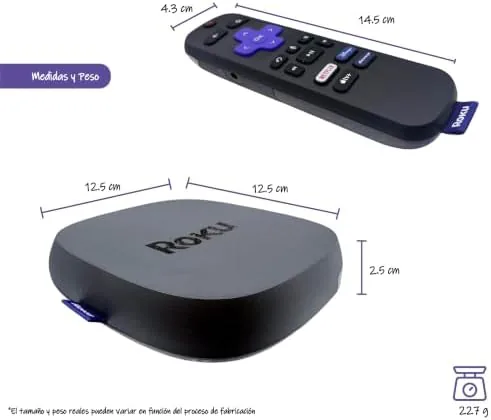
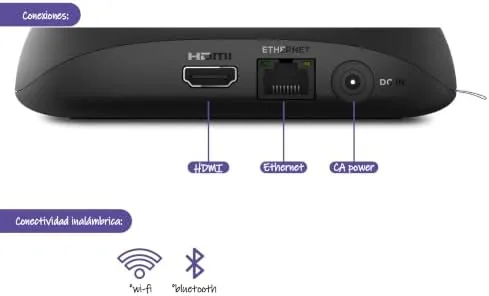
The Ultra LT is a small black slab, roughly the size of a stack of coasters, with a matte finish that does not show fingerprints and a low profile that disappears on a shelf. Around the back sit the HDMI port, an Ethernet jack, and a USB port, while the front carries a tiny status light that blinks during setup and then settles into near invisibility.
The box build is sturdy and the footprint is small enough to slip behind a television or beside a sound bar. Unlike a dongle, the Ultra LT can sit on a shelf where its antenna has clean air, and the wired Ethernet port means the box can join the network with zero Wi Fi dependence at all. That single detail separates it from every stick on the market.
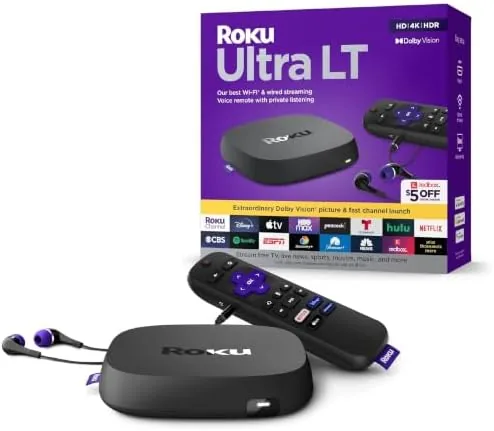
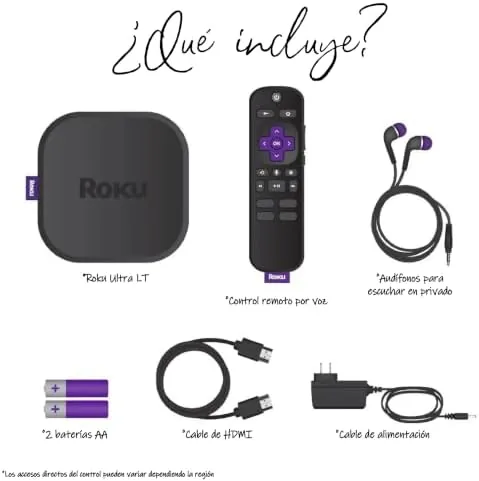
In the box Roku includes the player, a voice remote, a pair of wired earbuds, an HDMI cable, and a power supply. The remote has the familiar Roku layout: a d pad, quick launch buttons for major services, a voice button, and a 3.5mm headphone jack tucked into the edge, which is the heart of the private listening feature.
Key Features
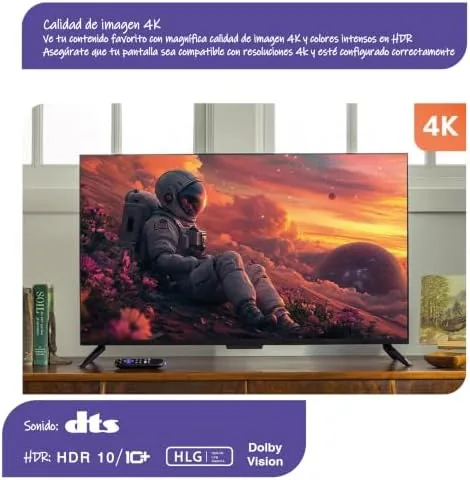
The picture output is the headline. The Ultra LT drives 4K resolution and supports HDR10, HDR10 Plus, and Dolby Vision, so the player hands the best signal it can to whatever display is connected. On a Dolby Vision capable television the difference is visible in the highlights and colors of streamed content, and the box passes the format through cleanly.
Private listening is the feature that makes the box feel generous. Plug the bundled earbuds into the remote and the audio leaves the speakers and plays through the remote instead, which means watching after everyone has gone to bed without disturbing the house. The remote handles the audio itself, and the feature works across every streaming app on the platform.
The voice remote adds another layer. The dedicated voice button searches across services, launches apps, and controls playback by voice, and the remote works point anywhere over RF rather than needing line of sight to the player. The Ethernet port, meanwhile, guarantees the most stable stream the network can provide, which matters for anyone in a house where Wi Fi congestion is a real problem.
Under the hood a quad core processor drives the Roku operating system, and the box supports audio passthrough for surround formats so sound bars and receivers get the right signal. A USB port offers a path to play local media files, rounding out a feature set that covers streaming, local playback, and search.
Real-World Performance
Setup took about three minutes. The box powered on, connected over Ethernet instantly, and walked through the Roku onboarding without a single glitch. App installation from the channel store was quick, and within ten minutes the living room was streaming in 4K.
In daily use the Ultra LT is fast enough to never annoy. The menu moves crisply, apps launch within a second or two, and streaming starts with minimal buffering on a wired connection. Roku's interface is famously simple, and the box serves it up without the ad density and dead ends that bloat some competing platforms.
Picture quality delivered on the format support. On my 4K HDR television, Dolby Vision content looked punchy and detailed, and the box handled the metadata without washing out or crushing dark scenes. Even standard high definition upscales looked clean, which is the quiet test most players fail.
The private listening feature became a nightly habit. Plugging in the earbuds shifted audio to the remote instantly, and the sound quality was perfectly respectable for streamed dialogue and music. The voice remote's RF connection also meant I could walk across the room and still control playback without pointing the remote at anything, which is one of those conveniences that is hard to give up once you have it.
The USB port also proved useful for a small library of home videos. Plugging in a flash drive let the player browse and play local files through the same remote and interface as streaming, a small convenience that keeps the box useful well beyond the app stores.
Pros and Cons
Pros:
- 4K output with HDR10, HDR10 Plus, and Dolby Vision
- Ethernet port delivers a rock solid wired stream
- Private listening works through the remote's headphone jack
- Simple, fast Roku interface with broad app support
- Voice remote works point anywhere over RF
- Bundled HDMI cable, earbuds, and power supply
Cons:
- Quad core power is modest by flagship standards
- No Wi Fi 6, so wireless users get earlier generation speeds
- No Dolby Atmos decoding on the box itself
- The physical design is plain rather than premium
How It Compares
Set against the Roku Streaming Stick 4K, the Ultra LT trades compact size for substance. The stick hides behind the TV and runs on Wi Fi, while the Ultra LT brings Ethernet, a USB port, and the private listening remote. For a living room with a sound bar and a demanding network, the box is the better tool.
| Feature | Roku Ultra LT | Streaming Stick 4K |
|---|---|---|
| Form factor | Shelf box | HDMI stick |
| Ethernet | Yes | No |
| USB port | Yes | No |
| Private listening | Remote headphone jack | App only |
| 4K with Dolby Vision | Yes | Yes |
Compared with a premium player like the Apple TV 4K, the Ultra LT costs less and keeps things simpler, but gives up the fastest silicon and the tightest integration with one ecosystem. For most households the Roku hits the better balance: all the mainstream apps, honest picture quality, and a remote that just works.
Who Should Buy the Roku Ultra LT
Buy this player if you want 4K streaming without fuss, if your living room has Wi Fi dead spots that a cable would fix, or if you watch after the household goes to bed and want the private listening the remote provides. It suits families, cord cutters, and anyone who values A Simple interface Over a learning curve. If you want the very fastest premium experience, the top tier players are the step up.
You can check the current price at the Roku Ultra LT on Amazon. If portability matters more than Ethernet, the Streaming Stick 4K is the lighter alternative.
How We Test
I used the Roku Ultra LT as my main living room player for a month, streaming daily across all the major services, watching 4K and Dolby Vision content, and testing the voice remote and private listening every night. I ran it over both Ethernet and Wi Fi to compare stability, and I checked local playback through the USB port.
Streaming hardware reviews follow the same practical approach that The Verge uses in its home entertainment coverage: real apps, real viewing, and honest notes on interface and reliability. The Ultra LT earned a month of zero interruptions, which is the outcome that matters most in a living room.
Roku Ultra LT: Questions People Ask
Does the Roku Ultra LT support 4K and Dolby Vision?
Yes. The Ultra LT outputs 4K resolution with HDR10, HDR10 Plus, and Dolby Vision, so the picture scales with your display. On a capable television the Dolby Vision content looks notably detailed and well balanced.
Can I use private listening with the Roku remote?
Yes. The voice remote has a headphone jack, and the bundled earbuds plug straight in so audio plays through the remote instead of the speakers. It works across every streaming app, which makes late night viewing effortless.
Does the Ultra LT need a wired Ethernet connection?
No, it works over Wi Fi just fine. The included Ethernet port is there for anyone who wants the most stable wired stream possible, and in a congested household that cable can make a real difference to buffering.
How is the Ultra LT different from a Roku Streaming Stick?
The Ultra LT is a shelf box with Ethernet, a USB port, and the private listening remote, while the sticks are smaller, Wi Fi only, and lack those extras. The current price and availability are shown at the Roku Ultra LT listing.
As an Amazon Associate, I earn from qualifying purchases.



