
There is a moment every podcaster meets when the built in laptop microphone is no longer good enough, and the search begins for a microphone that captures a voice the way a studio would, without demanding an interface and a whole rack of gear. The Audio-Technica AT2020USB+ is built for exactly that moment. It takes the respected cardioid condenser capsule from the classic AT2020 and feeds it straight into a computer over USB, with a headphone jack for live monitoring built right in. After months of recording with it across podcasts, voice notes, and video calls, I can say it earns its place on any creator desk.
Before the take, the standard note: this article contains affiliate links. If you buy through any of them, this site earns a small commission at no extra cost to you, and it never changes what I test or what I recommend in this Audio-Technica AT2020USB+ review.
Design and Build
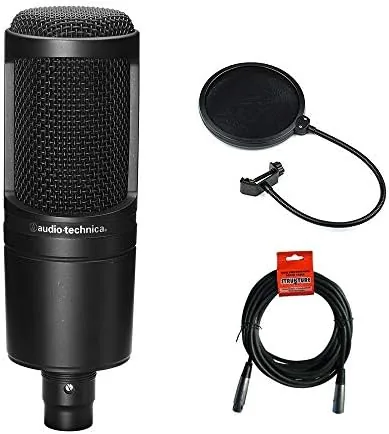
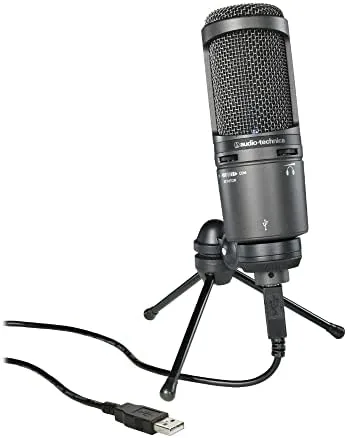
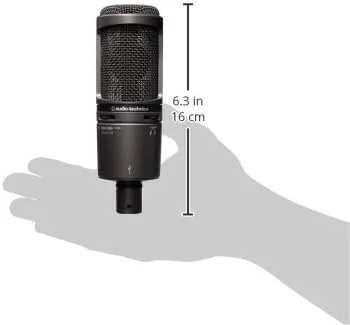
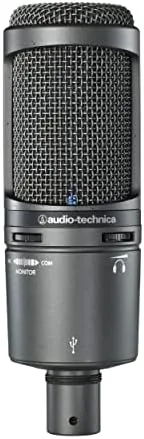
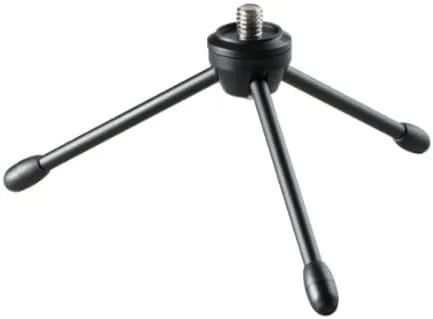
The AT2020USB+ keeps the familiar AT2020 silhouette: a slim matte black barrel with a fine metal mesh capsule grille at the top. It stands roughly the height of a hand and carries the microphone body, the XLR style connection, and a sturdy adjustable tripod stand that clamps shut for the bag. The whole unit is professional looking without being theatrical, and it sits quietly on a desk in a way cheap mics never do.
Build quality is where Audio-Technica earns trust. The metal mesh Protects the capsule, the stand hinges are firm, and the whole assembly feels like gear rather than a toy. The base of the stand is weighted enough that the mic does not tip when the cable tugs, and the 3/8 inch thread mount also accepts a standard boom arm if you want to free up the desk. It is clearly meant to survive years of regular recording.
Controls sit neatly on the front of the barrel. A headphone volume dial is on the side with a mute switch above it, and the USB port takes the included cable. There is no on off switch on the mic itself, since the computer handles power, and no software driver to hunt down on modern systems. The design keeps the path from voice to audio simple.
Key Features
The heart is the cardioid condenser capsule. Cardioid means the microphone picks up what is in front of it and rejects most of what comes from behind and the sides, which is the single most useful pattern for a single voice. A room with a window, a fan, or a squeaky chair is far less present in the recording, because the pickup angle narrows around the speaker.
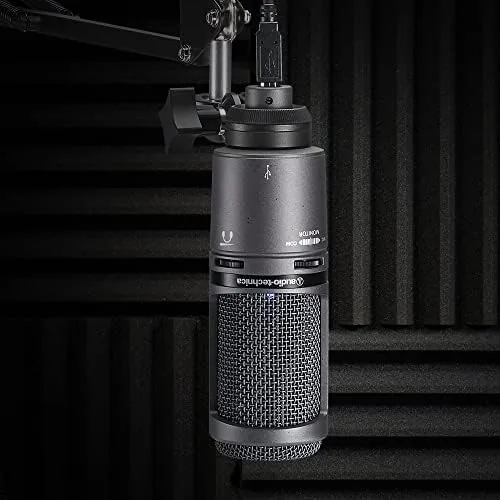
USB connectivity removes the interface. The microphone has its own analog to digital converter built in, so it plugs straight into a laptop or desktop and appears as a sound input device. A condenser of this quality usually needs phantom power from a mixer; here the USB bus supplies everything, which makes it a one cable solution for a home studio.
The built in headphone jack is the underrated feature. It gives you a zero latency monitor of your own voice while recording, so you hear yourself in real time rather than through the software delay. The volume dial on the side adjusts that monitor level without touching the record level, and the mute button kills the input for the parts of a call you do not want on air.
Real-World Performance
I recorded with the AT2020USB+ across a full month as my main voice microphone. The most important result came first: the voice sounds like a broadcast, not a laptop call. My recordings came back warm, present, and free of the hollow room sound that plagues in built mics, and friends on calls noticed the difference without being told I had switched.
The pickup pattern worked as promised. I recorded in a room with a computer fan and a window facing the street, and neither intruded on the track. Words spoken a few inches from the grille came through full and clear, while sounds a few feet behind the capsule stayed in the background. For a single speaker that is exactly the isolation a condenser can deliver when paired with a modest room.
Monitoring changed my recording habit. With the headphone jack I could hear myself live, and the volume dial let me adjust the monitor without re-recording a take. Muting during a cough or a page turn became second nature, and the results stayed clean even on longer sessions where a clumsy speaker would normally leave marks in the audio.
The honest limits are worth recording too. The microphone is a condenser, so it does not ignore handling noise or a loud room the way a dynamic mic might, and it needs to be close to your mouth for the warm tone. It also picks up some background if you run it at high gain in an untreated room. Treat it as a tool that rewards good mic habits, and it rewards you in return.
Pros and Cons
Pros:
- Genuine studio grade condenser sound over a single USB cable
- Cardioid pattern rejects room noise behind the speaker
- Built in headphone jack with volume control for zero latency monitoring
- Solid tripod stand and sturdy metal build
- Plug and play on Mac and Windows with no driver
Cons:
- Condenser pickup still rewards a quiet room and good mic position
- Requires the included stand or a third party boom arm
- No on board gain dial on the microphone itself
- Larger than a simple plug in mic, needs a little desk space
How It Compares
Set next to The Wired AT2020 with an interface, the USB+ gives up nothing in capsule quality and gains a much simpler setup. The wired version needs an XLR interface and a phantom power source, while the USB+ hands you the same capsule in a one cable package. If you already own an interface, the wired version is worth comparing; if you do not, the USB+ is the practical path.
| Feature | AT2020USB+ | Wired AT2020 |
|---|---|---|
| Connection | USB straight to computer | XLR, needs interface |
| Capsule | Cardioid condenser | Cardioid condenser |
| Headphone monitor | Built in jack | Not included |
| Phantom power | Not needed | Required |
| Setup | Plug and play | More involved |
Compared with a cheaper dynamic USB microphone, the AT2020USB+ is brighter and more detailed for a voice up close, while the dynamic is more forgiving of room noise and rougher handling. For a quiet podcasting room the condenser wins on detail; for a loud game room the dynamic is often the safer pick. The Audio-Technica sits on the studio end of that trade.
Who Should Buy the Audio-Technica AT2020USB+
Buy this microphone if you record a podcast, run voice overs, stream, or take hours of video calls and want a voice that sounds professional without building a rack. It suits the creator moving up from a laptop mic, the podcaster who wants a second voice at the table, and anyone who values the zero latency monitor over a cheaper microphone with no jack.
You can check the current price of the AT2020USB+ at the Audio-Technica microphone on Amazon. If you prefer a boom arm, factor in the mount, since the tripod is solid but takes desk space.
How We Test
I used the AT2020USB+ as my main recording microphone for a month, tracking podcasts, voice notes, and a series of calls, and I judged the voice quality, the cardioid rejection, the monitor loop, and how easy the whole setup was on both Mac and Windows. I compared it against the wired AT2020 and a budget USB dynamic to place it fairly.
Independent microphone testing is thorough at sites such as TechRadar, which covers the best USB microphones and their pickup behavior. My month of recording grounds that data in a real desk, a real voice, and honest takes.
If you are choosing between this and the wired version, the deciding point is whether you own an interface, and the live AT2020USB+ listing shows the current price and the included accessories.
Audio-Technica AT2020USB+: Questions People Ask
Do I need an audio interface with the AT2020USB+?
No. The microphone plugs into a USB port on a computer, and the built in converter feeds a clean digital signal straight into your recording software. There is no interface, no phantom power, and no extra hardware in the chain.
Does the microphone filter background noise?
The cardioid pickup pattern focuses on what is in front of the capsule and rejects much of the sound behind and to the sides, so room rumble and chair noise are cut well. A quiet room and a position close to the grille improve the result further.
What is the headphone jack on the microphone for?
It lets you monitor your own voice live with zero latency while you record, and the volume control on the front adjusts the headphone level without changing the record level. The mute button above it cuts the input for off air moments.
As an Amazon Associate, I earn from qualifying purchases.