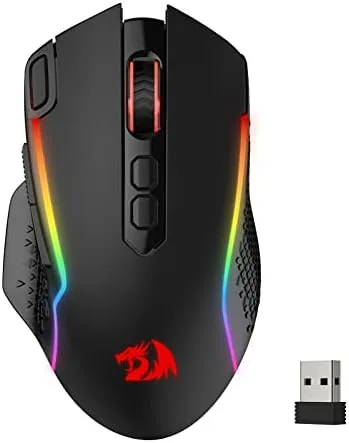

The cable has always been the weak point of a gaming setup. It drags across the desk, it snags on the keyboard, and it turns a frantic match into a tug of war with your own peripherals. Wireless gaming mice used to be the expensive answer to that problem, but budget brands have changed the equation over the last few years. The Redragon M810 PRO sits squarely in that new middle ground, promising a cable free connection, a 10000 DPI sensor, remappable Buttons, and RGB lighting at a price that undercuts the big names by a wide margin.
I spent three weeks with the M810 PRO as my only mouse, using it for shooters, strategy games, and everyday desktop work. This review covers the build, the features, and how the wireless link behaves in practice. The honest version is that the M810 PRO does a great deal well and a few things merely acceptably, and knowing the difference before you buy is worth more than a spec sheet.
Before the details, the standard note. This article contains affiliate links, and if you buy through one of them the site earns a small commission at no extra cost to you. That commission never changes what I test or what I recommend.
The M810 PRO is not trying to be a minimalist office pointer. It is a full size gaming mouse with a sculpted right handed body, a glowing logo, and enough buttons to keep a macro lover busy. The rest of this review walks through the design, the sensor, and the wireless behavior that decide whether this mouse stays on your desk.
Design and Build
The M810 PRO uses a familiar right handed ergonomic shape with a raised back that fills the palm and a gentle curve on the left side for the thumb. The shell is a glossy black plastic with RGB that shines through the logo on the back and along the edges of the scroll wheel. The glossy finish looks sharp out of the box, but it picks up fingerprints quickly, and players with naturally warm palms will feel the surface slide more than a matte coating would.
The build quality is better than the price point suggests. The main buttons sit on separate plates above the shell, and they click with a clean, tactile response that does not wobble. The scroll wheel has a notched step with a rubber coating, and the side buttons sit high enough that an aggressive thumb grip does not press them by accident. A DPI switch sits behind the scroll wheel, and the left side hosts two programmable buttons above a rubberized thumb rest.
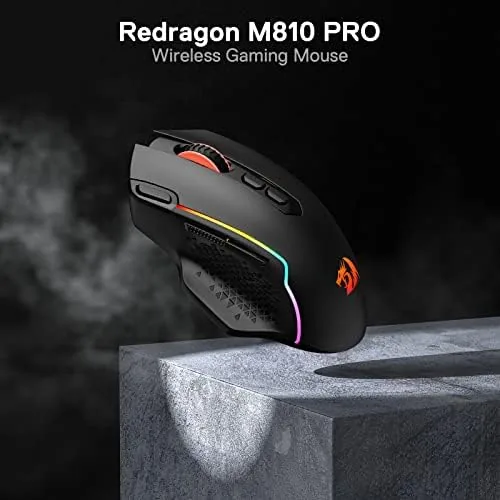
The underside holds a power switch, a storage slot for the tiny 2.4 GHz receiver, and an optical window set into a smooth base. Everything fits together with no creaks, and the mouse has a solid, planted feel during quick flicks. At this weight it is not the lightest mouse on the market, and players who prefer featherweight frames for low sensitivity aiming may find it heavier than ideal.
Key Features
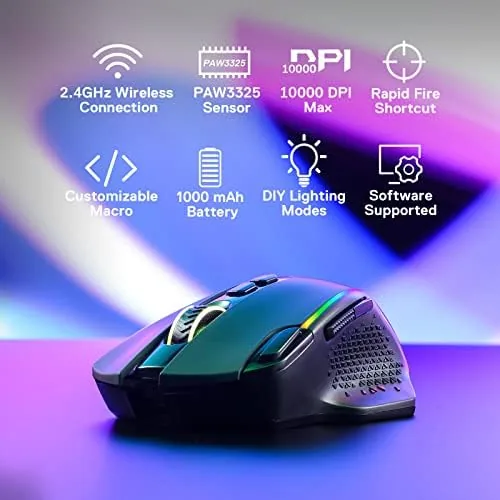
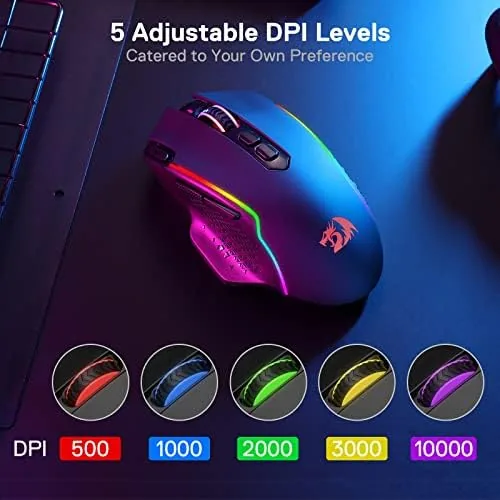
The headline spec is the 10000 DPI optical sensor. That figure is far beyond what most players will ever need, but the value of the number is in what it represents: the sensor is adjustable across a wide range of sensitivities through the DPI button, and it tracks reliably on cloth and hard pads alike. Players who want low sensitivity for aiming or high sensitivity for quick turns can set the mouse where it suits them without opening any software.
Remapping is the deeper feature. The buttons can be reassigned through the companion software, which lets you bind keyboard keys, media controls, or complex macro sequences to any programmable button. The rapid fire function is the gaming focused highlight, turning a held button into an automatic stream of clicks for semi automatic weapons or any game that rewards fast tapping.
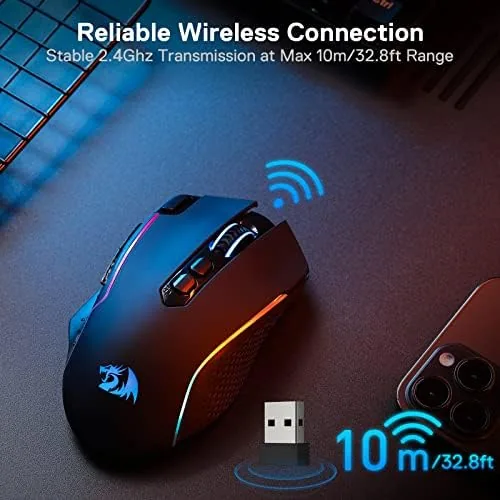
The wireless connection is the other pillar. The M810 PRO uses a 2.4 GHz link through the USB receiver, and Redragon markets it as a zero delay connection. The receiver doubles as a storage slot for travel, and a USB cable is included for charging and for wired operation if the battery ever runs dry mid match.
Real-World Performance
The wireless behavior is where budget mice used to fail, and the M810 PRO does not follow that pattern. I used the mouse over 2.4 GHz for the entire review period, and I could not feel a difference in latency between the wireless link and a wired mouse in fast paced games. Tracking stayed smooth during quick flicks in shooters, and I saw no skipped frames or frozen cursors even when the battery indicator sat low.
The sensor matched that stability. I ran the mouse at a moderate sensitivity for most of my testing, then switched to the highest DPI settings to stress the tracking. The cursor stayed steady on cloth and hard pads, and the lift off behavior never cost me the pointer during a fast flick and reset.
The rapid fire macro was the feature I was most skeptical about, and it earned its place. I bound it to a side button and used it in games with semi automatic weapons. The mouse held the click rate cleanly with no stutter, and holding one button instead of hammering it removed a layer of strain from long sessions.
Battery life held up through the review. I charged the mouse at the start, used it for roughly eight hours a day across desktop work and gaming, and it lasted about a week before the low battery light appeared. The charging cable reaches a useful charge in a couple of hours, and the mouse stays usable in wired mode while it tops up.
The compromises are real and specific. The glossy shell gathers fingerprints and oil from the hands, and anyone with damp hands will want a cloth nearby. The shape is built for a medium to large palm, so players with smaller hands will stretch for the side buttons. The software is functional but plain, covering the essentials of remapping and macros without the polish of premium brand utilities.
Pros and Cons
Pros:
- Responsive 2.4 GHz wireless link with no perceptible lag
- 10000 DPI sensor with smooth tracking on multiple pads
- Programmable buttons and a working rapid fire macro
- Rechargeable battery that lasted a week in testing
- Sturdy build that stays planted during fast flicks
- Budget price that undercuts premium wireless options
Cons:
- Glossy shell shows fingerprints and can slide for damp hands
- Heavier than featherweight esports mice
- Right handed shape leaves left handed players out
- Companion software is basic compared with big brands
How It Compares
To see where the M810 PRO sits, it helps to line it up against a pricier wireless option like the Logitech G305 Lightspeed, one of the most common benchmarks in the budget wireless class. The table below compares the two.
| Feature | Redragon M810 PRO | Logitech G305 Lightspeed |
|---|---|---|
| Sensor resolution | Up to 10000 DPI | Up to 12000 DPI |
| Connection | 2.4 GHz receiver, USB | Lightspeed 2.4 GHz receiver |
| Programmable buttons | Yes, with macros | Six total |
| Power | Rechargeable internal battery | Single AA battery |
| Weight | Heavier, planted feel | Lighter, around 99 grams |
| RGB lighting | Yes | No |
| Price | Lower | Higher |
The G305 is lighter, faster on paper, and better for players who want a true featherweight body. The M810 PRO answers with RGB lighting, a rechargeable battery, and a rapid fire macro that the Logitech mouse does not offer at this price. For players who want a glowing, feature packed wireless mouse on a budget, the M810 PRO is the stronger value. For players chasing grams and pure esports pedigree, the Logitech remains the reference. You can check the current price of the Redragon M810 PRO on Amazon to weigh the two side by side.
Who Should Buy It
The M810 PRO is the right mouse for players who want a wireless connection without paying premium prices, especially those who play shooters and want the rapid fire macro to save their fingers. It also suits desktop users who want one mouse for work and play, because the programmable buttons work as well for media control as they do for game macros.
Skip it if you have small hands, if you demand a lightweight frame for competitive aiming, or if you are left handed and need a symmetrical shape. For everyone else this is a feature rich wireless mouse that outruns its price tag. The M810 PRO listing on Amazon shows the current price and full specifications.

How We Test
I used the Redragon M810 PRO as my only mouse for three weeks, covering desktop work, web browsing, and around thirty hours of gaming across shooters, strategy games, and simulation titles. I ran the sensor across cloth and hard pads, cycled through the DPI settings up to the 10000 ceiling, and bound the rapid fire macro to a side button for extended sessions.
I judged wireless latency by switching back and forth with a wired mouse during the same games and comparing the feel, and I tracked battery life from a full charge through daily use until the low battery indicator appeared. I did not open the mouse or measure the sensor with lab equipment, and I judged comfort through daily use. For a broader look at choosing a gaming mouse, Tom's Hardware has a practical gaming mouse buying guide that is worth reading alongside any purchase.
Redragon M810 PRO Wireless Gaming Mouse: Questions People Ask
How do I remap the buttons on the Redragon M810 PRO?
Install the companion software, select the M810 PRO, and drag a keyboard key, macro, or command onto any programmable button. The changes store on the mouse, so they keep working even when the software is closed.
Is the M810 PRO really wireless without input delay?
In my testing the 2.4 GHz link felt identical to a wired mouse during fast paced games, with no skipped frames or visible lag. It also stays usable in wired mode through the charging cable if you prefer a physical connection.
How long does the battery last on the M810 PRO?
A full charge lasted about a week in my testing with roughly eight hours of use per day. The USB cable charges the internal battery and lets you keep playing while it tops up.
Is the M810 PRO comfortable for small hands?
The shape is sized for medium to large palms with a raised back and a right handed curve. Players with small hands will find the side buttons a stretch, so it is worth handling the shape before committing.
As an Amazon Associate, I earn from qualifying purchases.



