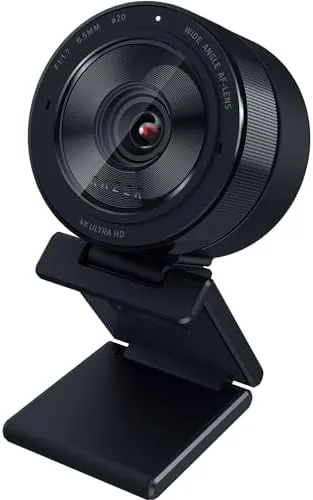

Most webcams are built around a tiny sensor the size of a pinhead, which is why Video Calls look flat, noisy, and gray the moment the lighting is anything less than perfect. The Razer Kiyo Pro Ultra is built the other way, around a large 1/1.2 inch sensor more commonly found in a mirrorless camera, and it promises 4K recording, 1080p at 60 frames per second, and automatic light correction. That design costs more than a typical webcam, so the question is whether the image quality justifies the price. I put the Kiyo Pro Ultra on my desk for three weeks of streams, meetings, and recordings to find out.
Before the details, the standard note. This article contains affiliate links, and if you buy through one of them the site earns a small commission at no extra cost to you. That commission does not change what I test or what I recommend, and the camera was used exactly the way a content creator would use it.
This review covers the build and the lens, the large sensor image quality, the software, and how the camera performs in real streams and calls.
Design and Build
The Kiyo Pro Ultra is built like a miniature camera lens, a substantial cylinder of matte black metal with a wide glass element at the front and a ring of vents around the barrel. It looks more like a lens cap for a proper camera than a webcam, and it communicates the intent immediately. The mounting clamp attaches to a monitor with a solid grip, and the camera tilts through a good range, though there is no rotation for vertical shooting, which is a miss for a camera aimed at content creators.
The built-in shutter is a physical slider that covers the lens completely when you are not on camera, and it is the best privacy feature I have tested on a webcam because it is mechanical rather than a software toggle. A green LED glows when the camera is active, and the whole unit feels dense and premium in the hand. The camera is also heavier than a typical webcam, so it needs a sturdy monitor mount or a tripod, and the included clamp handles a thick monitor edge without wobble.
The package is minimal: the camera, a USB-C cable, and the mounting clamp. There is no ring light and no carrying case, which keeps the design clean. The USB-C connection is a welcome modern choice, and the cable is long enough to reach a desktop tower without an extension.
Key Features
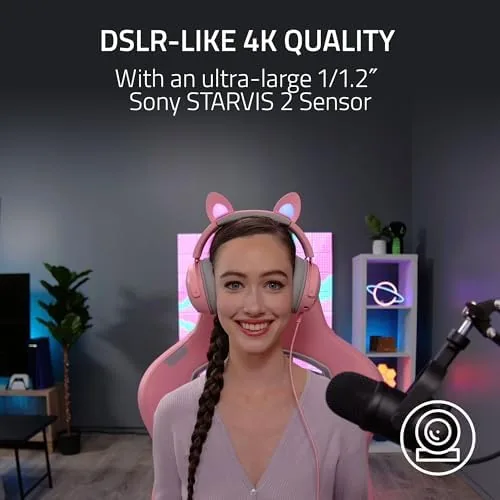
The large sensor is the feature that defines this camera. At 1/1.2 inches, the sensor is many times larger than the ones in standard webcams, which means it captures far more light. In practice that translates to a clean image in dim rooms where other webcams turn to noise, and to better dynamic range, so a face stays visible against a bright window instead of becoming a silhouette.
The resolution options are generous. The camera records 4K at 30 frames per second, which suits recording and pre-recorded content, and it streams 1080p at 60 frames per second for smooth live video. The extra frames matter in gaming streams and on camera movement, and the camera handles both modes without overheating across a full streaming session. A 4K video call is also an option, though most platforms cap at 1080p anyway.
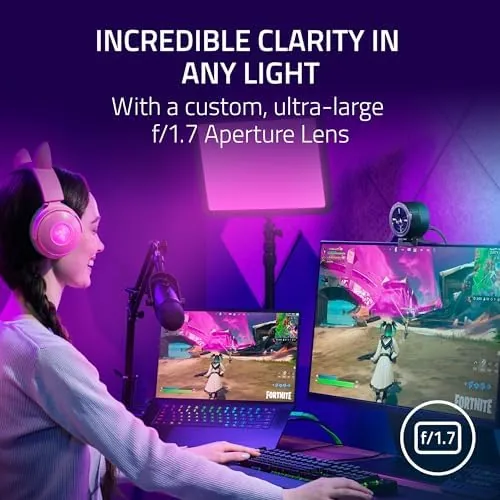
Auto light correction is the headline software feature. The camera has an HDR mode that merges multiple exposures, so shadows lift and bright highlights roll off instead of clipping. In my office, with a window on one side and a lamp on the other, the HDR mode produced a balanced image without any manual setup, which is the whole point of the feature. A small built-in microphone covers calls, and the integrated shutter completes the privacy package.
Real-World Performance
The image quality is genuinely the best I have tested from a webcam. In good light the picture is sharp, detailed, and natural, with skin tones that do not get the waxy look of over-processed budget cameras. The large sensor shows real texture in clothing and hair, and the autofocus is fast enough to track a face leaning in and out of frame. In a video call, the difference from a typical webcam is obvious to everyone on the other end.
The low light performance is where the camera earns its price. In a room lit by a single lamp, the Kiyo Pro Ultra produced a usable, clean image where a standard webcam would have been a grainy mess. The HDR mode held detail in both the bright window and the shaded side of my face, and the automatic exposure adjusted quickly when I moved between light and shadow. for Streamers who do not run a full light kit, this is the feature that matters most.

In streaming software the camera behaved perfectly. OBS picked it up as a standard UVC device, and 1080p60 streaming ran smoothly with no dropped frames. The Razer Synapse software adds controls for white balance, exposure, and field of view, and while the app is not essential, it gives the manual control that serious users want. The built-in microphone is clear enough for calls, but it cannot match a dedicated mic, which most streamers already own.
The honest limits come down to value and a couple of quirks. The camera is expensive, far beyond a standard webcam, and for someone who only joins video calls the price is hard to justify. There is no vertical orientation for social content, and the camera needs Razer Synapse for the full feature set, which some users prefer to avoid. The built-in mic is also merely good rather than great, so serious recording needs separate audio gear.
Pros and Cons
Pros:
- Large sensor delivers the best webcam image I have tested
- Excellent low light performance without extra lighting
- HDR mode handles bright windows and dark rooms at once
- 4K recording and 1080p60 streaming for content
- Mechanical privacy shutter for real security
- Fast autofocus that tracks movement well
Cons:
- Premium price that is hard to justify for casual calls
- No vertical orientation for social media content
- Full features require Razer Synapse software
- Built-in mic is only good, not great
How It Compares
Streamers and remote workers pick between a standard webcam, a premium webcam, and a mirrorless camera rig. The table below compares the Kiyo Pro Ultra with a standard 1080p webcam and a mirrorless camera setup.
| Feature | Kiyo Pro Ultra | Standard Webcam | Mirrorless Rig |
|---|---|---|---|
| Sensor size | Large 1/1.2 inch | Small | Full frame or APS-C |
| Resolution | 4K30, 1080p60 | 1080p30 | 4K and beyond |
| Low light | Very good | Poor | Excellent |
| Setup time | Minutes | Minutes | Hours of tuning |
| Price | High | Low | Very high |
| Best for | Streamers and pros | Everyday calls | Production quality |

Against a standard webcam, the Kiyo Pro Ultra is in another class, especially in low light, and the difference is visible in the very first frame. Against a mirrorless camera, it gives up ultimate image quality but wins on simplicity, because it works out of the box with no capture card and no lens. For a streamer who wants camera-grade video without the rig, it hits a sweet spot, if you can live with the price.
Who Should Buy It
Buy the Razer Kiyo Pro Ultra if you stream, record video, or spend hours in video calls and you care about how you look on camera. It is the right choice for streamers who do not want a full camera rig, for remote workers who want to look professional in bad lighting, and for creators who record talking head content that needs to look sharp. The large sensor and HDR make it the most forgiving webcam on the market.
Skip it if you only join the occasional video call, because a good 1080p webcam costs a fraction of the price and does the job. For anyone whose image is part of their work, the Kiyo Pro Ultra is a genuine upgrade. You can check the current price of the Razer Kiyo Pro Ultra on Amazon when you are ready.
How We Test
I used the Razer Kiyo Pro Ultra as my primary camera for three weeks, including live streams, recorded videos, and daily video calls. I tested it in bright light, dim rooms, and mixed lighting with a bright window, and I compared the image side by side with a standard 1080p webcam under identical conditions.
I checked the streaming modes in OBS at 1080p60 and 4K30, tested the HDR mode across changing light, and evaluated the built-in mic for calls. For a wider look at webcam options and what to expect from streaming cameras, the guide at PCMag covers the best webcams across price ranges. The Razer Kiyo Pro Ultra listing on Amazon shows the current price and the latest customer feedback.
Questions People Ask
Is the Razer Kiyo Pro Ultra really a large sensor webcam?
Yes, it uses a 1/1.2 inch sensor that is far larger than typical webcams, which is why it handles low light and dynamic range so well. The larger sensor captures more light and produces a cleaner, more detailed image.
Does the webcam work with OBS, Zoom, and Teams?
It works with any app that accepts a UVC webcam, including OBS, Zoom, Teams, and Meet, and it records at 4K and streams at 1080p60. It behaved flawlessly in my streaming and call testing.
How good is the built-in microphone?
The built-in mic is clear enough for calls and casual streams, but most streamers will still want a separate microphone for serious recording. It is good, not great.
How does auto light correction help in dark rooms?
The sensor and HDR mode pull detail out of shadows and bright windows, so faces stay visible without adding harsh artificial light. In my test, a single lamp produced a clean, usable image.
As an Amazon Associate, I earn from qualifying purchases.