
The streaming boom changed the webcam market in ways that few products predicted. Logitech saw it coming earlier than most, and the C922 Pro Stream Webcam was its answer to the question every new content creator asks: what camera do I put in front of my face that looks professional without breaking the budget. Years later, this camera still fills the same role, and the renewed version reviewed here brings that familiar performance back at a lower price.
I mounted this renewed C922 on a monitor, on a desk stand, and in front of a laptop over the course of a month. I ran it through OBS sessions, recorded product overviews, and joined a stack of video meetings. What follows is an honest account of how it handles the two jobs it claims to cover: streaming and everyday recording.
Before the details, the standard note. This article contains affiliate links. If you buy through any of them, this site earns a small commission at no extra cost to you, and that commission does not change what I test or what I recommend.
Design and Build
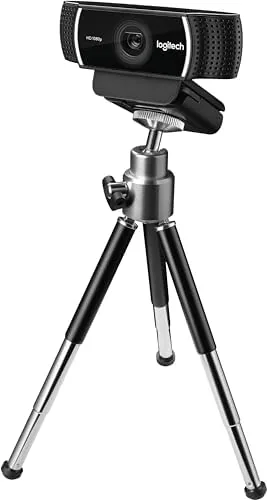
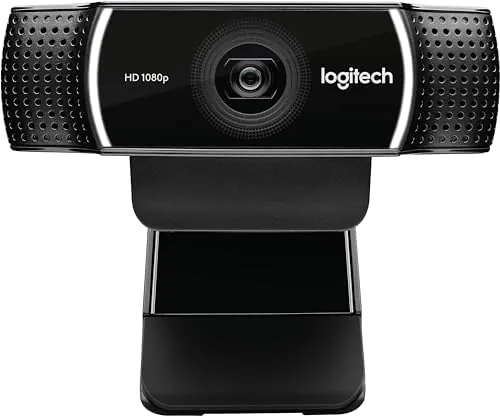
The C922 keeps the familiar Logitech formula: a compact black body with a glass lens at the center and a microphone grille on each side. It is light enough to trust on a clip, yet dense enough to feel more substantial than the plastic cameras that ship inside laptops. The renewed unit I received showed light cosmetic marks on the base, but the lens glass was clean and the mounting clip had full tension.
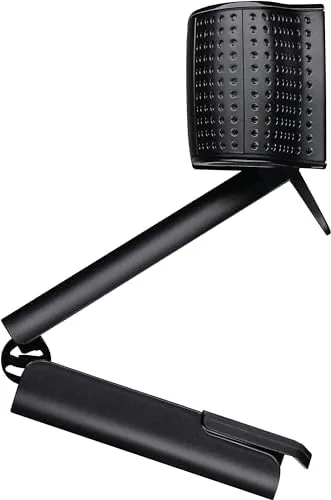
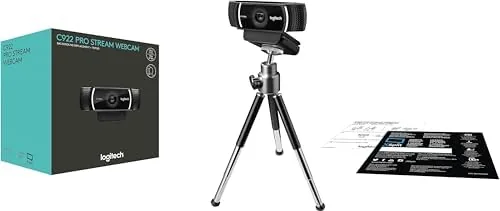
The mounting hardware is one of the unsung strengths. The clip opens wide enough to grip thick monitor bezels, and the same mechanism folds flat so the camera can sit on a desk. A quarter inch thread on the underside accepts a standard tripod, which is the configuration most streamers end up using once they stop balancing the camera on a book stack.
The one meter cable is attached and non removable. That is fine for a desk where the computer sits within reach, but it means you plan your cable run around the fixed length. There is no built in privacy shutter, a detail I keep noting on cameras in this price range, so you either unplug it or slide a cover over the lens when the work day ends.
Key Features
The headline spec is 1080p video at 30 frames per second, captured through the same glass optics that made the C920 a legend. The C922 refines that formula with a wider field of view and a sensor that handles moderate lighting a little more gracefully than its older sibling.
The 720p mode at 60 frames per second is the feature that separates the C922 from the C920. For a streamer whose facecam runs alongside fast gameplay, that extra smoothness makes motion look natural instead of stuttery. At 1080p you stay at 30fps, which is a ceiling worth knowing about before you plan your whole setup around this camera.
Background removal and replacement effects come through Logitech Capture, which pairs the camera with a virtual green screen. The effect is not perfect; it struggles with hair and low light, as all consumer background removal does, but it works well enough for someone who wants to hide a cluttered room without buying a real green screen. Dual microphones with noise reduction round out the package, capturing usable audio for calls even if a dedicated mic will always sound better.
Real-World Performance
In streaming use the C922 is a quiet workhorse. I ran it as the facecam for several recording sessions and the image stayed sharp, the autofocus tracked my face as I leaned forward and back, and the exposure adapted when I turned a desk lamp on mid session. It simply did what a stream camera should do, without begging for attention.
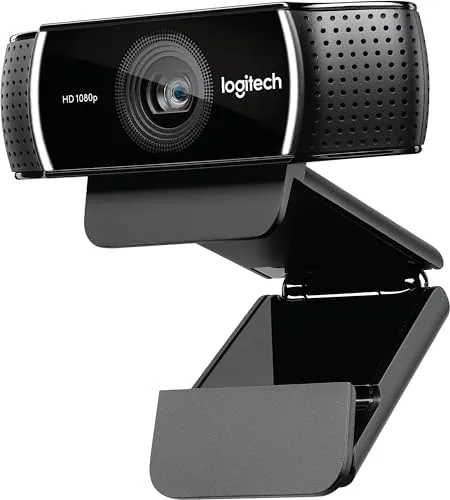
Color reproduction is the camera strong suit. Skin tones look natural rather than washed out, and Logitech Capture gives enough manual control over brightness, contrast, and saturation to dial in a look that matches a channel brand. The 78 degree field of view frames a single person comfortably while leaving room for hands and props to enter the shot.
Low light is the honest weak point. In a dim room the sensor introduces visible noise and the image softens, and the automatic exposure will often brighten the frame at the cost of a flat, milky look. A modest ring light fixes this completely, and most streamers have one anyway, but you should not expect this camera to rescue a dark corner on its own.
The microphone is better than a laptop mic and worse than a dedicated one. In calls my voice sounded full and the hum of a nearby fan faded into the background. For the stream audio, I reached for a real microphone, which is the right call for anyone who cares about how they sound on air.
Pros and Cons
Pros:
- Sharp 1080P Video With natural color reproduction
- 720p at 60 frames per second for smoother facecam motion
- Reliable autofocus and responsive exposure
- Dual microphones are genuinely usable for calls
- Familiar mounting clip plus tripod thread for flexible setups
- Renewed price makes the value proposition stronger
Cons:
- 1080p is capped at 30 frames per second
- Low light image turns noisy and soft
- No built in privacy shutter
- Fixed cable length limits placement options
How It Compares
The C922 does not exist in a vacuum. It competes with the C920 it improved upon, and with newer cameras that cost more and offer more. Here is how it lines up against the familiar alternatives.
| Feature | Logitech C922 | Logitech C920 | Budget 4K Webcam |
|---|---|---|---|
| Max resolution | 1080p at 30fps | 1080p at 30fps | 4K at 30fps |
| 60fps mode | 720p | No | 1080p on some models |
| Field of view | 78 degrees | 78 degrees | 90 degrees |
| Background removal | Yes, via software | No | Often via software |
| Typical street price | Mid range | Slightly lower | Higher |
Against the C920, the C922 earns its place through the 60fps mode and the software extras. Against a 4K camera, the C922 trades resolution for price and simplicity, and for a streamer whose platform caps at 1080p anyway, the higher resolution sensor rarely pays off. That is the honest trade: the C922 is not the most capable camera you can buy, but it is one of the most sensible.
Who Should Buy the Logitech C922 Pro
Buy the C922 if you are starting a stream, upgrading from a laptop camera, or recording talking head videos and want dependable image quality without a learning curve. It suits creators who run OBS, work from home and live on calls, and anyone who values A Camera that works the first time, every time.
It is not the camera for someone who needs 4K output, who streams in 60fps at full resolution, or who regularly shoots in a room with no light. Those buyers should spend more. For everyone else, the C922 remains a proven, sensible pick, and the renewed listing makes it cheaper still.
You can check the current price and condition at the Logitech C922 Pro on Amazon.
How We Test
I used the C922 as my primary camera for a month across streaming sessions, recorded reviews, and daily video calls. I evaluated autofocus response, color accuracy, low light behavior, and microphone quality, and I compared the renewed unit against a retail C920 to confirm the refurbished hardware matched the original performance.
Webcam setup advice and streaming hardware guidance are covered well by the editors at The Verge, who review the broader world of creator gear. My month of testing confirms the C922 holds up: it delivers exactly the clean, dependable 1080p image that made this line famous, at a price that makes the renewed version hard to ignore.
If your desk setup differs, the renewed C922 listing on Amazon shows the exact unit condition and the current ask before you decide.
Logitech C922 Pro: Questions People Ask
Is the renewed Logitech C922 as good as a new one?
In my testing, yes. The renewed unit carried the same sensor, lens, and autofocus performance as the retail version, with only cosmetic wear on the body. Buy from a seller with strong ratings and check the stated condition grade.
Does the C922 do 60 frames per second?
Only at 720p. At 1080p the camera is limited to 30 frames per second, which covers calls and most streaming needs. If you need 60fps at full resolution, you want a more expensive camera.
Does the C922 work with OBS and streaming software?
Yes. It is a standard USB video device, so OBS, Streamlabs, Discord, and Zoom all detect it without extra drivers. Logitech Capture adds scene settings and the background removal effects.
Does the C922 need extra lighting?
Under normal room light, no. In dim conditions the sensor gets noisy, so a basic ring light or desk lamp noticeably improves the image for streams and recordings.
As an Amazon Associate, I earn from qualifying purchases.