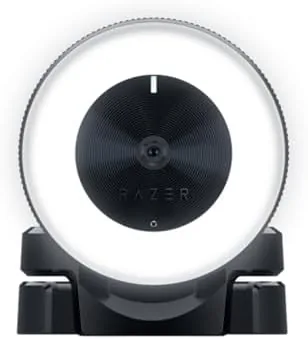

Lighting is the difference between a webcam feed that looks professional and one that looks like you are filming from inside a cave. Streamers learned this years ago, and it is why the Razer Kiyo became such a popular choice. It is a streaming webcam with a built in ring light, an adjustable brightness control, a built in microphone, and advanced autofocus, all aimed at the person who wants to look good on camera without building a full lighting rig. I streamed with it for several weeks to see if the all in one approach holds up.
Before the review, a disclosure. This article includes affiliate links, and if you buy through them I may earn a commission at no extra cost to you. That never influences my verdict.
Design and Build
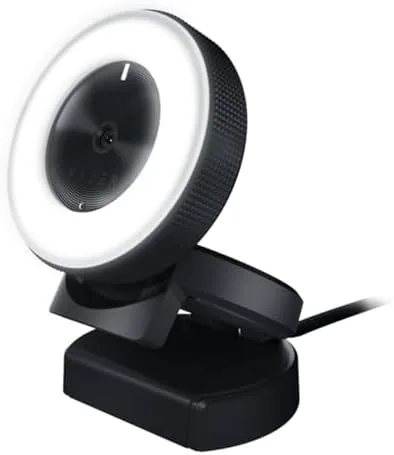
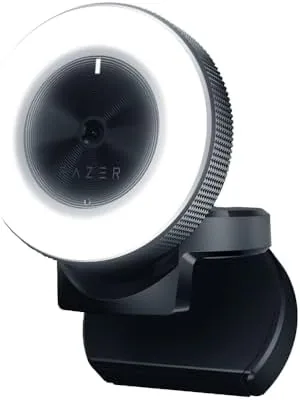
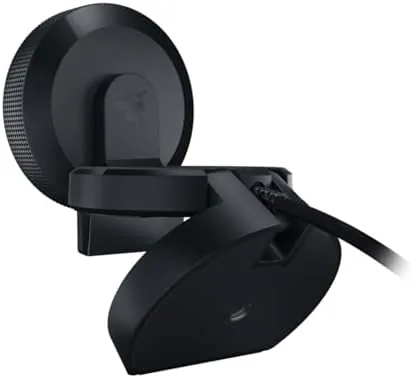
The Kiyo is unmistakably a Razer product. The black body is angular and understated, and the ring of light around the lens is the defining feature when it is on. It mounts to a monitor with a sturdy clip that grips firmly, and it can also stand on its own base if you are shooting at eye level on a desk. The cable is a fixed USB connection, which is the standard for this type of camera.
Build quality feels premium. The casing is solid, the clip has enough tension to hold the camera in place without damaging the monitor, and the ring light ring rotates to adjust brightness through its steps. The whole unit is compact enough to travel, and the mounting options cover both monitor and desktop use. It is a webcam that looks like it belongs in a streamer setup, not a conference room. The cable is long enough to reach a desktop tower or an overhead monitor mount, which removes one more point of friction when you are rearranging your desk.
Key Features
The ring light is the headline feature. It sits around the lens and casts even, flattering light directly onto your face, which removes the harsh shadows and washed out backgrounds that ruin so many webcam feeds. The brightness is adjustable across several levels, so you can dial in just enough light for a dark room or dial it back in a bright one. That single feature is why the Kiyo carved out its place in the market.
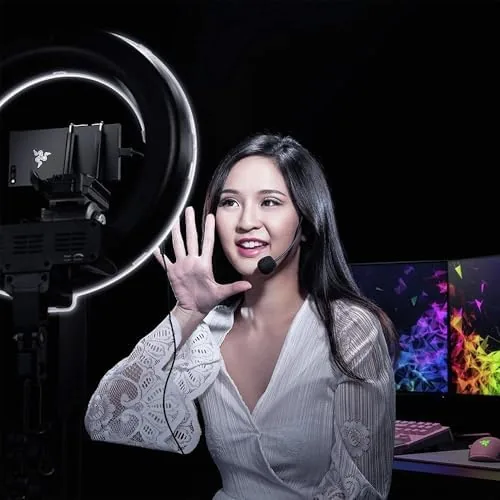
The camera captures 1080p at 30 frames per second, and it drops to 720p at 60 frames per second for smoother motion, which is a common setup for streamers who want fluid video without the bandwidth cost of high resolution. Advanced autofocus keeps you sharp as you move around, and the built in microphone handles casual audio so you can start streaming without a separate mic. It is a capable feature set wrapped in one compact body.
Real-World Performance
I used the Kiyo for streams and video calls over several weeks, and the ring light did exactly what it promises. In a dim room, the light filled in my face evenly, cut background shadows, and made the feed look far better than my previous webcam. The adjustable brightness meant I could tune the light to match the time of day, and the effect was consistent across the whole test period.
Video quality at 1080p 30 FPS is solid for a webcam, with clean color and sharp enough detail for faces. The 720p 60 FPS mode gives you the smoother motion some streamers prefer, though the lower resolution is noticeable if you are doing close up detail work. Autofocus tracked me reliably as I leaned forward and back, and it did not hunt or stutter the way some budget cams do.
One thing worth understanding is how the two modes fit into a real streaming workflow. Most platforms cap uploads below what 1080p 60 FPS would need, so the Kiyo's 30 FPS cap at full resolution rarely holds you back in practice. The 60 FPS option is there for fast motion, such as handheld crafting videos or product close ups, where smoother movement matters more than raw pixels. Choosing the right mode depends on what you are showing, and it is nice to have both.
The built in microphone is genuinely usable. It is not a replacement for a dedicated mic, and it picks up room noise if you stream in a busy space, but for a first stream or a casual call it sounds perfectly acceptable. The biggest practical detail is the ring light, which turns out to be worth more than a lot of expensive camera upgrades.
I also checked how the Kiyo handled different lighting conditions beyond the ring light. In a brightly lit room with the ring light dialed down, the image stayed balanced without blowing out highlights, and in near darkness with the ring light at full, my face remained clearly lit with acceptable background detail. The ring light is not a substitute for a proper three point setup, but it covers the worst cases, which is all most streamers need from a single webcam.
Pros and Cons
Pros:
- Built in ring light gives flattering, even lighting
- Adjustable ring brightness for any room
- 1080p 30 FPS and 720p 60 FPS capture modes
- Advanced autofocus that tracks you reliably
- Usable built in microphone for casual streams
- Sturdy monitor mount and desk stand included
Cons:
- 1080p detail is modest by modern standards
- Built in mic picks up room noise in busy spaces
- No 60 FPS at 1080p resolution
How It Compares
The Kiyo competes with other streaming webcams, where the ring light is the differentiator, and with newer cameras that offer higher resolutions but no integrated lighting. The table below shows how it stacks up against a standard premium webcam and a newer 4K model.
| Feature | Razer Kiyo | Standard Premium Webcam | Newer 4K Webcam |
|---|---|---|---|
| Built in ring light | Yes, adjustable | No | No |
| Max resolution | 1080p 30 FPS | 1080p 60 FPS | 4K |
| Autofocus | Yes, advanced | Yes | Yes |
| Built in microphone | Yes | Yes | Yes |
| Integrated lighting | Yes | No | No |
If you already own good lighting, A 1080p 60 FPS webcam gives you smoother motion at the same price. But if you are starting from scratch and want one box that handles lighting, video, and audio, the Kiyo is hard to beat for the money. You can check the current price of the Razer Kiyo on Amazon to compare.
Who Should Buy It
The Razer Kiyo is for streamers and video callers who want to look good on camera without building a lighting kit. If you are starting a channel, upgrading from a laptop webcam, or working from home and tired of looking washed out in meetings, the built in ring light delivers a visible improvement for a reasonable price.
Skip it if you already own a softbox or ring light, in which case a higher resolution webcam serves you better, or if you need the smoothest possible motion at 1080p. For everyone else, the Kiyo is one of the most practical streaming cameras you can buy. The Razer Kiyo listing on Amazon has the full spec sheet.
How We Test
I tested the Razer Kiyo over several weeks across live streams, recorded videos, and video calls. I evaluated ring light brightness and coverage in dark and bright rooms, image quality in both capture modes, autofocus behavior during movement, and microphone performance in quiet and busy environments. I also checked the monitor mount stability and the desk stand for regular repositioning.
I did not run a lab colorimetry test, because the practical question is whether you look good on camera in your own room. For broader webcam and streaming coverage, PCMag reviews webcams and streaming gear extensively.
Razer Kiyo: Questions People Ask
Does the Razer Kiyo stream in 1080p?
Yes, it captures 1080p at 30 frames per second, and it also supports 720p at 60 frames per second for smoother motion.
Can you adjust the ring light on the Razer Kiyo?
Yes, the built in ring light has adjustable brightness so you can control how much light it casts on your face.
Does the Razer Kiyo have a microphone?
Yes, it has a built in microphone, which is fine for quick calls even though dedicated mics still sound better.
Does the Razer Kiyo have autofocus?
Yes, it uses advanced autofocus to keep you sharp as you move closer to or away from the camera.
As an Amazon Associate, I earn from qualifying purchases.