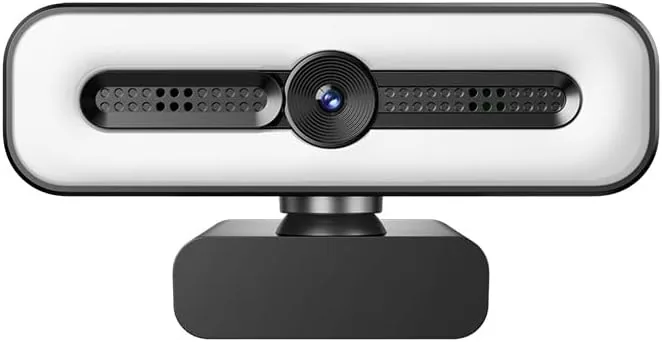

Most webcam problems are not really webcam problems. The picture looks muddy because the room is dark, the audio sounds hollow because the laptop mic is a foot away, and the focus drifts because the camera keeps hunting. The 4K UHD Ring Light Webcam attacks those three failures directly, with a built-in ring light for even face lighting, dual AI noise-cancelling microphones for clear audio, and PDAF autofocus that locks onto your face. I used it for a month of video calls, a few live streams, and a pile of recordings, and this review is the honest record of what it fixed and what it left alone.
Before the details, the standard note. This article contains affiliate links, and if you buy through one of them the site earns a small commission at no extra cost to you. That commission does not change what I test or what I recommend. The camera reviewed here was used exactly the way a streamer or a remote worker would use it. If you want the current price, the 4K UHD ring light webcam listing on Amazon is the fastest way to check it.
This camera is built around one idea: solve the lighting problem inside the camera so you do not have to solve it with a separate light. This review covers the design, the features, real performance across calls and streams, and who should trade their laptop camera for it.
Design and Build
The camera has a clean, modern look that fits a professional desk. The body is compact, with a wide base that clips securely onto a monitor top or sits on a tripod, and the whole unit rotates on its mount to frame your face properly. The 73 degree field of view is a smart middle ground, wide enough to show you and a small desk area, narrow enough that you do not look like a tiny head in a huge room.
The ring light wraps around the lens, and the built-in privacy cover slides over the glass when you want the camera physically blocked. The construction feels solid, with no wobble in the mount and controls that sit where your hand expects them. It is the kind of hardware you set up once and forget about, which is the highest compliment a webcam can earn.

Key Features
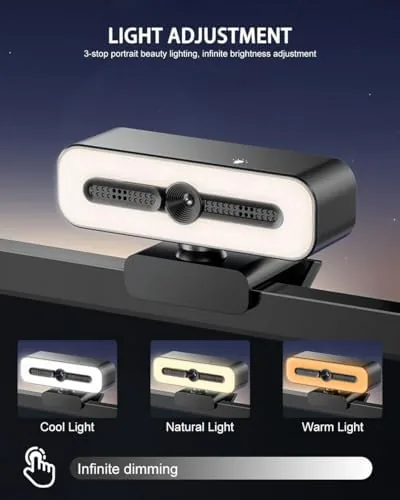
The ring light is the feature that changes everything. The circular light around the lens shines evenly onto your face, which is the single biggest improvement a webcam can offer, because it fixes the dark room and the backlit window that ruin most laptop camera footage. The light has adjustable brightness, so you can dial it to suit the room rather than looking like you are being interrogated.
The dual AI noise-cancelling microphones handle the audio. The pair of mics capture your voice and use AI processing to suppress keyboard clicks, fans, and room hum, which means you do not need a separate microphone for most calls. The PDAF autofocus keeps you sharp as you move, and the 1080P output delivers clean, detailed video for the platforms that actually matter, from Zoom and Teams to Twitch and YouTube.
The auto light correction ties it together. The camera adjusts its exposure to match the room, so moving from a bright window to a dark corner does not leave you blown out or in shadow. The privacy cover completes the package, giving you a physical shutter for the moments you are not on camera.
Real-World Performance
The first video call told the story. I joined a meeting in a room that always looked bad on the laptop camera, a dim home office with a bright window behind the desk, and for the first time I looked like a person rather than a silhouette. The ring light evened out the face, the auto exposure handled the window, and the 1080P image was sharp enough that my coworkers asked what camera I had bought.
The microphones earned their keep across the month. I typed during a call with mechanical keyboard clicks and the other end heard my voice, not the keys, and a fan running in the same room stayed in the background. The AI processing is aggressive enough to be useful and careful enough not to make my voice sound robotic, which is the balance most noise-cancelling webcam mics get wrong.
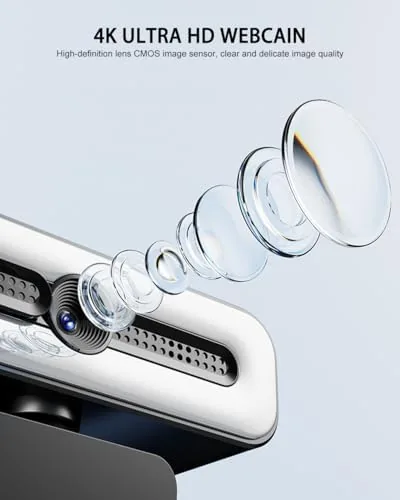
For streaming, the autofocus proved its worth. During a live session I leaned in to read a comment, leaned back to gesture, and briefly stepped out of frame to grab a drink, and the camera tracked and recovered without the constant refocus hunting that cheaper webcams do. The focus locked on fast and stayed put, which is exactly what you want when the audience is watching.
The ring light performed across room conditions. In a bright daylit room I dialed the light down to a subtle fill, and in the evening I ran it at full strength, and both times the face stayed evenly lit. The 73 degree field of view framed me well with the desk visible but not stretched, and the image held its quality on both wired and Wi-Fi connections.
The honest limits are minor. The 1080P output is excellent, but the 4K sensor is really about image processing rather than 4K delivery, so do not buy it expecting 4K feeds to platforms that would not use them anyway. The ring light works best on the lens axis, which is natural for a webcam. And the built-in mics, while impressive, are still a step below a dedicated microphone for serious recording.
Pros and Cons
Pros:
- Built-in ring light fixes the lighting that ruins most webcam video
- Dual AI noise-cancelling mics remove the need for a separate mic
- PDAF autofocus tracks faces quickly without hunting
- Auto light correction handles windows and dark rooms
- Physical privacy cover blocks the lens when idle
- 73 degree field of view frames the face well
Cons:
- Outputs 1080P despite the 4K sensor branding
- Built-in mics are good but not studio grade
- Ring light works best on the lens axis
- Extra setup for a tripod mount compared to the clip
How It Compares
The ring light webcam competes against a plain 1080P webcam and the classic approach of a camera plus a separate light. The table below lines up the three options.
| Feature | Ring Light Webcam | Plain 1080P Webcam | Camera Plus Light |
|---|---|---|---|
| Video quality | 1080P clean | 1080P varies | Depends on gear |
| Lighting | Built in | None | Separate light |
| Microphones | Dual AI noise-cancelling | Basic | Usually external |
| Autofocus | PDAF | Often fixed | Varies |
| Setup | One device | One device | Two devices |
| Price | Moderate | Low | High |

The ring light webcam wins on simplicity, because it packages the light, the mic, and the camera into one device that clips onto a monitor. A plain webcam is cheaper but inherits the lighting and audio problems that made your laptop camera look bad, and a separate light and mic setup is better quality but costs more and takes up desk space.
Who Should Buy It
Buy the 4K UHD ring light webcam if you live on video calls, stream regularly, or record content from a home office where the lighting has never looked right. It is the right pick for remote workers, YouTubers starting out, and streamers who want a clean image and clear audio without building a desk full of gear.
Skip it if you already own a good webcam and a separate light, because the upgrade is modest, or if you need A Camera for close up product shots, where the 73 degree field of view is too wide. For anyone who just wants to look and sound good on the next call, this is the camera that does it in one purchase, and the current price of the 4K UHD ring light webcam on Amazon is worth checking.

How We Test
I used the 4K UHD ring light webcam for a month across video calls, a live stream, and recorded sessions. I tested the ring light in a dark room, a bright daylit room, and against a backlit window, and I compared the audio against a dedicated microphone on a few calls. I moved around during sessions to stress the autofocus, and I ran the camera on both wired and Wi-Fi connections to check image stability.
I did not test the camera for 4K delivery, because the platforms I used output 1080P, and I did not test it as a close up product camera, since its field of view is designed for face framing. For a broader look at how webcams compare for home office and streaming use, Wirecutter has a running guide to the best webcams that is worth reading. The 4K UHD ring light webcam listing on Amazon has the full spec sheet and current pricing.
Questions People Ask
Is the webcam 4K or 1080P output?
The camera uses a 4K UHD sensor, but it outputs 1080P video for streaming and calls, which is the practical resolution for Zoom, Teams, and most platforms.
Does the ring light improve the picture?
Yes, the built-in ring light provides even face lighting that fixes dark rooms and backlit windows, which is the biggest single reason webcam video looks bad.
How good are the noise-cancelling microphones?
The dual mics with AI noise cancellation suppress keyboard clicks, fans, and room hum while keeping your voice clear, which removes the need for a separate mic on most calls.
How does the PDAF autofocus work?
The phase detection autofocus locks onto your face quickly and keeps you sharp as you lean in or move around, and it recovers fast when you step out of frame and return.
As an Amazon Associate, I earn from qualifying purchases.