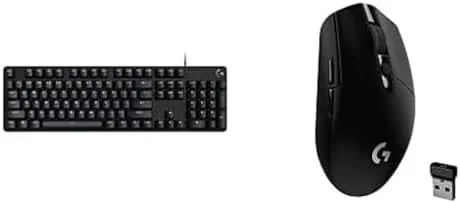
A Keyboard and mouse bundle is usually a compromise: the keyboard feels mushy and the mouse skips, and you end up replacing both within a year. The pairing of the Logitech G413 SE mechanical keyboard with the G305 Lightspeed wireless mouse is different, because it is two real products from the same gaming lineup sold together, rather than a marketing bundle of cut corners. The G413 SE is a full size mechanical keyboard with tactile switches and a metal top plate, and the G305 is a lightweight wireless Gaming Mouse built around the HERO sensor. I used them side by side for weeks of work and gaming to see whether this desktop duo earns its place.
Before the details, the standard note. This article contains affiliate links, and if you buy through one of them the site earns a small commission at no extra cost to you. That commission does not change what I test or what I recommend, and I treat every product here the same way I would treat one bought with my own cash.
Design and Build
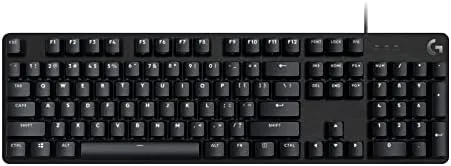
The G413 SE is a sturdy, full size keyboard with a brushed aluminum alloy top plate that gives it a premium feel at a mid range price. The construction is rigid, with no flex when you lean on it, and the frame has a clean, understated look that would not embarrass you on a desk shared with work. The white LED backlighting provides a consistent glow across the keycaps rather than a rainbow of effects, which suits its no fuss personality.
The G305 is a compact, ambidextrous mouse with a rounded shell and a smooth matte finish. It is light in the hand and easy to grip for extended sessions, and the six programmable buttons sit where your fingers naturally find them. The battery compartment on top takes a single AA cell, which is the tradeoff for the long wireless life.
Together the two share a consistent black aesthetic that looks intentional on a desk. Nothing about the combo screams gamer RGB, which makes it a good fit for anyone who wants gaming performance without the flashing lights.
Key Features
The keyboard's defining feature is its mechanical switches. The G413 SE uses Logitech's tactile mechanical switches, which give a clear bump at the actuation point without the loud click of a blue switch. That means satisfying feedback for both typing and gaming, and the full size layout keeps the number pad for productivity work.

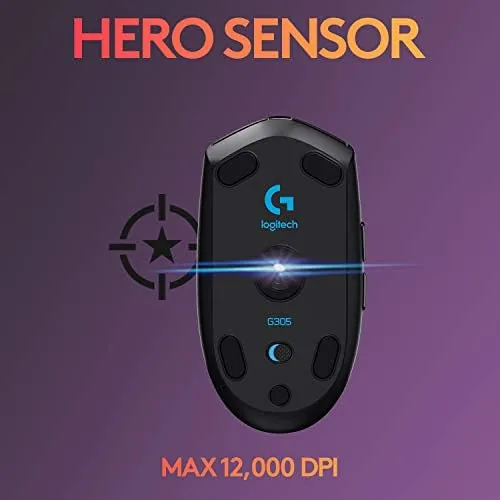
The mouse's headline feature is the HERO sensor, which Logitech rates for extreme DPI sensitivity and low power draw. That efficiency is why the G305 runs for so long on a single AA battery, and why it tracks with the low latency that gaming demands. The wireless connection uses Logitech's Lightspeed protocol, which pairs a fast polling rate with a stable signal.
Both devices are configurable through Logitech G HUB software, where you can remap buttons, adjust DPI stages, and tune the keyboard backlighting. The software is easy to use, and the settings persist on the hardware, so your configuration follows the devices to any computer.
Battery life is a genuine selling point. The G305 advertises months of use on one AA cell depending on settings, and in my testing it far outlasted the rechargeable mice I had been using. The keyboard is wired, so it has no battery concern at all, just a reliable USB connection.
Real-World Performance
I ran the combo through my normal routine: a full day of writing and desk work followed by evening gaming sessions. For typing, the G413 SE's tactile switches were a clear improvement over the membrane keyboards I have used, with a crisp bump on every keystroke and a consistent feel across the board. Long writing sessions left my fingers comfortable rather than fatigued.

Gaming is where the pair shines. In fast paced shooters the G305 tracked flick shots and quick flicks with no perceptible lag, and the low weight made prolonged aim sessions easier. The six buttons came in handy for binding abilities, and the default DPI stages were easy to adjust on the fly through the software.
I deliberately left the mouse on its standard power profile to test the battery claim honestly, and after several weeks of daily use the AA battery was still going strong. That removes one of the most annoying parts of a Wireless mouse, which is the constant recharging that most wireless gaming mice demand.
The G413 SE also handled gaming input reliably. The rollover allowed clean multi key presses during rapid sequences, and the keyboard never registered a missed or double keystroke across the whole test. The backlighting was bright enough to use in a dark room without being distracting.
One practical note: the tactile switches are not silent. They are quieter than blue clicky switches, but in a shared bedroom or an open office the sound of typing will carry, so it is worth knowing before you buy. The tradeoff is the satisfying feedback, and most mechanical keyboard users accept that trade willingly.
Pros and Cons
Pros:
- Tactile mechanical switches with a clear, consistent feel
- Aluminum top plate makes the keyboard sturdy and premium
- HERO sensor mouse with long battery life on one AA cell
- Lightspeed wireless with no perceptible lag in gaming
- Clean, understated design without gaudy RGB
Cons:
- Switches are audible, so not ideal for silent shared spaces
- White backlighting only, no per key RGB effects
- Mouse battery compartment uses a AA cell rather than rechargeable
How It Compares
Against a single all in one wireless keyboard and mouse combo from the general consumer aisle, this pairing wins on every axis that matters to a serious user: real mechanical switches, a high performance sensor, and low latency wireless. The difference is immediately obvious the first time you type and the first time you flick the mouse in a game.
| Feature | G413 SE + G305 | Budget Wireless Combo |
|---|---|---|
| Keyboard switch | Mechanical, tactile | Membrane, mushy |
| Mouse sensor | HERO, high DPI | Basic optical |
| Wireless | Lightspeed, low latency | Standard, variable |
| Battery life | Weeks on one AA | Varies widely |
| Build quality | Aluminum top plate | Plastic throughout |
| Gaming viability | Designed for it | Not really |
Compared with buying the two separately, the bundle is the better value, since it pairs two proven products at a combined price that usually undercuts buying them apart. The G413 SE and G305 are both well regarded in their own right, so the bundle simply removes the shopping decision.
Who Should Buy It
Buy this Logitech combo if you want a real mechanical keyboard and a proper gaming mouse without chasing premium RGB boards, if you hate recharging a mouse every few days, or if you are upgrading from a membrane keyboard and basic mouse in one step. It is an excellent gift for a gamer who is new to mechanical peripherals.

Skip it if you insist on per key RGB, if you need a silent typing experience for a shared office, or if you want a rechargeable mouse you never have to swap batteries in. For everyone else, this is one of the most dependable combos in its price range, and you can check the current price of the Logitech G413 SE and G305 combo on Amazon when you are ready.
How We Test
I tested the G413 SE and G305 as a daily driver for several weeks, using the keyboard for extended writing sessions and the mouse for both productivity and competitive gaming. I evaluated typing comfort, key feel, and accuracy, and I tracked mouse latency, DPI behavior, and battery consumption on a single AA cell.
I configured both devices through Logitech G HUB to verify button remapping and DPI adjustment, and I ran the mouse on its default power profile to test the long battery claim honestly. I also tested the keyboard backlighting in a dark room and confirmed multi key rollover during rapid gaming input.
For independent context on Logitech peripherals, reviews from TechRadar have covered the G413 and G305 lines and offer a useful second opinion on their performance and value. The Logitech G413 SE and G305 combo listing on Amazon shows current pricing and what is included.
Logitech G413 SE and G305 Combo: Questions People Ask
Are the switches on the G413 SE loud?
The G413 SE uses tactile mechanical switches that have a clear click, so they are louder than membrane keys but not as loud as the clickiest blue style switches.
How long does the G305 battery last?
In my testing the G305 ran for weeks on a single AA battery with regular gaming use, and Logitech rates it up to 250 hours depending on settings.
Is the G413 SE RGB or white backlit?
It has white LED backlighting rather than per key RGB, which keeps the price down while still making the keys easy to see in the dark.
Does the G305 work with the keyboard receiver?
The mouse uses its own Lightspeed receiver and the keyboard connects with its own cable, so they work as separate devices on the same system without conflict.
As an Amazon Associate, I earn from qualifying purchases.