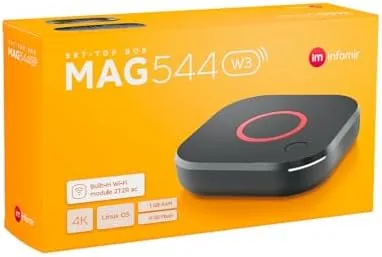

The set top box market has split into two very different worlds. On one side sit the polished streaming sticks from the big platforms, designed for mainstream services and controlled by their own ecosystems. On the other side sits a quieter category of open boxes like this one, built for IPTV services, local media, and users who want a device that does not care which app store you believe in. The Raxxio MAG544w3 belongs firmly to the second world. It is a 4K HDR set top box built around the Amlogic S905Y4 chipset, with 1GB of DDR4 RAM, 4GB of flash storage, and a specification sheet that reads like a checklist for IPTV use. I spent two weeks with it connected to a 4K television, and this is the honest account of how it performed.
Before the details, the standard note. This article contains affiliate links. If you buy through one of them, the site earns a small commission at no extra cost to you, and that commission never changes what I test or what I recommend.
Design and Build
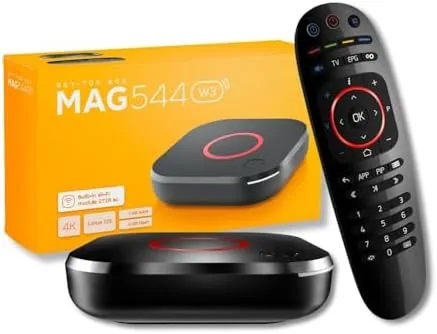
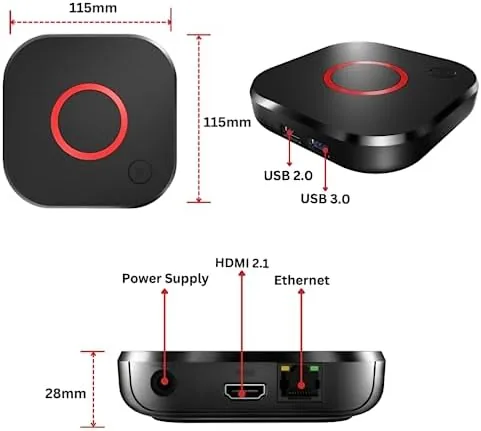
The MAG544w3 is a small, flat slab of a box, about the size of two stacked decks of cards, finished in matte black plastic. It is the kind of device you tuck beside the television and forget is there, which is exactly the design intent. The top has a subtle logo, and the front hides a small status Light That tells you when the box has power and network activity.
Around the back you find the connections that matter: an HDMI output for the television, a LAN port for a wired network, and a USB 2.0 port for a flash drive or a USB media source. There is also an AV output for older televisions, which gives the box a longer life in setups that predate HDMI. The build feels light but not flimsy, and the box ran completely silent in my tests, since there is no fan to spin up.

The box ships with an HDMI cable and a remote control, which are the two things you would otherwise have to buy separately. The remote is simple and functional, with the navigation cluster and playback controls you expect, and it worked reliably from across the room. There is no instruction manual in the box beyond a quick start card, which is fine for a device this straightforward.
Key Features
The Amlogic S905Y4 chipset is the engine of this box. Amlogic is one of the most common names inside Android and IPTV set top boxes, and the S905Y4 is a four core processor that is well matched to 4K media playback. It handles H.265 and VP9 decoding in hardware, which means the chip does the heavy lifting instead of the software, and that keeps playback smooth and the box responsive.

The box supports 4K HDR output, which is the headline for anyone with a modern television. When fed a 4K HDR source, the picture shows the wider color range and better contrast that HDR content is meant to deliver. Dolby Digital Plus audio support rounds out the home theater side, passing through the audio codecs used by streaming and broadcast content to your sound system.
On the networking side, the box has dual band WiFi for both the 2.4GHz and 5GHz bands, plus the wired LAN port. A 5GHz connection is the better default for HD streaming, and the wired option is there for anyone who wants a rock solid connection without relying on WiFi. The 1GB of DDR4 RAM and 4GB of flash are modest by smartphone standards but in line with what this category of box needs for its job. For a look at the current price, the Raxxio MAG544w3 listing on Amazon has the details.
Real-World Performance
I connected the MAG544w3 to a 4K television over the included HDMI cable and used both WiFi and the wired port during the review. The boot time is fast, a matter of seconds from power on to the home screen, and the interface responds without the sluggish pauses that plague cheap boxes. Menus open promptly, and navigation feels snappy for the price.

Playback was where the box needed to prove itself, and it held up well. 4K video played smoothly with No Stuttering, and the HDR output looked right on the television. I played a mix of media files from a USB stick, including HEVC encoded 4K files, and the box decoded them without complaint. The Dolby Digital Plus passthrough worked as expected when I routed the audio through an AV receiver.
The IPTV side of the box, which is its main purpose, ran dependably. Channels changed quickly, the electronic program guide populated as expected, and live streams stayed stable during my testing. The box runs a Linux based operating system, which keeps the interface simple and avoids the app bloat of full Android boxes, though it also means you are tied to the apps and services the box supports rather than the full Google Play catalog.
The honest limits of the hardware showed up when I pushed beyond streaming. With 1GB of RAM, heavy multitasking is not on the menu, and the 4GB of storage fills up quickly if you install much beyond the core apps. A USB stick is a smart addition for media, and the box is best treated as a focused streaming appliance rather than a general purpose computer. During long viewing sessions the box stayed cool and quiet, and the remote never dropped a command.
Pros and Cons
Pros:
- 4K HDR output with Dolby Digital Plus support
- Fast boot and responsive interface for the price
- Smooth HEVC and VP9 decoding through the S905Y4 chipset
- Dual band WiFi plus a wired LAN port
- HDMI cable and remote included in the box
- Quiet, fanless, low power operation
Cons:
- 1GB RAM and 4GB storage are tight for multitasking
- Linux based OS limits app availability
- USB 2.0 port caps external drive speeds
- Budget plastic build feels light
How It Compares
The obvious comparison for a MAG box is an Android streaming box in the same price range, plus the mainstream streaming sticks that most households default to. I compared the MAG544w3 against a generic Android TV Box and a popular streaming stick to see where each approach fits.
| Feature | MAG544w3 | Android TV Box | Streaming Stick |
|---|---|---|---|
| Operating system | Linux | Android TV | Proprietary |
| App catalog | Limited | Full Play Store | Curated store |
| 4K HDR | Yes | Yes | Yes |
| IP TV support | Strong | Good | Limited |
| Ports | USB, LAN, AV | USB, LAN | HDMI only |
| Price | Low | Mid | Mid |
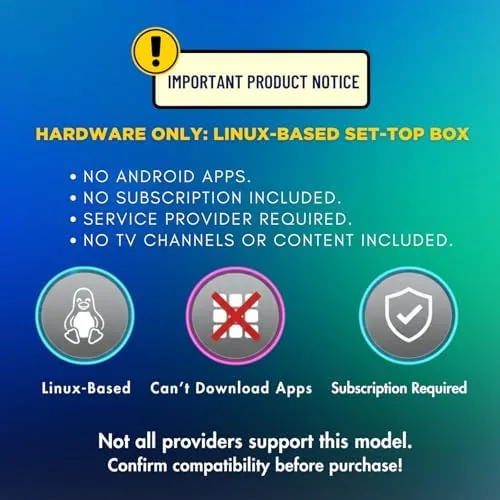
Against an Android TV box, the MAG wins on IPTV focus and simplicity, since the Linux interface does not fight you with bloat, but it loses the full app store that Android offers. Against a mainstream streaming stick, the MAG wins on ports, IPTV support, and the freedom from a single ecosystem, while the stick wins on polish and the best known services. For users whose setup centers on IPTV and local media, the MAG544w3 is the more honest fit, while a stick remains the easy choice for a mainstream household.
Who Should Buy It
Buy the MAG544w3 if you run IPTV services, want a dedicated streaming box that will not nag you with app updates, or need the ports for local media playback. It is also a sensible pick for a secondary television, a vacation home, or a setup where a simple, reliable streaming device beats a full smart TV platform.
Skip it if you want the full Android app ecosystem, if you stream almost entirely from a single mainstream service that you already have a stick for, or if you need to run several apps at once. For everyone else, this is a capable and affordable IPTV box that does its job quietly and well. You can check the current price of the Raxxio MAG544w3 on Amazon.
How We Test
I tested the MAG544w3 over two weeks connected to a 4K television. I played a range of media from a USB stick, including 4K HEVC files, to test the decoder, ran live IPTV channels to check stability and channel change speed, and used both the WiFi and wired connections to compare playback reliability. I also left the box running for several hours at a time to check heat and quiet operation.

I did not test the AV output for older televisions, and I did not push the storage to its absolute limit, so the full extent of those limits is based on the specifications and reasonable use. I also could not verify the performance of specific IPTV services, since those depend on the provider rather than the box. For a broader perspective on streaming hardware, guides such as Tom's Guide's best streaming devices cover the wider landscape. The Raxxio MAG544w3 page on Amazon shows the current price and available options.
Raxxio MAG544w3: Questions People Ask
What chipset powers the MAG544w3?
The box runs on the Amlogic S905Y4 chipset with 1GB of DDR4 RAM and 4GB of flash storage, which is a combination well suited to smooth 4K media playback and IPTV streaming.
Does the MAG544w3 support 4K HDR?
Yes. The box outputs 4K HDR video and supports Dolby Digital Plus audio, so compatible content plays with the wider color range and improved sound on a 4K television and receiver.
What is included in the box with the MAG544w3?
The package includes the set top box, an HDMI cable, a remote control, and a power supply, so everything you need for a first time setup is in the box.
Does the MAG544w3 connect to WiFi?
Yes. The box has dual band WiFi covering both 2.4GHz and 5GHz networks, and it also includes a wired LAN port and USB 2.0 for those who prefer a wired or local media setup.
As an Amazon Associate, I earn from qualifying purchases.