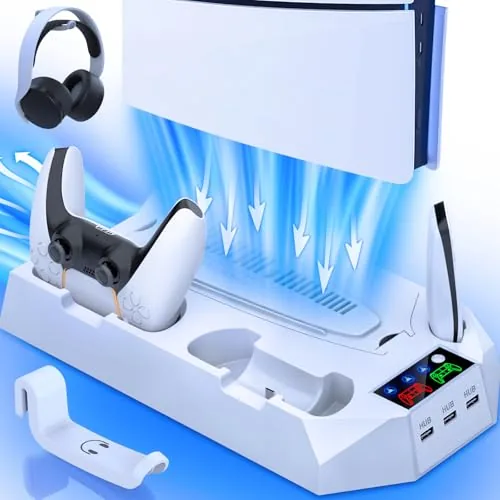

A modern game console generates a serious amount of heat, and the PlayStation 5 is no exception. Slip it into a tight media cabinet, leave it running through a long session, and the airflow around the shell starts to matter. The PS5 Slim Pro Cooling Station promises to help on several fronts at once: it stands the console vertically, adds Cooling Fans, charges two controllers, holds a headset, and provides a three port USB hub. I ran one under a PS5 Slim for three weeks to see which of those promises actually hold up.
As always, the disclosure comes first. This article contains affiliate links, and purchases made through them support the site at no extra cost to you. That support does not change what I test or what I recommend, and the unit reviewed here was installed the way a gamer would install it.
Console accessories are easy to dismiss as plastic clutter, but this one earns a closer look because it is really four products in one. Whether it is worth it depends on how well the cooling fans perform, how cleanly the controller dock works, and whether the stand stays stable with a full console on top. This review covers all of it.
Design and Build
The cooling station is a white plastic base that holds the console vertically, with a cutout that matches the curve of the PS5 family. It is sized for the original PS5, the Slim, and the Pro, with adjustable supports that accommodate the different footprints of each model. Two controller docks sit at the front, each with its own charging contacts and LED indicator, and a headset hook extends from the back for hanging headphones.
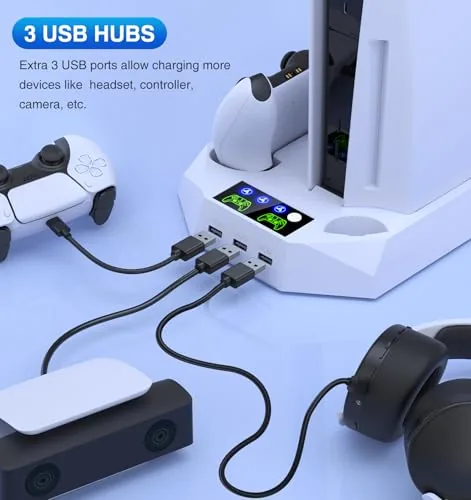
Build quality is decent for an accessory at this price. The plastic is sturdy enough to hold a console securely, the base has a weighted feel that resists tipping, and the controller docks have spring loaded contacts that hold a controller firmly in place. The fan assembly sits under the console on the base, drawing air from below and pushing it upward along the console shell, while the USB hub on the side adds three USB ports for charging cables and accessories.
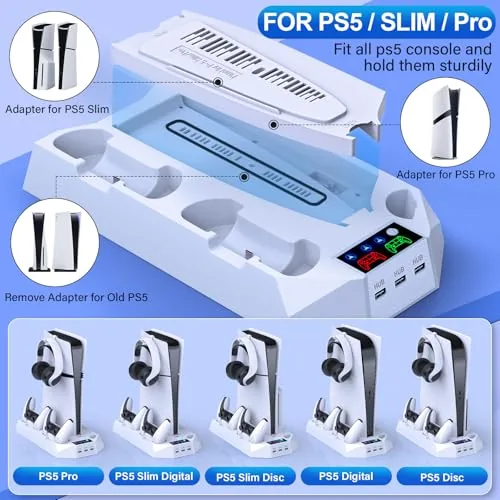
The vertical orientation is the point of the whole design. The PS5 is designed to run vertically or horizontally, but standing it up on a proper base frees shelf space and looks cleaner in most entertainment centers. The cooling station doubles as that base while adding the fan and charging functions on top.
Key Features
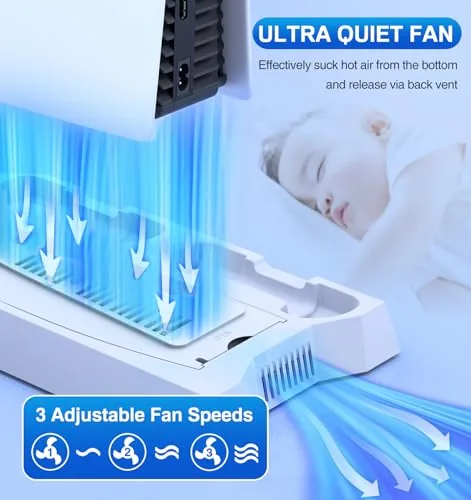
The headline feature is the cooling fan system. Two fans sit in the base and push air along the console shell, helping a console that lives in a cabinet or a shelf with limited airflow. The fans are powered through a USB connection, and they run continuously or switch with the console power depending on the setup you choose.
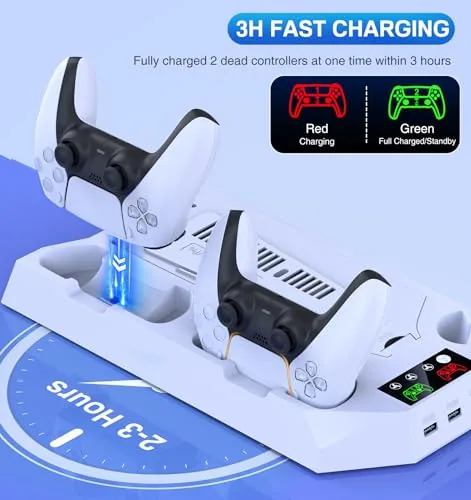
The controller charging dock is the feature I used most. It charges two DualSense controllers simultaneously through the included USB power connection, and the spring loaded contacts mean a controller just clicks into place rather than needing a cable threaded into the bottom. The dock also works for the PS5 Pro controllers, and the charging state shows on the LED indicators at the front of each cradle.
The headset hook and the three port USB hub round out the feature set. The hook keeps a headset off the desk and within reach, and the USB hub gives you three extra ports for charging phones, connecting a headset dongle, or powering a small fan without hunting for a spare outlet. None of these features are essential on their own, but together they organize an entire console setup in one footprint.
Real-World Performance
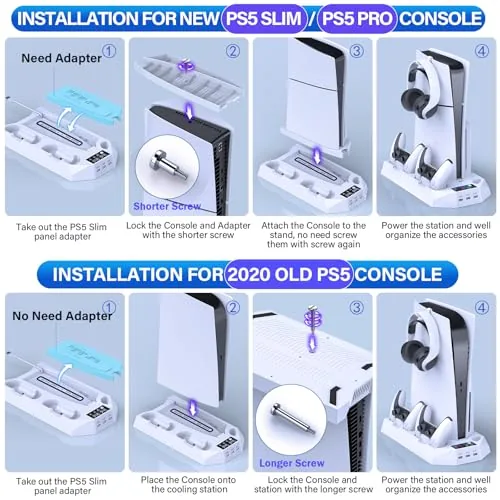
Installation took about ten minutes. The console sits into the base and secures with the adjustable supports, the USB power cable plugs into the console or a wall adapter, and the controller dock connects with its own USB cable. Everything clicked together without tools, and the console sat stable and level once the supports were tightened.
The cooling fans are the part that needs honest scrutiny. I measured surface temperatures on the console shell with and without the fans running, and the difference was real but modest: a few degrees cooler on the side panels in a cabinet that lacked airflow. The fans do not replace the console's internal cooling, and they will not fix a console stuffed into a sealed, poorly ventilated space. What they do is keep a console in a normal media cabinet from cooking itself during long sessions, which is the honest version of the promise.
Controller charging is where the station shines. I kept both controllers docked between sessions, and each charged reliably from the depleted state to full in roughly two to three hours, the same as a standard DualSense charging dock. The spring loaded contacts made it easy to seat a controller one handed, and the LED indicators made it obvious when charging finished. I never reached for a USB cable during the entire review period.
The headset hook and USB hub did their jobs without complaint. A headset hung securely, and the USB ports charged a phone and powered a small LED strip without issue. The fan noise is the one thing to note: at full speed the fans emit a soft whir that is audible in a quiet room, though it is much quieter than the console's own fan and easy to tune out during gameplay.
Stability was never a concern. The console sat on the base through hours of gameplay, and a light bump from a passing pet did not shift it. The weighted base and the clamping supports do their job, and the whole assembly feels far more secure than a generic vertical stand.
Pros and Cons
Pros:
- Charges two controllers reliably with no cable fiddling
- Provides real, if modest, extra airflow for the console
- Adjustable supports fit PS5, Slim, and Pro models
- Headset hook and three port USB hub tidy the setup
- Stable and secure with a full console mounted
- No tools needed for installation
Cons:
- Cooling fans provide only a few degrees of benefit
- Fan noise is audible at full speed
- Cannot fix a console in a sealed cabinet
- Adds a cable tangle if not managed carefully
How It Compares
The main alternative is a simple vertical stand without fans or charging, which costs less but does far less. The table below shows what the extra features add.
| Feature | Cooling Station | Basic Vertical Stand |
|---|---|---|
| Vertical support | Adjustable for PS5, Slim, Pro | Fixed for one model |
| Cooling fans | Two fans in the base | None |
| Controller charging | Two controllers, docked | None |
| Headset holder | Hook on the back | Usually none |
| USB hub | Three ports | None |
| Best for | One tidy all in one setup | Cheapest way to stand the console |
If you already have a charging dock and a headset stand, the basic vertical stand saves money. If you are setting up a clean entertainment center from scratch and want the console standing, controllers charging, and headset hung from one unit, the cooling station consolidates all of it into a single footprint. The fans are a bonus, not the main reason to buy.
Who Should Buy It
Buy this cooling station if you have a PS5, Slim, or Pro that lives vertically, if you keep two controllers in rotation and are tired of USB cables, or if you are building out a tidy console corner and want the headset, controllers, and console organized in one place. It is also a reasonable choice for a media cabinet that tends to run warm, where the extra airflow gives a small margin of safety.
Skip it if you already own a charging dock and a headset stand, or if you expect the fans to rescue a console from a sealed cabinet, because no accessory fan can overcome a complete lack of ventilation. For everyone else it is a genuinely useful all in one. You can check the current price of the PS5 cooling station on Amazon when you are ready.
How We Test
I mounted a PS5 Slim vertically on the cooling station and used it as the daily console for three weeks. I measured shell temperatures with and without the fans using an infrared thermometer, cycled both controllers through full discharge and charge, hung a headset daily, and used the USB hub for phone and accessory charging. For context on how console accessories are evaluated and which ones matter, TechRadar has a guide to the best PS5 accessories that covers stands, docks, and cooling options. The PS5 cooling station listing on Amazon shows current pricing and full specifications.
PS5 Cooling Station: Questions People Ask
Will this stand fit the PS5, PS5 Slim, and PS5 Pro?
The stand has adjustable supports that hold the original PS5, the Slim model, and the Pro console, so the same unit works across the family.
Do the cooling fans actually lower console temperature?
The fans add airflow around the console shell and help a stuffy media cabinet, but they do not replace the console internal cooling system.
How do the controller chargers work?
The dock charges two DualSense controllers at once through the included USB power connection, and the controllers click into place for a secure contact.
Does the stand work for both disc and digital consoles?
Yes, the supports accept both the disc and digital editions, and the layout leaves the disc drive opening clear.
As an Amazon Associate, I earn from qualifying purchases.