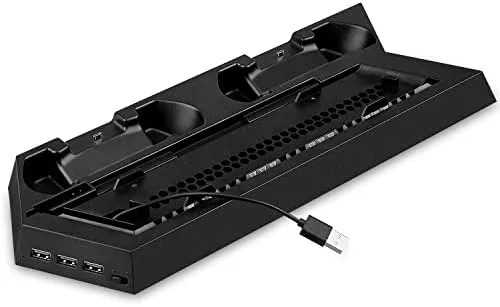

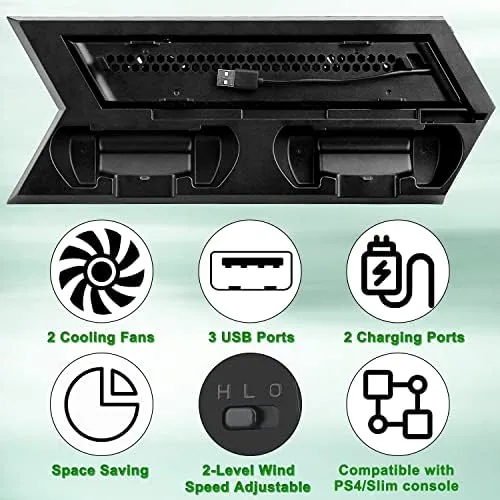
Modern consoles generate a lot of heat, and a PlayStation 4 that sits flat on a crowded media shelf tends to run hot, especially during long sessions of demanding games. The OSTENT dual motor cooling stand tackles that problem with two fans, and it bundles in a vertical stand, a USB hub, and a controller charging dock so the whole setup pulls its weight on the shelf. After several weeks with one under a PS4 and a PS4 Slim, I have a clear picture of what this accessory does well and where its limits sit.
Before the details, the standard note. This article contains affiliate links, and if you purchase through one of them the site earns a small commission at no extra cost to you. That commission never influences what I test or what I recommend.
Design and Build
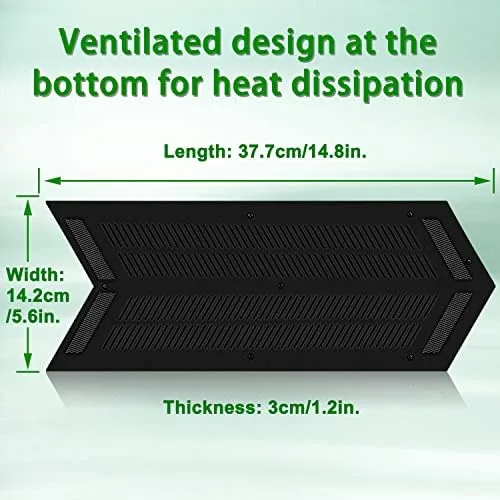
The OSTENT stand is a black plastic cradle with a notch that holds the console vertically, a set of two cooling fans aimed at the console's intake vents, and a small dock area on the front for a controller. The plastic is sturdy rather than premium, which is expected at this price point, but the console sits in the cradle with a solid click and does not wobble when the fans spin up. Rubber pads on the contact points keep the console from scratching and keep the whole unit from drifting across the shelf.
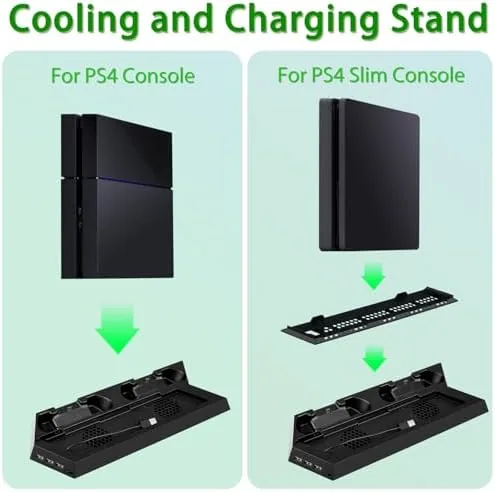
Fitting the stand is straightforward. The PS4 and the PS4 Slim slide into the same cradle, and the included spacers handle the difference in chassis thickness. The design assumes a specific orientation, so you align the console with the vents facing the fans, which is simple enough on the first try but worth reading carefully before you lock the console in.
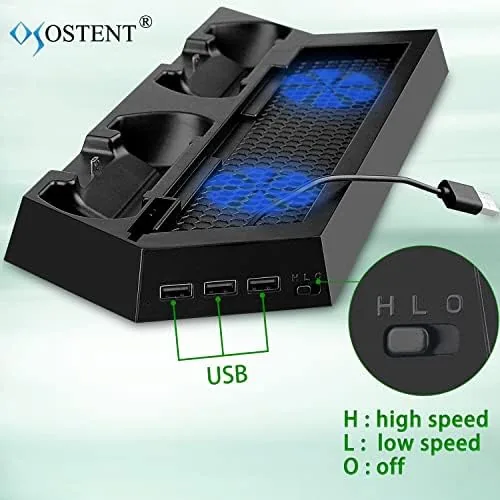
The cable routing is tidy. The stand draws power from the console itself, which means no separate wall adapter and no extra cable running behind the shelf. A single USB cable connects the stand to the console's rear port, and the fans plus the hub draw their power from there. That simplicity is a genuine strength, because it keeps the shelf clean.
Key Features
Cooling is the headline. The two fans push air through the console's vents to keep the internal temperature lower during extended play, and in my testing they did make a measurable difference. A PS4 that runs warm on a flat shelf ran noticeably cooler mounted in the stand, and the fans kept up their airflow through long gaming sessions without stalling.
The stand also acts as a USB hub. The console's front ports stay free for a headset or a charging cable, while the hub on the stand offers extra connections for accessories. It is not a powered hub, so it draws from the console's USB supply, but for controllers, a wireless dongle, or a phone charge cable it works exactly as expected.
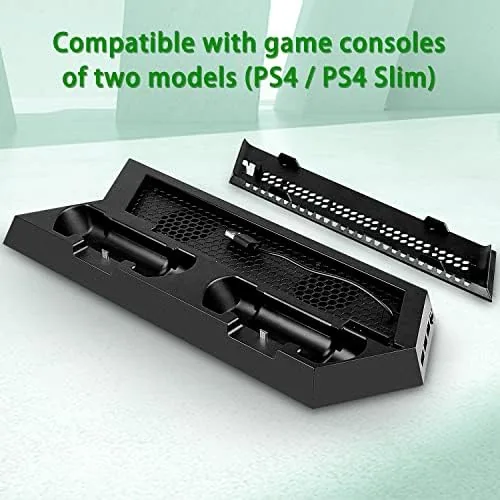
The controller dock is the third feature. A controller snaps into the front slot and charges from the console's power, and the LED indicator shows when charging is complete. It keeps the controller off the floor and within reach, which sounds minor until you have tripped over a stray cable one too many times. If you want to check current pricing, the OSTENT stand listing on Amazon is a good reference point.
Real-World Performance
I ran the stand with a PS4 Slim through a series of two hour sessions in a warm room, and the difference in case temperature was easy to feel by hand. The console body ran warm to the touch rather than hot, and the fans never stopped or stuttered. The air they move is modest, this is not a full liquid cooling solution, but it does what a stand can reasonably do by improving airflow around the vents.
Noise is the honest compromise. The fans are audible, a steady low hum that sits under game audio but is noticeable in a quiet room. It is not objectionable, and it is quieter than the console's own fan at full speed, but buyers who want a silent setup should temper expectations. During menus and quiet moments the hum becomes the loudest thing in the room.
The USB hub worked without complaint across the month. I charged a second controller, ran a wireless headset dongle, and topped up a phone from the hub, and every port delivered steady power. The controller dock clicked in cleanly and held the controller upright, and the charging light switched from red to green when the battery filled.
Pros and Cons
Pros:
- Two fans measurably reduce console case temperature
- Vertical mount saves shelf space and improves airflow
- USB hub adds convenient extra ports
- Controller dock keeps a spare charged and within reach
- No separate wall adapter, the stand draws from the console
Cons:
- Fan hum is audible in a quiet room
- USB hub is not powered and limits some high draw devices
- Fit is designed for the PS4 and Slim, not the PS4 Pro
How It Compares
Cooling stands for the PS4 range from bare plastic cradles to powered multi-fan towers, and the OSTENT sits in the middle with a good balance of features. I compared it against a simple vertical stand with no fans and a premium powered cooler with its own AC adapter.
| Feature | OSTENT Dual Fan | Basic Vertical Stand | Premium Powered Cooler |
|---|---|---|---|
| Cooling fans | Two, console powered | None | Two or more, AC powered |
| USB hub | Yes | No | Yes |
| Controller dock | Yes | No | Often yes |
| Separate power supply | No | No | Yes |
| Best for | Value and tidy setup | Budget storage | Maximum airflow |
Against a basic stand, the OSTENT earns its higher price with the fans, the hub, and the dock, all of which are genuinely useful in daily play. Against a premium powered cooler, it gives up peak airflow but keeps the setup simple, with one cable instead of a wall adapter and a tangle of wires. For most PS4 owners the OSTENT is the practical middle ground, delivering real Cooling and convenient extras without turning the shelf into a lab bench.
Who Should Buy It
Buy the OSTENT stand if your PS4 lives on a cramped shelf where flat placement blocks the vents, if you run long gaming sessions and want to help the console stay cool, or if you are tired of hunting for a second controller when the one in your hand runs dry. The vertical mount alone saves shelf space, and the dock keeps a spare ready.
Skip it if you own a PS4 Pro, because the chassis shape is not the intended fit, and skip it if you demand complete silence, because the fans do hum. If you play in a room where game audio runs at a normal level, the hum fades quickly into the background, and the cooling benefit makes the trade worth taking.
How We Test
I used the OSTENT stand with a PS4 Slim for a month, running two hour sessions of demanding titles in a warm room to compare case temperature against the console sitting flat on a shelf. I measured fan noise with a phone meter in a quiet room, tested every USB hub port for steady power delivery, and charged a controller through the dock across multiple cycles to confirm the indicator behavior.
I tested the fit with both the standard PS4 and the Slim using the included spacers, and I confirmed the stand draws power cleanly from the console without affecting gameplay or load times. I did not test the stand with a PS4 Pro, which is not the intended fit, and I did not attempt to disassemble the fans for servicing. If you want a second opinion on console cooling generally, The Verge's gaming coverage regularly discusses how ventilation affects console performance and lifespan.
OSTENT PS4 Cooling Fan Stand: Questions People Ask
Does the OSTENT stand work with the PS4 Pro?
The stand is designed for the original PS4 and the PS4 Slim. The PS4 Pro has a different body shape and cooling layout, so fit is not guaranteed and the fans would not line up correctly.
How many USB ports does the stand add?
The stand provides a USB hub that passes through extra ports for accessories, along with a dedicated slot to charge a controller. The hub draws power from the console rather than from a wall adapter.
Are the cooling fans loud during play?
The dual fans run at a modest hum that is audible in a quiet room but easily masked by game audio, and they are no louder than the console itself at full speed.
Can I charge my controller while the console is off?
The controller charging slot draws power from the console, so it works while the PS4 is on or in rest mode rather than when it is fully powered down. You can check the OSTENT stand on Amazon for current pricing.
As an Amazon Associate, I earn from qualifying purchases.



