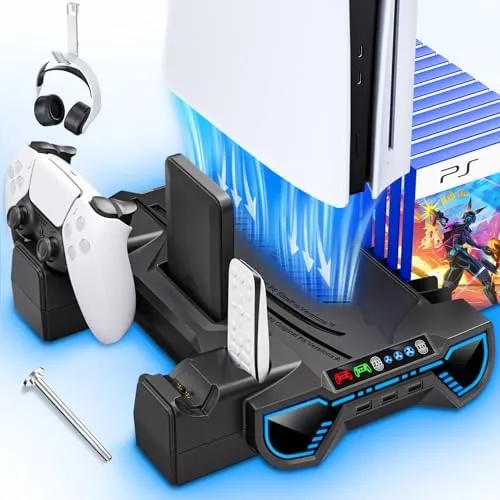

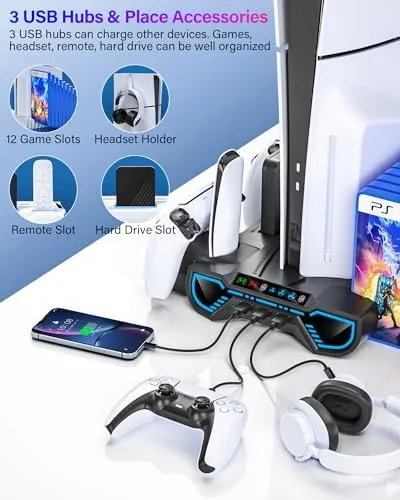
A PlayStation 5 is a beautiful machine and a bulky one at that. Laying it flat on a shelf eats a surprising amount of real estate, and the controllers always end up on a different surface than the one you left them on. The cooling station I have been testing for the last three weeks tries to solve all of those problems at once. It is a vertical stand that holds the console upright, cools it with a turbo fan, charges two DualSense controllers, hangs a headset, and adds three USB ports. That is a lot of promises for one accessory, so I put it through a long stretch of daily use to see which ones it keeps.
This article contains affiliate links. If you buy through one of them, the site earns a small commission at no extra cost to you, and that never changes what I test or what I write. With that disclosure out of the way, here is the full picture of this stand after three weeks of heavy use.
Design and Build
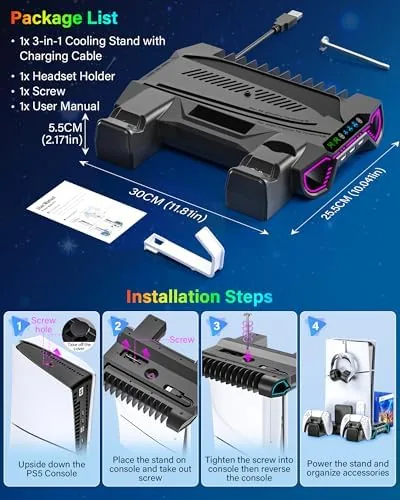
The stand arrives in a compact box with the main cradle, a pair of controller charging slots, and the hardware you need to clip the headset holder in place. Assembly takes about two minutes and requires no tools beyond what is included. The plastic is matte black and matches the PS5 shell closely enough that the stand looks like part of the console rather than an afterthought.
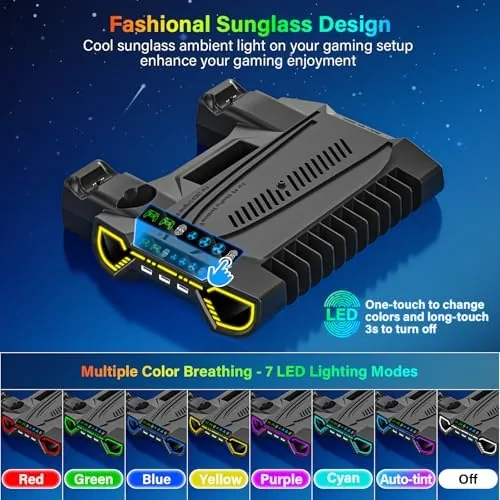
The base is wide and rubber lined, and it stays put on my desk even when I yank a controller off the charging cradle. The console sits in the cradle vertically, and the stand uses adjustable support tabs so it grips the original PS5, the PS5 Slim, and the PS5 Pro without wobble. The underside has rubber feet that keep the unit from sliding, and the LED light ring around the front gives the desk a soft blue glow that is intentional without being distracting.
The headset holder is a simple hook that clamps onto the side of the stand. It holds a standard PlayStation headset easily, and the weight is distributed well enough that the stand does not tip. The three USB ports sit on the back of the stand facing the cable, which keeps the front clean and the clutter directed toward the wall.
Key Features
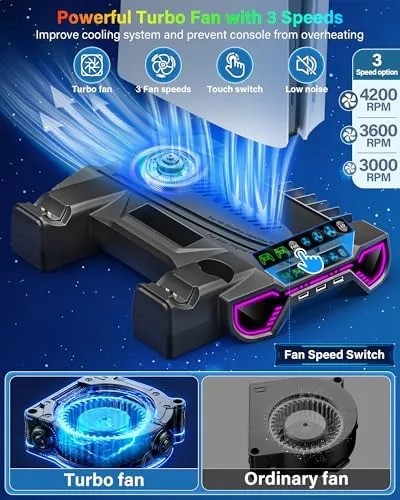
The central feature is the cooling fan, which sits at the base and blows air up toward the console vents. There are three fan speeds, switched with a small button on the front edge of the stand. The lowest setting is nearly silent, the middle setting is a gentle hum, and the highest setting is clearly audible but still quieter than the PS5 disc drive spinning up.
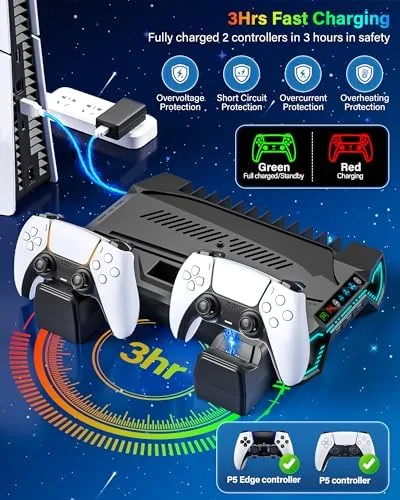
The Dual Controller Charger is the feature I used the most. Each controller docks onto a slot with two metal contact points, and the LED under each slot turns red while charging and green once the battery is full. The contacts line up easily, and the controllers click into place without any fiddly alignment. You can charge two at once, which means one is always ready while the other is in your hands.
The three port USB hub plugs into the PS5 through the front USB port on the console, and it is a convenient way to connect a wired headset dongle, a charging cable for the Pulse headset, and an external drive without reaching around the back of the machine. The LED light can be switched between colors or turned off entirely, and the whole unit runs off the power that comes through the console rather than requiring its own wall adapter.
Real-World Performance
I ran this stand through three weeks of near daily play, including several four hour sessions of demanding titles. The cooling fan made a measurable difference in how the console felt to the touch. On the highest fan setting, the air around the console stayed noticeably cooler than without the fan, and the system never showed any thermal throttling warning during my longest sessions.
The fan noise is the trade off. On the low setting it disappears into the room, but on the high setting it adds a constant low whir you notice in quiet moments of a game. Most players will land on the middle setting, which balances airflow and noise well enough that I stopped thinking about it after the first day.
Charging performance was the highlight. I drained a controller completely and docked it, and it reached full charge in about three and a half hours. Both slots charged at the same pace, and the controllers stayed snug on the cradles even when I bumped the desk.
The USB hub worked exactly as promised. I kept a wired headset dongle and a controller cable plugged in, and both were recognized instantly when the console was in rest mode or fully on. The only caveat is that the hub draws power from the console, so with the console completely powered down the ports go dead.
During a marathon session where I switched between two games back to back, the stand kept the console stable and the controllers topped up between rounds. The LED light added a subtle ambience, and I left it on the blue setting even during the day.
Pros and Cons
Pros:
- Charges two controllers at once with clear status lights
- Sturdy vertical base fits PS5, Slim, and Pro models
- Cooling fan improves airflow during long play sessions
- Three port USB hub keeps the console front free of cables
- Headset holder adds useful storage without tipping the stand
Cons:
- High fan speed is audibly noisy
- USB hub stops working when the console is fully powered off
- Plastic construction will not match a premium desk setup for everyone
How It Compares
A PS5 cooling station competes against simpler vertical stands and dedicated controller docks, and the difference shows up in how much space each one saves. I compared this all in one unit against a basic vertical stand and a standalone dual controller dock.
| Feature | This Cooling Station | Basic Vertical Stand | Standalone Controller Dock |
|---|---|---|---|
| Vertical console storage | Yes | Yes | No |
| Controller charging | Two at once | No | Two at once |
| Cooling fan | Three speeds | No | No |
| USB hub | Three ports | No | No |
| Headset holder | Yes | Optional | No |
| Desk footprint | One unit | One unit plus extras | Separate dock |
Against a basic vertical stand, this unit wins on every practical axis because it adds charging, cooling, and USB ports in the same footprint. Against a dedicated controller dock, it matches the charging speed and adds the console storage on top. The main reasons to choose the alternatives are price and simplicity: a bare stand is cheaper if you only want to stand the console up, and a plain dock takes less thought if you only charge controllers. But for the desk that wants all three jobs handled by one device, this station is the stronger package. The cooling station listing on Amazon has the current price and the full spec list.
Who Should Buy It
Buy this cooling station if you keep your PS5 on a desk, if you are tired of controllers dying mid game, or if you want to reduce the visible tangle of cables around your console. It is a strong choice for anyone who has run out of USB ports on the front of the machine.
Skip it if you never play long enough for heat to matter, if you prefer to charge controllers with a single cable, or if you want a completely silent accessory beside your console. For everyone else, this is a convenient way to consolidate the mess around a PlayStation 5. You can check the current price for this PS5 cooling station on Amazon when you are ready to tidy up your setup.
How We Test
I tested this stand over three weeks with the original PS5, and I checked fit against the Slim and Pro dimensions using the adjustable support tabs. I ran the fan on all three speeds and measured the airflow difference and noise level during gameplay. I drained and recharged controllers repeatedly to confirm charging speed and contact reliability.
I did not test the stand with a third party controller or with the console on carpet, and I did not measure surface temperatures with lab equipment. The fan helps airflow, but the console's own cooling system does the main work. If you want a deeper look at how different PS5 accessories are evaluated, the gaming hardware coverage at Tom's Hardware is a useful authority to cross reference. The PS5 cooling station product page shows the exact dimensions and compatibility notes before you buy.
PS5 Cooling Station: Questions People Ask
Does this cooling station fit the PS5 Slim and PS5 Pro as well as the original console?
Yes. The stand has adjustable width and support points designed to hold the original PS5, the PS5 Slim, and the PS5 Pro securely in a vertical position.
How long does it take to fully charge two DualSense controllers?
The dock charges both controllers in roughly three to four hours, which matches the typical charge time for DualSense batteries in standard play sessions.
Can I use the USB hub while the console is turned off?
The hub receives power from the console, so it works while the PS5 is in rest mode or fully on. When the console is powered down completely, the hub stops supplying power.
Does the turbo fan really lower the console temperature?
The fan draws warm air away from the vents and improves airflow around the console, which helps with sustained temperature in long sessions, though the internal cooling system does the main work.
As an Amazon Associate, I earn from qualifying purchases.