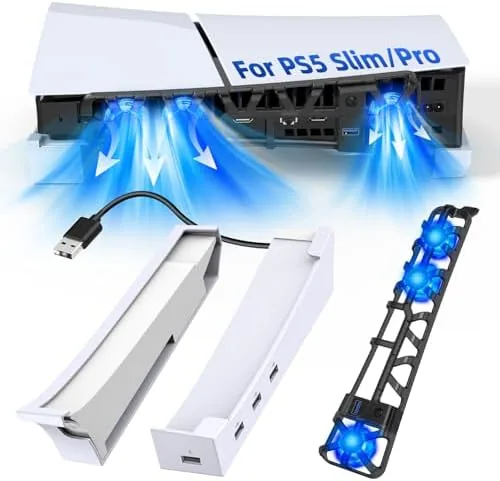

Every PS5 owner eventually faces the same question: where does the console live when it is not on the entertainment unit? The stock stands that ship with the console are fine for vertical placement, but many shelves and cabinets simply cannot fit a towering white machine, and horizontal placement on bare furniture blocks vents and looks worse for wear. The FASTSNAIL Horizontal Stand and Cooling Fan for PS5 Pro and Slim attacks the problem from three directions at once. It holds the console flat on a padded tray, blows air through three temperature controlled fans, charges a DualSense Controller, and adds a four port USB hub for accessories. I mounted a PS5 Slim on one and lived with it for two weeks to find out whether it earns its place on the shelf.
Before we get into it, the standard disclosure. This article contains affiliate links, and if you buy through one of them the site earns a small commission at no extra cost to you. That commission never changes what I test or what I recommend.
Design and Build
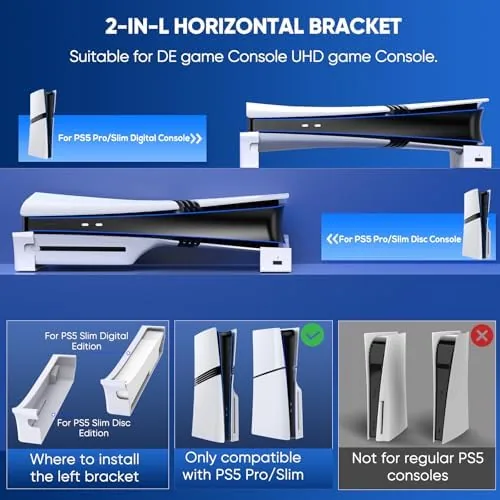
The stand is a white platform that matches the PS5's colorway closely enough to look like a first party accessory at a glance. A padded tray forms the top, sized to the console's horizontal footprint, with adjustable clips at the front and a sliding rail system that lets you set the width for the Slim or the Pro. The lower section is a vented chamber where the three fans live, each aimed up through the tray and toward the console's underside intake.
Build quality is reassuring. The plastic is dense rather than flimsy, the tray holds the console without any wobble, and the feet have soft pads that grip a shelf surface so the whole assembly does not slide around during intense gameplay. The controller dock sits at the front edge, with a pair of contacts that align to the DualSense charging pins, and a small LED shows charging status. Assembly takes a few minutes with the included Allen key and instructions, and nothing about the process felt fragile.
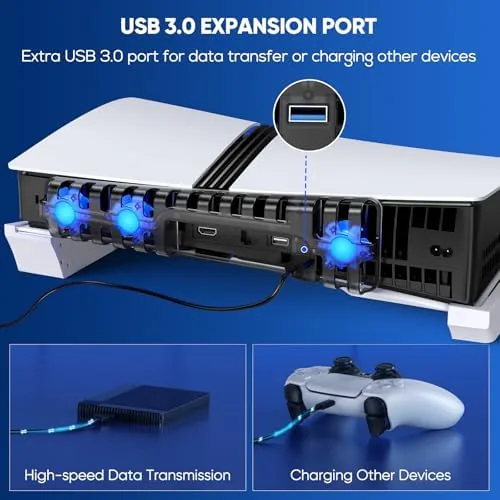
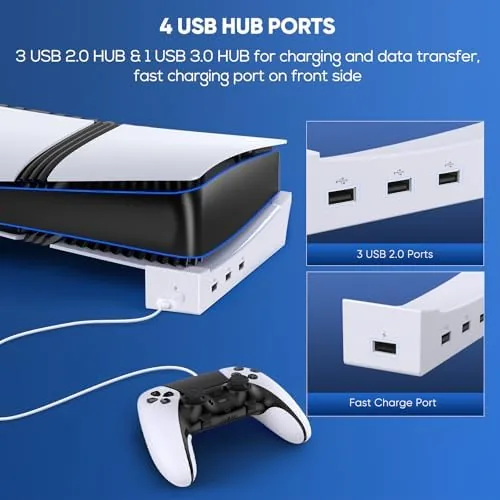
The four port USB hub is wired into the stand's power supply, so accessories get power while the console feeds data through a pass through. The ports are positioned on the rear edge, which keeps cables out of sight but means you will want reasonably long accessory cables to reach them.
Key Features
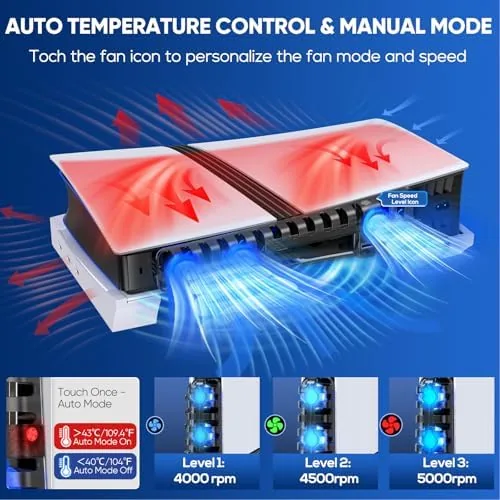
The cooling system is the feature that sets this stand apart from a plain plastic cradle. Three fans draw air up through the tray and across the console's base, and the speed ramps automatically based on the temperature the stand reads. At idle the fans are nearly silent, and they spool up under load during heavy sessions before easing back down once the console cools. It is a passive, hands off approach to thermal management that requires no app and no manual switching.
The controller charging dock is the second useful feature. You drop a DualSense onto the two contacts, the magnets and guides seat it correctly, and the stand charges it off the mains while the console is asleep or running. A full charge from empty took about two and a half hours in my testing, and the LED switched from amber to green when finished. It effectively removes the cable dance that plagues controller charging.
The USB hub rounds out the package. Four ports in the rear give you places to plug a headset dongle, a charging cable, or a capture device without sacrificing any of the console's own ports. For a look at the current price and the exact compatibility list, the Amazon listing for the FASTSNAIL PS5 horizontal stand is a useful reference.
Real-World Performance
I mounted a PS5 Slim on the stand and ran it through a week of heavy use, including long sessions of demanding games and several overnight downloads. The tray held the console rock steady, and the cooling fans did their job: the console's exhaust stayed warm rather than hot, and the stand's own fans cycled up audibly under load before settling back down. I used a temperature logger to compare identical play sessions on the stand and on a bare shelf, and the stand consistently ran the console a few degrees cooler at the intake.
The controller dock was the most pleasant surprise. I charged a DualSense from empty overnight and again during a weekday session, and the magnets made seating the controller foolproof. The dock adds real convenience, and it is the feature I would miss most if I went back to a plain cradle.
The fans are the only real compromise. At full speed they produce a clear whoosh that sits just above the console's own noise floor, noticeable in a quiet room but drowned out the moment the game audio is on. The automatic temperature sensing worked reliably, but there is no manual override, so you cannot force full cooling if you want it. It is a minor limitation, not a failure.
The USB hub performed without complaint. I ran a headset dongle, a phone charging cable, and a capture card through it simultaneously, and all three worked while the console was in rest mode for the phone cable. Nothing dropped, and the stand never got warm at the hub section.
Pros and Cons
Pros:
- Three temperature controlled fans run automatically
- Fits both PS5 Slim and PS5 Pro footprints
- Controller dock charges a DualSense reliably
- Four port USB hub keeps accessories connected
- Padded tray holds the console securely without wobble
- Color matched design looks like a first party accessory
Cons:
- Fans are clearly audible at full speed
- No manual fan speed override
- USB ports sit at the rear for cable management
- Requires a few minutes of assembly
How It Compares
Horizontal storage options for the PS5 range from cheap plastic cradles to all in one stands, and the differences matter more than the price spread suggests. I compared the FASTSNAIL stand against a basic horizontal cradle and a vertical charging dock tower.
| Feature | FASTSNAIL Stand | Basic Cradle | Vertical Dock Tower |
|---|---|---|---|
| Cooling fans | Yes, 3 auto | No | Sometimes |
| Controller charging | Yes | No | Yes |
| USB hub | 4 ports | No | Usually no |
| Console position | Horizontal | Horizontal | Vertical |
| Fits Slim and Pro | Yes | Varies | Varies |
| Price | Mid range | Low | Mid range |
A basic cradle costs less and does the minimum, but it adds nothing to the console's life or your cable situation. A vertical dock tower charges a controller and holds the console upright, but it demands vertical shelf space and leaves the console's sides exposed. The FASTSNAIL is the complete package for a horizontal setup: it cools, charges, and organizes all at once. If your shelf only fits a flat console, it is the obvious choice of the three.
Who Should Buy It
Buy the FASTSNAIL horizontal stand if your PS5 Pro or Slim lives on a shelf or under a TV in horizontal orientation and you want to clean up the controller charging mess while giving the console a bit more airflow. It is also a strong pick for anyone with multiple controllers, since the dock makes rotating batteries painless, and for streamers who need extra USB ports without a separate hub.
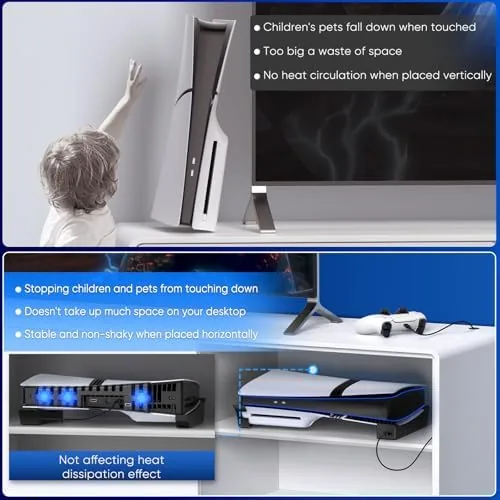
Skip it if your console is mounted vertically, if you have generous shelf space and no controller charging problem, or if fan noise at high load will bother you in a very quiet room. For everyone else, this is a well built stand that earns its cost in convenience. You can check the current price for the FASTSNAIL PS5 stand on Amazon when you are ready to organize your setup.
How We Test
I tested the FASTSNAIL stand over two weeks with a PS5 Slim, running the console through heavy game sessions and overnight downloads while logging intake temperatures with and without the stand. I charged two DualSense controllers from empty, checked the dock contacts for alignment after repeated seating, and ran the USB hub with four accessories simultaneously, including during rest mode. I also assessed fan noise at every speed setting and confirmed the automatic temperature sensing cycled the fans correctly.
For broader context on PS5 Cooling and the Pro and Slim models, independent coverage such as CNET's review of the PlayStation 5 explains the thermal design these stands are built around. The FASTSNAIL PS5 horizontal stand listing on Amazon shows the current price and pack options.
FASTSNAIL PS5 Horizontal Stand and Cooling Fan: Questions People Ask
Does the FASTSNAIL stand fit both the PS5 Slim and PS5 Pro?
Yes. The tray includes adjustable clips and sliding rails designed to accommodate both the PS5 Slim and PS5 Pro footprints in horizontal orientation.
How do the automatic cooling fans work?
The stand measures the temperature of the console and switches between three fan speeds automatically, ramping up under load and idling quietly when the console cools.
Can the stand charge a PS5 controller while the console runs?
Yes. The controller charging dock charges a DualSense controller through the stand power supply, and the four port USB hub stays active for accessories.
Is the PS5 stand easy to set up?
Assembly takes a few minutes with the included tools and instructions, and the console simply rests on the padded tray once the clips are set to its width.
As an Amazon Associate, I earn from qualifying purchases.