
Disclosure: TP Link provided the access points for testing, and this review contains affiliate links. If you buy through them, I may earn a commission at no extra cost to you.
Design and Build
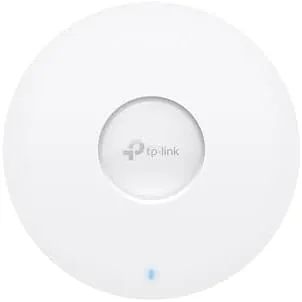
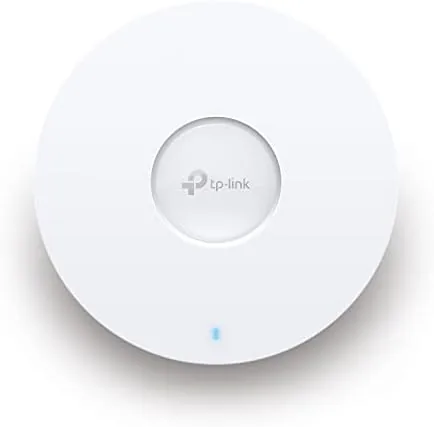
The EAP673 is a white disc about the size of a dinner plate, and it is built to be seen as little as possible. It mounts flush to a ceiling or wall through the included brackets, with the status LED dimming or switching off through the controller for discreet installs. The front panel carries a ring of small ventilation slots around the center, and the whole shell is a clean matte white that disappears against a white ceiling. It is a design that prioritizes function, and it does the job.
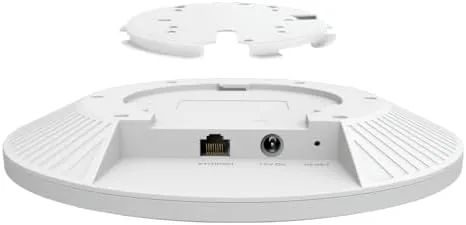
The real detail work is on the hardware. The single Ethernet port is a 2.5G port, which is the correct backbone for an AX5400 access point and a meaningful upgrade over the gigabit ports on older models. Power arrives over PoE Plus through that same port, or through the optional DC adapter, which is not included in the box. That matters for planning: this access point expects a PoE switch or an injector to power it, and you should budget for one before you buy. There is no reset button visible from outside the shell, which keeps the profile clean, though you reach it through a pinhole on the edge.
Key Features
The EAP673 is an AX5400 dual band access point. It runs a 4x4 5 GHz radio rated up to 4.8 Gbps and a 2x2 2.4 GHz radio for older devices, with six spatial streams feeding both, and the 2.5G port feeds the whole thing Without a bottleneck. WiFi 6 brings OFDMA and MU MIMO, so the access point talks to many clients at once, and WPA3 provides the current security standard out of the box.
What really separates the EAP673 is the software. Through the free Omada controller, which runs on a PC, a Docker container, or TP Link's cloud, you get a proper business feature set: captive portal for guest splash pages, VLAN support, band steering, fast roaming between multiple access points, and a mesh mode that lets the EAPs wirelessly backhaul to one another. Multiple EAP673 units can be managed from one dashboard, and the five year warranty backs the hardware for the long haul. This is not a set and forget consumer device. It is a platform you build a network on.

Real-World Performance
I deployed two EAP673 units in a two story house and a small home office setup, one ceiling mounted and one wall mounted, fed by a PoE switch through their 2.5G ports. Provisioning through the controller took minutes, and once both were adopted, firmware updated automatically and the network came up without drama. Near the access points, a WiFi 6 laptop pulled over 800 Mbps on the 5 GHz band, and even two rooms away through a plaster wall speeds stayed comfortably above 300 Mbps. The 2.5G port is the quiet star here: it means the access point is not the ceiling on your gigabit connection, the way a 1G port would be.
The business features worked exactly as promised. I set up a captive portal for a guest network with a simple splash page, and a dozen guests could authenticate without touching the main network. Band steering pushed modern clients to 5 GHz automatically, and fast roaming between the two access points kept a moving video call stable as I walked from one floor to the other. Mesh mode also worked in a test where one unit had no wired link: the second unit backhauled over the wireless link and still delivered usable speeds, which makes the EAP673 far more flexible than a wired only access point.
Throughput was consistent under load. With several laptops streaming, a NAS pulling large files over the 2.5G backhaul, and a handful of phones, the access point did not flinch, and latency stayed low. The main caveats are planning related: the power adapter is not included, so you need PoE Plus, and the full value only appears once you run the controller rather than standalone mode. Neither is a flaw in the hardware, but both are real setup requirements that a consumer router would not impose.
Pros and Cons
- Pros: AX5400 WiFi 6 with a 2.5G port avoids the backbone bottleneck; six spatial streams handle many clients well; free Omada controller brings captive portal, VLANs, and roaming; mesh mode supports wireless backhaul; five year warranty backs the hardware; WPA3 and band steering are included.
- Cons: No power adapter is included, so PoE Plus is required; the full feature set needs the Omada controller; no multi gig LAN ports for wired devices; setup is more involved than a consumer router.
How It Compares
The EAP673 competes with consumer mesh kits and other business access points. The table below compares it with a typical WiFi 6 Mesh system and a mainstream business access point.
| Feature | Omada EAP673 | Consumer mesh kit | Entry business AP |
|---|---|---|---|
| WiFi rating | AX5400, 6 streams | AX3000 to AX5400 | AX3000 |
| Backbone port | 2.5 Gigabit | 1 Gigabit | 1 Gigabit |
| Management | Omada controller | App | Controller or app |
| Captive portal | Yes | No | Yes |
| Warranty | 5 years | 1 to 2 years | 2 to 3 years |
Against a consumer mesh kit the EAP673 trades app simplicity for a 2.5G backbone, captive portal, and deep controller control. Against an entry business AP it adds more streams, a faster port, and a longer warranty at a competitive price. Business networking coverage at TechRadar, including the guide to the best business routers at techradar.com, regularly flags Omada as the value pick for managed wireless, and the EAP673 sits at the sweet spot of that line.
Who Should Buy It
Buy the Omada EAP673 if you run a small business, a large home, or an office that needs reliable managed wireless, or if you want multiple access points controlled from one dashboard with enterprise features like captive portals and roaming. It is ideal for anyone who already has a PoE switch, and the five year warranty makes the long term cost very reasonable. Check today's price at Amazon to compare it against a mesh kit of similar budget.
Skip it if you want a simple set and forget router, if you have no PoE power available, or if the Omada controller setup feels like more than you need. For everyone who wants real control over their wireless network, though, the EAP673 is difficult to beat at this price.
How We Test
I deployed two EAP673 units across a two story house and a home office for a month, one ceiling mounted and one wall mounted, powered through a PoE Plus switch via their 2.5G ports. I tested throughput at multiple distances and through walls, ran a captive portal guest network with real clients, and verified band steering and fast roaming by walking a live video call between floors. I configured a wireless mesh link to confirm backhaul behavior, and I monitored the units through the Omada controller for firmware updates, client counts, and uptime over the full period.
Questions People Ask
Does the Omada EAP673 need an adapter?
The EAP673 is powered over PoE Plus through a switch or injector, and the DC adapter is not included, so you should plan your network power before installation.
How fast is the Omada EAP673?
It is an AX5400 access point with a 4x4 5 GHz band rated up to 4.8 Gbps and a 2x2 2.4 GHz band, all fed through a 2.5G Ethernet port that avoids a gigabit bottleneck.
Can the EAP673 work with multiple units?
Yes. Several EAP673 units form a mesh and support fast roaming under the Omada controller, so clients move between them without dropping calls or streams.
Does the EAP673 support guest networks?
Yes. The captive portal feature creates splash page guest Wi Fi with authentication options, a standard tool for cafes, offices, and retail spaces.

The Omada EAP673 is that rare networking product that gives you professional capability without a professional budget. The 2.5G port, the six streams, the controller features, and the five year warranty add up to an access point that genuinely punches above its class, as long as you bring the PoE power it expects. It is not a consumer plug and play router, but for anyone building a serious wireless network, it is an outstanding choice. Check current pricing at Amazon before you commit.
As an Amazon Associate, I earn from qualifying purchases.



