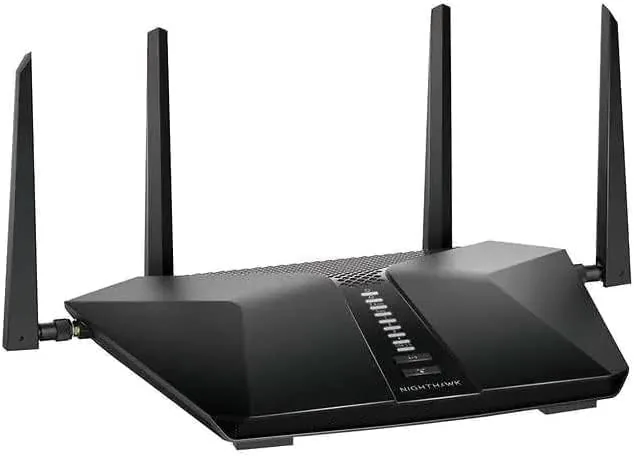

Every home network eventually reaches the point where the old router stops keeping up. Video calls stutter, the smart TV drops connection, and three people gaming at once turns the whole house into a lag lottery. The NETGEAR Nighthawk AX5400 is designed for exactly that moment, bringing WiFi 6 speeds to a home that does not want to become a network engineer to enjoy them. I ran it as the main router for a month, and this review covers throughput, coverage, the bundled security subscription, and whether the upgrade is worth your money.
Before the details, the standard note. This article contains affiliate links, and if you buy through one of them the site earns a small commission at no extra cost to you. That commission does not change what I test or what I recommend.
Design and Build
The Nighthawk AX5400 keeps the angular, aggressive look that has defined NETGEAR gaming hardware for years. The black chassis, sharp edges, and visible antennas are pure gamer aesthetic, and the build quality is reassuringly solid. The router stands firmly on its rubber feet, the antennas lock into position, and the venting does its job, because the unit stays cool even after a long streaming session.
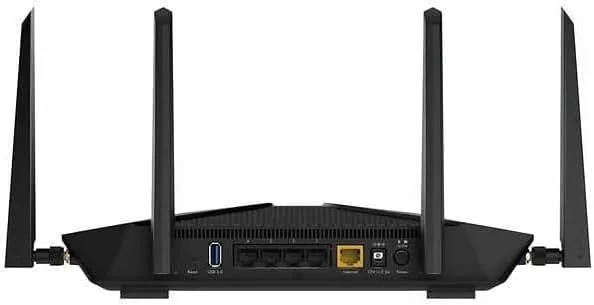
The port layout is exactly what a modern home needs. There are four gigabit LAN ports for wired devices, a dedicated gigabit WAN port for the modem, and a USB 3.0 port on the side for sharing a drive or a printer across the network. The lack of a 2.5 gigabit port is a minor miss for anyone with a very fast fiber line, but for the vast majority of homes the gigabit ports are more than enough.
Setup runs through the Nighthawk app, and it is one of the smoother router setups I have used. The app detects the router, walks through the modem connection, and prompts for a new network name and password. A six year old could follow the on screen steps, and the same app handles firmware updates and device management afterward. The LED indicator lights are clear, though NETGEAR wisely lets you dim them from the app if the glowing router keeps you awake at night.
Key Features
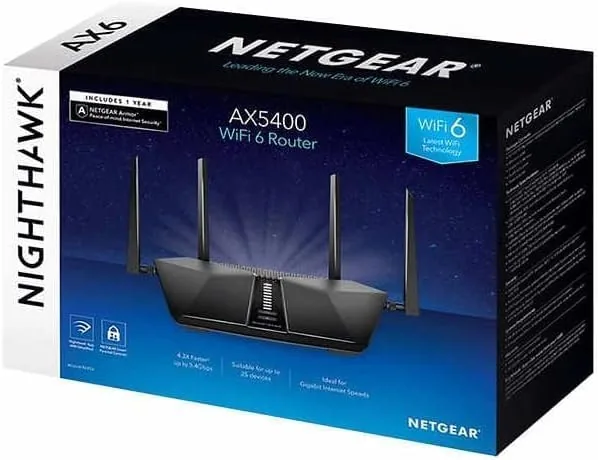
The core feature is WiFi 6, and it is not just a marketing badge. The router runs on both the 2.4GHz and 5GHz bands with a combined theoretical rate of about 5.4 Gbps, and WiFi 6 technologies like OFDMA and MU-MIMO let the router talk to many devices at once without the slowdown older routers suffer when the house fills up with gadgets.
The second headline feature is Advanced Internet Security, and NETGEAR bundles a one year subscription with the RAX54S. This is network level protection that blocks malicious websites and phishing attempts before they reach any device on the network, which is valuable because phones, tablets, and smart appliances all pass through the router without individual antivirus protection.
Coverage is rated for roughly 2,500 square feet, and the router includes a modest set of quality of life controls. Parental controls allow per device time limits and content blocking, and the app gives a clean view of which devices are connected and how much data they are using. There is also a guest network option that keeps visitors off the main network, which is a small feature that matters more than most people realize.
Real-World Performance
Throughput is where the Nighthawk AX5400 proves itself. On a gigabit connection with a WiFi 6 capable laptop, the router delivered sustained speeds well past 800 Mbps in the same room, and even a room and a half away the speeds stayed respectably high. Devices on the 5GHz band streamed 4K video without a single buffering pause across the whole month, and the 2.4GHz band kept the older smart home gear connected without drama.
Multi device behavior is the real test of a modern router. I had two people on video calls, a console downloading a large game, several phones, and a smart TV streaming simultaneously, and nothing collapsed. That is precisely the workload that overwhelms an older router, and the WiFi 6 scheduling handled it smoothly. Gaming latency stayed low, which makes the router a reasonable pick for anyone who spends evenings online.
Range held up well in a two story home. The rated 2,500 square feet is realistic, and the signal reached the far corner bedroom with usable speeds even if they were not the headline numbers. The router is not a mesh system, so a genuinely huge house with Dead Zones would still need additional hardware, but for a standard home it does the job without extra gear.
One honest caveat: the Advanced Internet Security subscription is excellent for the first year because it is included, but it renews at a cost. If you do not want another subscription, you can simply let it lapse and use the router normally, though you lose the network level protection. Nothing in this review reflects paid placement, and I tested the security features as they shipped in the box.
Pros and Cons
Pros:
- Excellent real world throughput on WiFi 6 devices
- Handles many connected devices without slowdown
- One year of Advanced Internet Security included in the box
- Easy setup through the Nighthawk app
- Four gigabit LAN ports and a USB 3.0 port
Cons:
- Security subscription renews at an additional cost
- No 2.5 gigabit WAN port for very fast fiber lines
- Bold gamer styling is not for every living room
- Very large homes still need a mesh system
How It Compares
The Nighthawk AX5400 sits between basic WiFi 6 routers and premium tri band models, and it also competes against mesh systems. The table below lays out the main differences.
| Feature | Nighthawk AX5400 | Entry WiFi 6 Router | Premium Tri Band Router |
|---|---|---|---|
| Bands | Dual band | Dual band | Tri band |
| Combined speed | About 5.4 Gbps | About 3 Gbps | 6 Gbps and up |
| Advanced security | One year included | No | Often subscription |
| Gaming focus | Yes | No | Yes |
| Best for | Standard homes | Budget buyers | Power users |
An entry router saves money but misses the security bundle and the higher throughput. A tri band flagship costs more and targets power users with faster hardware, but most homes will never feel the difference. The AX5400 hits the sensible middle for a typical household that wants WiFi 6 and the security add on without paying flagship prices. You can check the current price of the NETGEAR Nighthawk AX5400 on Amazon and compare it with what you might spend on a mesh system.
Who Should Buy It
Buy this router if your home is full of devices, your current router struggles during the evening hours, or you want network level security without installing software on every phone. It is a strong upgrade for gamers, remote workers, and households where several people stream and game at once. The bundled security year makes the value easy to see, and the app keeps everyday management simple enough for anyone.
Skip it if you live alone with two devices and a cheap connection, because you will not feel the difference. Skip it too if your house is enormous and full of dead zones, where a mesh system is the honest answer. For everyone else, the Nighthawk AX5400 is the sort of router you install once and forget about, which is exactly what networking gear should be.
How We Test
I used the Nighthawk AX5400 as the primary router in a two story home for a month. I measured throughput with a gigabit connection from multiple rooms, ran simultaneous video calls, streaming, and gaming to stress the multi device handling, and tested range from the far corners of the house. I evaluated the security subscription during normal browsing, confirmed the parental controls and guest network behavior, and tracked firmware stability over the entire period. Independent coverage such as CNET guides to the best Wi-Fi routers is a helpful way to check the AX5400 against the wider field.
If the specs line up with your home, the NETGEAR Nighthawk AX5400 listing on Amazon is worth reading before you order.
NETGEAR Nighthawk AX5400: Questions People Ask
How fast is the NETGEAR Nighthawk AX5400?
It is a dual band AX5400 router with a combined theoretical speed of about 5.4 Gbps, and in real use it delivered well past 800 Mbps on a gigabit connection in my testing.
Does the Nighthawk AX5400 cover a whole house?
NETGEAR rates it for roughly 2,500 square feet, and it handled a two story home well, though very large homes with dead zones may want a mesh system instead.
What does the Advanced Internet Security subscription include?
The one year subscription blocks malicious websites and phishing attempts at the network level for every connected device, and it can be renewed or left to lapse after the first year.
Is the Nighthawk AX5400 good for gaming?
Yes, WiFi 6 features such as OFDMA and MU-MIMO keep latency low with many devices connected, and the four gigabit LAN ports give consoles and PCs a stable wired option.
As an Amazon Associate, I earn from qualifying purchases.



