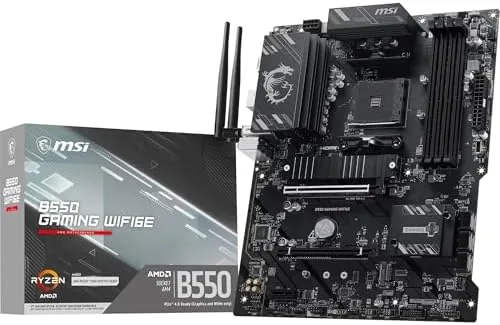

The AM4 platform has had an extraordinary run, and motherboards like the MSI B550 Gaming WIFI6E are the reason it kept going so long. This ATX board supports the full sweep of AMD Ryzen 5000 Series, 5000 G-Series, 4000 G-Series, and 3000 Series processors, which means a budget or mid-range builder can pick up an older CPU, drop it in, and still get modern features like PCIe 4.0 and DDR4 memory boost without paying a premium.
I built a test system around this board and ran it through several weeks of daily work and gaming, and this review covers the layout, the memory support, the connectivity, and whether the WIFI6E wireless is worth building around. Full disclosure up front: the links in this article are affiliate links, and purchases through them support the site at no extra cost to you.
Design and Build: A Clean, Practical ATX Layout
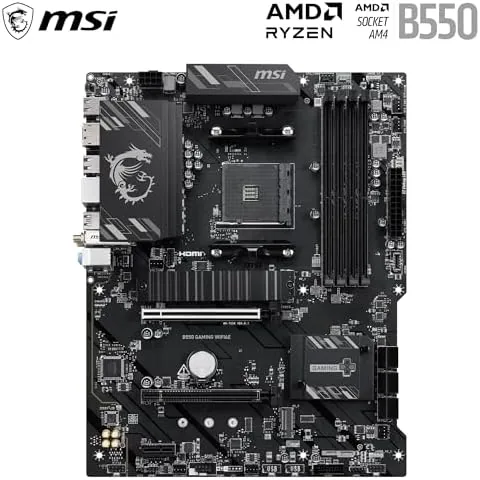
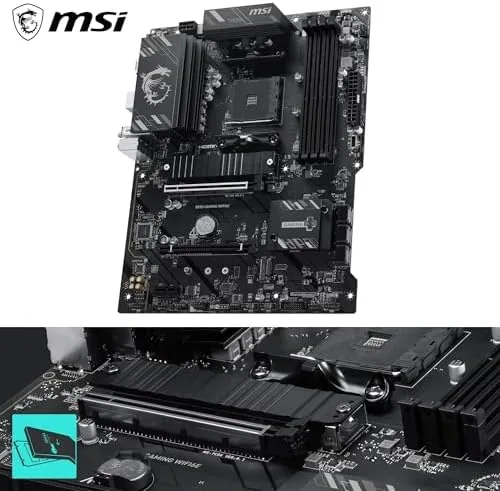
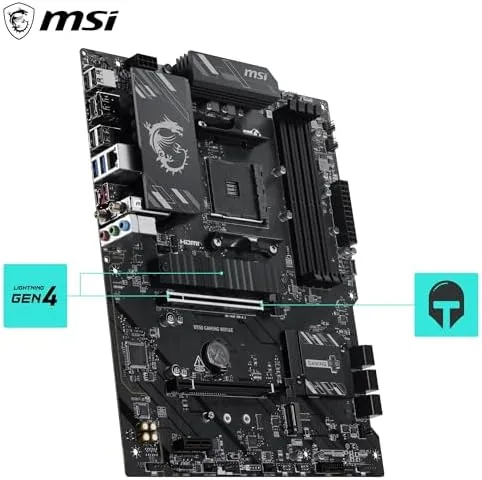
The board follows the standard ATX layout, and MSI has arranged the key components sensibly. The CPU socket sits with generous clearance around it for large coolers, and the PCIe 4.0 x16 slot is reinforced for heavy graphics cards, which matters when modern GPUs are bigger than ever. The M.2 slots are positioned where they are easy to reach, and the whole board has a tidy, professional look with subtle heatsinks rather than aggressive gamer styling.
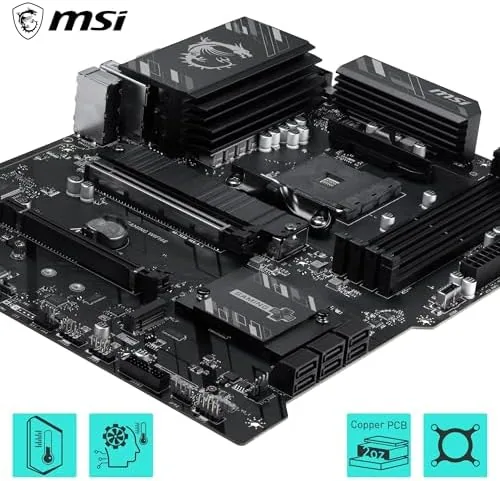
The build quality is solid for the price tier. The power delivery heatsinks are substantial, the board feels sturdy when components are mounted, and the SATA and fan headers are placed where they are actually reachable during a build. Anyone who has fought with a cramped motherboard layout will appreciate the thought that went into this one.
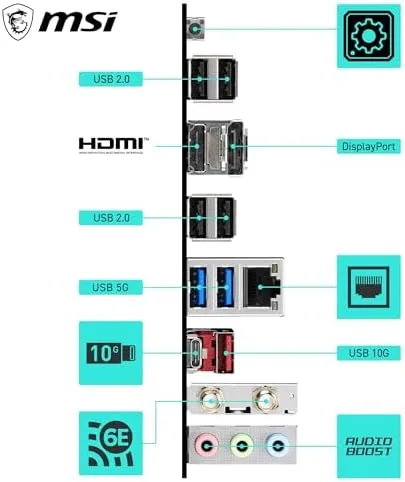
The rear I/O panel includes the WIFI6E antenna ports, which is the feature this board is named for, along with a full set of USB ports and a 1G LAN connection. The wireless module supports the latest Wi-Fi 6E standard, which opens up the 6GHz band for devices that support it, and the metal antenna screws in securely without the wobbly feel of cheap bundled antennas.
The layout also leaves room to work. The CPU power and fan headers sit along the top edge where they belong, the front panel connectors are labeled clearly, and there is enough space between the PCIe slots and the chipset heatsink that even a large graphics card does not block access to the M.2 slots or the SATA headers you need to reach.
Key Features: PCIe 4.0, M.2 Gen4, and WIFI6E
The headline feature set is the PCIe 4.0 support. The board offers a PCIe 4.0 x16 slot for the graphics card and PCIe 4.0 support on the M.2 slot, which doubles the bandwidth of the older PCIe 3.0 standard. For anyone building with a modern GPU or a Gen4 NVMe drive, that bandwidth matters, and it is a feature you typically have to pay more for on other platforms.
The M.2 Gen4 slot means you can run one of the fast NVMe drives without bottlenecking it, which is a genuine performance win for game loading and large file work. The board also includes additional M.2 and SATA ports for storage expansion, so a multi-drive build is straightforward.
The WIFI6E wireless module is the differentiating feature. Wi-Fi 6E adds the 6GHz band alongside the existing 2.4GHz and 5GHz bands, which means less congestion and lower latency for gaming in busy wireless environments. For builders who cannot run an Ethernet cable, the built-in wireless saves the cost of a separate card.
DDR4 memory boost supports speeds up to 4800+MHz with overclocking, which keeps the system responsive for years to come. DDR4 may be the previous generation of memory, but it is cheap, available, and more than fast enough for the Ryzen processors this board is designed to feed.
Real-World Performance: A Reliable Foundation
In practice, the board performed exactly as a solid B550 should. I paired it with a Ryzen 5000 Series processor and a Gen4 GPU, and the system ran through weeks of daily use without a single stability issue. Boot times were quick with a Gen4 NVMe drive, and game loading was snappy throughout the test period.
The memory support held up under overclocking. I ran a memory kit above its rated speed using the memory boost feature, and the system was stable through stress testing and long gaming sessions. For builders who like to tune their RAM, the board offers the settings you need without a frustrating BIOS experience.
The WIFI6E connection performed well in my testing. The antenna provided a stable connection at range, and game latency over wireless stayed low enough that I never felt the need to pull out an Ethernet cable. For an office or home where cabling is impractical, the built-in wireless is a genuine convenience.
The 1G LAN port covers wired connections for anyone who does run a cable, and while it is not the 2.5Gbe that some newer boards offer, it is perfectly adequate for internet speeds and most local transfers. The BIOS itself is the modern MSI click BIOS, which is easy to navigate for both first-time builders and veterans, with a clear overview page and sensible defaults for memory and fan tuning.
Thermals were not a concern during my test build. The chipset and M.2 heatsinks did their job even under sustained gaming loads, and the board did not need aggressive fan curves to stay cool. It is the kind of background reliability that never shows up on a spec sheet but makes the difference between a build you forget about and one you are always troubleshooting.
Pros and Cons
- Pros: PCIe 4.0 x16 and M.2 Gen4 support, built-in WIFI6E wireless, supports a wide range of AM4 Ryzen processors, DDR4 memory boost up to 4800+MHz, clean layout with reachable headers, reinforced PCIe slot for heavy GPUs.
- Cons: 1G LAN rather than 2.5G, AM4 is at the end of its platform life, no PCIe 5.0 for future GPUs, DDR4 will not carry over to a future build.
How It Compares: B550 vs the AM4 and AM5 Field
| Spec | MSI B550 WIFI6E | B450 Board | B650 (AM5) Board |
|---|---|---|---|
| Socket | AM4 | AM4 | AM5 |
| PCIe support | PCIe 4.0 x16 | PCIe 3.0 | PCIe 4.0 / 5.0 |
| Memory | DDR4, up to 4800+MHz | DDR4, up to 3600MHz | DDR5 |
| M.2 speed | Gen4 | Gen3 | Gen4 / Gen5 |
| Wireless | Wi-Fi 6E | Usually none | Often Wi-Fi 6E |
| CPU range | 3000 to 5000 Series | 3000 Series | Ryzen 7000/9000 |
Against an older B450 board, the B550 WIFI6E wins on PCIe 4.0, Gen4 M.2, and the built-in Wi-Fi 6E, all without a large price jump. Against a newer B650 board on the AM5 platform, you give up DDR5 and PCIe 5.0, but you keep the cost savings of DDR4 and the ability to use a cheaper Ryzen 5000 Series CPU. For a budget or mid-range builder who wants to stretch a dollar on the mature AM4 platform, this board is the sensible choice.
If you want to understand how the AM4 platform compares to the newer AM5 options, Tom Hardware guide to the best motherboards is a strong independent reference.
Who Should Buy the MSI B550 Gaming WIFI6E
Buy it if you are building on AM4 with a Ryzen 5000 Series or 3000 Series CPU, if you want PCIe 4.0 and Gen4 storage without paying AM5 prices, or if you need reliable wireless and want to skip a separate Wi-Fi card. Skip it if you want the headroom of DDR5 and PCIe 5.0 for future upgrades, or if you already have a B450 board that meets your needs.
How We Test
We build full systems around motherboards and run them daily for weeks, covering gaming, productivity, and stability testing. We run memory at its rated boost speeds, test the wireless module at range, and install a Gen4 drive to confirm M.2 throughput. We only recommend a board that proves stable through real use, not just on a test bench.
Questions People Ask
Which processors does this B550 board support?
It supports AMD Ryzen 5000 Series, 5000 G-Series, 4000 G-Series, and 3000 Series processors on the AM4 socket, which covers the entire modern Ryzen lineup on that platform.
Does the board support PCIe 4.0?
Yes. It offers a PCIe 4.0 x16 slot for the graphics card and PCIe 4.0 support on the M.2 slot, which doubles the bandwidth of the older PCIe 3.0 standard.
Is the Wi-Fi 6E worth having?
Yes if you cannot run an Ethernet cable. Wi-Fi 6E adds the 6GHz band, which means less congestion and lower latency, and it saves you the cost and effort of installing a separate wireless card.
Can I use DDR4 memory with this motherboard?
Yes. The board uses DDR4 memory with support for speeds up to 4800+MHz with overclocking, which keeps the system fast and keeps your build cost down versus DDR5 platforms.
You can check the MSI B550 Gaming WIFI6E on Amazon for the current listing, and browse the MSI B550 options on Amazon to compare bundles before you order.
As an Amazon Associate, I earn from qualifying purchases.



