
Most webcams make your face look like a slightly soft potato under office light, which matters more than ever now that so much professional life happens from the same desk. This Logitech MX Brio 4K review comes from a month on my desk for video calls, an occasional stream, and product demo work, and the honest verdict is that this is the webcam you buy when your face is part of your job. The larger sensor and the Logitech software produce a view that flatters more than it fudges, and anyone who presents daily to clients will notice the difference within the first call, not in a lab chart.
Before the details, the standard note that covers every review on this site: this article contains affiliate links. If you buy through one of them, the site earns a small commission at no extra cost to you, and it does not change what I review. I have no arrangement with Logitech beyond the review unit, and the picture judgments below are my own over the month on camera.
Design and Build
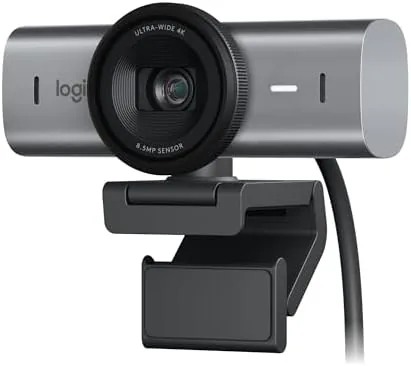
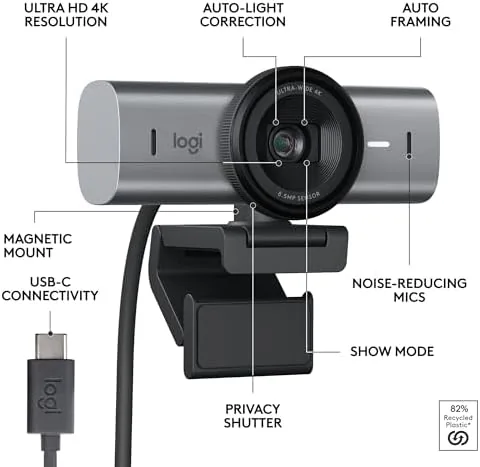
The MX Brio is a solid, graphite-finished camera that clamps firmly to the top of a monitor or mounts on a tripod thread. It feels like a real tool rather than a flimsy accessory, with a metal front and a mount that does not sag even on a thin laptop lid. Show Mode lets you rotate the sensor to point down at a desk for product demos, and the software flips the image for you, saving the morning you spend upside-down otherwise.
The included USB-C cable is plenty long for most desks, though frequent travelers will want a spare shorter one. It runs on the Logitech suite, which is quick to learn and honest about what each setting actually does, and the hardware itself has been reliable all month with no need to unplug and reconnect.
The magnetic clamp and the tripod thread both held a locked angle well, and the integrated privacy shutter sits tight enough that the camera never visibly opens when you join a call by mistake. Small touches like that stop being interesting the moment they simply work, and that reliability is the quietest and strongest recommendation I can give a peripheral after a month of daily use.
Key Features
The core appeal is the larger sensor size, roughly 1/1.7 inch, that handles low light far better than the typical 1080p webcam with a plastic-fantastic lens. It captures true 4K for meetings, streams, and content, and the detail holds up in the offices that are the real world, dark at the walls, rather than the lights out, in many rooms where cheap webcams fail entirely.
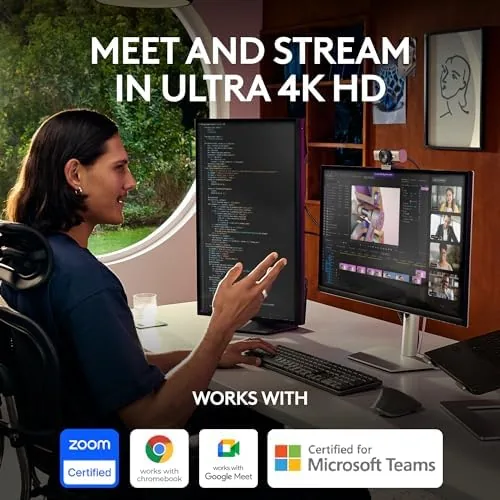
Show Mode is the party trick, transforming the camera into a little visualizer for showing a sketch, a product, or a whiteboard on a desk. You also get a privacy shutter that slot-cover when you are done, and Auto framing that keeps you centered as you lean and move. It is a genuinely useful bundle for anyone who both talks and shows things for a living.
Real-World Performance
In the first week the MX Brio delivered a much brighter, warmer picture than my older webcam, with skin tones that no longer look washed out under the cool light of my office. On video calls the subtle clarity and edge sharpness stand out, especially on hair and glasses, and streams held a stable, crisp frame at a higher resolution than my old camera managed. The low-light handling was the thing that kept grabbing me: even at the darker end of the afternoon the face stayed clean.

The honest limits are room and price. In a genuinely very dark room the sharpness softens a little, like any sensor, and this camera sits well above the common 1080p webcam in price. The software is excellent, but you have to open it to make the features pay their way, and the settings are worth learning rather than installed and forgotten. For the right person that learning pays off every call.
One detail I liked is that once you set the framing and light profile it holds on its own, so the same camera behaves consistently in the same room call after call rather than drifting back to a generic default. That predictability matters more than any single feature to a regular presenter, because the whole point of a premium webcam is that your face looks the same every time your name appears in a meeting. The Brio earns that trust quickly.
Pros and Cons
Pros:
- True 4K detail and crisp image for calls and streams
- Excellent low-light handling for its class
- Show Mode simplifies desk and product demos
- Solid build with a privacy shutter and auto framing
- Works well across Teams, Zoom, and Meet
Cons:
- Price is well above a basic 1080p webcam
- You must open the software to unlock the best results
- Still softens in very dark rooms
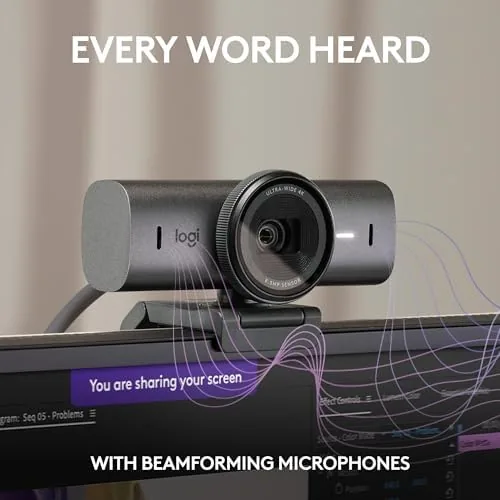
The pros are the camera's whole reason for existence: if you live on camera, they are features you use every day. The cons are the honest cost of that polish, and they are easy to live with for anyone who has already accepted that a good webcam is worth real money.
How It Compares
Against the hugely popular Logitech C920, the MX Brio is a different class: sharper, brighter in low light, and far more expensive. The step up from a cheap to a mid webcam does not feel small; it feels like moving past the point where your face starts. For a work, dedicated within it, that is the entire point.
| Feature | MX Brio 4K | Logitech C920 |
|---|---|---|
| Resolution | 4K UHD | 1080p |
| Low light | Large sensor | Basic |
| Show Mode | Yes | No |
| Price | Premium | Budget |
For a home office on a budget, the C920 does the job at a fraction of the price and is a reasonable place to start. For anyone who presents to clients, sells on camera, or streams every day, the MX Brio is the worth-it jump and the difference shows on the record, not just in your confidence. The two cameras serve different rooms, and being honest about which room you actually work in is the fastest way to pick the right one.
Who Should Buy the Logitech MX Brio 4K
Buy it if you spend your days on camera for meetings, sales, or streams, and if the clarity of your face on a call affects how you are read. It is the camera that pays for itself most publicly for freelancers, presenters, and course creators whose work depends on looking sharp and trustworthy on demand.
Skip it if you only need a serviceable image for the occasional chat, or if you would rather spend the money elsewhere. When you are ready you can check the Logitech MX Brio price and options on Amazon and see the current bundles with software.
How We Test
I used the Logitech MX Brio for a month across video meetings, streams, and desk demos, judging the picture in good and low light, the framing, and how reliably it stayed connected through a week of back-to-back calls. I paid particular attention to low light because that is where most cameras fall apart and where a reviewer can separate a real improvement from a spec-sheet claim.
I compared it against a Logitech C920 and a capable stream camera, judging the sharper image it produced out of the box against the spec and the price. Independent work such as The Verge on the MX Brio is a useful second view and is worth reading before you invest.
When you decide, the Logitech MX Brio listing on Amazon shows the current bundles and whether a mount or a stand is included.
Logitech MX Brio 4K: Questions People Ask
Does the MX Brio work with every meeting app?
Yes. It works as a standard USB webcam with Teams, Zoom, Meet, and most streaming software, and the extra features, such as framing and tuning, run through the Logitech app once it is installed and set correctly.
What is Show Mode used for?
It lets you aim the camera down over your desk to show a product or a page, and the software flips and frames the feed so you look natural on the call rather than upside down.
Is the 4K worth the money over 1080p?
For presenters on calls all day or for streamers, yes, because the sharpness and low-light behavior are visibly better and pay back in how people see you. For occasional chat, a 1080p webcam is honestly enough.
As an Amazon Associate, I earn from qualifying purchases.