
Home routers carry a surprising weakness: they rarely offer enough wired ports. Between a desktop computer, a console, a TV, and the router itself, two or three usable jacks vanish quickly, and the devices that suffer are the ones that need a stable connection most. A compact gigabit switch solves that without reconfiguring anything. I ran the Linksys SE3005 in a busy home office and living room setup for several weeks, and this review covers real transfer speeds, heat, noise, and whether five ports are actually enough.
As always, a note on how I work. This article contains affiliate links, and if you buy through one of them the site earns a commission at no cost to you. That does not influence the verdict, and the switch reviewed here was used exactly as a homeowner would use it.
The SE3005 is a five-port unmanaged gigabit switch, which in plain language means it adds four usable network ports beyond the one you give it from the router, it has no configuration interface, and it simply moves data at gigabit speeds between everything plugged in. The promise is that you plug it in and forget it. The question is whether a device this simple still earns its place, and the answer depends on how well it handles real traffic, so let us look at the hardware first.
Design and Build
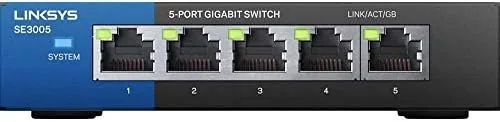
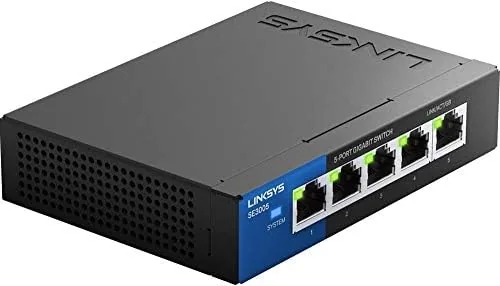
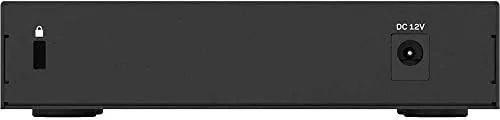
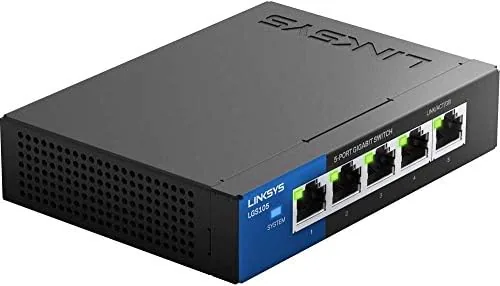
The switch is a small, low-profile black box with a blue accent line running along the edge, and it is light enough to hold in one hand. The case is made of solid plastic that feels denser than the price suggests, with ventilation slots along the sides and a row of five ports across the back. A single status LED per port glows when a connection is active, and a small power jack sits beside the ports.
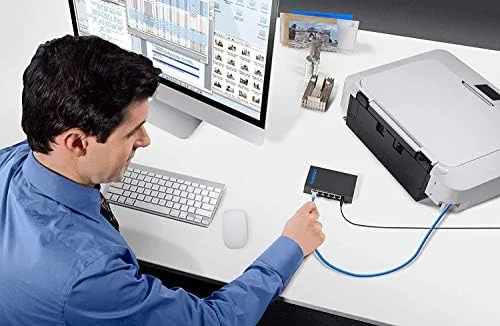
The physical design is unremarkable in the best way. There is no antenna, no fan, and no protruding heatsink, which means nothing to knock over or to collect dust. The footprint is small enough to tuck behind a TV or sit on a shelf beside the router, and the included power adapter uses a standard wall plug with a reasonably long cable. For a device that is meant to disappear into a corner of the network, the build is exactly as it should be.
Key Features
The headline feature is the five auto-sensing gigabit ports. Each port negotiates the fastest speed the connected device supports, from 10 to 100 to 1,000 Mbps, so an older device does not hold back a newer one. The switch moves data between all ports simultaneously without the user caring how it happens, which is the entire point of an unmanaged switch.
Plug-and-play operation is the second feature that matters. There is no management page, no firmware to babysit, and no crossover cable requirement, because the switch handles the signaling automatically. You connect the router to any port and the devices to the rest, and traffic starts flowing. For people who do not want to touch network settings, this is a genuine relief.
The other features are quiet competence rather than flash. The case runs Fanless, so there is no hum in a bedroom or home office. The switch is also backward compatible with older 10 and 100 Mbps devices, which matters when you have a legacy printer or a smart TV box that never got upgraded. Energy efficiency is handled through the same technology that reduces power draw when links are idle, which is a small but welcome detail.
Real-World Performance
The honest test of a gigabit switch is a large file transfer, so I connected a desktop and a laptop to the SE3005 and moved a 4 gigabyte video file between them. The transfer hovered near the gigabit ceiling, finishing in well under a minute with consistent throughput and no drops. That is the result a gigabit switch should produce, and the SE3005 produced it without complaint.
I then loaded the switch with a console, a smart TV, and a network attached storage drive in addition to the two computers, pushing all five ports at once. Streaming video, a game download, and a backup ran simultaneously, and none of them starved the others. This is the real benefit of wired networking over Wi-Fi: latency stays flat and buffering disappears, and the switch simply enables that across every port.
Heat and noise are the quiet virtues here. After an afternoon of constant traffic, the case was warm to the touch but never hot, and there is no fan to make noise, so the switch is effectively silent. It sat on a wooden shelf in a living room corner for the whole test and never needed attention, which is exactly what a network appliance should do.
The limits are honest ones. Five ports is enough for a starter setup but fills quickly in a media-heavy home, so if you know you will add more than three devices, a larger switch or a second unit will be needed. The unmanaged design also means there is no way to prioritize traffic, so a bandwidth-hungry download can slow other devices when the connection itself is the bottleneck. And because the switch has no built-in intelligence, it does not secure the network; that job stays with the router, which is worth remembering.
One stability note: over several weeks the switch never dropped a link, never needed a reboot, and the LED indicators always matched what was connected. In a world where home networking gear often misbehaves, that kind of boring reliability is the most valuable feature of all.
Pros and Cons
Pros:
- True gigabit speeds on all five ports
- Plug-and-play with no configuration needed
- Silent fanless design with low heat output
- Auto-sensing ports work with 10, 100, and 1000 Mbps devices
- Compact body fits behind a TV or on a shelf
- Energy efficient when links sit idle
Cons:
- Five ports fill quickly in a media-heavy home
- No management or traffic priority features
- Does not add any network security on its own
How It Compares
Choosing a switch usually comes down to port count and whether you want management features. The table below lines up the SE3005 with a managed switch and with a budget unmanaged option.
| Feature | Linksys SE3005 | Managed Switch | Budget Unmanaged 5-Port |
|---|---|---|---|
| Ports | 5 x gigabit | 8 to 48 Ports | 5 x gigabit |
| Setup | Plug and play | Web interface, VLANs | Plug and play |
| Traffic control | None | Full control | None |
| Noise | Silent | Fanless or fan | Silent |
| Best for | Home office, living room | Prosumer, small office | Minimal budgets |

For a typical home, the SE3005 hits the sweet spot: it costs less than a managed switch, needs no technical knowledge, and performs identically for ordinary traffic. A managed switch only earns its price if you need VLANs, QoS, or monitoring, which most households do not. Against a bare-bones budget switch, the SE3005's build quality and Linksys reliability justify the small premium.
Who Should Buy It
Buy the Linksys SE3005 if you are out of router ports and you have a desktop, console, or TV that deserves a stable wired connection. It is ideal for home offices, media centers, and anyone who wants gigabit speeds without touching network settings. If you stream, game, or back up large files, the wired path this switch opens is a clear upgrade over Wi-Fi.
Skip it if you already need more than five ports, or if you are a network hobbyist who wants VLANs and traffic shaping, because an unmanaged switch cannot do those jobs. For everyone else, five gigabit ports that just work are a simple answer to a common problem. You can check the current price of the Linksys SE3005 on Amazon when you are ready.
How We Test
I connected the SE3005 to a home router and loaded it with two computers, a console, a smart TV, and a network attached storage drive. I ran large file transfers to measure throughput, pushed all five ports at once to test simultaneous use, and monitored heat and noise over several weeks of daily use.
I did not measure the switch in a lab-grade network or test it under data-center loads, because that is not its intended role. For a broader look at wired networking and switch selection, Tom's Hardware has a guide to choosing a network switch that explains port counts, managed versus unmanaged, and when each makes sense. The Linksys SE3005 listing on Amazon has the current price and full specifications.
Questions People Ask
Do I need configuration to use the SE3005?
No, the switch is plug and play: connect the router to one port and devices to the others, and the network starts working immediately with no software.
Will the SE3005 work with my existing router?
Yes, any router with an open LAN port will feed the switch, which then shares that connection across all five gigabit ports.
Does the switch slow down my connection?
No, each port supports up to 1,000 Mbps and auto-senses speed, so wired devices use their full connection without sharing bandwidth.
Can I mount the switch or place it flat?
The compact case sits flat on a desk or shelf, and its light body is easy to position anywhere with cable slack.
As an Amazon Associate, I earn from qualifying purchases.



