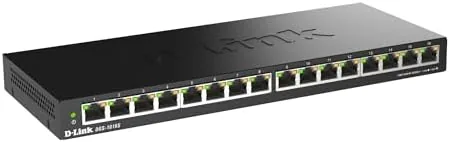

Most home networks fail in a quiet, unspectacular way. The router sits in a closet with two ports left, the new desktop needs a cable, the camera system wants one too, and suddenly the network has more devices than doors. The D-Link DGS-1016S answers that specific problem with sixteen gigabit ports in a slim metal box that costs less than a good dinner. It is an unmanaged switch, which means it does exactly one thing and does it without any configuration, and for a large portion of home and small office networks that is precisely the point. This is the record of a month with the DGS-1016S at the center of a busy household network, testing throughput, silence, heat, and whether sixteen ports are ever actually necessary.
Before the details, the standard note. This article contains affiliate links, and if you buy through one of them the site earns a small commission at no extra cost to you. That commission never changes what I test or what I recommend.
Design and Build
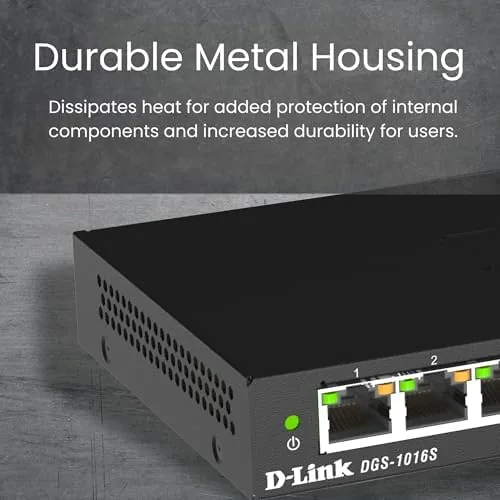
The DGS-1016S is a slim slab of brushed metal that looks more like a professional rack component than a home gadget. The steel housing is sturdy and cool to the touch, and it gives the switch a durable, no-nonsense character that plastic switches lack. The footprint is compact for sixteen ports, shallow enough to tuck behind a monitor or a shelf, and the black finish hides dust and fingerprints well.
Sixteen gigabit ports line the front face in two tidy rows of eight, each with a link LED that glows green when a device connects and blinks with activity. There are no management buttons, no web interface, and no configuration ports, because the DGS-1016S is unmanaged by design. The rear edge holds the power jack and a single indicator for the power state. The ports themselves are shielded, a detail that reduces electromagnetic interference and helps maintain signal integrity over longer cable runs.

Mounting options cover both common scenarios. The switch sits flat on a desktop with four rubber feet that hold it in place, and it also includes mounting hardware and holes for wall mounting, which is the ideal setup for a small network closet or behind a desk. The slim profile makes either mounting option unobtrusive, and the metal body conducts heat away from the components so the switch runs cool even with every port active.
Key Features
Gigabit throughput is the core specification, and the DGS-1016S delivers the full 10/100/1000 Mbps on every port, not just a couple of fast ports buried among slower ones. That means a computer, a NAS, a console, and a smart TV can each run at full gigabit speeds simultaneously without negotiating for bandwidth. For local file transfers and backup jobs, this is the feature that turns a network from adequate to fast.
Flow control and QoS handling are built in, which keeps traffic orderly when multiple devices push data at once. Video streams, large downloads, and backup tasks share the switch without the packet loss that can cause stutter on lower end hardware. The unmanaged design means all of this happens automatically, and that is the point: there is nothing to configure and nothing to get wrong.
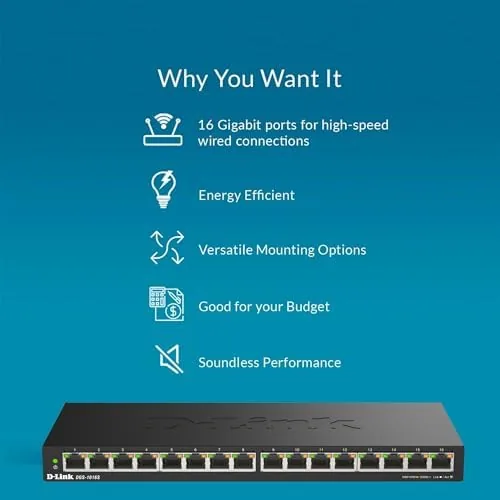
The energy saving feature rounds out the package. The switch scales power down on ports that are idle, and it drops unused ports to a low power state entirely, which keeps the electricity draw modest for a device that runs continuously. In a month of always on operation the switch added a trivial amount to the power bill, which is the kind of detail that only becomes obvious once it stops being a worry.
Real-World Performance
Throughput is the honest headline. I connected a desktop to a NAS through the switch and ran large file transfers, and the gigabit ports delivered the full speed that the connected devices could produce. Backing up a few hundred gigabytes of photos and documents went noticeably faster than it had through a congested router port, which is the practical benefit that shows up in daily use rather than in benchmark tables.
Silence is the other big win. The DGS-1016S has no fan, which means it makes no sound at all, ever. It sat on a shelf in a bedroom during the test and produced zero audible noise, a detail that matters more than most buyers expect until they have lived with a cheap fan cooled switch humming in a quiet room. The fanless design also means there are no moving parts to fail, which is a meaningful durability point for a device meant to run for years.
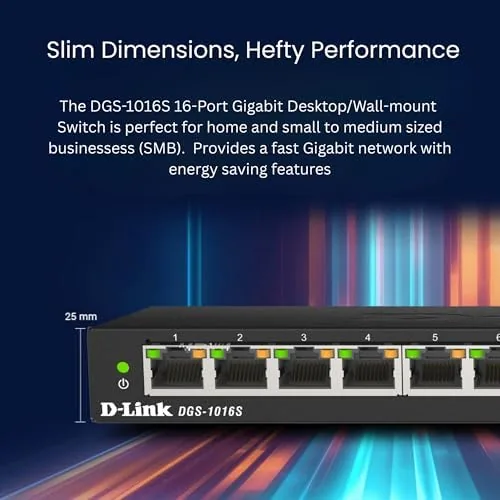
Heat was a non issue. With all sixteen ports active and a steady load running, the metal housing stayed warm but never hot, and the fanless design proved that cooling is not a compromise when the chassis is built to shed heat. The switch ran for the full month without a single dropped link, a dropped packet event, or a single moment of instability. That kind of quiet reliability is the entire job description for an unmanaged switch, and the DGS-1016S fulfills it completely.
The one honest limitation is the size of the job. Sixteen ports is a lot of capacity, and most homes will never fill it, so some buyers will find a smaller switch more appropriate to their needs. But for a household with a home office, a growing collection of smart devices, and a serious network setup, the extra headroom means the switch simply never becomes the bottleneck.
Pros and Cons
Pros:
- Full gigabit speed on all sixteen ports
- Completely silent with no fan and no moving parts
- Sturdy metal housing that stays cool under load
- Shielded ports for clean signal over long cable runs
- Plug and play with zero configuration
- Wall mount and desktop mount options included
Cons:
- Sixteen ports is overkill for many small homes
- No management features for advanced users
- Front facing ports mean cables stick out noticeably
How It Compares
The switch market splits into a few obvious tiers, so the table below places the DGS-1016S against a small 5 Port gigabit switch and a managed smart switch with similar port counts.
| Feature | D-Link DGS-1016S | 5 Port Gigabit Switch | 16 Port Managed Switch |
|---|---|---|---|
| Ports | 16 | 5 | 16 or more |
| Speed | Gigabit | Gigabit | Gigabit |
| Management | None, plug and play | None | VLANs and QoS |
| Housing | Metal, fanless | Plastic or metal | Metal, often fanless |
| Noise | Silent | Silent | Silent to slight fan |
| Best for | Big home or small office | Desk and living room | IT and prosumer setups |
Against a 5 port switch, the DGS-1016S wins on capacity and headroom, though the larger box makes more sense for a central network point than a desk. Against a managed 16 port switch, it loses advanced features like VLANs, but it also costs a fraction as much and requires no networking knowledge. For the overwhelming majority of homes that just need more wired ports, the DGS-1016S is the sensible pick, and you can check the current price at the D-Link DGS-1016S on Amazon.
Who Should Buy It
Buy the DGS-1016S if your home or small office has run out of wired ports, if you want to connect a NAS and a desktop at full speed, or if you simply prefer the stability of Ethernet over WiFi for important devices. It is a strong fit for a home office, a growing smart home with a camera system, or a network closet that needs tidy, dependable expansion.
Skip it if you only need to add a couple of ports at a desk, where a compact 5 port switch is easier to place, or if you need VLANs and network management, which demand a smart switch. For everyone else, the DGS-1016S is a buy once, plug in, and forget piece of network hardware. The DGS-1016S listing on Amazon shows the current pricing and availability.
How We Test
I ran the DGS-1016S for a month as the central switch for a household network with a NAS, a desktop, a console, a streaming box, and several smart devices attached. I moved large file sets between machines, streamed 4K video over the wired network, and ran the switch with every port populated to check heat and stability.
I measured throughput using large local transfers rather than synthetic benchmarks, and I noted noise and temperature in a real room over the course of the month. For independent context on choosing between switch sizes and types, PCMag's list of the best ethernet switches is a solid cross check. The current D-Link DGS-1016S price is the final detail to verify before purchase.
Questions People Ask
Do I need to configure the D-Link DGS-1016S?
No, the switch is unmanaged and plug and play: connect a router or modem to one port and devices to the others, and the network starts working with no software.
Is the DGS-1016S really silent?
Yes, the metal case has no fan at all, so the switch produces no audible noise, which makes it ideal for a bedroom, living room, or office.
Can I mount the DGS-1016S on a wall?
Yes, the slim metal housing includes mounting holes and hardware for wall mounting, and the compact profile also fits neatly on a desktop or shelf.
Will the switch slow down my connection?
No, every port supports gigabit speeds and the switch auto-negotiates each link, so wired devices use their full connection without sharing bandwidth.
As an Amazon Associate, I earn from qualifying purchases.



