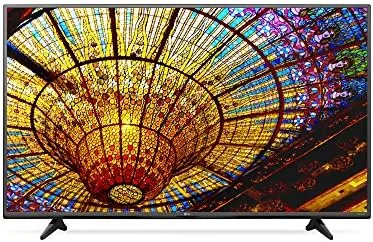

The 43 inch television sits in a sweet spot that 55 inch panels cannot reach: it fits comfortably in bedrooms, apartments, and secondary living spaces where a giant screen simply does not belong. The LG 43UF6430 is LG's take on that category, a 43 inch 4K Ultra HD smart LED TV running the webOS platform, built for streaming, gaming, and everyday television watching. It is not the flashiest panel LG makes, but it does not carry the flagship price either, and that positioning raises the obvious question of how much real picture quality survives at this size and this price.
This article contains affiliate links. If you purchase through one of these links the site earns a small commission at no additional cost to you, and that commission does not influence what I test or what I recommend.
Design and Build
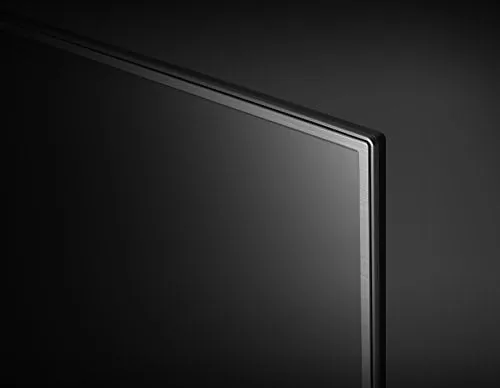
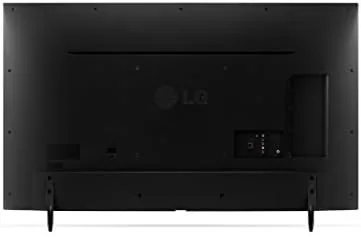
The 43UF6430 follows the clean design language LG has used across its mid range lineup. The bezel is thin on three sides, giving the panel a modern look that downplays the 43 inch footprint, and the small stand keeps the TV stable without demanding a wide media console. The build is all plastic, but the panels fit together cleanly, nothing flexes or creaks, and the cable management channel on the back keeps the wall of cables behind the set reasonably tidy.
Ports sit on the back and side of the panel: three HDMI inputs, two USB ports, an optical audio output, and the usual tuner and LAN connections. Three HDMI ports is a reasonable count for a secondary TV, enough for a streaming box, a console, and a cable receiver with one input to spare, and the side mounted port makes cable changes easier than reaching around behind a wall mounted set.
The included remote is a compact LG wand with a wheel style scroll control, and it pairs with the TV by default. The layout is simple, with direct buttons for the streaming services, and the voice control button on the remote works with the built in assistant for searches and app launches. Wall mounting is a realistic option as well, since the panel is light and the VESA pattern is standard, so anyone moving the set from a stand to a mount faces a ten minute job rather than a project.
Key Features
The headline spec is the 4K Ultra HD resolution, 3840 by 2160 pixels, on a 43 inch panel. That pixel density is genuinely sharp at normal viewing distances, and for a screen this size it is all the detail most eyes can use. The panel upscales 1080p content cleanly, which matters because a large share of broadcast and streaming content is still delivered in 1080p or lower.
The smart platform is the other major feature. LG webOS is one of the more polished smart TV operating systems, with a clean app grid, fast loading streaming apps, and regular updates. It handles the major services, has a usable built in web browser, and supports voice search, and it rarely felt sluggish even after the TV had been on for hours.
The picture features are modest but present: a bright enough panel for daytime viewing, LG's usual set of picture presets, and a game friendly mode for console input. For a look at the current price and the exact connectivity options, the LG 43UF6430 listing on Amazon is a useful reference.
Real-World Performance
I lived with the 43UF6430 in a bedroom and a small living room for two weeks. In daylight conditions the panel is bright enough to watch comfortably with windows open, and the matte finish does a good job controlling reflections from a side window. Colors look vibrant in the standard preset, with skin tones reading natural rather than oversaturated.
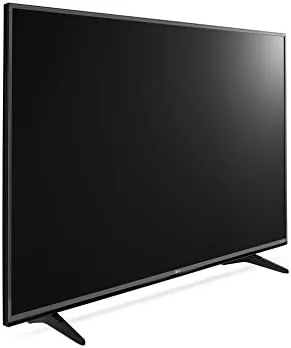
In a dark room the LED panel shows its character. Bright scenes look excellent, with good pop and punch, but dark scenes reveal the limits of the backlight, with blacks that read as dark gray and some backlight clouding in the corners. That is expected from an LED TV at this price, and it is only an issue for viewers who watch a lot of dark movies with the lights off.
Upscaling impressed me more than expected. Streaming 1080p content on the panel looked sharp with no obvious softening, and even cable content at lower resolutions looked respectable from a normal viewing distance. The motion handling is fine for sports and general viewing, with no distracting judder, though it is not tuned for the same motion clarity as LG's higher end models.
For gaming, I connected a console in game mode and played through a session of a fast paced title. The input lag felt comfortable, and the 4K input handled the console output without issue. It is not a competitive gaming display, but for casual console play in a bedroom or secondary room it performs exactly as needed. The sound, meanwhile, is the least impressive part of the package. The built in speakers are thin and lack bass, so action Movies and music benefit greatly from a soundbar, though dialogue in regular television remains perfectly intelligible.
Pros and Cons
Pros:
- Sharp native 4K panel at a practical 43 inch size
- Clean, fast webOS smart platform
- Bright enough for daytime viewing
- Natural, vibrant colors out of the box
- Good upscaling of 1080p content
- Game friendly mode with comfortable input lag
Cons:
- Blacks read as gray in dark rooms
- Some backlight clouding in corners
- Speakers are thin for action movies
- No HDR performance to speak of at this level
How It Compares
The 43UF6430 competes with other budget 43 inch 4K panels and with slightly larger mid range sets, and the differences come down to contrast, smart platform, and price. The table below compares it with a budget 43 inch 4K model and a higher end mid range panel.
| Feature | LG 43UF6430 | Budget 43 inch 4K | Mid Range 43 inch 4K |
|---|---|---|---|
| Resolution | 4K UHD | 4K UHD | 4K UHD |
| Smart platform | webOS | Basic Linux | Advanced OS |
| HDR support | Basic | None | Full HDR |
| Black levels | Good for LED | Mediocre | Better |
| HDMI ports | Three | Two | Three |
| Price | Mid range | Low | High |
Against a bare budget 4K panel, the 43UF6430 wins on smart platform polish, build quality, and brightness, all for a modest price premium. Against a higher end mid range panel it gives up true HDR depth and better black levels, but it costs significantly less and offers the same daily viewing experience for most content. Reviews like RTINGS' television testing consistently show that budget 4K LED panels like this one trade contrast for value, which matches exactly what I found in real use.
Who Should Buy It
Buy the 43UF6430 if you want a dependable 4K smart TV for a bedroom, apartment, or secondary room, if you watch mostly bright and streaming content, or if you want a reliable webOS platform without paying flagship prices. It is a strong pick for anyone who wants a sharp picture and simple smart features at a 43 inch size.

Skip it if you are a home theater enthusiast who watches dark movies in a blacked out room, or if you need full HDR support for the latest streaming titles. For everyday viewing in a secondary room, the LG 43UF6430 43 inch 4K TV on Amazon is a solid and honest choice.
How We Test
I tested the 43UF6430 over two weeks in a bedroom and a small living room. I watched streaming content at 4K and 1080p, broadcast television, and a fast paced console game, and I evaluated picture quality in daylight, evening, and fully dark conditions.
I measured input lag by feel during gameplay, checked the smart platform response across the major apps, and compared the picture against a budget 4K panel and a higher end mid range TV in the same room. Reference testing like RTINGS' TV reviews helped me set expectations for what a panel at this price should deliver. I also left the TV running for a full weekend of background use to confirm the platform stayed stable and the panel produced no image retention or temperature issues.
Questions People Ask
Is the LG 43UF6430 a 4K television?
Yes, the panel has a native 4K Ultra HD resolution of 3840 by 2160 pixels, and it upscales 1080p content cleanly for everyday viewing.
What smart platform does this TV run?
The TV runs LG webOS, which gives you the major streaming apps, a built in web browser, and voice control through the remote.
Is the 43UF6430 good for gaming?
Yes, the TV supports 4K input and has a game friendly picture mode, and input lag stayed comfortable for casual console play in testing.
How many HDMI ports does it have?
The TV includes three HDMI ports, which is enough for a streaming box, a console, and a cable or satellite receiver with one spare.
As an Amazon Associate, I earn from qualifying purchases.