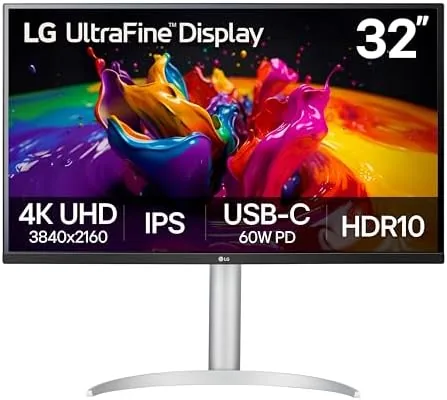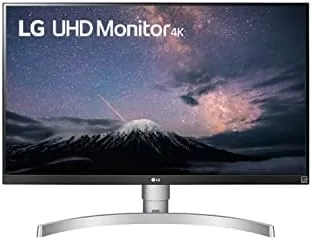

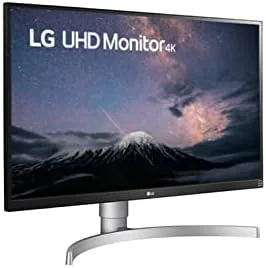
There was a time when a 4K monitor cost as much as a small car, but those days are long gone. The LG 27UL650-W is part of the new wave: A 27 Inch IPS panel at 3840 by 2160, with VESA DisplayHDR 400, 99 percent sRGB coverage, Radeon FreeSync, and a white borderless design that looks at home on a modern desk. After a month of office work and photo editing on this screen, I understand why it keeps appearing on value lists.
Before the details, the usual note: this review contains affiliate links. If you buy through one of them, the site earns a small commission at no extra cost to you, and it never affects what I test or what I recommend.
Design and Build
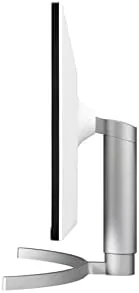
The first thing you notice is how much the screen dominates the frame. LG calls it a virtually borderless design, and the slim bezels on three sides are genuinely thin, which makes the panel look larger than 27 inches when it sits on a desk. The white finish is clean and modern, and it stays smart looking rather than showing every fingerprint.
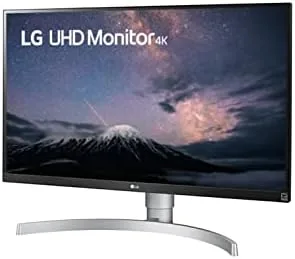
The stand is sturdier than the price point suggests. It supports the panel without wobble, offers tilt adjustment, and the panel itself is VESA compatible, so mounting it on an arm is a simple upgrade for anyone who wants more desk space. The controls are a small joystick on the back that is easy to reach once you learn where it sits, and the on-screen menus are clean and quick to navigate.
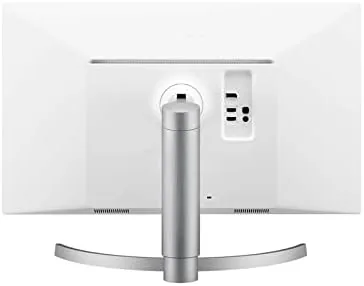
Ports live in a tidy recess on the rear: two HDMI inputs and a DisplayPort, plus a headphone jack. There is no USB hub here, which is a small omission at this price, but the core video connectivity covers a desktop PC and a console or a laptop without switching cables.
One welcome detail is the power consumption. The LED panel runs cool and draws modest power even at full brightness, which keeps a home office quiet and keeps the electric bill small. It is not a headline feature, but for a monitor that sits on for eight hours a day, it adds up over the year.
Key Features
The IPS panel is the star. At 4K resolution, text is pin sharp, and the wide viewing angles mean colors stay accurate even when you look at the screen from an angle, which matters when two people share a desk. The 99 percent sRGB coverage is the figure photographers care about, and in practice it delivers color that needs little correction for web and print work.
VESA DisplayHDR 400 adds a modest HDR capability. The monitor reaches about 400 nits of brightness and accepts HDR10 content, which improves highlights and shadows in supported videos and games. It is not the punch of a true HDR panel with local dimming, but at this price it is a fair and honest bonus.
Radeon FreeSync completes the feature set. It matches the refresh rate to compatible AMD graphics cards, which removes screen tearing in games and makes scrolling feel smoother on any system that supports it. Combined with the 60Hz refresh and the fast enough response time for casual play, the 27UL650-W covers light gaming as well as serious work.
The monitor also handles text-heavy work without eye strain. The 4K resolution makes fonts crisp rather than jagged, and the panel's stable brightness means there is no flicker to fatigue the eyes over an afternoon. I ran the screen at a lower scaling on Windows and still found every interface element sharp, which is more than can be said for some cheaper 4K panels.
Real-World Performance
For a month this monitor was the center of my home office. Writing, spreadsheets, and coding all benefit from the 4K resolution, and the sharpness is immediately obvious the first time you read small text on it. The IPS colors are accurate enough that photos I edited on this screen printed with no surprise shifts, which is the test that matters most to me.
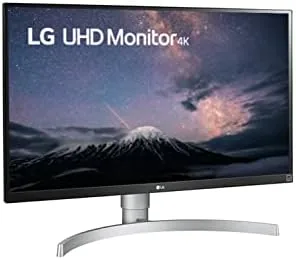
Brightness was never a complaint. In a normally lit room the panel is plenty bright, and the matte finish keeps reflections off the screen even with a window behind me. The anti-glare coating is a real comfort for an eight hour workday, and it is something many cheaper 4K monitors skimp on.
I connected it to both a Windows desktop and a MacBook, and both handled it cleanly. Windows scaled 4K text sharply, and macOS read the panel over HDMI with no fuss. The FreeSync feature engaged without drama on the AMD machine, and even a couple of sessions of light gaming ran smoothly with no tearing.
Color consistency across a workday deserves its own note. The panel held its calibration through long sessions, with no drift in the whites or the neutral grays that photo editors stare at for hours. Because the coverage lands at 99 percent sRGB, the colors I saw matched what I got back from a print shop, which is the practical test that separates a useful display from a merely large one.
Pros and Cons
Pros:
- Sharp 27 inch 4K IPS panel with accurate sRGB color
- Thin bezels and a clean white design that fits a modern desk
- FreeSync support keeps gaming and scrolling smooth
- DisplayHDR 400 adds honest HDR improvement
- Simple, sturdy stand with VESA mounting option
Cons:
- No USB hub, which some rivals include
- 60Hz refresh is fine but not for competitive gaming
- HDR is entry level, not true HDR
- White finish will not suit every setup
How It Compares
The LG 27UL650-W competes directly with the Dell S2721QS and the newer LG 27UP650. The Dell offers the same 4K IPS core and a similar price, with a slightly bulkier bezel. The LG 27UP650 adds a USB-C port and a modest refresh bump, but it costs a little more and loses some of the clean white look of this model.
| Feature | LG 27UL650-W | Dell S2721QS | LG 27UP650 |
|---|---|---|---|
| Resolution | 4K UHD 3840x2160 | 4K UHD 3840x2160 | 4K UHD 3840x2160 |
| Panel | 27 inch IPS | 27 inch IPS | 27 inch IPS |
| HDR | DisplayHDR 400 | HDR10 support | HDR10 support |
| Ports | 2 HDMI, DisplayPort | 2 HDMI, DisplayPort | 2 HDMI, DisplayPort, USB-C |
| Sync | FreeSync | FreeSync | FreeSync |
| Design | White borderless | Black, thicker bezel | Black slim bezel |
The table shows how close this field is. The 27UL650-W wins on design and keeps pace on the features that matter, while the 27UP650 edges ahead on connectivity if you need USB-C. For a home office that values looks and value equally, the 27UL650-W is the standout.
Who Should Buy It
Buy the LG 27UL650-W if you work on a laptop or desktop and want a sharp 4K display for documents, spreadsheets, coding, or photo editing. It is also a smart pick for a home setup that doubles as a light gaming station, because FreeSync and the clean design cover both roles without compromise.
Skip it if you do serious color-graded photo or video work and need a wide-gamut professional panel, or if you want USB-C power delivery to your laptop in a single cable. For the everyday buyer, this is one of the best values in 4K today. Businesses with a fleet of home workers have also taken to this model, because the clean white design and the consistent panel quality make it easy to recommend at scale. For a second office, a spare room, or a student setup, the 27UL650-W checks every box without the cost of a pro-grade display. You can check the current price of the LG 27UL650-W on Amazon when you are ready.
How We Test
I used the LG 27UL650-W as my main display for a month, working through documents, spreadsheets, coding, and photo editing, and I connected it to both Windows and macOS machines. I judged color accuracy, sharpness, brightness, viewing angles, and how well FreeSync behaved in real use.
I compared it against the Dell S2721QS and the LG 27UP650 on the same tasks, and I judged practical experience over lab measurements. For an independent technical look at this monitor, PCMag's review of the LG 27UL650-W is a helpful second opinion.
The LG 27UL650-W listing on Amazon shows the current price and delivery options.
LG 27UL650-W Monitor: Questions People Ask
Is the LG 27UL650-W good for photo and video editing?
Yes for most work. The IPS panel covers 99 percent of sRGB, and colors look accurate out of the box, though it is not a wide-gamut professional display for demanding color work.
Does the 27UL650-W support 4K at 60Hz?
Yes. It runs 3840 by 2160 at 60Hz over both HDMI and DisplayPort, and Radeon FreeSync keeps supported games smooth without screen tearing.
Is this monitor good for a Mac or a Windows PC?
Both. Windows gets sharp 4K scaling, and macOS reads the panel cleanly over HDMI or DisplayPort, so the monitor works well on either platform without special setup.
What is VESA DisplayHDR 400 on this LG monitor?
It is an entry-level HDR certification covering 400 nits of brightness and HDR10 support, which improves highlights in HDR content without the cost of a true HDR panel with local dimming.
As an Amazon Associate, I earn from qualifying purchases.