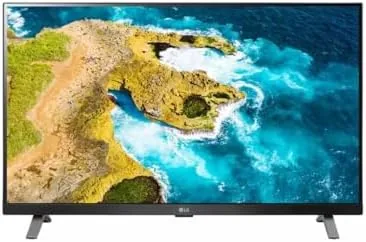

A computer monitor and a television used to be separate devices with separate jobs, one for pixel accurate work and one for movies on the couch. The LG 27 inch Class LED Full HD Smart TV Monitor with webOS tries to erase that line, because it is a computer display that also runs the full webOS smart platform with Streaming apps and built in speakers. This review covers whether one panel can honestly serve as both your daily monitor and your evening TV, tested in a home office where both jobs happen within arm's reach.
Before the results, the disclosure. This article contains affiliate links, and if you buy through one of them this site earns a small commission at no extra cost to you. The commission does not affect my testing or verdict, and I used the panel across a normal work week for this review.
Design and Build
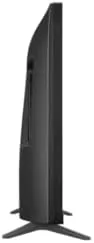
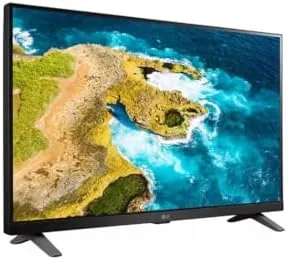
The panel looks like a monitor first and a TV second. The slim bezel keeps the 27 inch screen feeling modern on a desk, and the stand is a straightforward pair of feet that hold the panel steady without taking up the whole desk. The back is clean plastic with a subtle texture, and the overall build quality matches the price class without wobble.
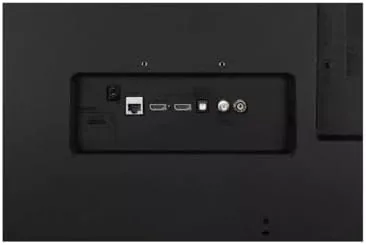
Connectivity is where the dual personality shows. The panel carries multiple HDMI inputs plus a USB port for media playback, which means a PC and a game console can both stay connected while the USB port handles a thumb drive of videos. The magic remote style controller that comes with LG webOS panels makes the TV side feel like a proper smart TV rather than a monitor with a half baked app.
The built in speakers sit behind the screen and do the work of a small TV. They are fine for streaming shows and casual video, though anyone serious about sound will still reach for a soundbar or a pair of desktop speakers.
Key Features
The webOS platform is the defining feature. Unlike a plain monitor, this panel boots into a smart TV interface with app tiles for Netflix, YouTube, Prime Video, and Hulu, plus a full app store for more. You do not need a cable box or a streaming stick, because the panel streams directly over your home internet.
The dual role extends to the ports and the input switching. One HDMI can feed a desktop PC while another carries a console, and the input switcher on the remote hops between them cleanly. The same panel that runs a spreadsheet at lunch can stream a movie after dinner without any cable reconfiguration.
Full HD resolution at 27 inches keeps text sharp enough for everyday office work, browsing, and spreadsheets. It is not a 4K panel, so pixel pushers who edit high resolution photos will see the difference, but for the smart TV use case that dominates this product the resolution matches the price.
The remote control is the hidden convenience. Rather than the button rows of a monitor, the LG remote gives you app shortcuts, a cursor mode, and a voice button, which turns the panel into a real living room device when you want it to be.
Real-World Performance
I ran the panel through a full work week as my primary monitor and then spent evenings watching streams and a movie on it, to test both halves of the promise without giving either an unfair advantage.
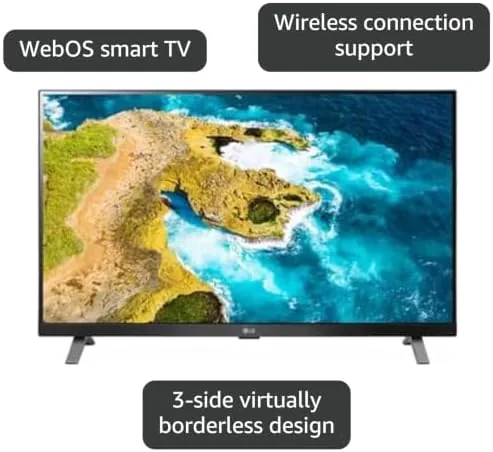
As a monitor, the panel behaved well for daily work. Text in documents and browser pages looked crisp enough to read for hours, and the full HD resolution at 27 inches sits at a comfortable pixel density for standard office software. The brightness handled a well lit room without washing out, and there was no visible backlight bleed in the areas of the screen I focused on.
As a TV, the webOS side impressed with its speed. Apps launched quickly, the interface scrolled smoothly, and streaming a movie through the built in platform was indistinguishable from using a streaming stick. The input switching between my PC and the console was instant, which is the little thing that makes a hybrid panel feel polished instead of gimmicky.
The built in speakers delivered adequate sound for dialogue driven shows. Voices stayed clear and the volume reached a useful level, though music and action scenes sounded thin compared with a dedicated soundbar. For a desk setup that is an acceptable trade off, and the soundbar connection is there if you want it.
The limits appeared when I pushed the panel beyond its lane. As a gaming display the 60Hz refresh rate and full HD resolution are perfectly playable for casual titles but not built for competitive high refresh gaming. As a photo editing display, the color accuracy is good for the price but not calibrated to professional standards. In both cases the panel is honest about its role as a budget smart screen.
Pros and Cons
Pros:
- webOS smart platform streams apps with no extra stick or cable box
- Works as a daily computer monitor over HDMI
- Multiple HDMI inputs plus USB for media playback
- Slim bezel and clean design that suits a desk
- Remote control with app shortcuts and voice support
Cons:
- Full HD only, so 4K content gets downscaled and desktop sharpness is limited
- Built in speakers are thin for music and action scenes
- 60Hz panel is not built for competitive high refresh gaming
How It Compares
The LG 27 inch smart TV monitor sits between a plain computer monitor and a full size smart TV. A standard 27 inch monitor costs less and offers sharper text or higher refresh, but it gives up the webOS platform and the built in speakers. A 32 Inch smart TV gives you a bigger screen and a true TV experience, but it is clumsier on a desk as a primary computer display.
| Feature | LG 27 Smart TV Monitor | Standard 27 Monitor | 32 inch Smart TV |
|---|---|---|---|
| Smart platform | Full webOS with apps | None | Full smart TV OS |
| Use as monitor | Full HD, desk friendly | Often better text sharpness | Works but large for a desk |
| Built in speakers | Yes | Rarely useful | Yes |
| Resolution | Full HD 1080p | Up to 4K in same size | Usually 4K |
| Best role | One screen, two jobs | Dedicated work | Dedicated entertainment |
For a home office with limited space, the LG panel wins by collapsing two devices into one footprint. For a workstation that never streams, a dedicated monitor is still the better buy, and for a dedicated living room, a larger TV wins. Independent TV and display coverage at CNET home entertainment is a good place to compare the wider smart TV landscape.
Who Should Buy It
Buy the LG 27 inch smart TV monitor if you work from home on a desk that has no room for a separate TV, if you want a panel that streams Netflix and YouTube with no extra stick, or if you want one clean setup that covers both work and evening viewing in a small room.
Skip it if you need 4K for photo or video work, if competitive gaming is your main use, or if you already own a monitor and a streaming stick and simply do not need the combination. For everyone else this panel is a clever space saver. You can check the current LG 27 inch smart TV monitor price on Amazon when you are ready.
How We Test
I used the LG panel as my primary monitor for a full work week, then spent several evenings streaming shows, a movie, and a console session through it. I tested the webOS app loading speed, the input switching between PC and console, the text clarity of office documents, and the built in speaker output across dialogue and music.
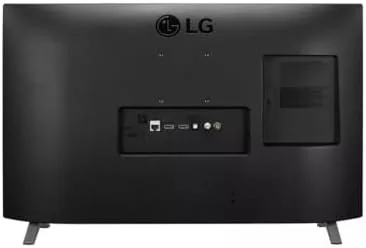
I verified the USB media playback with a thumb drive of videos and checked the remote functions including the app shortcuts and the voice search. The LG 27 inch smart TV monitor listing on Amazon lists the ports, the webOS details, and the panel specs.
LG 27 Inch Smart TV Monitor: Questions People Ask
Can this LG smart TV monitor be used as a regular computer monitor?
Yes, it connects over HDMI like any display, and the full HD panel works fine for office work, browsing, and light productivity tasks.
Which streaming apps come on webOS?
The webOS store carries the main services including Netflix, YouTube, Prime Video, and Hulu, with more titles added through the app library.
Does the monitor need a cable box to work as a TV?
No, the smart platform streams apps directly over your home internet, so a cable box is optional and only needed if you want live cable channels.
What ports does the LG 27 inch smart monitor include?
It includes multiple HDMI inputs plus a USB port for media playback, which is enough to attach a console, a PC, and a thumb drive at the same time.
As an Amazon Associate, I earn from qualifying purchases.



