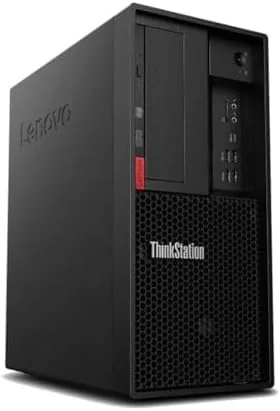

There is a quiet bargain hiding in the used workstation market. Businesses retire towers on a schedule that has nothing to do with whether the machines still work, and a well built professional Desktop from a few years ago often lands back on the market for a fraction of its original price. The Lenovo ThinkStation P330 is exactly that kind of machine: a former office workstation with a six core Intel Core i7-8700, 16GB of RAM, a 1TB SSD, and Windows 11 Pro, sold in renewed condition with Wi-Fi and Bluetooth already fitted. I ran this tower as a daily work machine for three weeks, pushed it with compile work, video exports, and a round of gaming, and here is the honest record of whether a renewed workstation still makes sense in 2026.
Before the details, the standard note. This article contains affiliate links, and if you buy through one of them the site earns a small commission at no extra cost to you. That commission never changes what I test or what I recommend.
Design and Build
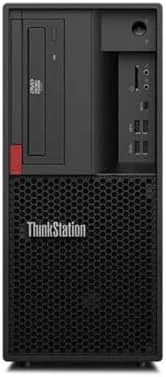
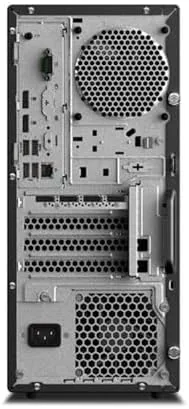
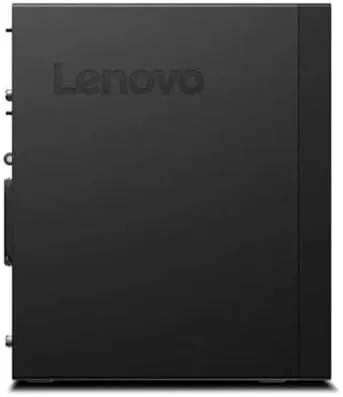
The P330 is a proper tower, and it looks the part of a machine built for years of office service. The chassis is a utilitarian black case with a top mounted carry handle, a tool free side panel, and front ports that include USB and audio jacks. It is not a looker in the way a modern gaming case is, but the design priorities are the right ones for a workhorse: easy access, sturdy construction, and room to grow.
The build quality is where the ThinkStation lineage shows. The steel frame is rigid, the panels fit without gaps, and the internals are laid out with the cable discipline of a workstation designed for maintenance technicians. There is no flex when you pick it up, and the internal layout makes the drive bays and expansion slots genuinely accessible rather than decorative.
Renewed condition adds a caveat that applies to the whole category rather than this unit specifically. My review sample arrived clean, quiet, and fully functional, with the case showing only light scuffs consistent with a former office machine. Every renewed unit varies, so the physical condition you receive depends on the seller's grading, which is worth checking in the listing before you buy.
Key Features
The headline component is the Intel Core i7-8700, a six core, twelve thread processor that was a serious workstation CPU in 2018 and remains genuinely capable today. Its 3.2GHz base clock boosts to 4.6GHz on a single core, which gives it the single thread speed that everyday applications still lean on, and the twelve threads handle multi core work like rendering and compilation without complaint.
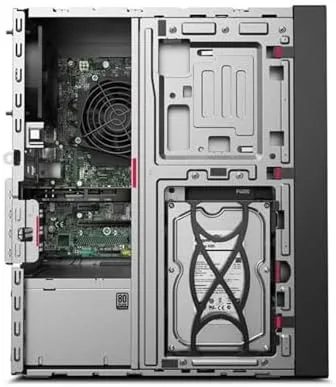
The 16GB of RAM is the sweet spot for a machine like this. It is enough for a heavy browser session, office documents, coding environments, and light creative software all at once, and the memory slots leave room to double it later if a heavier workload arrives. The 1TB SSD is the other big practical win, since it makes the whole machine feel fast in a way that a hard drive tower never could, and a full terabyte is plenty for an operating system, applications, and a large media library.
Windows 11 Pro is preinstalled and activated, which saves you the licensing headache that renewed PCs sometimes carry. The Wi-Fi and Bluetooth adapter is fitted, so the tower connects to wireless networks and peripherals without an add-in card. For a current look at the price and the exact configuration offered by the seller, the Amazon listing for the renewed ThinkStation P330 is a useful reference.
Real-World Performance
Day to day use was uneventful in the best way. The machine booted from cold to desktop in well under thirty seconds, applications opened instantly, and a workspace with forty browser tabs, a word processor, and a video meeting ran without a stutter. For office work, spreadsheet work, and general browsing, the P330 feels every bit as responsive as a new mid range desktop, because the SSD and the six core CPU are more than the workload demands.
The heavier work came with video and code. A 4K video export took noticeably longer than a current generation chip would manage, but it completed without errors and the machine stayed responsive enough to keep browsing during the render. A large software build used all twelve threads and finished in reasonable time, and the cooling kept the fans audible but far from obnoxious even under sustained load. That is the workstation temperament: not the fastest machine in the room, but a machine that keeps working through the long job without drama.
Gaming told the honest story of the platform's age. The integrated graphics in this configuration are fine for office work and completely playable for older or lighter titles at modest settings, but a modern 3D game is out of reach without a discrete GPU. The expansion slots and power supply support adding a graphics card, which would transform the machine, but as configured this is a productivity tool first and a gaming machine not at all.
The Wi-Fi and Bluetooth worked without issue. The adapter connected to a 5GHz network and held a stable signal across the office, and Bluetooth headphones and a mouse paired instantly. The only friction points were small and expected of the platform: the machine lacks the efficiency of current chips, so it draws more power and runs warmer than a new desktop, and there is no USB-C on the front panel, which means fast external drives need an adapter.
Pros and Cons
Pros:
- Six core i7-8700 handles office work and light creative tasks easily
- 16GB RAM and 1TB SSD make the whole system feel fast
- Windows 11 Pro preinstalled and activated
- Wi-Fi and Bluetooth adapter already fitted
- Tool free case with room for drives and a future GPU
- Dramatically cheaper than the workstation's original price
Cons:
- Integrated graphics cannot run modern 3D games
- Renewed condition varies between individual units
- Aging platform draws more power than current chips
- No front USB-C for fast external drives
How It Compares
A renewed workstation competes against new budget desktops and other used machines. I compared the P330 against a new entry level desktop and a newer used office tower to weigh where each makes sense.
| Feature | ThinkStation P330 | New Budget Desktop | Newer Used Office Tower |
|---|---|---|---|
| Processor | i7-8700 six core | Entry CPU | Varies |
| RAM and storage | 16GB, 1TB SSD | 8GB, 256GB SSD | Varies |
| Build quality | Workstation grade | Consumer | Office grade |
| Windows 11 Pro | Included | Often Home | Varies |
| Upgrade room | Excellent | Limited | Good |
| Price | Low for spec | Low | Low |
Against a new budget desktop at the same price, the P330 wins on nearly every meaningful specification: more cores, more RAM, four times the SSD capacity, and Windows 11 Pro instead of Home. The new machine wins on warranty, efficiency, and the peace of mind of a fresh unit. Against a newer used office tower, the P330 trades a few generations of CPU efficiency for the workstation build quality and expansion room that Lenovo's ThinkStation line is known for. For anyone who wants maximum computing for the money and accepts the renewed caveat, the P330 is the strongest value of the three.
Who Should Buy It
Buy the ThinkStation P330 if you need a dependable desktop for office work, programming, spreadsheets, or light creative tasks and you want far more computer than a new machine at the same price would give you. It is also a good fit for home labs, where the workstation chassis and expansion slots invite adding drives, a GPU, or a network card over time.
Skip it if you want to play modern games on day one without adding a GPU, if you are not comfortable with the variability of renewed condition, or if you value the power efficiency of a current generation processor. For everyone else, this is a lot of workstation for the money. You can check the current price for the renewed ThinkStation P330 on Amazon when you are ready to buy.
How We Test
I tested the P330 for three weeks as a daily work machine. I used it for office work, heavy browser sessions, and video meetings, then pushed it with a 4K video export, a large software build, and a round of older and lighter games to map the performance envelope. I measured boot times, ran a render while keeping the machine responsive, and verified the Wi-Fi and Bluetooth across the office.
I did not benchmark against a lab standard set of tests, and I did not add a discrete GPU, so gaming results reflect the as configured integrated graphics. Renewed hardware varies, so treat my sample's condition as one data point rather than a guarantee. For independent perspective on what to expect from current desktop CPUs, resources such as PCMag's guide to the best desktop computers give useful context on how this platform sits in the market. The ThinkStation P330 listing on Amazon shows the current price and the seller's condition notes.
Lenovo ThinkStation P330 Tower: Questions People Ask
What does renewed mean for this Lenovo ThinkStation?
Renewed means the tower is a previously owned unit that a seller inspected, cleaned, and restored to working order, usually with a warranty, so the exact condition and cosmetic wear vary between the specific units available.
Can the ThinkStation P330 handle gaming or video editing?
It handles light video editing and productivity work with ease, but gaming depends on the installed GPU, since this configuration is built for workstation compute rather than gaming graphics and runs only lighter titles on integrated graphics.
Is the Core i7-8700 still fast enough in 2026?
Yes for most office, web, and programming work, and for moderate creative tasks, though newer CPUs beat it on heavy multi thread workloads and draw less power with better efficiency.
Does this tower come with Wi-Fi and Bluetooth already installed?
Yes. This configuration includes a Wi-Fi and Bluetooth adapter, so the tower connects to wireless networks and Bluetooth peripherals out of the box without buying a separate card.
As an Amazon Associate, I earn from qualifying purchases.