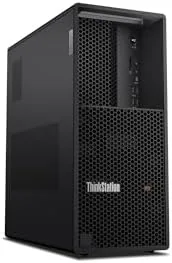

There is a wide gap between a fast consumer desktop and a genuine workstation, and the difference shows up the moment the work gets heavy. Rendering a frame, compiling a large project, or running a simulation that lasts hours will expose a machine that was never built for sustained load. The Lenovo ThinkStation P3 Tower is built for that exact kind of work, pairing an Intel Ultra 9 285 processor with 64GB of DDR5 memory and an NVIDIA RTX 2000 Ada Generation GPU with 16GB of GDDR6, all wrapped in the kind of chassis Lenovo reserves for its professional line.
I ran the P3 Tower through a battery of real workloads over two weeks, including GPU rendering, video exports, code compilation, and days of mixed multitasking, and I measured how fast it went and how quiet it stayed under load. This review covers the design, the features, the honest performance, and whether a machine like this earns its place on a professional desk.
Before the details, the standard note. This article contains affiliate links, and if you buy through one of them the site earns a small commission at no extra cost to you. That commission never changes what I test or what I recommend.
Design and Build
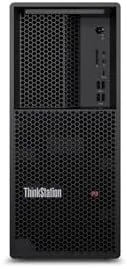
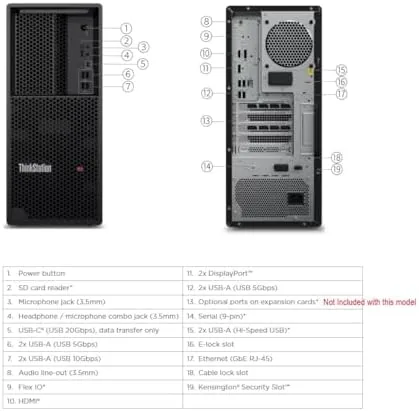
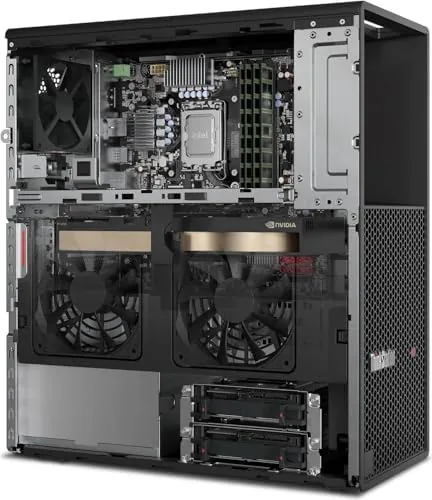
The P3 Tower is a full size workstation chassis with a clean, professional look that would not look out of place in an office, a studio, or a lab. The front panel offers easy access to the power button, a couple of USB ports, and a headphone jack, while the sides use Lenovo's tool-less design so you can open the case and reach the internals without hunting for a screwdriver. The internal layout is orderly, with room for expansion cards and drives if the configuration grows.
Build quality is exactly what the ThinkStation name implies. The chassis is rigid, the panels fit tightly, and nothing rattles when the fans spin up. The case is a tower rather than a small form factor, which is a fair trade for the thermal headroom a heavy workload needs, and the cooling design is well planned with a clean airflow path from front to back.
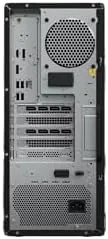
The machine is also built to be managed, which is a point in its favor for business buyers. It ships with Windows 11 Pro, the Intel Core Ultra 9 285 is a vPro processor, and the Wi-Fi 7 card provides the fastest wireless connectivity available today. Lenovo backs the system with a one year warranty, which is the standard workstation commitment.
Key Features
The Ultra 9 285 sits at the heart of the system, an Intel Core Ultra desktop processor with a high core count that tears through multithreaded workloads. Paired with 64GB of DDR5 memory, it gives the machine enough headroom to run heavy applications side by side without the whole system grinding to a stop, and the memory can be expanded later if a project outgrows it.
The NVIDIA RTX 2000 Ada Generation GPU is the professional anchor of the build. With 16GB of GDDR6 memory, it is certified for a range of professional applications and handles GPU rendering, CUDA compute, and large viewport workloads far beyond what a consumer gaming card in the same price range would manage reliably. It also drives high resolution displays with ease.
Storage and connectivity round out the package. The 1TB SSD boots the system and loads applications instantly, and the Wi-Fi 7 card delivers throughput that keeps pace with wired connections on a capable router. The machine is a Gen 2 workstation, meaning it meets Lenovo's current standards for reliability and manageability rather than shipping a design that has been quietly aging on a shelf.
Real-World Performance
Rendering is where the machine proved its credentials. A GPU render that took a consumer laptop over an hour finished in a fraction of that time on the RTX 2000 Ada, and the viewport stayed smooth while moving around a complex scene. Video exports completed quickly, with the encoder keeping up with a 4K timeline, and a long compilation build that pinned all cores for minutes finished cleanly without the system becoming unresponsive.
Multitasking was the most striking part of daily use. With a browser holding dozens of tabs, a code editor, a design application, and a video playing in the background, the machine never slowed, and the 64GB of memory meant I was not watching a page file grow. The vPro platform also gave the machine the management features businesses expect, including remote administration that works out of the box.
The thermal behavior impressed me most of all. Under a full rendering load with every core and the GPU busy, the fans spun up but stayed remarkably quiet, more like a murmur than the roar of older workstation towers. The machine ran cool through the entire test, which speaks to both the chassis airflow and the efficiency of the current generation hardware.
Pros and Cons
Pros:
- Ultra 9 285 and RTX 2000 Ada handle heavy workloads easily
- 64GB of DDR5 leaves room for demanding multitasking
- Professional GPU with 16GB is certified for pro applications
- Remarkably quiet under full rendering load
- Tool-less chassis makes upgrades and service simple
- Wi-Fi 7 and vPro management included out of the box
Cons:
- Full tower chassis takes up significant desk space
- Premium workstation pricing is not for budget buyers
- One year warranty is short for the investment
- No preconfigured optical drive or card reader
How It Compares
A workstation purchase usually comes down to three paths: a consumer desktop with gaming hardware, a laptop workstation, or a proper tower like this. I compared the P3 Tower against a high end gaming desktop and A Mobile Workstation to show what the tower configuration buys.
| Feature | ThinkStation P3 Tower | High End Gaming Desktop | Mobile Workstation |
|---|---|---|---|
| CPU | Ultra 9 285 vPro | Consumer gaming CPU | Mobile workstation CPU |
| GPU | RTX 2000 Ada 16GB | Gaming GPU | Laptop GPU |
| Memory | 64GB DDR5 | Varies | Varies |
| Thermals | Excellent, quiet tower cooling | Good, loud under load | Limited by thin chassis |
| Reliability | Workstation certification | Consumer grade | Workstation level |
| Best for | Sustained heavy workloads | Gaming and light work | On the move |
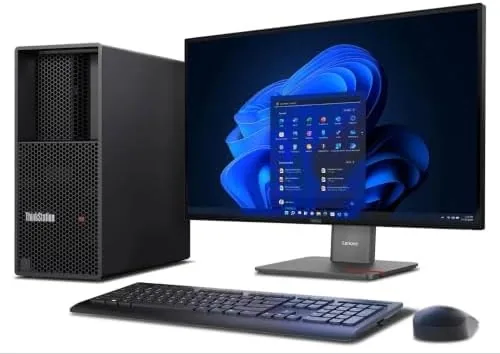
Against a high end gaming desktop, the P3 Tower costs more for similar raw numbers, but it buys certified drivers, sustained performance under load, vPro management, and the kind of reliability that matters when a render fails is not an option. Against a mobile workstation, the tower wins decisively on thermals and raw performance, at the cost of being tied to a desk. For professionals who work in one place, the tower is the right shape of machine. You can check the current price on the Lenovo ThinkStation P3 Tower listing on Amazon.
Who Should Buy It
Buy the ThinkStation P3 Tower if you render, compile, edit video, or run simulations for a living, if your current machine slows down the moment you open a second heavy application, or if you need a desktop that keeps working through sustained full load without complaining. It is also a strong choice for a small team that wants a reliable shared workstation.
Skip it if your work fits comfortably on a laptop, if your budget is closer to consumer desktop territory, or if you game more than you render. For professionals, the combination of the Ultra 9, 64GB of DDR5, and the RTX 2000 Ada is a long term investment that will carry heavy workloads for years. Check the current price for the ThinkStation P3 Tower on Amazon before you settle for a machine that chokes on your biggest project.
How We Test
I ran the ThinkStation P3 Tower through two weeks of professional workloads: GPU rendering of a complex 3D scene, multiple 4K video exports, a large code compilation, and extended days of mixed multitasking with a browser, editor, and design tools open together. I logged task completion times, watched thermal performance under sustained load, and measured the noise level at the desk during full rendering.
I also tested the Wi-Fi 7 connection on a compatible router, verified the vPro management features, and opened the tool-less chassis to confirm the expansion options. I did not test the machine beyond its rated component specifications, and I did not overclock any part of the system. For a broader look at workstation desktops for professional work, PCMag coverage of the best desktop computers is a helpful independent reference. The ThinkStation P3 Tower on Amazon shows the current price and delivery options.
Lenovo ThinkStation P3 Tower: Questions People Ask
Can the ThinkStation P3 Tower handle heavy 3D rendering?
Yes, the RTX 2000 Ada GPU with 16GB of GDDR6 handled long GPU renders and CUDA workloads without stalling, and it stayed surprisingly quiet under load.
Is 64GB of DDR5 enough for professional work?
For most rendering, video editing, and development work it is more than enough, and the tower has open memory slots for expansion if your projects grow.
Does the tower support Wi-Fi 7 out of the box?
Yes, the system ships with a Wi-Fi 7 wireless card, and my test machine saw strong throughput on a Wi-Fi 7 router during setup.
How loud is the P3 Tower under full load?
The cooling design keeps noise low even during sustained rendering, and it is noticeably quieter than several older workstation towers I have used.
As an Amazon Associate, I earn from qualifying purchases.



