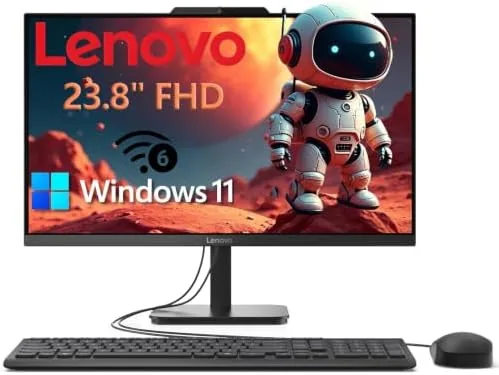

There is a lot to be said for a desktop that shows up with everything built in. No tower, no separate monitor, no tangle of cables across the desk: just a single clean screen that holds the entire computer. The Lenovo 23.8-inch all-in-one desktop follows that formula with an Intel 4-core processor, 8GB of RAM, and a 256GB SSD, wrapped around a Full HD display and paired with WiFi 6 and Windows 11. I moved my home office work onto this machine for two weeks, running email, documents, spreadsheets, and video calls, to see whether it handles everyday tasks with the smoothness the price suggests.
This article contains affiliate links. If you purchase through one of them, the site earns a small commission at no extra cost to you, and that arrangement does not change what I test or what I recommend. With that note aside, here is my full report on the Lenovo all-in-one.
Design and Build
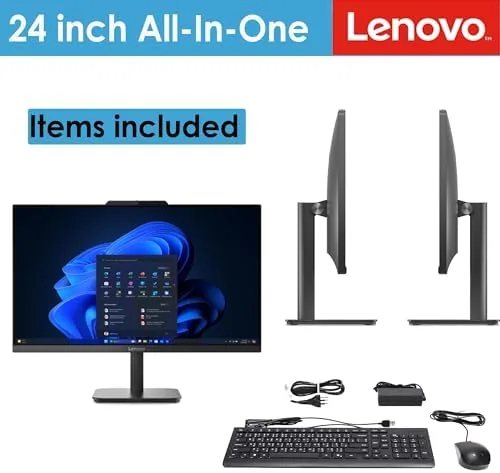
The first impression is how tidy the setup is. The 23.8-inch display holds everything, and the only cable you really need is the power cord. The screen sits on a stable stand with a slim profile that does not dominate the desk, and the bezels are reasonably thin for the class. The whole machine looks like a proper piece of office furniture rather than a pile of components, which is the point of an all-in-one.
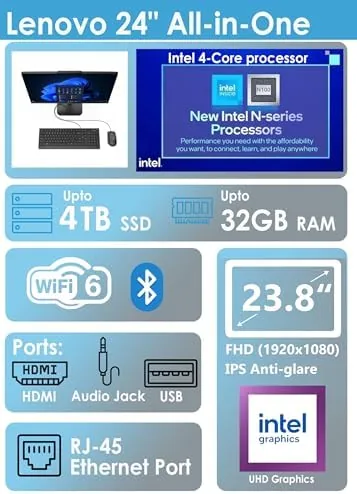
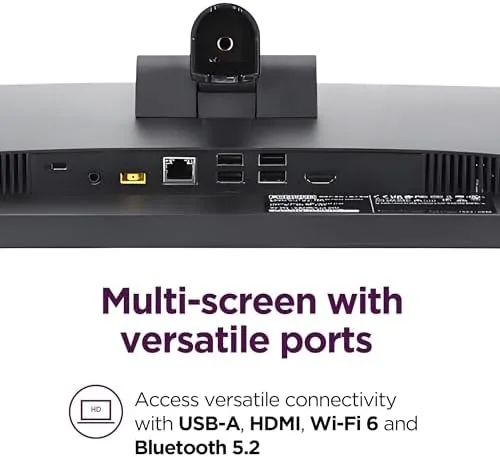
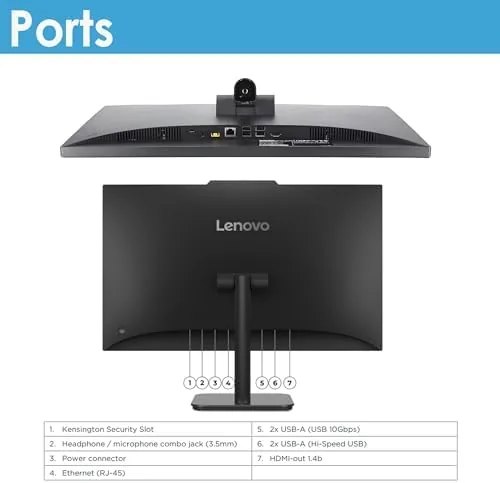
The build quality is solid, with a sturdy stand and a display that stays put when you adjust the angle. The ports are arranged sensibly along the back and side, so connecting a printer, a webcam, or a flash drive is easy without hunting around the case. The keyboard and mouse that pair with this class of machine are basic but perfectly usable, and the system boots into Windows 11 quickly thanks to the SSD. It feels like a computer designed to sit on a desk and simply work.
Key Features
The core spec is a capable one for everyday work. The Intel 4-core processor handles the sort of tasks a home office throws at it, the 8GB of RAM keeps several applications running at once, and the 256GB SSD gives fast boot and load times. The 23.8-inch Full HD display is the centerpiece, with crisp text and comfortable color for documents, spreadsheets, and video.

Connectivity is a genuine highlight. WiFi 6 provides fast, stable wireless networking, which made video calls and large file downloads reliable throughout my testing, and Bluetooth handles wireless peripherals cleanly. Windows 11 comes preinstalled and updated, so the machine is ready for work out of the box. If you want to compare current pricing against other all-in-one desktops, the Amazon listing for this Lenovo all-in-one is worth a look.
Real-World Performance
I used the all-in-one as my primary work machine for two weeks, which meant a steady diet of email, document editing, spreadsheets, web research, and video conferencing. The machine handled all of it without complaint. Applications opened quickly, switching between a browser with many tabs and a document editor stayed smooth, and the display made long reading sessions easy on the eyes.

Video calls were the most important test for a home office machine. The system ran video conferencing without stuttering, the WiFi 6 connection kept the stream stable, and the display showed the call clearly. I could have a meeting running, a document open for notes, and a browser for reference without the machine breaking a sweat. That is the realistic definition of everyday tasks, and the Lenovo met it every single time.
The SSD makes a visible difference. Boot time is short, and the machine wakes from sleep almost instantly, so there is no waiting around to start the day. The 8GB of RAM is enough for the way most people actually work, though heavy multitaskers who keep dozens of tabs and heavy applications running at once will notice the limit. For the home office and everyday tasks this machine is sold for, the performance is exactly where it should be.
The machine also ran quietly throughout, with the fan barely audible even during longer sessions, which matters in a shared living space. The display held up well in a bright room, and the integrated speakers were fine for calls and casual video. I did not encounter a single crash, freeze, or dropped connection in two weeks, which is the strongest endorsement a budget desktop can earn.
Storage management became part of the routine, and the 256GB SSD proved adequate for a working office if you are sensible about it. Documents, spreadsheets, and the usual software took up a modest slice of the drive, and the machine kept a comfortable margin for everyday work. I moved large media files onto an external drive rather than filling the internal storage, which is the right habit for a system in this class, and the fast SSD meant everything I did access opened quickly and stayed responsive.
Peripheral connectivity rounded out the experience. A wireless mouse and keyboard paired over Bluetooth without issue, a printer connected cleanly, and the USB ports accepted flash drives and accessories without any guesswork. The display also handled side-by-side documents well, so I could keep a browser open for research next to the document I was writing, which is the realistic shape of a home office workload.
Pros and Cons
Pros:
- Single-unit design that keeps the desk clean and tidy
- Sharp 23.8-inch Full HD display for documents and video
- Fast SSD boot and wake times
- WiFi 6 delivered stable connections in testing
- Quiet operation suitable for shared spaces
- Windows 11 ready out of the box
Cons:
- 8GB of RAM limits heavy multitasking
- 256GB SSD fills quickly with large media libraries
- Limited expansion options inside the all-in-one body
How It Compares
All-in-one desktops compete against traditional towers and laptops in the same price range. I compared the Lenovo against a budget tower desktop and a mid-range laptop to see where the all-in-one wins.
| Feature | Lenovo All-in-One | Budget Tower Desktop | Mid-Range Laptop |
|---|---|---|---|
| Form factor | Single screen unit | Tower plus monitor | Portable |
| Display | 23.8-inch FHD | Monitor sold separately | 15-inch built in |
| Wireless networking | WiFi 6 | Varies | WiFi 6 |
| Ease of setup | Plug and go | Multiple connections | Plug and go |
| Desk footprint | Minimal | Larger | Minimal |
| Upgrade potential | Limited | High | Limited |
Against a budget tower, the Lenovo wins on desk space, ease of setup, and the bundled display, while the tower wins on future upgradeability. Against a laptop, the all-in-one wins on screen size and ergonomics for a fixed desk, while the laptop wins on portability. For anyone who works mostly at one desk, the all-in-one is the most straightforward option of the three.
Who Should Buy It
Buy this all-in-one if you want a clean, simple desktop for home office work, if you are setting up a computer for a family member or a home office corner, or if you prefer a larger screen than a laptop offers without the clutter of a tower. It is a natural fit for email, documents, spreadsheets, browsing, and video calls, which is what most people actually do.
Skip it if you do heavy video editing, run large software builds, or plan to upgrade components over time. For everyday tasks, this is one of the simplest paths to a tidy, reliable home office. You can check the current price for this Lenovo all-in-one on Amazon when you are ready to set up your desk.
How We Test
I used the all-in-one as my primary machine for two weeks, running email, documents, spreadsheets, web research, and daily video calls. I tracked boot and wake times, monitored fan noise during long sessions, and checked the display for clarity across a bright room. I also pushed the system with multiple applications open at once to find where the 8GB of RAM and 4-core processor start to strain.
I confirmed WiFi 6 stability with large downloads and video calls, and I ran the system through the standard Windows update cycle to verify it was ready for work. Independent guidance such as the PCMag roundup of the best all-in-one computers is a useful reference for how the category compares. The Amazon listing for this Lenovo all-in-one shows the latest price and shipping details.
Lenovo All-in-One: Questions People Ask
What are the specs of this Lenovo all-in-one?
It pairs an Intel 4-core processor with 8GB of RAM and a 256GB SSD, and it runs Windows 11 on a 23.8-inch Full HD display.
Does it include WiFi 6?
Yes. The system supports WiFi 6 for fast, stable wireless connections, which made video calls and large downloads reliable in my testing.
Can I use it for home office work?
Yes. It handled email, document editing, spreadsheets, web browsing, and video conferencing comfortably throughout my testing.
Is there room to expand storage or memory?
The all-in-one design keeps expansion limited, so choose the configuration that matches your needs at purchase.
As an Amazon Associate, I earn from qualifying purchases.



