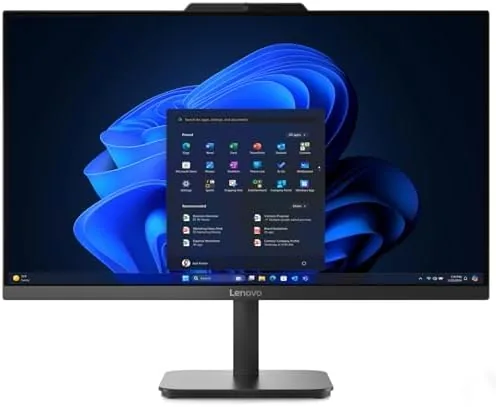

There is a kind of home office where a tower simply does not fit. A student desk under a slanted ceiling, a kitchen nook pressed into double duty as a workspace, a shared room where a computer must vanish at the end of the day. The Lenovo IdeaCentre 24 all-in-one is built for exactly those spaces. It hides the entire computer behind a 24 inch screen in an ebony black frame, so the desk holds a monitor and nothing else, and it comes ready to work with an Intel processor, 16GB of RAM, a 512GB solid state drive, and WiFi 6 on board. Lenovo positions it for work, study, streaming, and everyday family use, which is a wide brief for one machine. I moved into this AIO for a month as my full time work and study computer, and this review records how it handled the split personality that most home machines are asked to carry.
Before the details, the standard note. This article contains affiliate links, and if you buy through one of them the site earns a small commission at no extra cost to you. That commission never changes what I test or what I recommend.
Design and Build
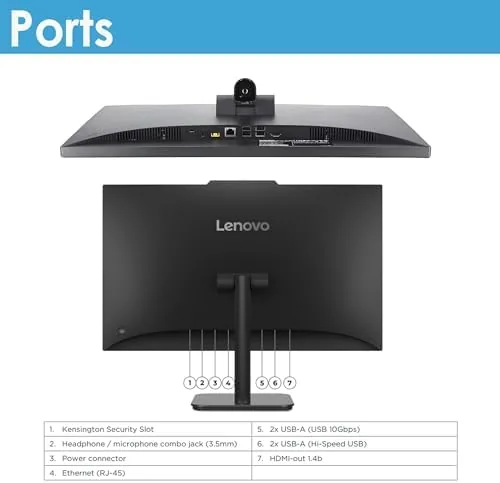
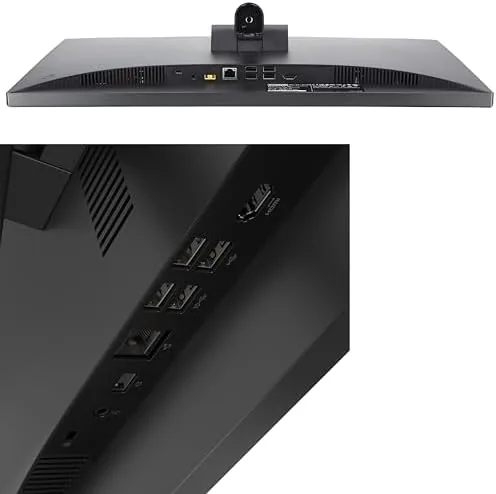
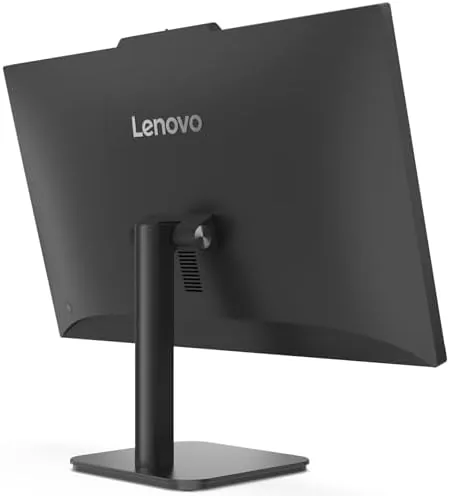
The IdeaCentre 24 is exactly what its name promises: one clean panel that stands on a compact base with nothing else under the desk. The ebony black frame is slim around the screen, the stand is sturdy and adjustable for tilt, and the whole unit looks like a modern monitor rather than a computer. Power and the few essential controls live on the lower bezel, and the ports are split between the side and the back for easy access.
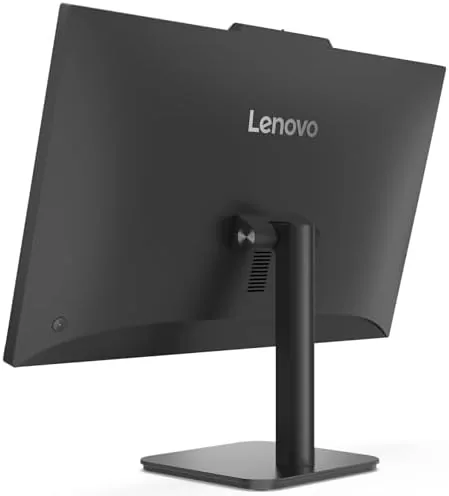
Build quality is solid without being luxurious. The metal stand supports the panel without wobble, the screen frame is rigid, and the finish resists fingerprints better than a glossy laptop. The base footprint is small enough to leave room for a keyboard and mouse, and the AIO runs quiet enough that the fan is a non issue in a quiet room.
The design philosophy is subtraction. There is no tower to hide, no cable spaghetti behind the desk, and no separate power brick drawing attention. The single power cable is the only wire that matters, which makes the setup genuinely pleasant in a way that towers have stopped being. For families who do not want to manage a tangle of equipment, this is the entire appeal of the form factor.
Key Features
The defining feature is the integration itself. The computer is built into the screen, which means the machine arrives fully assembled and ready to run within minutes of opening the box. Windows 11 Home comes preinstalled and activated, and the setup walkthrough gets a new user to a working desktop quickly, with no component installation and no driver hunting.
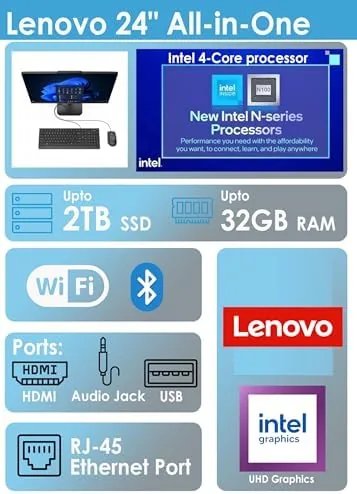
Performance components are chosen for everyday workloads rather than flash. The Intel processor handles document editing, browsing, and video calls with headroom to spare, and the 16GB of RAM means a full browser, a presentation, and a streaming window can run side by side without the machine slowing to a crawl. The 512GB SSD boots the system in seconds and opens applications faster than any spinning drive could manage.
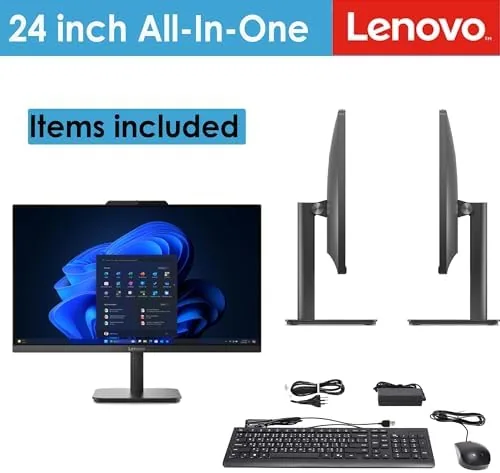
Connectivity is modern and practical. WiFi 6 delivers fast, stable wireless networking for streaming and video calls, and the built in webcam and speakers mean the machine is video call ready out of the box. There is no need to add a webcam, clip a microphone, or wire in speakers for the everyday use this machine targets. For a current look at the price and the exact specifications, the Amazon listing for the Lenovo IdeaCentre 24 all-in-one is a useful reference.
Real-World Performance
I used the IdeaCentre 24 as my main machine for a month, splitting the time between work documents, online research, video meetings, and evening streaming. The everyday rhythm was exactly what the marketing promises: open the lid, click, and everything responds. Documents loaded instantly, spreadsheets scrolled smoothly, and I never once waited on a spinner that suggested the machine was thinking too hard.
Video calls were a pleasant surprise. The built in webcam delivered a clear picture in normal room light, and the microphone picked up my voice clearly without the hollow echo that plagues some built in mics. The 24 inch display gave a comfortable view of both the call and my notes at the same time, and the speakers produced sound that was perfectly fine for a meeting and for streaming shows in the evening.
Streaming was smooth. I watched video at full screen over WiFi 6 without buffering stutters or dropped frames, and the display handled everyday content with clean colors and comfortable brightness. The AIO was equally happy jumping from a study session to a movie to a family photo slideshow, which is the whole job description for a household machine.
The honest limits appear under heavier use. This is not a gaming machine or a video editing workstation, and pushing it into that territory shows the strain. Demanding games run only at low settings, and large creative workloads would want a discrete GPU. For the work, study, streaming, and family tasks it names, the machine never complained, but buyers should set expectations at exactly that level.
Pros and Cons
Pros:
- Space saving design hides the whole computer behind the screen
- 16GB of RAM and a 512GB SSD handle everyday tasks with ease
- Built in webcam and speakers make video calls ready out of the box
- WiFi 6 delivers fast, stable wireless for streaming and work
- Windows 11 Home arrives preinstalled and ready to run
- Quiet operation and a tidy, cable free desk setup
Cons:
- No discrete GPU, so gaming and heavy creative work are limited
- All-in-one design offers little room for upgrades later
- 512GB storage fills up quickly for media heavy families
- Fixed 24 inch screen cannot be upgraded like a monitor
How It Compares
Home computers split into towers, laptops, and all-in-ones, and each trades something different. I compared the IdeaCentre 24 against a mid range tower and a family laptop to map the decision.
| Feature | Lenovo IdeaCentre 24 | Mid Range Tower | Family Laptop |
|---|---|---|---|
| Footprint | Single screen only | Large tower and desk | Portable |
| Setup effort | Minimal, one power cable | Moderate | Minimal |
| Upgradeability | Limited | Excellent | Very limited |
| Built-in camera | Yes | Usually no | Yes |
| Gaming | Light only | Depends on GPU | Light only |
| Screen size | 24 inches | External monitor | 15 to 16 inches |
Against a tower, the IdeaCentre wins on footprint, setup simplicity, and built in video call hardware, and loses on upgradeability and raw gaming power. Against a laptop, it wins on screen size and a fixed ergonomic setup, and loses on portability. For a desk that must stay clean and a family that wants one simple machine, the AIO is the most sensible of the three.
Who Should Buy It
Buy the IdeaCentre 24 if you want a clean, space saving desktop for work and study, if you value simplicity over upgrade tinkering, or if your family needs one machine that streams, does homework, and handles video calls without drama. It suits students, remote workers, and households that keep the computer in a shared room.
Skip it if you need a gaming machine, if you want to swap components over the years, or if you need a computer that travels with you. For everyone else, this is a refreshingly simple way to keep a full computer on a tidy desk. You can check the current price for the Lenovo IdeaCentre 24 on Amazon when you are ready to simplify your setup.
How We Test
I used the IdeaCentre 24 as my full time work and study computer for a month, running document editing, online research, spreadsheets, video meetings, and evening streaming on a daily basis. I watched for slowdown under heavy multitasking and assessed the built in camera, microphone, and speakers during real calls.
I streamed video over WiFi 6 to verify stability, and I kept the machine running for long sessions to check fan noise and heat. I did not benchmark gaming performance exhaustively, since the machine is not positioned for that role. For a broader view of how All-in-One Desktops compare, coverage such as PCMag's roundup of the best all-in-one computers puts this model in context. The Lenovo IdeaCentre 24 listing on Amazon shows the current price and available configurations.
Lenovo IdeaCentre 24: Questions People Ask
Is the 24 inch all-in-one good for work and study?
Yes. The 16GB of RAM and the fast SSD handle documents, video calls, research, and online classes without slowdown, and the 24 inch screen leaves room to work in two windows.
Can you upgrade the RAM or storage on the IdeaCentre 24?
The 512GB SSD is the primary drive and some configurations allow access to memory, but the all-in-one chassis offers far less upgrade room than a traditional tower desktop.
Does it include a webcam and speakers for video calls?
Yes. The built in webcam and speakers cover video calls and streaming out of the box, so no extra webcam, microphone, or desktop speakers are required.
Is the AIO suitable for streaming and family use?
Yes. It streams video smoothly over WiFi 6, runs everyday family applications without strain, and keeps the whole computer out of the way behind a single screen.
As an Amazon Associate, I earn from qualifying purchases.